Featured in:Best AI Education Tools
Get featured →🚀 Zaprep: Your Socials on Steroids. Start free — automate 1,000 DMs/month & turn engagement into leads. with 1,000 automated DMs/month.



✦
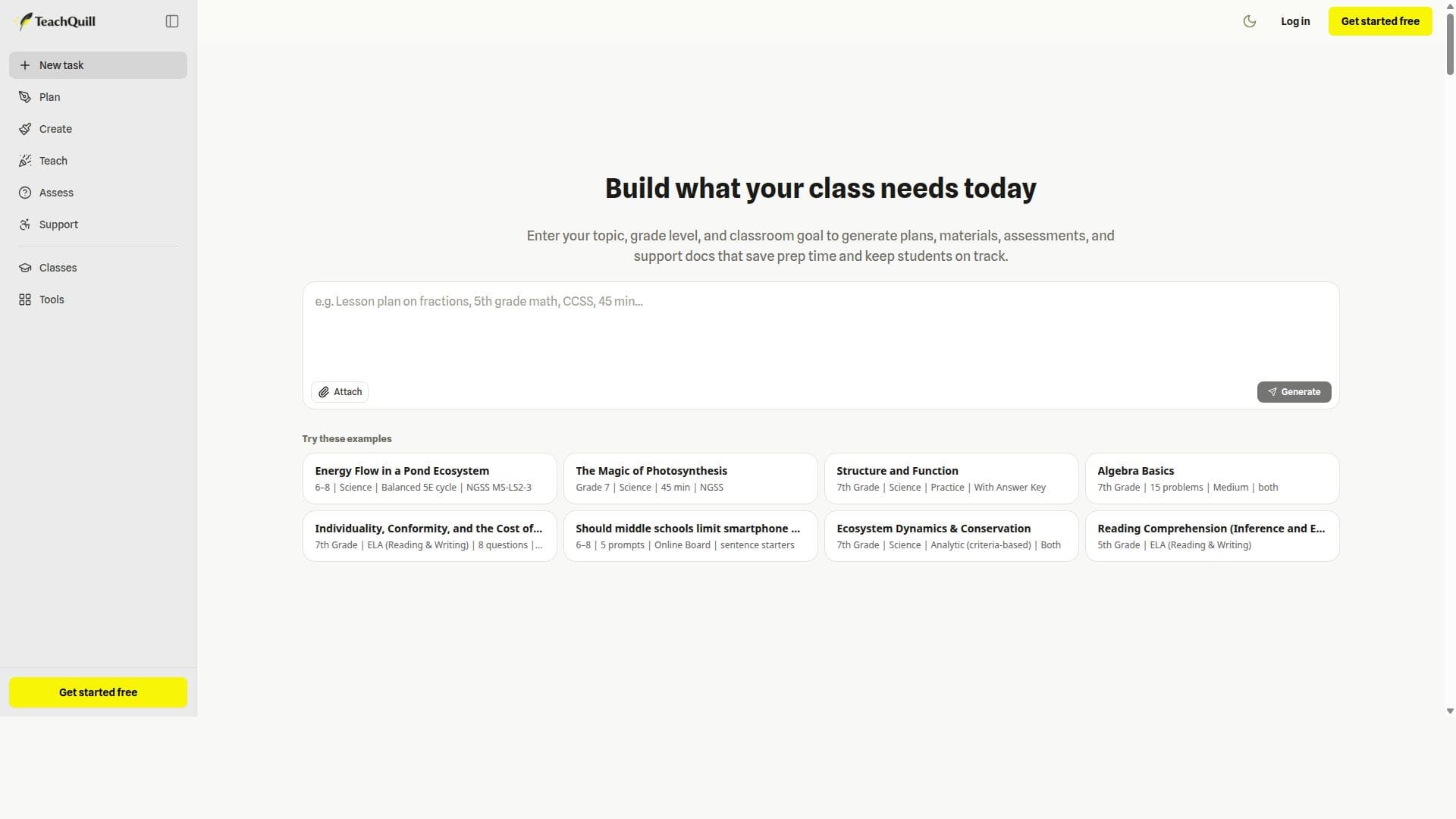
TeachQuill is a comprehensive AI platform offering over 100 specialized tools that help K–12 and college educators rapidly create standards-aligned lesson plans, assessments, and instructional materials. Its unique ability to automatically match tasks with the best AI tool and support for major U.S. educational standards makes it an indispensable resource for teachers seeking efficient, customizable classroom-ready content.

Description
TeachQuill provides K–12 and college educators with 100+ AI tools for lesson planning, instructional materials, classroom engagement, assessment, and learner support. It helps teachers create standards-aligned and classroom-ready resources such as lesson plans, worksheets, quizzes, rubrics, feedback, and lesson goals faster, supporting major U.S. standards frameworks including CCSS, NGSS, TEKS, AP, IB, WIDA, and C3. Give it a try — the free plan includes 30 daily refreshed credits, access to core tools, standard-speed generation, and basic export options like copy or PDF, along with limited history. If you have any ideas or suggestions, we'd love to hear them.
Detailed Description
TeachQuill is an advanced AI-powered platform designed specifically for educators at the K–12 and college levels, offering over 100 specialized AI tools to streamline the creation of lesson plans, instructional materials, classroom engagement strategies, assessments, and learner support resources. Its core purpose is to empower teachers to develop standards-aligned, classroom-ready educational content quickly and efficiently, reducing the time and effort traditionally required for lesson preparation. By leveraging AI, TeachQuill helps educators produce high-quality, editable resources such as lesson plans, worksheets, quizzes, rubrics, feedback, and lesson goals that adhere to major U.S. educational standards frameworks including CCSS (Common Core State Standards), NGSS (Next Generation Science Standards), TEKS (Texas Essential Knowledge and Skills), AP (Advanced Placement), IB (International Baccalaureate), WIDA (World-Class Instructional Design and Assessment), and C3 (College, Career, and Civic Life). This alignment ensures that the materials generated are relevant, compliant, and ready for immediate classroom use. TeachQuill’s extensive feature set includes more than 100 AI tools that cover every aspect of the teaching workflow. These tools assist educators in lesson planning by generating detailed, standards-aligned lesson outlines and objectives. For instructional materials, TeachQuill can create worksheets, quizzes, and other classroom resources in multiple editable and printable formats such as PDF, DOCX, and plain text, allowing teachers to customize content as needed. The platform also supports classroom engagement by providing interactive and adaptive content suggestions, and it aids in assessment by generating rubrics and feedback tailored to student performance. Additionally, TeachQuill facilitates learner support by producing differentiated resources that cater to diverse learning needs. One of its standout capabilities is the automatic routing of user prompts to the most appropriate AI tool based on the specific task, ensuring efficient and accurate content generation. Users can edit AI-generated content before finalizing it, save their work, and share resources with colleagues for collaborative teaching efforts. TeachQuill is ideal for K–12 and college educators who need to create high-quality, standards-aligned teaching materials quickly without sacrificing customization or pedagogical rigor. It is particularly useful for teachers managing multiple classes or subjects, curriculum coordinators, and school teams looking to collaborate on resource development. Use cases include generating daily lesson plans aligned with state or national standards, creating differentiated worksheets for diverse learners, designing formative and summative assessments, and providing detailed feedback to students. The platform’s support for a wide range of standards frameworks makes it versatile for educators across different states and educational systems. Regarding pricing, TeachQuill offers a free plan that includes 30 daily refreshed credits, access to core AI tools, standard-speed content generation, and basic export options such as copy or PDF. This plan requires no credit card to start, making it accessible for educators who want to explore the platform’s capabilities risk-free. Paid plans, which are not detailed here, likely offer expanded credits, faster generation speeds, advanced export formats, and additional collaboration features to support larger teams or schools. Compared to alternatives, TeachQuill stands out due to its comprehensive suite of over 100 AI tools tailored specifically for educators and its deep integration with multiple major U.S. educational standards frameworks. While other AI content generators may offer lesson planning or worksheet creation, TeachQuill’s ability to automatically route prompts to the best-suited AI tool and its focus on editable, standards-aligned, and printable resources provide a more specialized and efficient solution for educators. Its collaborative features also enhance team workflows, which is less common in general-purpose AI writing tools. However, some considerations include the daily credit limit on the free plan, which may restrict heavy users or large teams unless they upgrade. The platform’s reliance on AI-generated content means educators should review and customize outputs to ensure accuracy and appropriateness for their specific classroom contexts. Additionally, while TeachQuill supports many U.S. standards, educators outside the U.S. or those using non-standard curricula may find fewer direct alignments. Overall, TeachQuill offers a powerful, educator-centric AI toolkit that significantly reduces lesson planning workload while maintaining high standards of educational quality and customization.
Tool Features
- 100+ AI tools covering lesson planning, materials creation, classroom engagement, assessment, and learner support
- Supports major U.S. standards frameworks including CCSS, NGSS, TEKS, AP, IB, WIDA, and C3
- Creates editable, printable teaching resources in formats like PDF, DOCX, and plain text
- Includes 30 free daily credits with no credit card required to start
- Allows editing of AI-generated content before use
- Enables saving and sharing of AI-generated teaching resources for team or school collaboration
- Automatically routes user prompts to the most appropriate AI tool based on task type
Description
✦
TeachQuill is a comprehensive AI platform offering over 100 specialized tools that help K–12 and college educators rapidly create standards-aligned lesson plans, assessments, and instructional materials. Its unique ability to automatically match tasks with the best AI tool and support for major U.S. educational standards makes it an indispensable resource for teachers seeking efficient, customizable classroom-ready content.
TeachQuill provides K–12 and college educators with 100+ AI tools for lesson planning, instructional materials, classroom engagement, assessment, and learner support. It helps teachers create standards-aligned and classroom-ready resources such as lesson plans, worksheets, quizzes, rubrics, feedback, and lesson goals faster, supporting major U.S. standards frameworks including CCSS, NGSS, TEKS, AP, IB, WIDA, and C3. Give it a try — the free plan includes 30 daily refreshed credits, access to core tools, standard-speed generation, and basic export options like copy or PDF, along with limited history. If you have any ideas or suggestions, we'd love to hear them.
Detailed Description
TeachQuill is an advanced AI-powered platform designed specifically for educators at the K–12 and college levels, offering over 100 specialized AI tools to streamline the creation of lesson plans, instructional materials, classroom engagement strategies, assessments, and learner support resources. Its core purpose is to empower teachers to develop standards-aligned, classroom-ready educational content quickly and efficiently, reducing the time and effort traditionally required for lesson preparation. By leveraging AI, TeachQuill helps educators produce high-quality, editable resources such as lesson plans, worksheets, quizzes, rubrics, feedback, and lesson goals that adhere to major U.S. educational standards frameworks including CCSS (Common Core State Standards), NGSS (Next Generation Science Standards), TEKS (Texas Essential Knowledge and Skills), AP (Advanced Placement), IB (International Baccalaureate), WIDA (World-Class Instructional Design and Assessment), and C3 (College, Career, and Civic Life). This alignment ensures that the materials generated are relevant, compliant, and ready for immediate classroom use. TeachQuill’s extensive feature set includes more than 100 AI tools that cover every aspect of the teaching workflow. These tools assist educators in lesson planning by generating detailed, standards-aligned lesson outlines and objectives. For instructional materials, TeachQuill can create worksheets, quizzes, and other classroom resources in multiple editable and printable formats such as PDF, DOCX, and plain text, allowing teachers to customize content as needed. The platform also supports classroom engagement by providing interactive and adaptive content suggestions, and it aids in assessment by generating rubrics and feedback tailored to student performance. Additionally, TeachQuill facilitates learner support by producing differentiated resources that cater to diverse learning needs. One of its standout capabilities is the automatic routing of user prompts to the most appropriate AI tool based on the specific task, ensuring efficient and accurate content generation. Users can edit AI-generated content before finalizing it, save their work, and share resources with colleagues for collaborative teaching efforts. TeachQuill is ideal for K–12 and college educators who need to create high-quality, standards-aligned teaching materials quickly without sacrificing customization or pedagogical rigor. It is particularly useful for teachers managing multiple classes or subjects, curriculum coordinators, and school teams looking to collaborate on resource development. Use cases include generating daily lesson plans aligned with state or national standards, creating differentiated worksheets for diverse learners, designing formative and summative assessments, and providing detailed feedback to students. The platform’s support for a wide range of standards frameworks makes it versatile for educators across different states and educational systems. Regarding pricing, TeachQuill offers a free plan that includes 30 daily refreshed credits, access to core AI tools, standard-speed content generation, and basic export options such as copy or PDF. This plan requires no credit card to start, making it accessible for educators who want to explore the platform’s capabilities risk-free. Paid plans, which are not detailed here, likely offer expanded credits, faster generation speeds, advanced export formats, and additional collaboration features to support larger teams or schools. Compared to alternatives, TeachQuill stands out due to its comprehensive suite of over 100 AI tools tailored specifically for educators and its deep integration with multiple major U.S. educational standards frameworks. While other AI content generators may offer lesson planning or worksheet creation, TeachQuill’s ability to automatically route prompts to the best-suited AI tool and its focus on editable, standards-aligned, and printable resources provide a more specialized and efficient solution for educators. Its collaborative features also enhance team workflows, which is less common in general-purpose AI writing tools. However, some considerations include the daily credit limit on the free plan, which may restrict heavy users or large teams unless they upgrade. The platform’s reliance on AI-generated content means educators should review and customize outputs to ensure accuracy and appropriateness for their specific classroom contexts. Additionally, while TeachQuill supports many U.S. standards, educators outside the U.S. or those using non-standard curricula may find fewer direct alignments. Overall, TeachQuill offers a powerful, educator-centric AI toolkit that significantly reduces lesson planning workload while maintaining high standards of educational quality and customization.
Frequently Asked Questions
What is TeachQuill?
TeachQuill is an AI-powered platform designed to assist K–12 and college educators in creating standards-aligned lesson plans, instructional materials, assessments, and learner support resources quickly and efficiently using over 100 specialized AI tools.
How much does TeachQuill cost?
TeachQuill offers a free plan with 30 daily refreshed credits, access to core tools, standard-speed generation, and basic export options without requiring a credit card. Details on paid plans are available on their website for users needing expanded features and credits.
Who is TeachQuill best for?
TeachQuill is best suited for K–12 and college educators, curriculum coordinators, and school teams who need to create high-quality, standards-aligned teaching resources efficiently and collaborate on instructional materials.
What are the main features of TeachQuill?
Key features include 100+ AI tools for lesson planning, materials creation, classroom engagement, assessment, and learner support; support for major U.S. standards frameworks like CCSS, NGSS, TEKS, AP, IB, WIDA, and C3; editable and printable resource formats (PDF, DOCX, plain text); daily free credits with no credit card required; content editing and collaboration capabilities; and automatic routing of prompts to the most appropriate AI tool.
Does TeachQuill offer a free trial?
Yes, TeachQuill’s free plan acts as a trial with 30 daily refreshed credits, access to core AI tools, and basic export options, allowing educators to try the platform without any upfront payment or credit card.
What integrations does TeachQuill support?
TeachQuill primarily focuses on generating editable and printable teaching resources in formats like PDF, DOCX, and plain text, which can be easily integrated into most digital classroom environments and document management systems. Specific third-party software integrations are not detailed.
How does TeachQuill work?
Users input prompts related to their teaching needs, and TeachQuill automatically routes these prompts to the most suitable AI tool from its suite of over 100 specialized tools. The platform then generates editable, standards-aligned educational content that teachers can customize, save, export, and share with colleagues.
Reviews
0 reviews
No reviews yet. Be the first to share your experience.
Sponsored Tools











































Recommended Tools
Stay updated on latest Ai tools
Get the latest insights, Join our newsletter
Read and trusted by 50,000+ readers
Join the biggest AI Community
Our community and staff are here to help!
Your feedback will help Alice AI improve in future versions.








Submit your Tool


PoweredByAI.app is an AI Tools Directory helping individuals, businesses, and creators discover the best AI tools for writing, coding, design, productivity, and more.
© 2026 , Product of011BQ. All rights reserved.