Resume Yay, Free AI resume builder
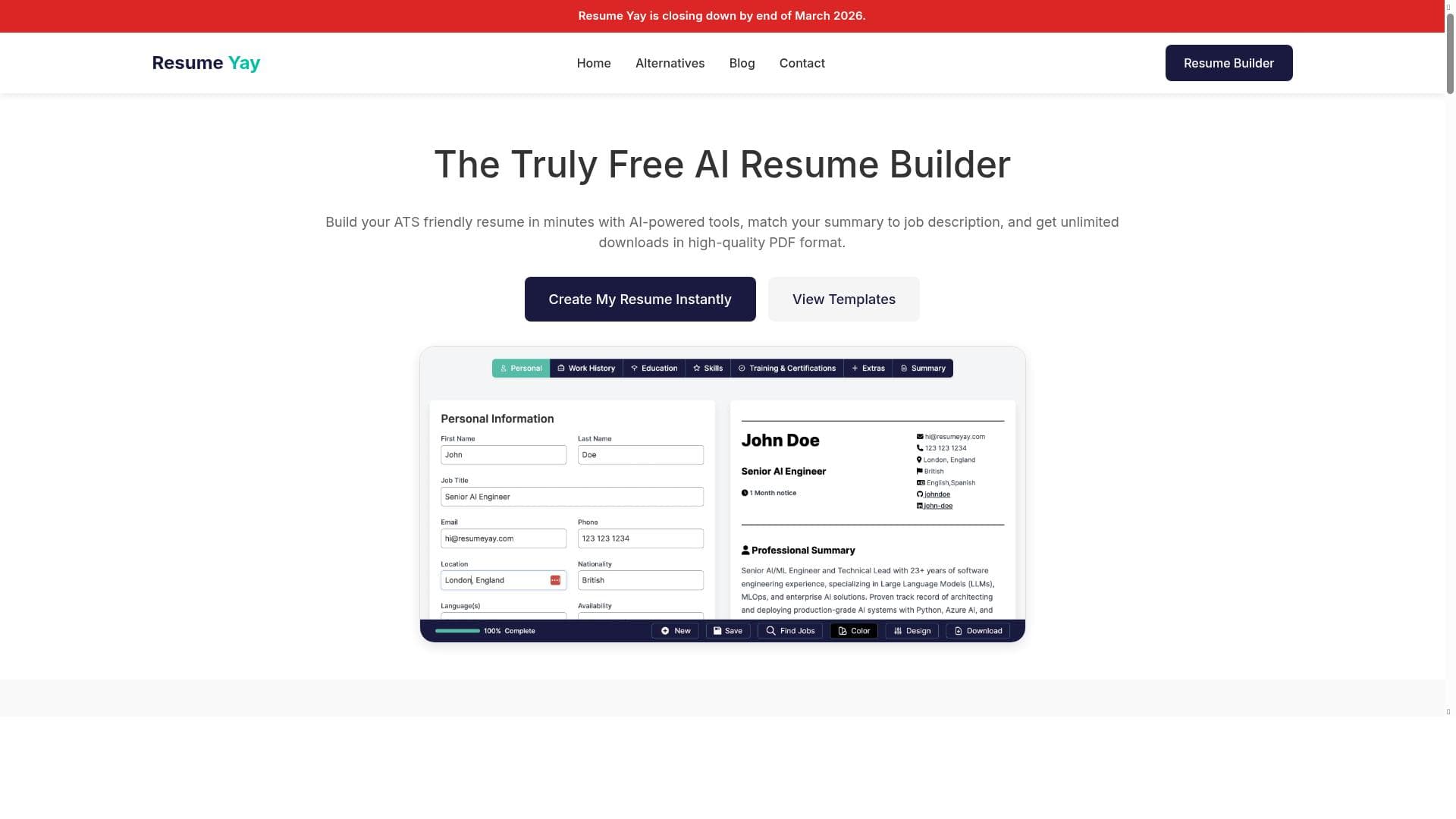


Resume Yay is a free, no-sign-up AI resume builder that crafts professional, ATS-optimized resumes tailored to specific job descriptions. Perfect for job seekers worldwide, it highlights key skills, improves grammar, supports multiple languages, and offers instant job matching—all at zero cost.

Description
Free AI Resume Builder, no sign-up required, no payment. Create your professional resume and find matching jobs instantly.
Detailed Description
Resume Yay is a free AI-powered resume builder designed to help job seekers create professional, optimized resumes quickly and effortlessly. Its core purpose is to simplify the resume creation process by leveraging artificial intelligence to tailor resumes that align closely with specific job descriptions. Unlike traditional resume builders that require sign-ups or payments, Resume Yay offers a completely free experience with no registration needed, making it highly accessible for users worldwide. The platform not only assists in resume creation but also helps users find matching job opportunities instantly, streamlining the job search process. One of the standout features of Resume Yay is its professional summary matching capability, which uses AI to generate summaries that are highly relevant to the job description provided by the user. This ensures that the resume immediately captures the attention of recruiters by highlighting the candidate’s suitability for the role. Additionally, the tool highlights the most relevant skills in bold, making it easier for hiring managers to spot key qualifications at a glance. Resume Yay also optimizes resumes for Applicant Tracking Systems (ATS) by incorporating relevant keywords and using ATS-friendly templates. This significantly increases the chances of a resume passing through automated screening processes used by many employers. Beyond keyword optimization, Resume Yay improves grammar and style, ensuring that the resume is polished and professional. Users can preview their resumes in real-time, allowing them to see changes instantly and make adjustments as needed. The platform supports multiple languages, including English, Spanish, French, German, Italian, Portuguese, Hindi, Chinese, and Turkish, making it a versatile tool for a global audience. Resume Yay is ideal for job seekers at all stages of their careers who want to create a high-quality resume without the hassle of complicated software or costly subscriptions. It is particularly beneficial for those applying to roles that require ATS-compliant resumes or for individuals looking to tailor their resumes to specific job listings quickly. Students, recent graduates, career changers, and professionals seeking to update their resumes will find Resume Yay especially useful. In terms of pricing, Resume Yay is completely free with no hidden fees or premium tiers. This differentiates it from many other resume builders that often lock essential features behind paywalls. Users can access all functionalities without signing up or providing payment information, which lowers the barrier to entry and encourages experimentation. Compared to alternatives, Resume Yay stands out for its combination of AI-driven content customization and complete free access. While other tools may offer AI features, they often require subscriptions or limit the number of resumes users can create. Resume Yay’s multi-language support and real-time preview further enhance its usability. However, it may lack some advanced customization options or integrations that premium tools provide, which could be a consideration for users needing highly specialized resume formats or direct application submission features. Notable limitations include the absence of a mobile app and limited integration with job boards or professional networking sites. Additionally, since it is free and does not require sign-up, users should be mindful of saving their work externally as the platform may not offer persistent account storage. Despite these minor drawbacks, Resume Yay remains a powerful, user-friendly solution for creating professional resumes that stand out in today’s competitive job market.
Tool Features
- Professional summary matching to the job description
- Highlighting the skills that are most relevant to the job description in bold
- Keyword optimization for ATS systems
- Grammar and style improvement
- ATS-friendly templates designed to pass Applicant Tracking Systems
- Multi-language support including English, Spanish, French, German, Italian, Portuguese, Hindi, Chinese, and Turkish
- Real time preview of your resume
Description
Resume Yay is a free, no-sign-up AI resume builder that crafts professional, ATS-optimized resumes tailored to specific job descriptions. Perfect for job seekers worldwide, it highlights key skills, improves grammar, supports multiple languages, and offers instant job matching—all at zero cost.
Free AI Resume Builder, no sign-up required, no payment. Create your professional resume and find matching jobs instantly.
Detailed Description
Resume Yay is a free AI-powered resume builder designed to help job seekers create professional, optimized resumes quickly and effortlessly. Its core purpose is to simplify the resume creation process by leveraging artificial intelligence to tailor resumes that align closely with specific job descriptions. Unlike traditional resume builders that require sign-ups or payments, Resume Yay offers a completely free experience with no registration needed, making it highly accessible for users worldwide. The platform not only assists in resume creation but also helps users find matching job opportunities instantly, streamlining the job search process. One of the standout features of Resume Yay is its professional summary matching capability, which uses AI to generate summaries that are highly relevant to the job description provided by the user. This ensures that the resume immediately captures the attention of recruiters by highlighting the candidate’s suitability for the role. Additionally, the tool highlights the most relevant skills in bold, making it easier for hiring managers to spot key qualifications at a glance. Resume Yay also optimizes resumes for Applicant Tracking Systems (ATS) by incorporating relevant keywords and using ATS-friendly templates. This significantly increases the chances of a resume passing through automated screening processes used by many employers. Beyond keyword optimization, Resume Yay improves grammar and style, ensuring that the resume is polished and professional. Users can preview their resumes in real-time, allowing them to see changes instantly and make adjustments as needed. The platform supports multiple languages, including English, Spanish, French, German, Italian, Portuguese, Hindi, Chinese, and Turkish, making it a versatile tool for a global audience. Resume Yay is ideal for job seekers at all stages of their careers who want to create a high-quality resume without the hassle of complicated software or costly subscriptions. It is particularly beneficial for those applying to roles that require ATS-compliant resumes or for individuals looking to tailor their resumes to specific job listings quickly. Students, recent graduates, career changers, and professionals seeking to update their resumes will find Resume Yay especially useful. In terms of pricing, Resume Yay is completely free with no hidden fees or premium tiers. This differentiates it from many other resume builders that often lock essential features behind paywalls. Users can access all functionalities without signing up or providing payment information, which lowers the barrier to entry and encourages experimentation. Compared to alternatives, Resume Yay stands out for its combination of AI-driven content customization and complete free access. While other tools may offer AI features, they often require subscriptions or limit the number of resumes users can create. Resume Yay’s multi-language support and real-time preview further enhance its usability. However, it may lack some advanced customization options or integrations that premium tools provide, which could be a consideration for users needing highly specialized resume formats or direct application submission features. Notable limitations include the absence of a mobile app and limited integration with job boards or professional networking sites. Additionally, since it is free and does not require sign-up, users should be mindful of saving their work externally as the platform may not offer persistent account storage. Despite these minor drawbacks, Resume Yay remains a powerful, user-friendly solution for creating professional resumes that stand out in today’s competitive job market.
Frequently Asked Questions
What is Resume Yay, Free AI resume builder?
Resume Yay is a free AI-powered tool that helps users create professional resumes optimized for specific job descriptions without requiring sign-up or payment.
How much does Resume Yay, Free AI resume builder cost?
Resume Yay is completely free to use with no hidden fees or subscription plans.
Who is Resume Yay, Free AI resume builder best for?
It is best suited for job seekers at all career levels who want to quickly create ATS-friendly, professional resumes tailored to specific jobs, including students, recent graduates, and career changers.
What are the main features of Resume Yay, Free AI resume builder?
Key features include AI-generated professional summaries matched to job descriptions, bold highlighting of relevant skills, keyword optimization for ATS, grammar and style improvements, ATS-friendly templates, multi-language support, and real-time resume previews.
Does Resume Yay, Free AI resume builder offer a free trial?
Since Resume Yay is entirely free with no sign-up required, there is no need for a free trial.
What integrations does Resume Yay, Free AI resume builder support?
Resume Yay primarily focuses on resume creation and does not currently offer integrations with job boards or professional networking platforms.
How does Resume Yay, Free AI resume builder work?
Users input their job description and resume details, and Resume Yay’s AI generates a tailored professional summary, highlights relevant skills, optimizes keywords for ATS, improves grammar and style, and provides a real-time preview of the resume.
Socials
Use ToolReviews
No reviews yet. Be the first to share your experience.




















































