🚀 Zaprep: Your Socials on Steroids. Start free with 1,000 automated DMs/month.

Tool Features

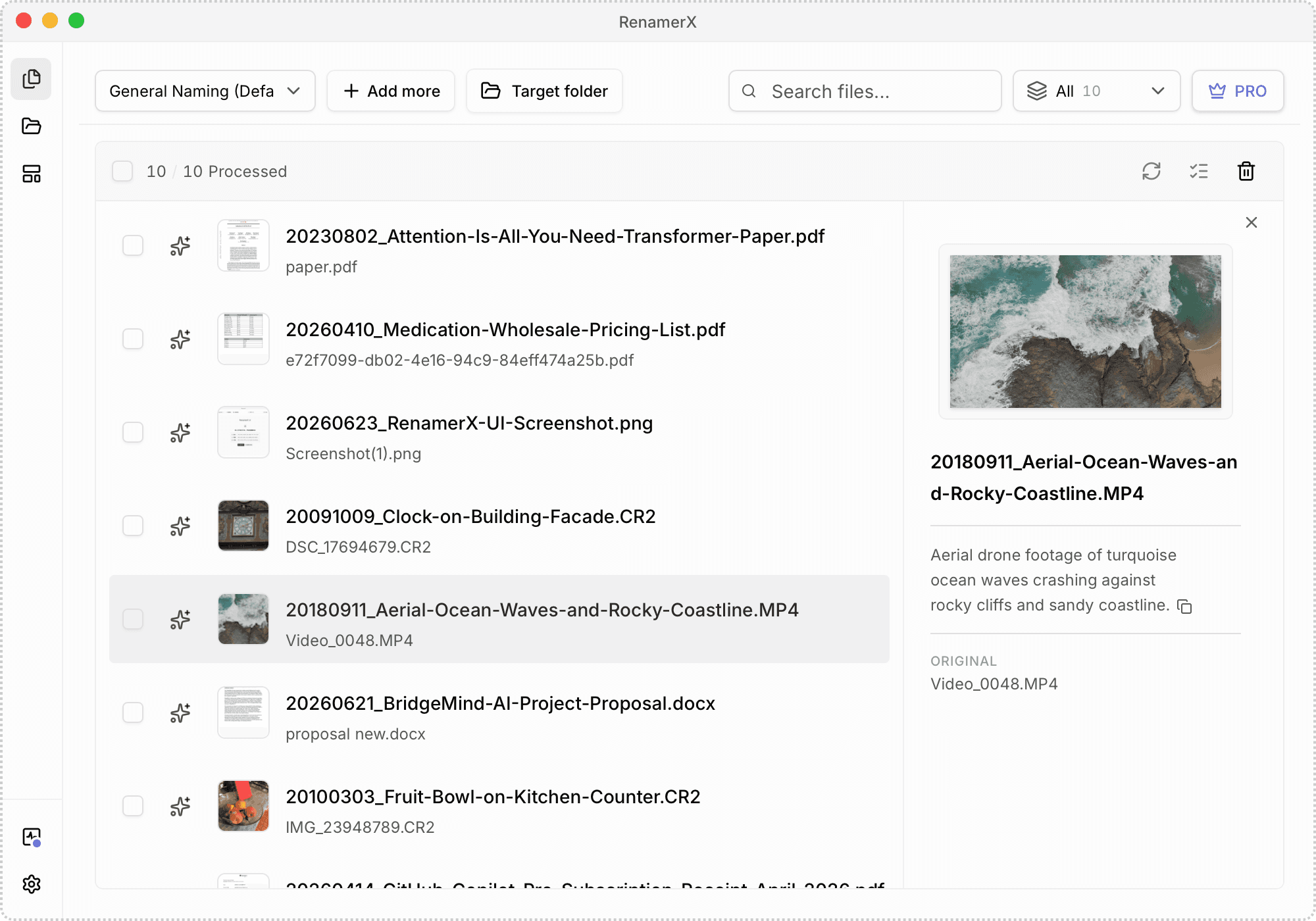
  • Rename files by content: Generate clear, searchable filenames from file content, so you can find files later without opening them one by one.
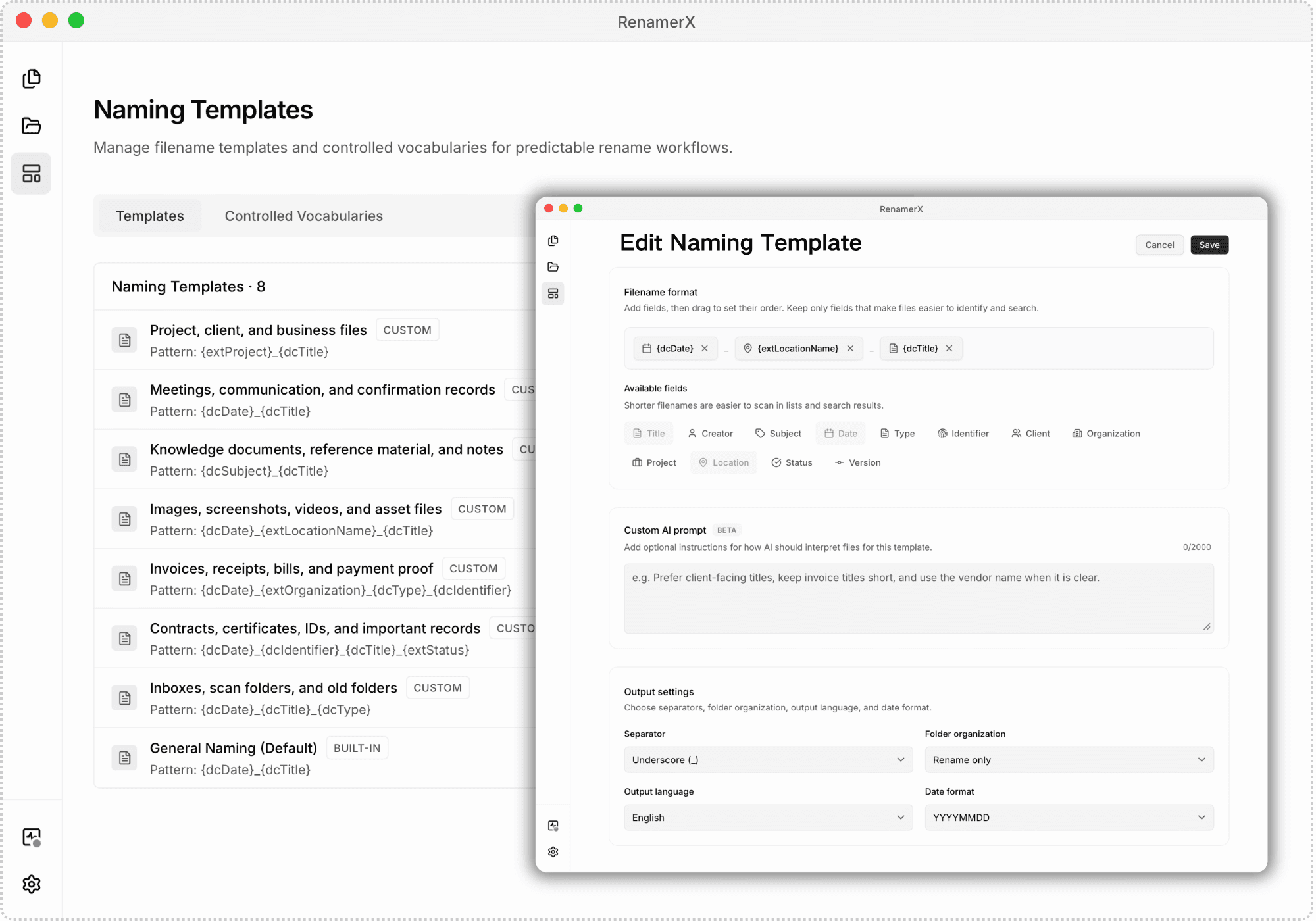
  • File naming conventions: Use naming templates to choose what information appears in a filename—such as date, title, topic, type, location, and identifier—then set the field order and output format to keep filenames consistent over time.
  • Review first. Apply when ready. Undo if needed: Review the new filenames, then rename files in a batch once everything looks right. Undo the changes and restore the original filenames if needed.
  • Built-in local AI: Built-in local AI runs on your device, so there is no need to upload files or install and configure another local AI tool.
  • File organization: Organize files into folders by date, topic, file type, project, or organization.
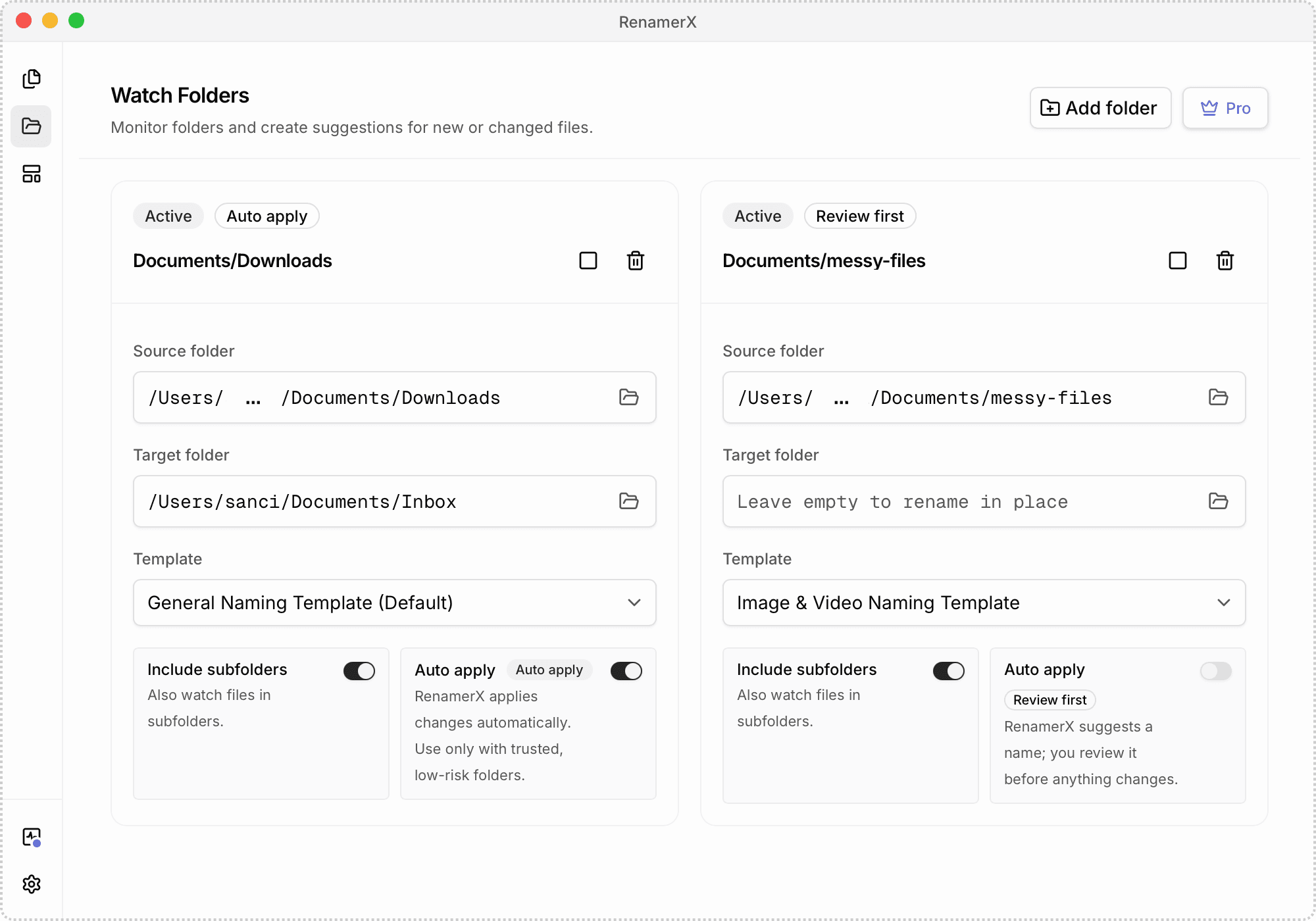
  • Watch Folders and automation: Continuously monitor selected folders, automatically renaming and organizing new or modified files.
  • Documents, images, and videos: Rename common file formats, including Office documents, PDFs, scans, screenshots, photos, camera RAW files, and videos.
  • Multiple AI services: Built-in Local AI, Ollama, LM Studio, OpenAI, Google Gemini, and other compatible AI services.
  • Quick Pane: Open Quick Pane with a global shortcut, then paste file or folder paths to import them into RenamerX.

Description

✦

RenamerX is an AI-powered file renamer and organizer that uses local AI to generate descriptive, searchable filenames based on file content without uploading your data. Ideal for professionals managing large digital libraries, it offers customizable naming templates, automation via Watch Folders, and supports multiple AI services for flexible, privacy-conscious file management.

RenamerX is an AI file renamer and organizer for macOS and Windows. It uses built-in local AI by default to understand documents, images, and videos without uploading your files. It generates clear, searchable filenames based on their content. RenamerX can identify dates, titles, summaries, visual content, topics, file types, identifiers, projects, and organizations that helps you find files later. For example, video_0001.mp4 can become 20180911_Travel_Aerial-View-of-Waves-Crashing-Against-Rocks.mp4. Custom naming templates let filenames follow your naming convention. Choose which details to include and set their order, separators, date format, and output language. RenamerX shows the original and new filenames before changing any files. You can edit inaccurate filenames, skip files you do not want to process, and apply the changes once you are satisfied with the results. If needed, undo the renames to restore the original filenames. RenamerX can also organize files into folders by date, topic, file type, project, or organization. Watch Folders detect new or modified files and can automatically rename and organize them. RenamerX supports multiple local and cloud AI services. The built-in local AI runs on your device. You can also connect to Ollama, LM Studio, OpenAI, Google Gemini, or another compatible AI service. Data handling depends on the service you choose.

Detailed Description

RenamerX is a sophisticated AI-powered file renaming and organizing tool designed for both macOS and Windows users. Its core purpose is to help users efficiently manage their digital files by automatically generating clear, searchable filenames based on the actual content of documents, images, and videos. Unlike many other file renaming tools, RenamerX leverages built-in local AI technology by default, ensuring that your files never need to be uploaded to the cloud, thereby prioritizing privacy and security. This local AI analyzes file content to identify key attributes such as dates, titles, summaries, visual elements, topics, file types, identifiers, projects, and organizations, enabling users to rename files in a way that makes them easier to locate and organize later. For example, a generic file named "video_0001.mp4" can be transformed into a descriptive filename like "20180911_Travel_Aerial-View-of-Waves-Crashing-Against-Rocks.mp4," making file retrieval intuitive and efficient. RenamerX offers a rich set of features that extend beyond simple renaming. One of its standout capabilities is the use of customizable naming templates, which allow users to define exactly what information should appear in filenames. Users can select fields such as date, title, topic, type, location, and identifiers, then arrange their order, choose separators, set date formats, and even specify the output language. This flexibility ensures that filenames adhere to any organizational or personal naming conventions, maintaining consistency across large file collections. Before any changes are applied, RenamerX provides a side-by-side preview of original and proposed filenames, allowing users to edit any inaccuracies or skip files they prefer not to rename. Additionally, the tool supports an undo feature that can revert all changes, restoring original filenames if needed. Beyond renaming, RenamerX excels at file organization. It can automatically sort files into folders based on criteria like date, topic, file type, project, or organization, streamlining file management workflows. The Watch Folders functionality enables continuous monitoring of selected directories; new or modified files are detected and automatically renamed and organized according to user-defined rules, facilitating seamless automation. RenamerX supports a broad range of file formats including Office documents, PDFs, scans, screenshots, photos, camera RAW files, and videos, making it versatile for various professional and personal use cases. RenamerX is ideal for professionals and individuals who manage large volumes of digital files and require a robust, privacy-conscious solution for file organization. Photographers, videographers, researchers, archivists, and office workers can all benefit from its ability to generate meaningful filenames that improve searchability and reduce time spent manually sorting files. Its compatibility with multiple AI services, including built-in local AI, Ollama, LM Studio, OpenAI, and Google Gemini, offers users flexibility in how their data is processed, balancing convenience with privacy preferences. Regarding pricing, RenamerX offers different plans tailored to user needs, including options for personal and professional use. While specific pricing details should be confirmed on their official website, the availability of a free trial or demo version allows users to evaluate the tool’s capabilities before committing financially. This trial period is particularly useful for assessing how well RenamerX integrates with existing workflows and AI services. When compared to alternative file renaming tools, RenamerX stands out due to its AI-driven content analysis and local processing capabilities. Many competitors rely solely on manual renaming or cloud-based AI services, which may raise privacy concerns or require internet connectivity. RenamerX’s ability to combine local AI with cloud AI options provides a unique balance of security, flexibility, and power. However, users should consider that the effectiveness of AI-based renaming depends on the quality and type of files being processed; some highly specialized or encrypted files may not be fully interpretable by the AI. In summary, RenamerX is a powerful, privacy-focused AI file renaming and organizing solution that caters to users who demand intelligent, automated file management on macOS and Windows. Its extensive features, including customizable naming templates, Watch Folders automation, and multi-service AI support, make it a standout choice for anyone looking to streamline their digital file workflows while maintaining control over their data.

Frequently Asked Questions

What is RenamerX?

RenamerX is an AI-driven file renaming and organizing tool for macOS and Windows that automatically generates clear, searchable filenames based on the content of documents, images, and videos using built-in local AI or other compatible AI services.

How much does RenamerX cost?

RenamerX offers various pricing plans tailored to personal and professional users. For detailed and up-to-date pricing information, it is best to visit their official website at https://renamerx.com/. They may also provide a free trial or demo version.

Who is RenamerX best for?

RenamerX is ideal for photographers, videographers, researchers, archivists, office workers, and anyone who manages large volumes of digital files and needs an automated, privacy-conscious solution to rename and organize files efficiently.

What are the main features of RenamerX?

Key features include AI-powered renaming based on file content, customizable naming templates, preview and undo capabilities, file organization into folders by various criteria, Watch Folders for automation, support for multiple file formats, and compatibility with several AI services including built-in local AI.

Does RenamerX offer a free trial?

RenamerX typically offers a free trial or demo version to allow users to test its features before purchasing. For specific details, check their official website or contact their support team.

What integrations does RenamerX support?

RenamerX supports multiple AI services including its built-in local AI, Ollama, LM Studio, OpenAI, Google Gemini, and other compatible AI platforms, giving users flexibility in how their files are processed and renamed.

How does RenamerX work?

RenamerX analyzes the content of files locally or via connected AI services to extract meaningful information such as dates, titles, topics, and visual content. It then generates descriptive filenames based on customizable templates. Users can preview and edit proposed filenames before applying changes, and automate renaming and organization through Watch Folders.

Socials

Use Tool

Reviews

0 reviews

No reviews yet. Be the first to share your experience.

Sponsored Tools

Recommended Tools

Seedance 2.5

Verified

Seedance 2.5 represents a landmark advancement in AI video generation technology, developed by ByteDance's Volcano Engine as the next-generation production-grade video foundation model. Unveiled in June 2026 and scheduled for full commercial release in early July, this iteration marks a structural leap forward from its predecessor, Seedance 2.0, transcending incremental quality refinements to address the fundamental limitations that have constrained AI video from true commercial viability. Built on an optimized diffusion architecture with industry-leading computational efficiency, Seedance 2.5 transforms AI video from fragmented visual snippets into a complete narrative medium, empowering creators, marketers, studios, and industrial teams to produce polished, consistent, and story-driven video content at unprecedented speed and scale. At the core of Seedance 2.5's breakthrough is its industry-leading 30-second native single-segment generation capability, doubling the 15-second ceiling of the 2.0 version and establishing a new global benchmark for continuous AI video output. Unlike conventional approaches that require stitching multiple short clips together—a workflow plagued by character inconsistency, lighting discontinuities, motion artifacts, and narrative fragmentation—Seedance 2.5 generates full 30-second sequences end-to-end in a single pass. Within this duration, the model maintains remarkable coherence across character appearance, physical motion, lighting atmosphere, and camera logic, enabling complete narrative arcs with proper setup, development, and resolution. This eliminates the labor-intensive post-production stitching process, reduces generation cycles for standard 90-second promotional videos from nine-plus segments to just three or four, and fundamentally elevates AI video from a novelty demonstration tool to a genuine narrative production instrument. The 30-second window comfortably accommodates full product demonstrations, complete short drama scenes, voiceover-accompanied explanatory sequences, and full music video segments, covering the majority of short-form commercial video requirements. Complementing its extended duration is Seedance 2.5's industry-most comprehensive multi-modal reference system, supporting up to 50 reference assets simultaneously including images, video clips, and audio tracks—a nearly fivefold increase over the previous generation's 12-asset limit. This massive expansion delivers unprecedented creative stability and controllability. The model holistically synthesizes stylistic attributes, character likenesses, shot compositions, and tonal qualities from all reference inputs, ensuring consistent visual identity across multiple generations. For brand content production, serialized IP development, and batch video creation, this resolves the longstanding pain point of AI video's inherent randomness—where each generation produces noticeably different results. Marketing teams can lock in brand color palettes, product specifications, and spokesperson appearances across dozens of output variants, while film teams can replicate specific cinematic styles, camera languages, and set aesthetics with remarkable fidelity. The reference system intelligently reconciles multi-source inputs without style conflicts, enabling complex multi-character scenes where every performer maintains consistent facial features, costumes, and proportions throughout the sequence. Seedance 2.5 further elevates creative control through its precision camera manipulation tools and built-in library of 50 professional cinematic shot templates. Creators can directly command camera movements—including push-ins, pull-outs, pans, tilts, and orbital shots—and specify shot scales from extreme close-ups to wide establishing shots. The curated template library organizes proven cinematic compositions by mood, shot type, and pacing, allowing users to achieve professional-grade cinematography without specialized film knowledge. Beyond generation, the model introduces advanced local editing capabilities that enable post-generation modifications such as background replacement, costume changes, and motion adjustments without full re-rendering, transforming the system from a pure content generator into an interactive creative decision-support tool. In terms of visual fidelity, Seedance 2.5 delivers native 4K resolution output at 30 frames per second with 10-bit color depth, eliminating the quality degradation inherent in upscaling lower-resolution sources. Fine details—fabric textures, hair strands, embroidery, and surface materials—remain crisp and defined rather than being smoothed away by super-resolution algorithms. Internal benchmarks demonstrate approximately 15% higher color accuracy than competing models, with particularly improved skin tone rendition and reduced teal-orange color grading bias, making outputs directly usable for professional advertising, corporate video, and broadcast applications. The platform also supports multiple aspect ratios including vertical, square, and widescreen formats for seamless cross-platform distribution across social media, e-commerce, and web channels. Beyond creative industries, Seedance 2.5 is engineered for industrial-grade deployment across manufacturing, retail, education, and advanced technology sectors. Enterprises leverage it to produce localized product documentation, multilingual training materials, and customer support videos at drastically reduced costs. In high-tech applications, it generates synthetic training data for embodied intelligence systems and simulates extreme weather or edge-case driving scenarios for autonomous vehicle development, addressing real-world data scarcity challenges. With API access for workflow automation, batch generation capabilities, and team collaboration features, Seedance 2.5 positions itself not merely as a creative tool but as foundational visual infrastructure for the AI era, bridging the gap between generative technology and real-world productivity.


  • Creates 30-second native 4K video
  • Uses 50 multimodal references
  • 3D pre-visualization

291

VIEWS

20

UPVOTES

FREEMIUM

Stay updated on latest Ai tools

Get the latest insights, Join our newsletter

Read and trusted by 50,000+ readers

Join the biggest AI Community

Our community and staff are here to help!
Your feedback will help Alice AI improve in future versions.

https://x.com/poweredbyai_apphttps://discord.gg/kzca34z2AQhttps://www.linkedin.com/company/poweredbyai/https://www.instagram.com/poweredbyai.apphttps://www.youtube.com/@Poweredbyai_officialhttps://www.facebook.com/poweredbyaiappmailto:support@poweredbyai.app
Use Tool

Submit your Tool

Submit AI Tools – The ultimate platform to discover, submit, and explore the best AI tools across various categories.Listed on codetrendy.comFeatured on ListBulb

PoweredByAI.app is an AI Tools Directory helping individuals, businesses, and creators discover the best AI tools for writing, coding, design, productivity, and more.

© 2026 , Product of011BQ. All rights reserved.





























