

MimicBrush AI revolutionizes image editing by enabling users to effortlessly mimic elements from reference images for precise, high-quality modifications. Ideal for designers, photographers, and content creators seeking fast, natural edits without complex tools, it offers a free, intuitive platform that streamlines creative workflows.

Description
MimicBrush, enabling users to effortlessly edit images by mimicking elements from reference images. Our platform offers powerful features for precise and high-quality image modifications.
Detailed Description
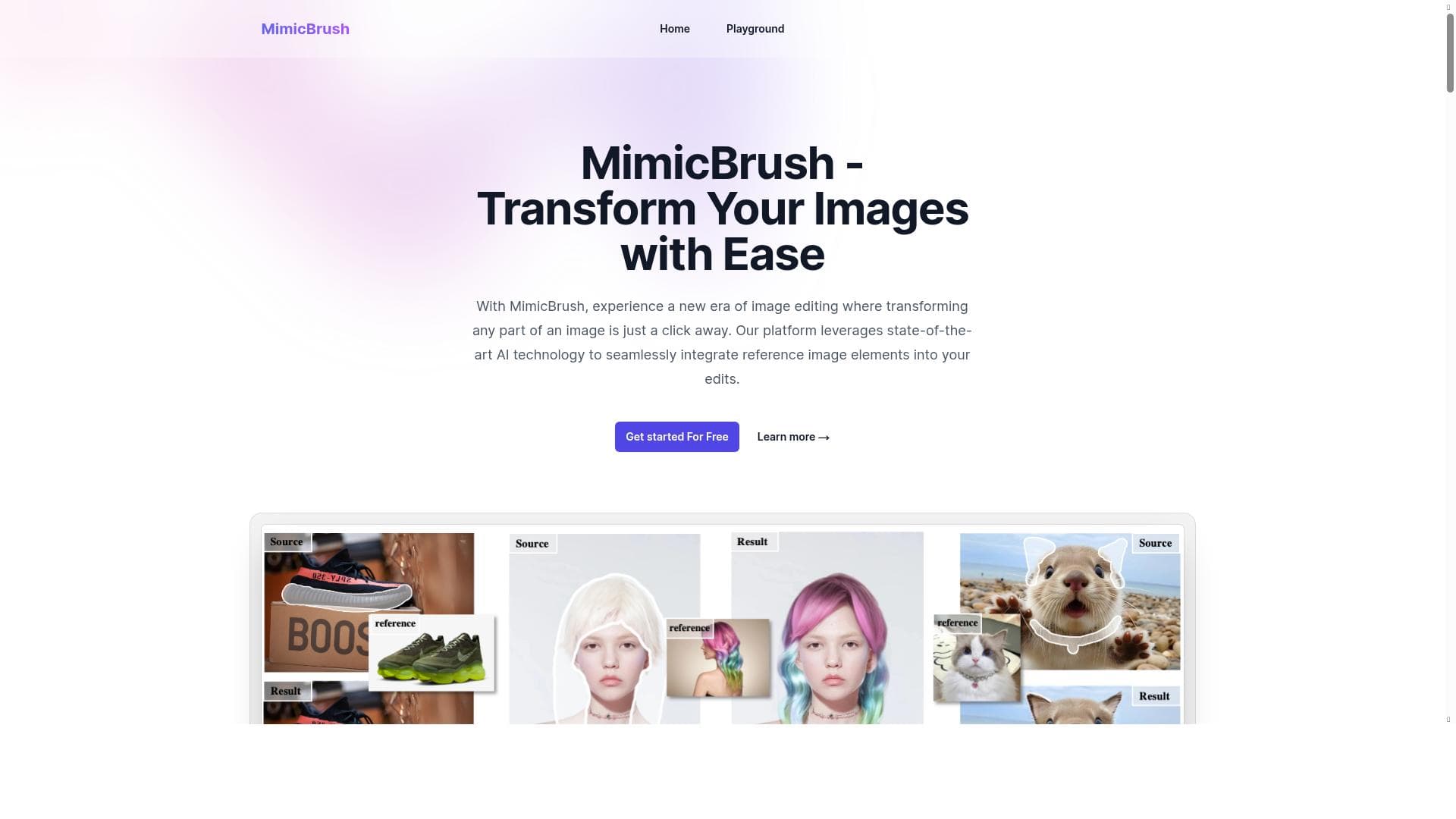
MimicBrush AI is an innovative image editing platform designed to simplify and enhance the process of modifying images by allowing users to mimic elements from reference images seamlessly. At its core, MimicBrush AI empowers users to perform precise and high-quality image edits without the need for advanced technical skills or complex software. By leveraging advanced AI algorithms, the tool intelligently analyzes reference images and applies selected elements onto target images, enabling effortless and natural-looking modifications. This approach transforms traditional photo editing workflows by reducing manual effort and increasing accuracy, making it accessible to both amateurs and professionals alike. MimicBrush AI’s core purpose is to bridge the gap between creative vision and technical execution, providing a user-friendly yet powerful solution for image editing needs. The platform’s key features center around its ability to mimic specific elements from reference images with remarkable precision. Users can select portions of a reference image—such as textures, colors, patterns, or shapes—and seamlessly integrate these into their target images. This capability is particularly useful for tasks like object replacement, style transfer, or enhancing image details. The precision of the modifications ensures that the inserted elements blend naturally with the original image, maintaining visual coherence and high quality. Additionally, MimicBrush AI supports high-resolution image editing, ensuring that the final output is suitable for professional use, whether for digital media, marketing materials, or artistic projects. Its intuitive interface guides users through the editing process, making complex edits straightforward and efficient. MimicBrush AI is best suited for a wide range of users, including graphic designers, photographers, digital artists, marketers, and content creators who require quick yet detailed image edits. For graphic designers, it offers a way to experiment with different visual elements without extensive manual retouching. Photographers can use it to enhance or correct images by borrowing textures or colors from other shots. Digital artists benefit from the creative flexibility to merge styles or elements from multiple sources effortlessly. Marketers and social media managers can quickly generate polished visuals that align with brand aesthetics by mimicking elements from branded images. The tool’s ease of use also makes it accessible for hobbyists and enthusiasts who want to elevate their photo editing without investing in complex software. MimicBrush AI is currently offered as a free tool, making it an attractive option for users seeking powerful image editing capabilities without financial commitment. The free pricing model allows users to explore the platform’s features fully, encouraging experimentation and adoption. While the free plan is generous, users should check the website for any updates regarding premium features or subscription plans that may be introduced in the future to support advanced functionalities or higher usage limits. When compared to alternative image editing tools, MimicBrush AI stands out due to its unique mimicry-based editing approach. Unlike traditional photo editors that rely heavily on manual brushwork or layered adjustments, MimicBrush AI automates the transfer of visual elements from reference images, significantly reducing editing time and effort. This differentiates it from other AI-powered tools that focus primarily on generative image creation or basic retouching. However, while powerful, MimicBrush AI may not replace comprehensive photo editing suites for users needing extensive control over every aspect of image manipulation. Instead, it complements these tools by offering a specialized function that enhances creativity and precision. Potential limitations include dependency on the quality and compatibility of reference images, as the effectiveness of mimicry relies on suitable source material. Additionally, while the tool excels at mimicking elements, it may have constraints when handling highly complex scenes or requiring intricate manual adjustments. Users should also consider that as a free platform, there may be usage caps or feature restrictions compared to paid professional software. Nonetheless, MimicBrush AI provides a compelling balance of ease, precision, and quality that makes it a valuable asset for many image editing scenarios.
Tool Features
- Effortless image editing by mimicking elements from reference images
- Precise image modifications
- High-quality image editing capabilities
Description
MimicBrush AI revolutionizes image editing by enabling users to effortlessly mimic elements from reference images for precise, high-quality modifications. Ideal for designers, photographers, and content creators seeking fast, natural edits without complex tools, it offers a free, intuitive platform that streamlines creative workflows.
MimicBrush, enabling users to effortlessly edit images by mimicking elements from reference images. Our platform offers powerful features for precise and high-quality image modifications.
Detailed Description
MimicBrush AI is an innovative image editing platform designed to simplify and enhance the process of modifying images by allowing users to mimic elements from reference images seamlessly. At its core, MimicBrush AI empowers users to perform precise and high-quality image edits without the need for advanced technical skills or complex software. By leveraging advanced AI algorithms, the tool intelligently analyzes reference images and applies selected elements onto target images, enabling effortless and natural-looking modifications. This approach transforms traditional photo editing workflows by reducing manual effort and increasing accuracy, making it accessible to both amateurs and professionals alike. MimicBrush AI’s core purpose is to bridge the gap between creative vision and technical execution, providing a user-friendly yet powerful solution for image editing needs. The platform’s key features center around its ability to mimic specific elements from reference images with remarkable precision. Users can select portions of a reference image—such as textures, colors, patterns, or shapes—and seamlessly integrate these into their target images. This capability is particularly useful for tasks like object replacement, style transfer, or enhancing image details. The precision of the modifications ensures that the inserted elements blend naturally with the original image, maintaining visual coherence and high quality. Additionally, MimicBrush AI supports high-resolution image editing, ensuring that the final output is suitable for professional use, whether for digital media, marketing materials, or artistic projects. Its intuitive interface guides users through the editing process, making complex edits straightforward and efficient. MimicBrush AI is best suited for a wide range of users, including graphic designers, photographers, digital artists, marketers, and content creators who require quick yet detailed image edits. For graphic designers, it offers a way to experiment with different visual elements without extensive manual retouching. Photographers can use it to enhance or correct images by borrowing textures or colors from other shots. Digital artists benefit from the creative flexibility to merge styles or elements from multiple sources effortlessly. Marketers and social media managers can quickly generate polished visuals that align with brand aesthetics by mimicking elements from branded images. The tool’s ease of use also makes it accessible for hobbyists and enthusiasts who want to elevate their photo editing without investing in complex software. MimicBrush AI is currently offered as a free tool, making it an attractive option for users seeking powerful image editing capabilities without financial commitment. The free pricing model allows users to explore the platform’s features fully, encouraging experimentation and adoption. While the free plan is generous, users should check the website for any updates regarding premium features or subscription plans that may be introduced in the future to support advanced functionalities or higher usage limits. When compared to alternative image editing tools, MimicBrush AI stands out due to its unique mimicry-based editing approach. Unlike traditional photo editors that rely heavily on manual brushwork or layered adjustments, MimicBrush AI automates the transfer of visual elements from reference images, significantly reducing editing time and effort. This differentiates it from other AI-powered tools that focus primarily on generative image creation or basic retouching. However, while powerful, MimicBrush AI may not replace comprehensive photo editing suites for users needing extensive control over every aspect of image manipulation. Instead, it complements these tools by offering a specialized function that enhances creativity and precision. Potential limitations include dependency on the quality and compatibility of reference images, as the effectiveness of mimicry relies on suitable source material. Additionally, while the tool excels at mimicking elements, it may have constraints when handling highly complex scenes or requiring intricate manual adjustments. Users should also consider that as a free platform, there may be usage caps or feature restrictions compared to paid professional software. Nonetheless, MimicBrush AI provides a compelling balance of ease, precision, and quality that makes it a valuable asset for many image editing scenarios.
Frequently Asked Questions
What is MimicBrush AI?
MimicBrush AI is an image editing platform that allows users to effortlessly edit images by mimicking elements from reference images, enabling precise and high-quality modifications with ease.
How much does MimicBrush AI cost?
MimicBrush AI is currently available for free, allowing users to access its full range of image editing features without any cost.
Who is MimicBrush AI best for?
MimicBrush AI is ideal for graphic designers, photographers, digital artists, marketers, and content creators who want to perform precise image edits quickly and efficiently.
What are the main features of MimicBrush AI?
The main features include effortless image editing by mimicking elements from reference images, precise image modifications, and high-quality image editing capabilities suitable for professional use.
Does MimicBrush AI offer a free trial?
MimicBrush AI is offered as a free tool, so users can access its features without needing a trial or subscription.
What integrations does MimicBrush AI support?
Currently, MimicBrush AI operates as a standalone platform focused on image editing and does not list specific integrations with other software.
How does MimicBrush AI work?
MimicBrush AI works by allowing users to select elements from reference images, which the AI then analyzes and seamlessly applies to target images, enabling precise and natural-looking edits.
Reviews
No reviews yet. Be the first to share your experience.