

Is this your AI tool? Claim it today.
Verify ownership, manage your profile, and unlock growth features.
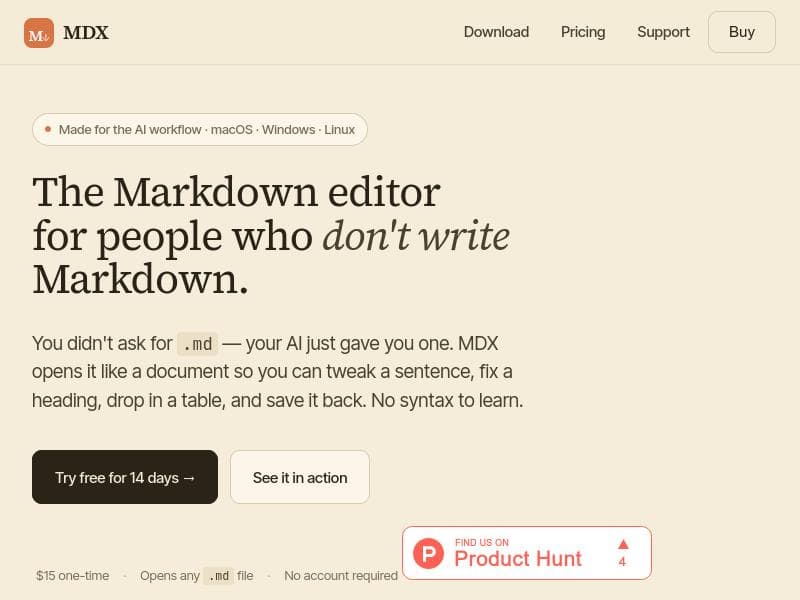
MDX is a local-first WYSIWYG Markdown editor that lets users edit AI-generated .md files like Word documents, no Markdown syntax required. With built-in math support, citation management from BibTeX, and AI-assisted ghost-writing, MDX is perfect for academics, researchers, and writers seeking a seamless AI-powered writing workflow across macOS, Windows, and Linux.

Description
A WYSIWYG Markdown editor for the AI era. Open themd files ChatGPT, Claude or Gemini just gave you and edit them like a Word document — tweak a sentence, fix a heading, drop in a table, save it back as plain Markdown. Click-to-format math, citations, diagrams. Export to DOCX, PDF or HTML with a numbered bibliography. Optional Tab-to-complete ghost-writer uses your own API key. Local-first. No account. No telemetry. $15 one-time. macOS, Windows, Linux.
Detailed Description
MDX is a local-first WYSIWYG Markdown editor designed specifically for the AI era, offering a seamless and intuitive way to work with Markdown files without requiring users to learn Markdown syntax. Its core purpose is to bridge the gap between the plain text Markdown format and the rich editing experience of word processors like Microsoft Word. MDX enables users to open .md files generated by AI tools or other sources and edit them directly in a familiar, visually rich environment. This approach makes Markdown accessible to users who want the benefits of Markdown's simplicity and portability without the steep learning curve of its syntax. One of the standout features of MDX is its local-first architecture, ensuring that all files are stored and edited on the user's device, enhancing privacy and control over content. The editor supports a wide range of formatting options through a WYSIWYG interface, allowing users to click to format text, insert tables, images, and links, and manage headings effortlessly. Unlike traditional Markdown editors, MDX supports math input without requiring LaTeX knowledge, making it ideal for academics, researchers, and students who need to include mathematical notation in their documents. Additionally, it integrates citation management by allowing users to cite sources directly from a BibTeX library, streamlining academic writing workflows. MDX also offers flexible export options, enabling users to save their documents as DOCX, PDF, or HTML files with a numbered bibliography automatically generated from the citations. This feature is particularly useful for producing publication-ready documents or sharing content in widely accepted formats. Another innovative capability is the optional Tab-to-complete ghost-writer feature, which leverages the user's own API key to provide AI-assisted writing suggestions and completions. This integration supports a smooth AI-assisted writing workflow, helping users draft and refine content more efficiently. The tool is cross-platform, supporting macOS, Windows, and Linux, which broadens its accessibility to a wide range of users regardless of their operating system preferences. MDX is ideal for professionals, academics, students, writers, and anyone who frequently works with Markdown files but prefers a more visual and user-friendly editing experience. It is especially beneficial for those who receive Markdown files from AI tools and want to edit them without switching to plain text editors or learning Markdown syntax. Regarding pricing, MDX is offered as a one-time purchase priced at $15 USD, which includes full access to its features without requiring any subscription or account creation. This straightforward pricing model makes it an attractive option for users seeking a cost-effective Markdown editor with advanced capabilities. A free 14-day trial is available, allowing potential users to test the software before committing to purchase. Compared to alternatives, MDX stands out by combining the simplicity of Markdown with the ease of WYSIWYG editing and AI integration. While many Markdown editors focus on raw text editing or require users to learn syntax, MDX removes this barrier, making Markdown editing accessible to a broader audience. Its support for math input without LaTeX and citation management from BibTeX libraries also differentiates it from typical Markdown editors, which often lack these academic-focused features. The AI ghost-writer integration further enhances its appeal for users looking to incorporate AI assistance directly within their writing environment. However, there are some considerations to keep in mind. As a local-first application, MDX does not inherently provide cloud syncing or collaboration features, which may be a limitation for teams needing real-time multi-user editing. Users must also supply their own API key to enable the AI ghost-writer functionality, which requires some technical setup and potentially additional costs depending on the API provider. Lastly, while MDX supports many export formats, users who require highly customized document styling or advanced publishing workflows might find it less flexible than dedicated word processors or publishing tools. In summary, MDX is a powerful and user-friendly Markdown editor tailored for the AI era, combining local-first privacy, rich WYSIWYG editing, math and citation support, and AI-assisted writing features. It is particularly well-suited for academics, researchers, and writers who want to work with Markdown files effortlessly and produce polished documents without mastering Markdown syntax.
Tool Features
- Local-first WYSIWYG Markdown editing
- Open and edit .md files generated by AI
- No Markdown syntax to learn
- Supports math input without LaTeX
- Citations from a BibTeX library
- Export to DOCX, PDF, or HTML with numbered bibliography
- Optional Tab-to-complete ghost-writer using your own API key
- Cross-platform support for macOS, Windows, and Linux
Description
MDX is a local-first WYSIWYG Markdown editor that lets users edit AI-generated .md files like Word documents, no Markdown syntax required. With built-in math support, citation management from BibTeX, and AI-assisted ghost-writing, MDX is perfect for academics, researchers, and writers seeking a seamless AI-powered writing workflow across macOS, Windows, and Linux.
A WYSIWYG Markdown editor for the AI era. Open themd files ChatGPT, Claude or Gemini just gave you and edit them like a Word document — tweak a sentence, fix a heading, drop in a table, save it back as plain Markdown. Click-to-format math, citations, diagrams. Export to DOCX, PDF or HTML with a numbered bibliography. Optional Tab-to-complete ghost-writer uses your own API key. Local-first. No account. No telemetry. $15 one-time. macOS, Windows, Linux.
Detailed Description
MDX is a local-first WYSIWYG Markdown editor designed specifically for the AI era, offering a seamless and intuitive way to work with Markdown files without requiring users to learn Markdown syntax. Its core purpose is to bridge the gap between the plain text Markdown format and the rich editing experience of word processors like Microsoft Word. MDX enables users to open .md files generated by AI tools or other sources and edit them directly in a familiar, visually rich environment. This approach makes Markdown accessible to users who want the benefits of Markdown's simplicity and portability without the steep learning curve of its syntax. One of the standout features of MDX is its local-first architecture, ensuring that all files are stored and edited on the user's device, enhancing privacy and control over content. The editor supports a wide range of formatting options through a WYSIWYG interface, allowing users to click to format text, insert tables, images, and links, and manage headings effortlessly. Unlike traditional Markdown editors, MDX supports math input without requiring LaTeX knowledge, making it ideal for academics, researchers, and students who need to include mathematical notation in their documents. Additionally, it integrates citation management by allowing users to cite sources directly from a BibTeX library, streamlining academic writing workflows. MDX also offers flexible export options, enabling users to save their documents as DOCX, PDF, or HTML files with a numbered bibliography automatically generated from the citations. This feature is particularly useful for producing publication-ready documents or sharing content in widely accepted formats. Another innovative capability is the optional Tab-to-complete ghost-writer feature, which leverages the user's own API key to provide AI-assisted writing suggestions and completions. This integration supports a smooth AI-assisted writing workflow, helping users draft and refine content more efficiently. The tool is cross-platform, supporting macOS, Windows, and Linux, which broadens its accessibility to a wide range of users regardless of their operating system preferences. MDX is ideal for professionals, academics, students, writers, and anyone who frequently works with Markdown files but prefers a more visual and user-friendly editing experience. It is especially beneficial for those who receive Markdown files from AI tools and want to edit them without switching to plain text editors or learning Markdown syntax. Regarding pricing, MDX is offered as a one-time purchase priced at $15 USD, which includes full access to its features without requiring any subscription or account creation. This straightforward pricing model makes it an attractive option for users seeking a cost-effective Markdown editor with advanced capabilities. A free 14-day trial is available, allowing potential users to test the software before committing to purchase. Compared to alternatives, MDX stands out by combining the simplicity of Markdown with the ease of WYSIWYG editing and AI integration. While many Markdown editors focus on raw text editing or require users to learn syntax, MDX removes this barrier, making Markdown editing accessible to a broader audience. Its support for math input without LaTeX and citation management from BibTeX libraries also differentiates it from typical Markdown editors, which often lack these academic-focused features. The AI ghost-writer integration further enhances its appeal for users looking to incorporate AI assistance directly within their writing environment. However, there are some considerations to keep in mind. As a local-first application, MDX does not inherently provide cloud syncing or collaboration features, which may be a limitation for teams needing real-time multi-user editing. Users must also supply their own API key to enable the AI ghost-writer functionality, which requires some technical setup and potentially additional costs depending on the API provider. Lastly, while MDX supports many export formats, users who require highly customized document styling or advanced publishing workflows might find it less flexible than dedicated word processors or publishing tools. In summary, MDX is a powerful and user-friendly Markdown editor tailored for the AI era, combining local-first privacy, rich WYSIWYG editing, math and citation support, and AI-assisted writing features. It is particularly well-suited for academics, researchers, and writers who want to work with Markdown files effortlessly and produce polished documents without mastering Markdown syntax.
Frequently Asked Questions
What is MDX?
MDX is a local-first WYSIWYG Markdown editor designed for the AI era that allows users to open and edit .md files generated by AI or other sources without needing to learn Markdown syntax. It provides a rich editing experience similar to word processors while maintaining the simplicity and portability of Markdown.
How much does MDX cost?
MDX is available for a one-time purchase price of $15 USD. There are no subscription fees or account requirements, making it an affordable option for users seeking a powerful Markdown editor.
Who is MDX best for?
MDX is ideal for professionals, academics, researchers, students, and writers who work with Markdown files but prefer a visual editing experience without learning Markdown syntax. It is especially useful for those who receive AI-generated Markdown files and want to edit them seamlessly, including users needing math input and citation management.
What are the main features of MDX?
Key features of MDX include local-first WYSIWYG Markdown editing, support for opening and editing AI-generated .md files, math input without LaTeX, citation management from a BibTeX library, export options to DOCX, PDF, or HTML with numbered bibliographies, an optional AI ghost-writer feature using your own API key, and cross-platform support for macOS, Windows, and Linux.
Does MDX offer a free trial?
Yes, MDX offers a free 14-day trial so users can test its features and experience before purchasing the full version.
What integrations does MDX support?
MDX integrates with BibTeX libraries for citation management and supports AI-assisted writing through a ghost-writer feature that uses your own API key. It does not currently offer cloud syncing or direct integrations with other collaboration platforms.
How does MDX work?
MDX works as a local-first application that opens Markdown (.md) files and presents them in a WYSIWYG editor, allowing users to format text, insert math, citations, tables, and images visually. Changes are saved back to plain Markdown files. The optional ghost-writer feature provides AI-generated writing suggestions using your API key, enhancing the writing process.
Reviews
No reviews yet. Be the first to share your experience.




















































