









Free AI Image Editor revolutionizes photo editing by allowing users to modify images with simple text prompts—no sign-up or watermarks required. Perfect for casual users and professionals alike, it offers powerful features like object removal, text rewriting, and layered PSD exports, all accessible via a mobile-first web app with free daily edits and flexible credit packs.
Description
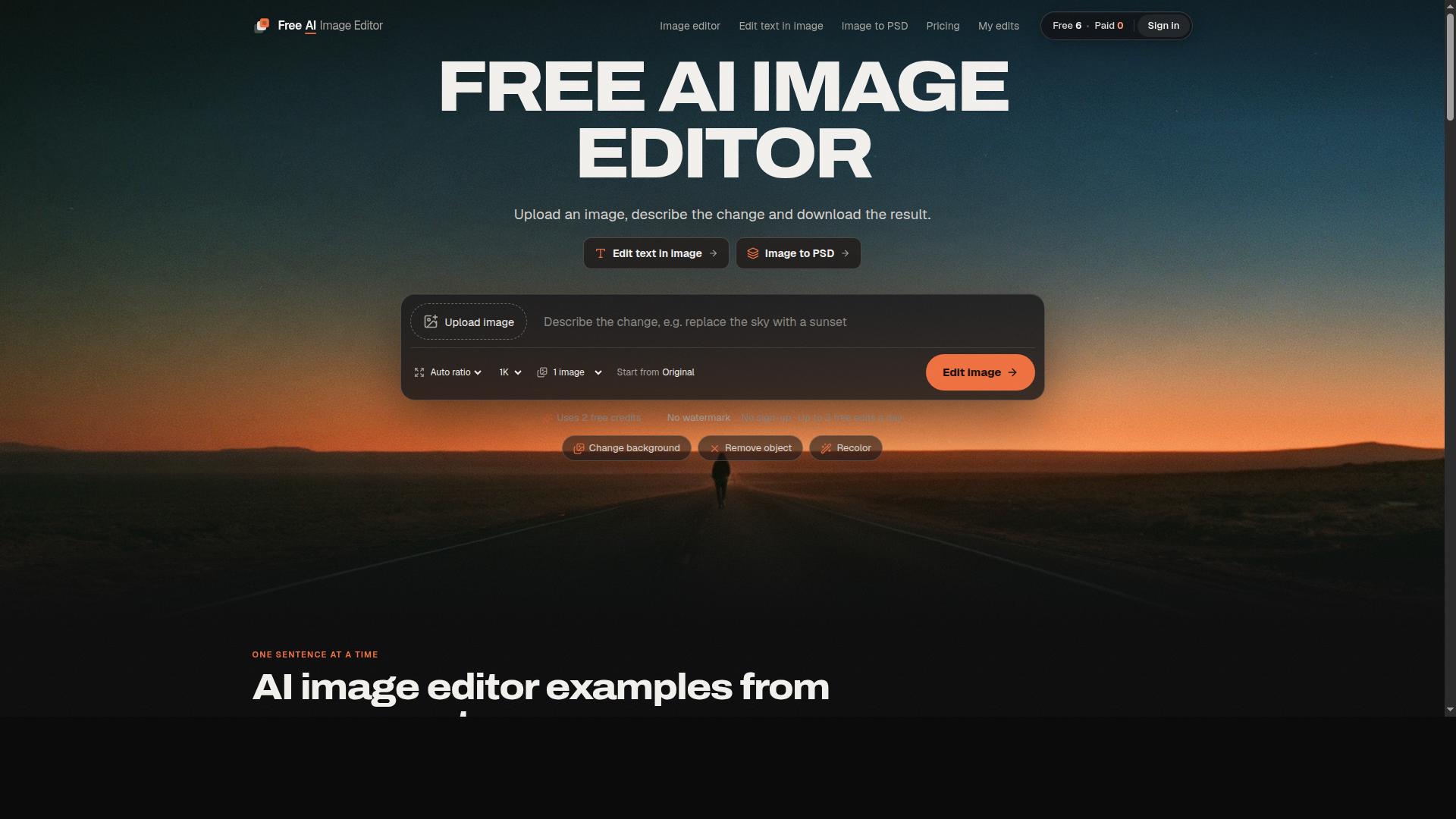
Free AI Image Editor lets you edit any photo online with plain text prompts—no sign-up and no watermark. Paint an area to remove objects or repaint locally, click directly on printed text to rewrite signs and posters, or split any flat graphic into a layered Photoshop PSD with editable text layers. Works as a mobile-first web app and includes desktop-to-phone QR photo upload. Free daily edits plus one-time credit packs starting at $9.90 (never expire).
Detailed Description
Free AI Image Editor is an innovative online tool designed to empower users to edit photos effortlessly using plain text prompts. Its core purpose is to simplify image editing by allowing users to make complex modifications without needing advanced software skills or installations. The tool operates entirely in the browser, requiring no sign-up and producing watermark-free results, making it highly accessible and user-friendly. It supports a wide range of editing tasks such as object removal, local repainting, text rewriting on images, and converting flat graphics into layered Photoshop PSD files with editable text layers. This versatility makes it a comprehensive solution for casual users, designers, marketers, and content creators who need quick yet powerful image edits on the go. One of the standout features of Free AI Image Editor is its ability to edit images through simple text instructions. Users can describe the changes they want, and the AI interprets these commands to modify the image accordingly. The tool also offers Local Repaint and Mark functionalities, which allow users to paint over specific areas for object removal or local color adjustments. Another unique capability is the direct interaction with printed text in images—users can click on signs or posters within a photo to rewrite the text seamlessly. Additionally, the tool can split any flat graphic into a layered Photoshop PSD file, preserving editable text layers, which is particularly useful for graphic designers working with complex compositions. The platform supports JPG and PNG uploads and works as a mobile-first web app, including a convenient desktop-to-phone QR code photo upload feature. Free AI Image Editor is best suited for a broad audience ranging from casual users who want to enhance personal photos to professionals such as graphic designers, social media managers, and marketers who require quick edits without the overhead of traditional software. It is ideal for those who want to remove unwanted objects, update text on images, or create layered PSD files without manual effort. The mobile-first design also makes it perfect for users who prefer editing images directly from their smartphones or tablets. Regarding pricing, Free AI Image Editor offers a generous free tier with daily free image edits supported by credits, allowing users to try the tool without any financial commitment. For users needing higher resolution outputs, batch editing capabilities, or additional edits beyond the free daily limit, the platform provides one-time credit packs starting at $9.90. These credits never expire, offering flexibility and value for occasional or frequent users. Importantly, the tool maintains a privacy-focused approach by not using uploaded images for model training, ensuring user content remains confidential. Compared to alternatives, Free AI Image Editor stands out due to its no sign-up requirement, watermark-free downloads, and the ability to edit images purely through text prompts. Many other AI image editors either require accounts, add watermarks, or limit editing capabilities. Its mobile-first web app design and desktop-to-phone QR upload feature also enhance convenience, setting it apart from desktop-only or app-only competitors. The layered PSD export is a particularly advanced feature uncommon in free or low-cost editors, providing professional-grade output. While Free AI Image Editor offers many advantages, users should consider that the quality of AI-driven edits can vary depending on the complexity of the image and instructions. The free daily edits limit may not suffice for heavy users, who will need to purchase credits. Additionally, as a web-based tool, performance may depend on internet speed and browser compatibility. However, these are typical considerations for online AI editing platforms and do not detract significantly from its overall value. In summary, Free AI Image Editor is a powerful, accessible, and privacy-conscious online image editor that leverages AI to simplify complex photo editing tasks. Its unique combination of text-based editing, local repainting, text rewriting, and layered PSD export makes it a versatile choice for a wide range of users, from casual to professional. The flexible pricing model and mobile-first design further enhance its appeal as a modern image editing solution.
Tool Features
- Edit an image with a text instruction
- Local Repaint and Mark for selected areas
- Download an edited image without a site watermark
- Daily free image edits with credits
- Supports JPG and PNG uploads
- No sign-up required for free edits
- Paid options for higher resolution and batch edits
- Privacy-focused with no use of images for model training
Description
Free AI Image Editor revolutionizes photo editing by allowing users to modify images with simple text prompts—no sign-up or watermarks required. Perfect for casual users and professionals alike, it offers powerful features like object removal, text rewriting, and layered PSD exports, all accessible via a mobile-first web app with free daily edits and flexible credit packs.
Free AI Image Editor lets you edit any photo online with plain text prompts—no sign-up and no watermark. Paint an area to remove objects or repaint locally, click directly on printed text to rewrite signs and posters, or split any flat graphic into a layered Photoshop PSD with editable text layers. Works as a mobile-first web app and includes desktop-to-phone QR photo upload. Free daily edits plus one-time credit packs starting at $9.90 (never expire).
Detailed Description
Free AI Image Editor is an innovative online tool designed to empower users to edit photos effortlessly using plain text prompts. Its core purpose is to simplify image editing by allowing users to make complex modifications without needing advanced software skills or installations. The tool operates entirely in the browser, requiring no sign-up and producing watermark-free results, making it highly accessible and user-friendly. It supports a wide range of editing tasks such as object removal, local repainting, text rewriting on images, and converting flat graphics into layered Photoshop PSD files with editable text layers. This versatility makes it a comprehensive solution for casual users, designers, marketers, and content creators who need quick yet powerful image edits on the go. One of the standout features of Free AI Image Editor is its ability to edit images through simple text instructions. Users can describe the changes they want, and the AI interprets these commands to modify the image accordingly. The tool also offers Local Repaint and Mark functionalities, which allow users to paint over specific areas for object removal or local color adjustments. Another unique capability is the direct interaction with printed text in images—users can click on signs or posters within a photo to rewrite the text seamlessly. Additionally, the tool can split any flat graphic into a layered Photoshop PSD file, preserving editable text layers, which is particularly useful for graphic designers working with complex compositions. The platform supports JPG and PNG uploads and works as a mobile-first web app, including a convenient desktop-to-phone QR code photo upload feature. Free AI Image Editor is best suited for a broad audience ranging from casual users who want to enhance personal photos to professionals such as graphic designers, social media managers, and marketers who require quick edits without the overhead of traditional software. It is ideal for those who want to remove unwanted objects, update text on images, or create layered PSD files without manual effort. The mobile-first design also makes it perfect for users who prefer editing images directly from their smartphones or tablets. Regarding pricing, Free AI Image Editor offers a generous free tier with daily free image edits supported by credits, allowing users to try the tool without any financial commitment. For users needing higher resolution outputs, batch editing capabilities, or additional edits beyond the free daily limit, the platform provides one-time credit packs starting at $9.90. These credits never expire, offering flexibility and value for occasional or frequent users. Importantly, the tool maintains a privacy-focused approach by not using uploaded images for model training, ensuring user content remains confidential. Compared to alternatives, Free AI Image Editor stands out due to its no sign-up requirement, watermark-free downloads, and the ability to edit images purely through text prompts. Many other AI image editors either require accounts, add watermarks, or limit editing capabilities. Its mobile-first web app design and desktop-to-phone QR upload feature also enhance convenience, setting it apart from desktop-only or app-only competitors. The layered PSD export is a particularly advanced feature uncommon in free or low-cost editors, providing professional-grade output. While Free AI Image Editor offers many advantages, users should consider that the quality of AI-driven edits can vary depending on the complexity of the image and instructions. The free daily edits limit may not suffice for heavy users, who will need to purchase credits. Additionally, as a web-based tool, performance may depend on internet speed and browser compatibility. However, these are typical considerations for online AI editing platforms and do not detract significantly from its overall value. In summary, Free AI Image Editor is a powerful, accessible, and privacy-conscious online image editor that leverages AI to simplify complex photo editing tasks. Its unique combination of text-based editing, local repainting, text rewriting, and layered PSD export makes it a versatile choice for a wide range of users, from casual to professional. The flexible pricing model and mobile-first design further enhance its appeal as a modern image editing solution.
Frequently Asked Questions
What is Free AI Image Editor?
Free AI Image Editor is an online photo editing tool that enables users to edit images using plain text instructions. It offers features such as object removal, local repainting, text rewriting on images, and exporting layered Photoshop PSD files, all without requiring sign-up or adding watermarks.
How much does Free AI Image Editor cost?
The tool provides free daily image edits supported by credits. For higher resolution edits, batch processing, or additional usage beyond the free limit, users can purchase one-time credit packs starting at $9.90. These credits never expire.
Who is Free AI Image Editor best for?
It is ideal for casual users who want to enhance photos quickly, as well as professionals like graphic designers, marketers, and social media managers who need efficient, high-quality image edits without complex software.
What are the main features of Free AI Image Editor?
Key features include editing images via text instructions, Local Repaint and Mark tools for targeted edits, watermark-free downloads, daily free edits with credits, support for JPG and PNG uploads, no sign-up required, paid options for higher resolution and batch edits, and privacy-focused policies.
Does Free AI Image Editor offer a free trial?
Yes, the platform offers free daily image edits with credits that allow users to try the tool without any payment or sign-up.
What integrations does Free AI Image Editor support?
Free AI Image Editor operates as a standalone web app and does not currently offer direct integrations with other software or platforms. However, it supports desktop-to-phone QR code photo uploads for easy file transfer.
How does Free AI Image Editor work?
Users upload an image in JPG or PNG format and provide plain text prompts describing the desired edits. The AI processes these instructions to modify the image accordingly. Users can also paint areas for local repainting or object removal, click on printed text to rewrite it, and export layered PSD files for advanced editing.
Reviews
No reviews yet. Be the first to share your experience.
























 , Product of