
ChatGPT Widescreen Mode
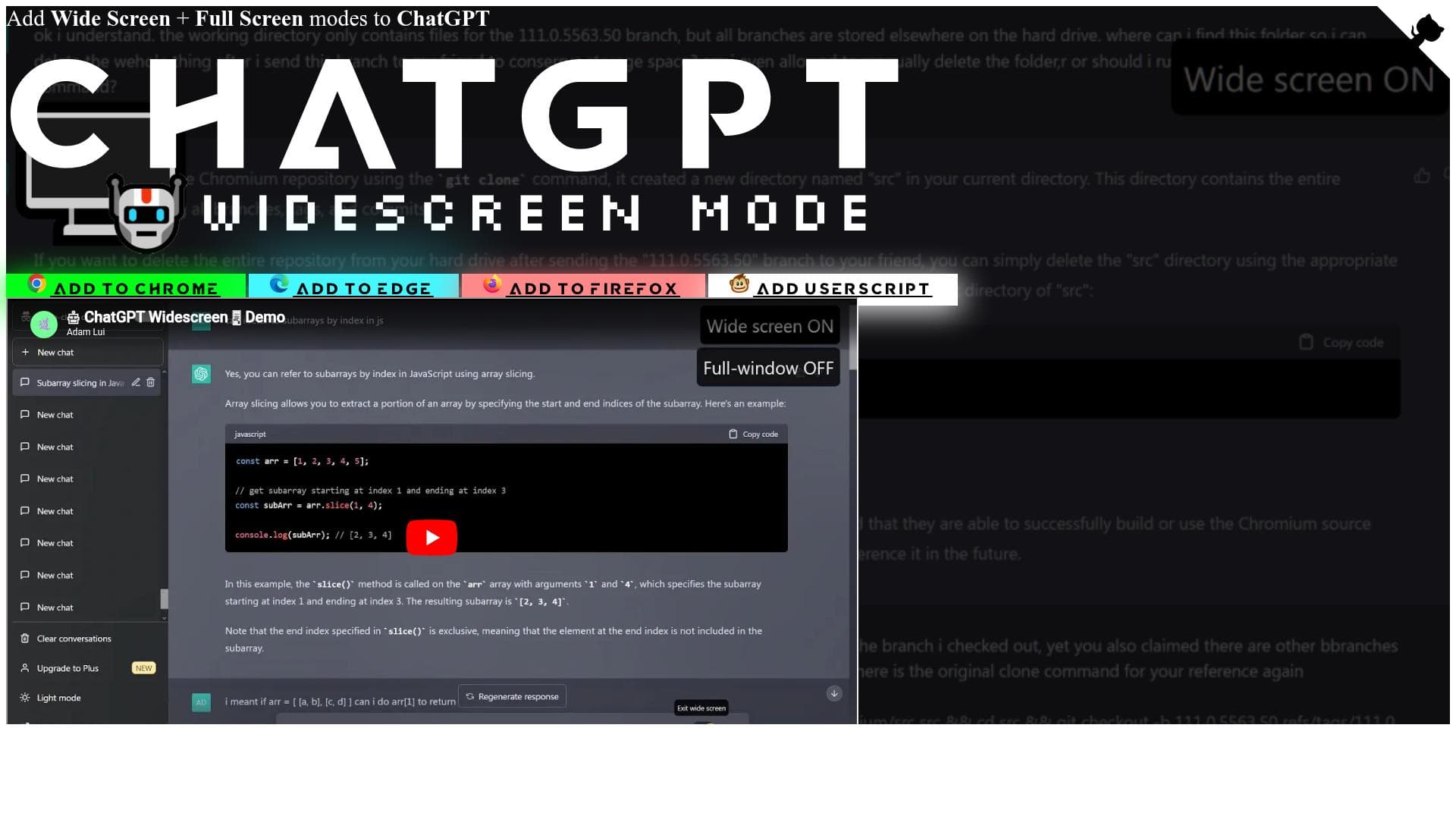


ChatGPT Widescreen Mode transforms your ChatGPT experience by adding widescreen and fullscreen modes that reduce scrolling and enhance readability, especially for code, multi-step instructions, and creative content. Ideal for developers, writers, and productivity enthusiasts, this free tool works seamlessly with major browsers and popular ChatGPT platforms to create a more immersive and efficient chat environment.

Description
ChatGPT Widescreen Mode adds widescreen + fullscreen modes to ChatGPT, enhancing your chat sessions by reducing scrolling & creating a more immersive viewing experience. - Experience clearer programming code display with proper indentation - View multi-step instructions or long recipes on a single page for easier reference - Enjoy original lyrics, poetry, essays, or compositions in a more visually pleasing format - Works with: openai.com + poe.com
Detailed Description
ChatGPT Widescreen Mode is a specialized enhancement tool designed to improve the user experience when interacting with ChatGPT on supported platforms such as openai.com and poe.com. Its core purpose is to transform the standard chat interface by introducing widescreen and fullscreen viewing modes, which significantly reduce the need for excessive scrolling and create a more immersive and visually appealing environment for users. This enhancement is particularly valuable for those who engage in lengthy conversations, work with complex code snippets, or follow multi-step instructions within the ChatGPT interface. By expanding the visible area and optimizing the layout, ChatGPT Widescreen Mode enables users to see more content at once, improving readability and workflow efficiency. The tool’s key features revolve around its ability to seamlessly add widescreen and fullscreen modes to ChatGPT. These modes allow the chat window to utilize the full width or full screen of the user’s display, providing a broader canvas for viewing responses. One of the standout capabilities is the clearer display of programming code, where proper indentation and formatting are preserved and enhanced, making it easier for developers and programmers to read and debug code directly within the chat. Additionally, users can view long, multi-step instructions or detailed recipes on a single page without needing to scroll extensively, which is a significant usability improvement for those relying on ChatGPT for stepwise guidance. The tool also enhances the presentation of creative content such as original lyrics, poetry, essays, or compositions, offering a more visually pleasing format that respects the structure and flow of the text. ChatGPT Widescreen Mode is best suited for a diverse range of users who depend on ChatGPT for productivity and creative tasks. Developers and programmers benefit from the improved code readability and reduced scrolling, which streamlines coding assistance and troubleshooting. Writers, poets, and content creators find value in the enhanced formatting for literary works and compositions. Additionally, users who frequently follow complex instructions or recipes enjoy the convenience of having all steps visible at once, reducing the cognitive load and improving task completion. The tool supports major browsers including Chrome, Edge, and Firefox through dedicated extensions, and also offers a userscript version for more advanced users who prefer custom installation methods. In terms of pricing, ChatGPT Widescreen Mode is offered completely free of charge, making it an accessible enhancement for anyone using ChatGPT on supported platforms. This no-cost approach encourages widespread adoption and allows users to experience the benefits without any financial commitment. The availability of browser extensions and a userscript version also means users can choose the installation method that best fits their technical comfort level and browser preference. Compared to alternative solutions, ChatGPT Widescreen Mode stands out due to its focused functionality and ease of use. While some users might rely on general browser zoom or window resizing to manage screen space, this tool specifically tailors the ChatGPT interface for widescreen and fullscreen modes, preserving the integrity of code formatting and text layout. Unlike generic screen management tools, it integrates directly with ChatGPT’s UI, offering a smoother and more consistent experience. However, it is important to note that this tool is an enhancement rather than a standalone chatbot or AI service, so its utility is dependent on the underlying ChatGPT platform. Notable limitations include its dependency on browser compatibility and the supported ChatGPT platforms. Users outside of openai.com or poe.com may not benefit from this tool, and those using unsupported browsers will be unable to install the extensions. Additionally, while the widescreen and fullscreen modes improve visual presentation, they do not add new AI capabilities or change the underlying ChatGPT functionality. Users should also be aware that as a free tool, support and updates might be limited compared to commercial software. Overall, ChatGPT Widescreen Mode is a practical, user-friendly enhancement that significantly improves the ChatGPT user interface for productivity and creative tasks without any cost.
Tool Features
- Adds Wide Screen mode to ChatGPT
- Adds Full Screen mode to ChatGPT
- Supports Chrome browser extension
- Supports Edge browser extension
- Supports Firefox browser extension
- Provides a userscript version
Description
ChatGPT Widescreen Mode transforms your ChatGPT experience by adding widescreen and fullscreen modes that reduce scrolling and enhance readability, especially for code, multi-step instructions, and creative content. Ideal for developers, writers, and productivity enthusiasts, this free tool works seamlessly with major browsers and popular ChatGPT platforms to create a more immersive and efficient chat environment.
ChatGPT Widescreen Mode adds widescreen + fullscreen modes to ChatGPT, enhancing your chat sessions by reducing scrolling & creating a more immersive viewing experience. - Experience clearer programming code display with proper indentation - View multi-step instructions or long recipes on a single page for easier reference - Enjoy original lyrics, poetry, essays, or compositions in a more visually pleasing format - Works with: openai.com + poe.com
Detailed Description
ChatGPT Widescreen Mode is a specialized enhancement tool designed to improve the user experience when interacting with ChatGPT on supported platforms such as openai.com and poe.com. Its core purpose is to transform the standard chat interface by introducing widescreen and fullscreen viewing modes, which significantly reduce the need for excessive scrolling and create a more immersive and visually appealing environment for users. This enhancement is particularly valuable for those who engage in lengthy conversations, work with complex code snippets, or follow multi-step instructions within the ChatGPT interface. By expanding the visible area and optimizing the layout, ChatGPT Widescreen Mode enables users to see more content at once, improving readability and workflow efficiency. The tool’s key features revolve around its ability to seamlessly add widescreen and fullscreen modes to ChatGPT. These modes allow the chat window to utilize the full width or full screen of the user’s display, providing a broader canvas for viewing responses. One of the standout capabilities is the clearer display of programming code, where proper indentation and formatting are preserved and enhanced, making it easier for developers and programmers to read and debug code directly within the chat. Additionally, users can view long, multi-step instructions or detailed recipes on a single page without needing to scroll extensively, which is a significant usability improvement for those relying on ChatGPT for stepwise guidance. The tool also enhances the presentation of creative content such as original lyrics, poetry, essays, or compositions, offering a more visually pleasing format that respects the structure and flow of the text. ChatGPT Widescreen Mode is best suited for a diverse range of users who depend on ChatGPT for productivity and creative tasks. Developers and programmers benefit from the improved code readability and reduced scrolling, which streamlines coding assistance and troubleshooting. Writers, poets, and content creators find value in the enhanced formatting for literary works and compositions. Additionally, users who frequently follow complex instructions or recipes enjoy the convenience of having all steps visible at once, reducing the cognitive load and improving task completion. The tool supports major browsers including Chrome, Edge, and Firefox through dedicated extensions, and also offers a userscript version for more advanced users who prefer custom installation methods. In terms of pricing, ChatGPT Widescreen Mode is offered completely free of charge, making it an accessible enhancement for anyone using ChatGPT on supported platforms. This no-cost approach encourages widespread adoption and allows users to experience the benefits without any financial commitment. The availability of browser extensions and a userscript version also means users can choose the installation method that best fits their technical comfort level and browser preference. Compared to alternative solutions, ChatGPT Widescreen Mode stands out due to its focused functionality and ease of use. While some users might rely on general browser zoom or window resizing to manage screen space, this tool specifically tailors the ChatGPT interface for widescreen and fullscreen modes, preserving the integrity of code formatting and text layout. Unlike generic screen management tools, it integrates directly with ChatGPT’s UI, offering a smoother and more consistent experience. However, it is important to note that this tool is an enhancement rather than a standalone chatbot or AI service, so its utility is dependent on the underlying ChatGPT platform. Notable limitations include its dependency on browser compatibility and the supported ChatGPT platforms. Users outside of openai.com or poe.com may not benefit from this tool, and those using unsupported browsers will be unable to install the extensions. Additionally, while the widescreen and fullscreen modes improve visual presentation, they do not add new AI capabilities or change the underlying ChatGPT functionality. Users should also be aware that as a free tool, support and updates might be limited compared to commercial software. Overall, ChatGPT Widescreen Mode is a practical, user-friendly enhancement that significantly improves the ChatGPT user interface for productivity and creative tasks without any cost.
Frequently Asked Questions
What is ChatGPT Widescreen Mode?
ChatGPT Widescreen Mode is a browser enhancement tool that adds widescreen and fullscreen viewing modes to the ChatGPT interface, improving readability and reducing scrolling during chat sessions.
How much does ChatGPT Widescreen Mode cost?
ChatGPT Widescreen Mode is completely free to use.
Who is ChatGPT Widescreen Mode best for?
It is ideal for developers, programmers, writers, and anyone who uses ChatGPT extensively for coding, following multi-step instructions, or reading long-form creative content.
What are the main features of ChatGPT Widescreen Mode?
The main features include widescreen and fullscreen modes for ChatGPT, clearer code display with proper indentation, support for Chrome, Edge, and Firefox browser extensions, and a userscript version for flexible installation.
Does ChatGPT Widescreen Mode offer a free trial?
Since ChatGPT Widescreen Mode is free, there is no need for a trial period.
What integrations does ChatGPT Widescreen Mode support?
It supports integration with ChatGPT platforms on openai.com and poe.com.
How does ChatGPT Widescreen Mode work?
It works by installing a browser extension or userscript that modifies the ChatGPT interface to enable widescreen and fullscreen modes, enhancing the layout and display of chat content.
Socials
Use ToolReviews
No reviews yet. Be the first to share your experience.




















































