AI Styling Studio — Infinite avatar looks from just 1 photo. Try it now.



描述
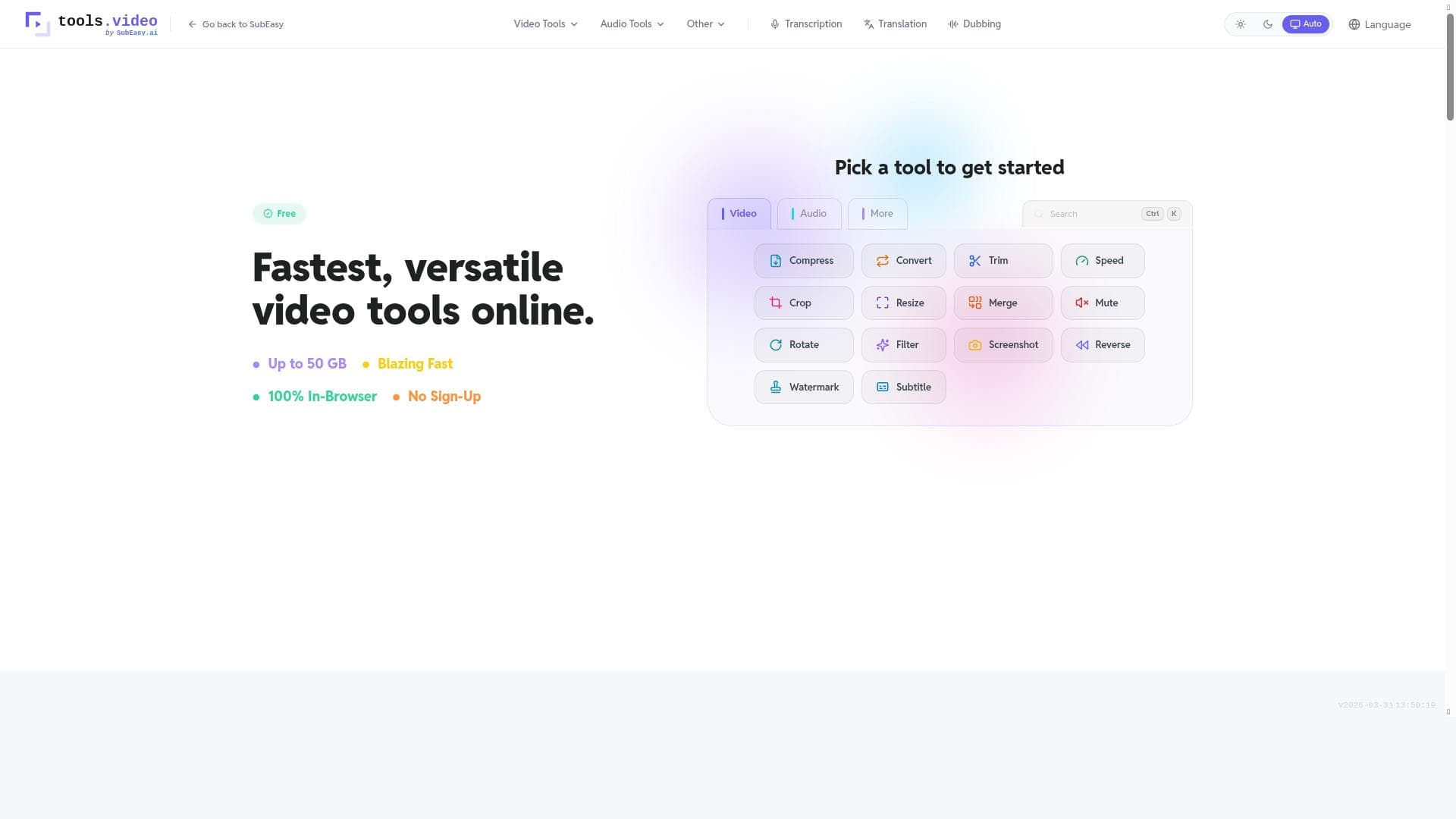
tools.video offers a powerful suite of 22 free browser-based video and audio tools that enable users to compress, convert, trim, merge, and crop files up to 50 GB—all while ensuring 100% privacy with no uploads. Ideal for content creators, educators, and marketers seeking quick, secure multimedia editing without software installation or cost.

tools.video offers 18 free browser-based video and audio tools that allow users to compress, convert, trim, merge, crop, and more. It supports files up to 50 GB and ensures 100% privacy with no uploads required.
Detailed Description
tools.video is a comprehensive suite of browser-based video and audio editing tools designed to provide users with a versatile and privacy-focused multimedia processing experience. Its core purpose is to empower users to manipulate video and audio files easily without the need for complex software installations or risking their data privacy. By offering a collection of 22 free tools accessible directly in the browser, tools.video caters to a wide range of editing needs such as compressing large files, converting between formats, trimming clips, merging multiple files, cropping videos, and more. The platform supports files up to an impressive 50 GB in size, making it suitable for both casual users and professionals handling high-resolution content. A standout feature of tools.video is its commitment to 100% privacy, as all processing happens locally in the browser without uploading files to any server, ensuring sensitive content remains secure and private. The key features of tools.video include a robust set of 22 free tools that cover nearly every basic and intermediate video and audio editing requirement. Users can compress video and audio files to reduce file size while maintaining quality, which is ideal for sharing or storage. The conversion tools support a wide range of popular formats, enabling seamless compatibility across devices and platforms. Trimming tools allow precise cutting of clips to extract desired segments, while merging tools facilitate combining multiple video or audio files into a single cohesive output. The crop feature helps users focus on specific areas of a video frame, enhancing visual storytelling or removing unwanted elements. The platform's ability to handle files up to 50 GB is particularly notable, as it accommodates large, high-definition videos that many online tools cannot process. Furthermore, the zero-upload policy means all editing is done client-side, providing peace of mind for users concerned about data security and privacy. tools.video is best suited for a diverse audience ranging from casual content creators and social media enthusiasts to educators, marketers, and small business owners who need quick and reliable multimedia editing without investing in expensive software. It is also valuable for professionals who require a lightweight, privacy-conscious tool for on-the-fly edits or format conversions. Specific use cases include compressing videos for faster uploads, converting audio files for podcasting, trimming lecture recordings, merging clips for marketing campaigns, and cropping videos for social media posts. Its browser-based nature makes it accessible on any device with internet access, eliminating compatibility issues and the need for powerful hardware. One of the most attractive aspects of tools.video is that it is completely free to use, with no hidden fees or subscription plans. This makes it an excellent choice for users seeking cost-effective multimedia editing solutions. The absence of pricing tiers or premium features means all users have access to the full suite of tools without restrictions. This democratizes video and audio editing, allowing anyone to enhance their media content regardless of budget. Compared to alternative video and audio editing platforms, tools.video stands out for its privacy-first approach and ability to process very large files directly in the browser. Many online editors require file uploads to cloud servers, which can raise privacy concerns and slow down processing times. Desktop software often demands installation, updates, and can be costly. tools.video strikes a balance by offering powerful functionality without compromising user privacy or convenience. However, unlike some professional-grade software, it may lack advanced editing features such as multi-track timelines, special effects, or color grading, which are beyond the scope of its browser-based tools. Notable limitations include the absence of advanced video editing capabilities and the reliance on the user’s device performance for processing large files, which could affect speed on less powerful machines. Additionally, since it operates entirely in the browser, users need a modern web browser and stable internet connection to access the platform, though no uploads are required. Despite these considerations, tools.video remains a highly practical and accessible solution for everyday video and audio editing tasks, especially for users prioritizing privacy and ease of use.
工具功能
- 22 free browser-based video and audio tools
- Compress video and audio files
- Convert video and audio formats
- Trim video and audio clips
- Merge multiple video or audio files
- Crop videos
- Supports files up to 50 GB
- 100% privacy with no uploads
描述
tools.video offers a powerful suite of 22 free browser-based video and audio tools that enable users to compress, convert, trim, merge, and crop files up to 50 GB—all while ensuring 100% privacy with no uploads. Ideal for content creators, educators, and marketers seeking quick, secure multimedia editing without software installation or cost.
tools.video offers 18 free browser-based video and audio tools that allow users to compress, convert, trim, merge, crop, and more. It supports files up to 50 GB and ensures 100% privacy with no uploads required.
Detailed Description
tools.video is a comprehensive suite of browser-based video and audio editing tools designed to provide users with a versatile and privacy-focused multimedia processing experience. Its core purpose is to empower users to manipulate video and audio files easily without the need for complex software installations or risking their data privacy. By offering a collection of 22 free tools accessible directly in the browser, tools.video caters to a wide range of editing needs such as compressing large files, converting between formats, trimming clips, merging multiple files, cropping videos, and more. The platform supports files up to an impressive 50 GB in size, making it suitable for both casual users and professionals handling high-resolution content. A standout feature of tools.video is its commitment to 100% privacy, as all processing happens locally in the browser without uploading files to any server, ensuring sensitive content remains secure and private. The key features of tools.video include a robust set of 22 free tools that cover nearly every basic and intermediate video and audio editing requirement. Users can compress video and audio files to reduce file size while maintaining quality, which is ideal for sharing or storage. The conversion tools support a wide range of popular formats, enabling seamless compatibility across devices and platforms. Trimming tools allow precise cutting of clips to extract desired segments, while merging tools facilitate combining multiple video or audio files into a single cohesive output. The crop feature helps users focus on specific areas of a video frame, enhancing visual storytelling or removing unwanted elements. The platform's ability to handle files up to 50 GB is particularly notable, as it accommodates large, high-definition videos that many online tools cannot process. Furthermore, the zero-upload policy means all editing is done client-side, providing peace of mind for users concerned about data security and privacy. tools.video is best suited for a diverse audience ranging from casual content creators and social media enthusiasts to educators, marketers, and small business owners who need quick and reliable multimedia editing without investing in expensive software. It is also valuable for professionals who require a lightweight, privacy-conscious tool for on-the-fly edits or format conversions. Specific use cases include compressing videos for faster uploads, converting audio files for podcasting, trimming lecture recordings, merging clips for marketing campaigns, and cropping videos for social media posts. Its browser-based nature makes it accessible on any device with internet access, eliminating compatibility issues and the need for powerful hardware. One of the most attractive aspects of tools.video is that it is completely free to use, with no hidden fees or subscription plans. This makes it an excellent choice for users seeking cost-effective multimedia editing solutions. The absence of pricing tiers or premium features means all users have access to the full suite of tools without restrictions. This democratizes video and audio editing, allowing anyone to enhance their media content regardless of budget. Compared to alternative video and audio editing platforms, tools.video stands out for its privacy-first approach and ability to process very large files directly in the browser. Many online editors require file uploads to cloud servers, which can raise privacy concerns and slow down processing times. Desktop software often demands installation, updates, and can be costly. tools.video strikes a balance by offering powerful functionality without compromising user privacy or convenience. However, unlike some professional-grade software, it may lack advanced editing features such as multi-track timelines, special effects, or color grading, which are beyond the scope of its browser-based tools. Notable limitations include the absence of advanced video editing capabilities and the reliance on the user’s device performance for processing large files, which could affect speed on less powerful machines. Additionally, since it operates entirely in the browser, users need a modern web browser and stable internet connection to access the platform, though no uploads are required. Despite these considerations, tools.video remains a highly practical and accessible solution for everyday video and audio editing tasks, especially for users prioritizing privacy and ease of use.
常见问题
What is tools.video?
tools.video is a free online platform that provides 22 browser-based video and audio editing tools, allowing users to compress, convert, trim, merge, crop, and perform other multimedia tasks directly in their web browser without uploading files.
How much does tools.video cost?
tools.video is completely free to use, with no subscription fees or premium plans. All features and tools are accessible at no cost.
Who is tools.video best for?
tools.video is ideal for casual content creators, social media users, educators, marketers, small business owners, and professionals who need quick, privacy-focused video and audio editing without installing software.
What are the main features of tools.video?
The main features include 22 free browser-based tools to compress, convert, trim, merge, and crop video and audio files, support for files up to 50 GB, and a privacy-first approach with no file uploads.
Does tools.video offer a free trial?
tools.video does not require a free trial because all its tools are freely accessible without any time limits or restrictions.
What integrations does tools.video support?
tools.video operates entirely within the browser and does not currently offer integrations with third-party applications or services.
How does tools.video work?
tools.video processes video and audio files directly in the user's web browser without uploading them to any server, ensuring privacy. Users simply select the desired tool, upload their file locally, perform edits, and download the output—all within the browser.
社交媒体
使用工具评价
暂无评价。成为第一个分享使用体验的人。
赞助工具
































推荐工具
及时了解最新 AI 工具
获取最新资讯,订阅我们的新闻通讯
已有 50,000+ 位读者阅读并信赖
加入最大的 AI 社区
我们的社区和团队随时为您提供帮助!
您的反馈将帮助 Alice AI 在未来版本中不断改进。







