Featured in:Best AI HR Tools
Get featured →🚀 Zaprep: Your Socials on Steroids. Start free — automate 1,000 DMs/month & turn engagement into leads. with 1,000 automated DMs/month.



✦
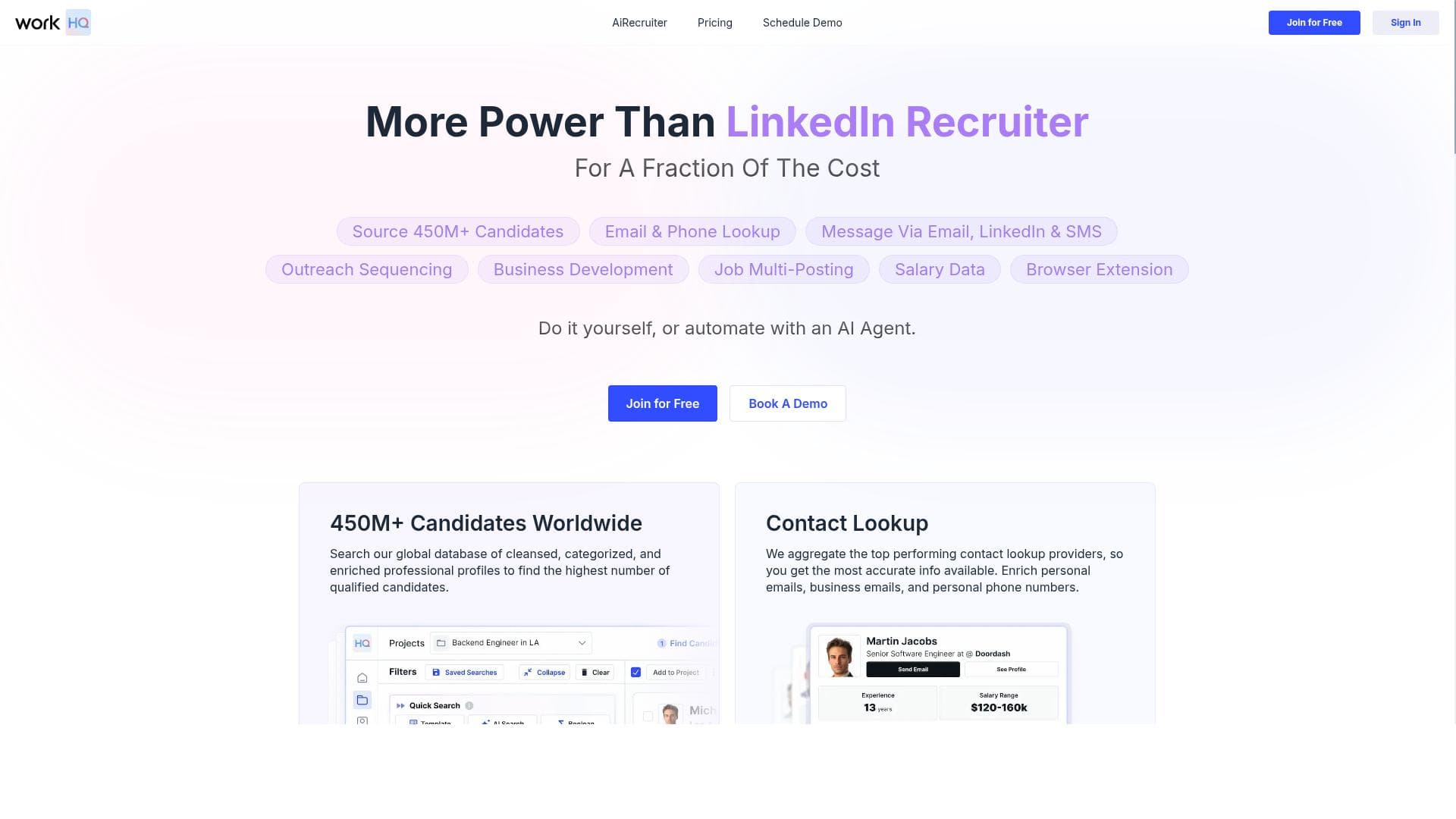
WorkHQ is a comprehensive workforce management platform that combines employee scheduling, task tracking, and talent sourcing with advanced analytics to boost productivity. Ideal for HR teams and project managers, it streamlines operations through an intuitive interface and seamless integrations, empowering businesses to optimize their workforce efficiently.

Description
WorkHQ is a cutting-edge platform designed to streamline and revolutionize the way companies manage their employees and workload. With its comprehensive suite of tools and features, WorkHQ empowers businesses to efficiently organize and track employee schedules, tasks, and projects while also providing valuable insights and analytics to improve overall productivity and performance. At the heart of WorkHQ is its intuitive and user-friendly interface, which makes it easy for all employees to access and utilize the platform's diverse functionalities. From creating and assigning tasks to managing leave requests and monitoring employee performance, WorkHQ offers a centralized and efficient solution for all workforce management needs. WorkHQ also integrates seamlessly with existing systems and applications, ensuring a smooth transition for businesses looking to implement this powerful tool into their operations. This allows for greater flexibility and customization, as well as the ability to leverage existing data and resources to optimize business processes. Additionally, WorkHQ is equipped with advanced reporting and analytics capabilities, providing valuable insights into employee productivity, project timelines, and resource allocation. These insights enable businesses to make data-driven decisions and effectively optimize their workforce and operations for maximum efficiency and performance. With its comprehensive features, intuitive interface, and seamless integration capabilities, WorkHQ is the ultimate solution for businesses looking to streamline their workforce management processes and drive greater productivity and success. Whether it's automating repetitive tasks, assigning and tracking projects, or analyzing performance metrics, WorkHQ's robust platform is designed to meet the diverse and evolving needs of modern businesses.
Detailed Description
WorkHQ is an advanced workforce management platform designed to transform how companies oversee their employees and workload. Its core purpose is to provide businesses with a centralized system to efficiently organize, assign, and track employee schedules, tasks, and projects, while delivering actionable insights to boost productivity and performance. By consolidating multiple workforce management functions into one intuitive interface, WorkHQ simplifies complex operational workflows and enhances communication across teams. The platform offers a comprehensive suite of features tailored to meet diverse business needs. Users can search a vast database of over 450 million professionals, enabling effective talent acquisition and resource planning. WorkHQ also provides detailed contact information, including email addresses and phone numbers, facilitating direct communication with candidates or team members. Bulk messaging capabilities allow businesses to reach multiple top candidates simultaneously, streamlining recruitment outreach. Additionally, the platform includes advanced pipeline tracking with metrics that help managers monitor hiring progress or project stages in real time. Its user-friendly interface supports task creation, assignment, leave request management, and performance monitoring, making it a versatile tool for day-to-day workforce operations. WorkHQ is particularly well suited for HR departments, recruitment agencies, project managers, and business leaders who require a robust yet flexible solution to manage human resources and project workflows. Companies aiming to improve employee productivity, optimize resource allocation, and gain deeper insights into operational efficiency will find WorkHQ invaluable. Use cases range from automating repetitive administrative tasks to tracking complex project timelines and analyzing workforce performance data to inform strategic decisions. Regarding pricing, WorkHQ operates on a paid subscription model without requiring annual commitments, offering businesses flexibility in how they engage with the platform. This approach allows organizations to scale usage according to their evolving needs without long-term contractual obligations. While specific pricing tiers are not detailed here, the absence of mandatory annual contracts suggests a customer-friendly, adaptable pricing structure. Compared to alternative workforce management tools, WorkHQ stands out due to its extensive professional database integration combined with robust communication and analytics features. Many competitors focus solely on scheduling or task management, whereas WorkHQ integrates these with talent sourcing and pipeline tracking, providing a more holistic solution. Its seamless integration capabilities ensure that businesses can incorporate WorkHQ into existing systems smoothly, reducing disruption and maximizing data utility. However, potential users should consider that WorkHQ is a paid service, which may not suit very small businesses or startups with limited budgets. Also, while it offers extensive features, organizations with highly specialized or industry-specific workforce management needs might require additional customization or complementary tools. Prospective users should evaluate the platform’s compatibility with their current software stack and specific operational requirements before adoption. In summary, WorkHQ is a powerful, all-in-one workforce management platform designed to enhance employee and project management through an intuitive interface, comprehensive features, and advanced analytics. It enables businesses to streamline operations, improve communication, and make data-driven decisions to drive productivity and success in a competitive business environment.
Tool Features
- Search over 450M+ professionals
- Find email and phone number info
- Bulk message top candidates
- Track your pipeline with advanced metrics
- No annual commitments required
Description
✦
WorkHQ is a comprehensive workforce management platform that combines employee scheduling, task tracking, and talent sourcing with advanced analytics to boost productivity. Ideal for HR teams and project managers, it streamlines operations through an intuitive interface and seamless integrations, empowering businesses to optimize their workforce efficiently.
WorkHQ is a cutting-edge platform designed to streamline and revolutionize the way companies manage their employees and workload. With its comprehensive suite of tools and features, WorkHQ empowers businesses to efficiently organize and track employee schedules, tasks, and projects while also providing valuable insights and analytics to improve overall productivity and performance. At the heart of WorkHQ is its intuitive and user-friendly interface, which makes it easy for all employees to access and utilize the platform's diverse functionalities. From creating and assigning tasks to managing leave requests and monitoring employee performance, WorkHQ offers a centralized and efficient solution for all workforce management needs. WorkHQ also integrates seamlessly with existing systems and applications, ensuring a smooth transition for businesses looking to implement this powerful tool into their operations. This allows for greater flexibility and customization, as well as the ability to leverage existing data and resources to optimize business processes. Additionally, WorkHQ is equipped with advanced reporting and analytics capabilities, providing valuable insights into employee productivity, project timelines, and resource allocation. These insights enable businesses to make data-driven decisions and effectively optimize their workforce and operations for maximum efficiency and performance. With its comprehensive features, intuitive interface, and seamless integration capabilities, WorkHQ is the ultimate solution for businesses looking to streamline their workforce management processes and drive greater productivity and success. Whether it's automating repetitive tasks, assigning and tracking projects, or analyzing performance metrics, WorkHQ's robust platform is designed to meet the diverse and evolving needs of modern businesses.
Detailed Description
WorkHQ is an advanced workforce management platform designed to transform how companies oversee their employees and workload. Its core purpose is to provide businesses with a centralized system to efficiently organize, assign, and track employee schedules, tasks, and projects, while delivering actionable insights to boost productivity and performance. By consolidating multiple workforce management functions into one intuitive interface, WorkHQ simplifies complex operational workflows and enhances communication across teams. The platform offers a comprehensive suite of features tailored to meet diverse business needs. Users can search a vast database of over 450 million professionals, enabling effective talent acquisition and resource planning. WorkHQ also provides detailed contact information, including email addresses and phone numbers, facilitating direct communication with candidates or team members. Bulk messaging capabilities allow businesses to reach multiple top candidates simultaneously, streamlining recruitment outreach. Additionally, the platform includes advanced pipeline tracking with metrics that help managers monitor hiring progress or project stages in real time. Its user-friendly interface supports task creation, assignment, leave request management, and performance monitoring, making it a versatile tool for day-to-day workforce operations. WorkHQ is particularly well suited for HR departments, recruitment agencies, project managers, and business leaders who require a robust yet flexible solution to manage human resources and project workflows. Companies aiming to improve employee productivity, optimize resource allocation, and gain deeper insights into operational efficiency will find WorkHQ invaluable. Use cases range from automating repetitive administrative tasks to tracking complex project timelines and analyzing workforce performance data to inform strategic decisions. Regarding pricing, WorkHQ operates on a paid subscription model without requiring annual commitments, offering businesses flexibility in how they engage with the platform. This approach allows organizations to scale usage according to their evolving needs without long-term contractual obligations. While specific pricing tiers are not detailed here, the absence of mandatory annual contracts suggests a customer-friendly, adaptable pricing structure. Compared to alternative workforce management tools, WorkHQ stands out due to its extensive professional database integration combined with robust communication and analytics features. Many competitors focus solely on scheduling or task management, whereas WorkHQ integrates these with talent sourcing and pipeline tracking, providing a more holistic solution. Its seamless integration capabilities ensure that businesses can incorporate WorkHQ into existing systems smoothly, reducing disruption and maximizing data utility. However, potential users should consider that WorkHQ is a paid service, which may not suit very small businesses or startups with limited budgets. Also, while it offers extensive features, organizations with highly specialized or industry-specific workforce management needs might require additional customization or complementary tools. Prospective users should evaluate the platform’s compatibility with their current software stack and specific operational requirements before adoption. In summary, WorkHQ is a powerful, all-in-one workforce management platform designed to enhance employee and project management through an intuitive interface, comprehensive features, and advanced analytics. It enables businesses to streamline operations, improve communication, and make data-driven decisions to drive productivity and success in a competitive business environment.
Frequently Asked Questions
What is WorkHQ?
WorkHQ is a workforce management platform designed to help businesses efficiently organize and track employee schedules, tasks, and projects, while providing valuable insights and analytics to improve productivity and performance.
How much does WorkHQ cost?
WorkHQ operates on a paid subscription model without requiring annual commitments, offering flexibility for businesses to scale their usage. Specific pricing details can be obtained by contacting WorkHQ directly or visiting their website.
Who is WorkHQ best for?
WorkHQ is best suited for HR departments, recruitment agencies, project managers, and business leaders looking for a centralized solution to manage workforce scheduling, task tracking, and talent acquisition efficiently.
What are the main features of WorkHQ?
Key features include searching over 450 million professionals, finding email and phone contact information, bulk messaging top candidates, tracking pipelines with advanced metrics, managing employee schedules and leave requests, and accessing advanced reporting and analytics.
Does WorkHQ offer a free trial?
There is no information indicating that WorkHQ offers a free trial. Interested users should check the official website or contact their sales team for the most current trial or demo options.
What integrations does WorkHQ support?
WorkHQ integrates seamlessly with existing systems and applications, allowing businesses to customize workflows and leverage existing data. Specific integrations are not listed but the platform is designed for smooth incorporation into current operations.
How does WorkHQ work?
WorkHQ works by providing a centralized platform where businesses can create and assign tasks, manage employee schedules and leave requests, communicate with candidates or employees via bulk messaging, and analyze workforce data through advanced reporting tools to optimize productivity.
Socials
Use ToolReviews
0 reviews
No reviews yet. Be the first to share your experience.
Sponsored Tools













































Recommended Tools
Stay updated on latest Ai tools
Get the latest insights, Join our newsletter
Read and trusted by 50,000+ readers
Join the biggest AI Community
Our community and staff are here to help!
Your feedback will help Alice AI improve in future versions.








Submit your Tool


PoweredByAI.app is an AI Tools Directory helping individuals, businesses, and creators discover the best AI tools for writing, coding, design, productivity, and more.
© 2026 , Product of011BQ. All rights reserved.