Featured in:Best AI Writing Tools
Get featured →🚀 Zaprep: Your Socials on Steroids. Start free — automate 1,000 DMs/month & turn engagement into leads. with 1,000 automated DMs/month.
Video Agent by Fotor


Is this your AI tool? Claim it today.
Verify ownership, manage your profile, and unlock growth features.
✦
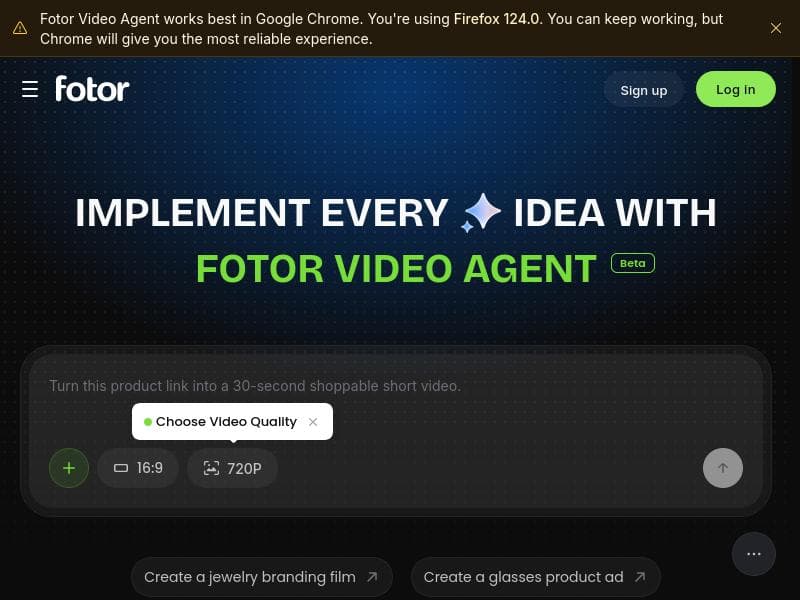
Fotor Video Agent transforms video creation with its unique chat-based AI interface, enabling users to effortlessly generate and fully edit production-ready videos and motion graphics. Ideal for marketers, creators, and businesses seeking professional-quality videos without complex editing software.

Description
Fotor Video Agent helps founders, marketers, and creators turn ideas, scripts, or raw assets into precision videos & motion graphics. It auto-orchestrates scenes, timing, visual FX, and kinetic typography—while keeping text, numbers, logos, and charts editable on a multi-track timeline before you render. Update stats at the last minute or refine timing without regenerating the whole video. Ship promos and explainers faster with zero black-box outputs and no tedious keyframes.
Detailed Description
Fotor Video Agent is an advanced AI-powered video creation platform designed to revolutionize how users produce professional-quality videos and motion graphics. At its core, the tool enables users to generate complete, production-ready videos through an intuitive chat-based interface, making video creation accessible even to those without prior editing experience. By leveraging conversational AI, Fotor Video Agent simplifies the complex process of video production, allowing users to interact naturally with the system to specify their creative vision, which the AI then translates into fully editable video content. This approach eliminates the need for traditional timeline-based editing, streamlining the workflow from concept to final output. One of the standout features of Fotor Video Agent is its chat-based video creation capability. Users can describe their desired video content, style, and motion graphics elements in plain language, and the AI responds by generating a tailored video project. This interactive process supports iterative refinement, so users can tweak and enhance their videos through ongoing dialogue. The platform produces production-ready videos, meaning the output is polished and suitable for immediate use in marketing campaigns, social media, presentations, or other professional contexts. Additionally, Fotor Video Agent supports motion graphics generation, enabling dynamic visual storytelling with animated text, shapes, and effects that elevate the overall video quality. Another key strength is the fully editable nature of the generated videos. Unlike many AI video tools that produce static or locked outputs, Fotor Video Agent allows users to modify every aspect of their videos post-generation. This flexibility is crucial for creators who want to customize timing, transitions, visual elements, or audio to perfectly align with their brand or message. The platform’s user-friendly interface further enhances the editing experience, making it straightforward to adjust layers, add new assets, or fine-tune animations without needing advanced technical skills. Fotor Video Agent is ideal for a wide range of users, including marketers, content creators, social media managers, educators, and small business owners who require high-quality video content but may lack the resources or expertise to use traditional video editing software. It is particularly useful for producing explainer videos, product advertisements, launch videos, user-generated content promotions, and short-form social media clips. The tool’s conversational approach also benefits teams looking to collaborate on video projects, as it facilitates clear communication of creative ideas and quick iteration cycles. Regarding pricing, while specific plans are not detailed in the provided information, platforms like Fotor Video Agent typically offer tiered subscription models that may include free trials or freemium options with limited features. Paid plans often unlock higher video resolution, longer video durations, access to premium templates, and commercial usage rights. Prospective users should visit the official website or Product Hunt page for the most current pricing and plan details. When compared to alternatives, Fotor Video Agent stands out due to its chat-based video creation interface combined with fully editable outputs. Many competing AI video tools either focus solely on automated video generation with limited customization or require manual editing in complex software. Fotor Video Agent bridges this gap by offering an intuitive conversational experience alongside robust editing capabilities, making it a versatile solution for both novices and experienced video producers. However, users should consider that AI-generated content may sometimes require manual refinement to meet very specific creative standards, and the quality of motion graphics might vary depending on the complexity of the input prompts. Notable limitations include potential dependency on internet connectivity and cloud processing, which might affect performance or accessibility in low-bandwidth environments. Additionally, while the chat interface simplifies video creation, users seeking highly specialized or cinematic video production might find the tool less suitable than traditional professional editing suites. Finally, integration options with other marketing or content platforms are not explicitly mentioned, which could be a consideration for users wanting seamless workflow automation. Overall, Fotor Video Agent offers a powerful, user-friendly AI-driven approach to video creation that democratizes access to professional video production, making it an excellent choice for a broad spectrum of users aiming to produce engaging, high-quality video content efficiently.
Tool Features
- Chat-based video creation
- Production-ready videos
- Motion graphics generation
- Fully editable video content
Description
✦
Fotor Video Agent transforms video creation with its unique chat-based AI interface, enabling users to effortlessly generate and fully edit production-ready videos and motion graphics. Ideal for marketers, creators, and businesses seeking professional-quality videos without complex editing software.
Fotor Video Agent helps founders, marketers, and creators turn ideas, scripts, or raw assets into precision videos & motion graphics. It auto-orchestrates scenes, timing, visual FX, and kinetic typography—while keeping text, numbers, logos, and charts editable on a multi-track timeline before you render. Update stats at the last minute or refine timing without regenerating the whole video. Ship promos and explainers faster with zero black-box outputs and no tedious keyframes.
Detailed Description
Fotor Video Agent is an advanced AI-powered video creation platform designed to revolutionize how users produce professional-quality videos and motion graphics. At its core, the tool enables users to generate complete, production-ready videos through an intuitive chat-based interface, making video creation accessible even to those without prior editing experience. By leveraging conversational AI, Fotor Video Agent simplifies the complex process of video production, allowing users to interact naturally with the system to specify their creative vision, which the AI then translates into fully editable video content. This approach eliminates the need for traditional timeline-based editing, streamlining the workflow from concept to final output. One of the standout features of Fotor Video Agent is its chat-based video creation capability. Users can describe their desired video content, style, and motion graphics elements in plain language, and the AI responds by generating a tailored video project. This interactive process supports iterative refinement, so users can tweak and enhance their videos through ongoing dialogue. The platform produces production-ready videos, meaning the output is polished and suitable for immediate use in marketing campaigns, social media, presentations, or other professional contexts. Additionally, Fotor Video Agent supports motion graphics generation, enabling dynamic visual storytelling with animated text, shapes, and effects that elevate the overall video quality. Another key strength is the fully editable nature of the generated videos. Unlike many AI video tools that produce static or locked outputs, Fotor Video Agent allows users to modify every aspect of their videos post-generation. This flexibility is crucial for creators who want to customize timing, transitions, visual elements, or audio to perfectly align with their brand or message. The platform’s user-friendly interface further enhances the editing experience, making it straightforward to adjust layers, add new assets, or fine-tune animations without needing advanced technical skills. Fotor Video Agent is ideal for a wide range of users, including marketers, content creators, social media managers, educators, and small business owners who require high-quality video content but may lack the resources or expertise to use traditional video editing software. It is particularly useful for producing explainer videos, product advertisements, launch videos, user-generated content promotions, and short-form social media clips. The tool’s conversational approach also benefits teams looking to collaborate on video projects, as it facilitates clear communication of creative ideas and quick iteration cycles. Regarding pricing, while specific plans are not detailed in the provided information, platforms like Fotor Video Agent typically offer tiered subscription models that may include free trials or freemium options with limited features. Paid plans often unlock higher video resolution, longer video durations, access to premium templates, and commercial usage rights. Prospective users should visit the official website or Product Hunt page for the most current pricing and plan details. When compared to alternatives, Fotor Video Agent stands out due to its chat-based video creation interface combined with fully editable outputs. Many competing AI video tools either focus solely on automated video generation with limited customization or require manual editing in complex software. Fotor Video Agent bridges this gap by offering an intuitive conversational experience alongside robust editing capabilities, making it a versatile solution for both novices and experienced video producers. However, users should consider that AI-generated content may sometimes require manual refinement to meet very specific creative standards, and the quality of motion graphics might vary depending on the complexity of the input prompts. Notable limitations include potential dependency on internet connectivity and cloud processing, which might affect performance or accessibility in low-bandwidth environments. Additionally, while the chat interface simplifies video creation, users seeking highly specialized or cinematic video production might find the tool less suitable than traditional professional editing suites. Finally, integration options with other marketing or content platforms are not explicitly mentioned, which could be a consideration for users wanting seamless workflow automation. Overall, Fotor Video Agent offers a powerful, user-friendly AI-driven approach to video creation that democratizes access to professional video production, making it an excellent choice for a broad spectrum of users aiming to produce engaging, high-quality video content efficiently.
Frequently Asked Questions
What is Fotor Video Agent?
Fotor Video Agent is an AI-powered video creation tool that allows users to chat with the system to produce complete, production-ready videos and motion graphics. It supports fully editable video content, enabling users to generate and customize professional-quality videos through conversational interaction.
How much does Fotor Video Agent cost?
Specific pricing details for Fotor Video Agent are not provided here. Typically, such platforms offer tiered subscription plans that may include free trials or freemium versions with limited features. For the most accurate and up-to-date pricing, users should visit the official website or the Product Hunt page.
Who is Fotor Video Agent best for?
Fotor Video Agent is best suited for marketers, content creators, social media managers, educators, and small business owners who need to create high-quality videos quickly and easily without extensive video editing experience. It is particularly useful for producing explainer videos, product ads, launch videos, and social media content.
What are the main features of Fotor Video Agent?
The main features include chat-based video creation, production-ready video output, motion graphics generation, and fully editable video content. Users can interact conversationally to specify video requirements and then customize every aspect of the generated videos.
Does Fotor Video Agent offer a free trial?
While the provided information does not explicitly confirm a free trial, many AI video platforms offer free trials or freemium access. Interested users should check the official website or Product Hunt listing for current trial availability.
What integrations does Fotor Video Agent support?
There is no specific information available about integrations with other platforms or tools. Users looking for integration capabilities should consult the official Fotor Video Agent resources or support channels.
How does Fotor Video Agent work?
Fotor Video Agent works by allowing users to chat with an AI interface to describe their desired video content and style. The AI then generates a complete, editable video project with motion graphics and production-ready quality, which users can further customize through an intuitive editing interface.
Socials
Use ToolReviews
0 reviews
No reviews yet. Be the first to share your experience.
Sponsored Tools











































Recommended Tools
Stay updated on latest Ai tools
Get the latest insights, Join our newsletter
Read and trusted by 50,000+ readers
Join the biggest AI Community
Our community and staff are here to help!
Your feedback will help Alice AI improve in future versions.








Submit your Tool


PoweredByAI.app is an AI Tools Directory helping individuals, businesses, and creators discover the best AI tools for writing, coding, design, productivity, and more.
© 2026 , Product of011BQ. All rights reserved.