Featured in:Best AI Writing Tools
Get featured →AI Styling Studio — Infinite avatar looks from just 1 photo. Try it now.



✦
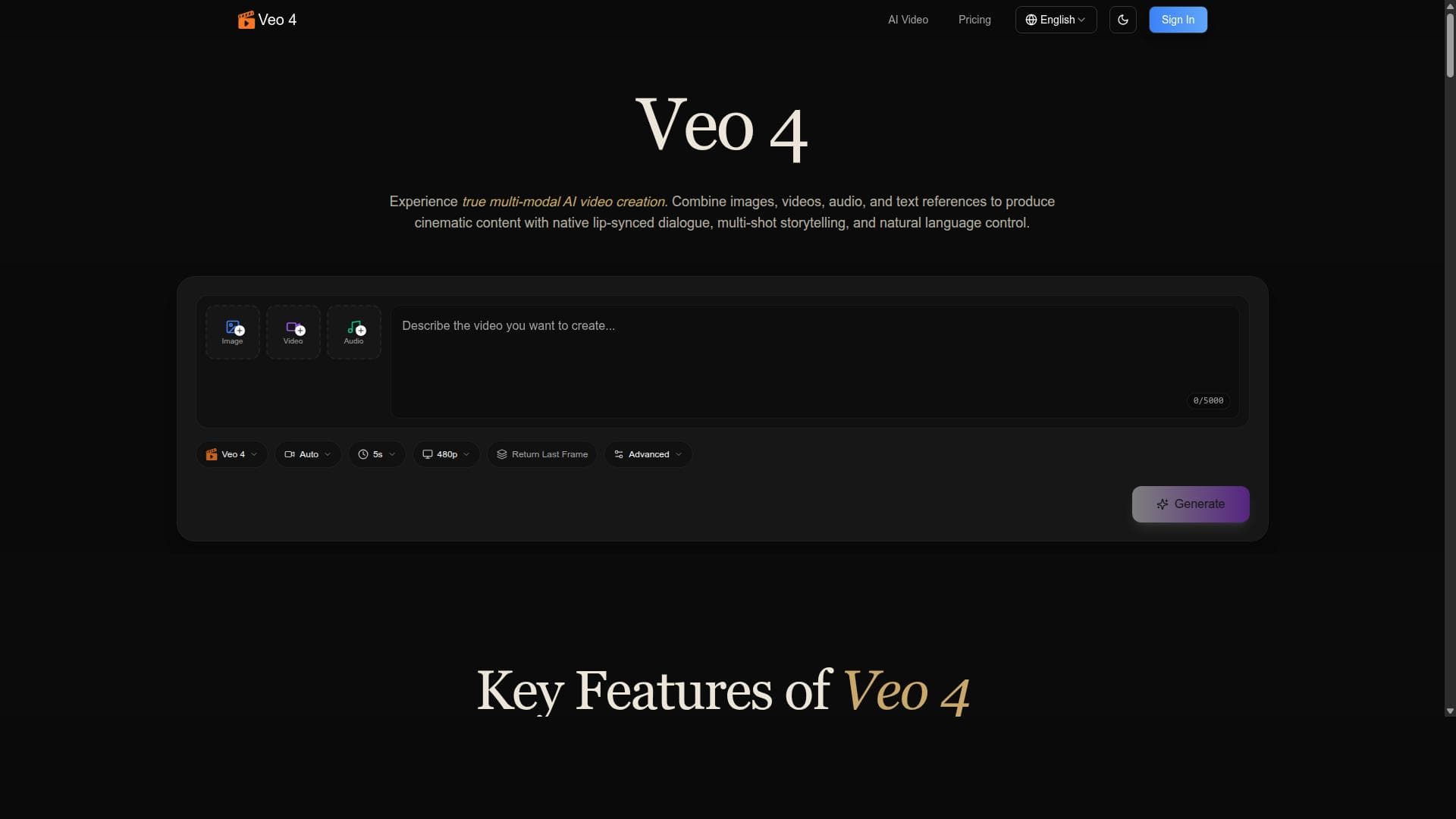
Veo 4 is a cutting-edge AI tool that crafts cinematic multi-shot videos by seamlessly blending text, images, video, and native audio with consistent character generation. Perfect for content creators and marketers, it transforms storytelling into an immersive, automated experience without the need for complex editing skills.

Description
Veo 4 is an AI-powered tool designed to create cinematic videos by combining text, images, video, and audio. It enables users to generate multi-shot stories featuring native audio and consistent characters, enhancing storytelling with AI technology.
Detailed Description
Veo 4 is an advanced AI-powered video creation platform designed to revolutionize the way cinematic videos are produced. Its core purpose is to enable users to seamlessly combine text, images, video clips, and audio elements into cohesive, multi-shot stories that feature native audio and consistent characters. By leveraging cutting-edge artificial intelligence, Veo 4 simplifies complex video production processes, making it accessible to creators, marketers, and storytellers without requiring extensive technical expertise or expensive equipment. The tool’s AI-driven approach focuses on enhancing narrative flow and visual consistency, allowing users to create professional-quality cinematic videos that engage audiences effectively. At the heart of Veo 4’s capabilities is its ability to generate multi-shot stories that maintain character continuity and integrate native audio naturally. Users can input text scripts, upload images or video footage, and add audio tracks, which the AI intelligently combines to produce dynamic video sequences. This multi-modal integration ensures that the final output is not only visually appealing but also narratively coherent. The consistent character generation feature is particularly notable, as it allows the same characters to appear across different shots and scenes, preserving visual identity and enhancing storytelling immersion. Additionally, Veo 4 supports native audio integration, meaning that voiceovers, background music, and sound effects are synchronized seamlessly with the video content, elevating the overall cinematic experience. Veo 4 is ideal for a wide range of users including content creators, digital marketers, educators, and small to medium-sized businesses looking to produce engaging video content quickly and efficiently. For marketers, Veo 4 offers a powerful way to create promotional videos that combine product images, customer testimonials, and compelling narratives. Educators can use it to develop instructional videos that blend lecture notes, illustrative images, and explanatory audio. Content creators and social media influencers benefit from its ability to craft multi-shot stories that maintain visual and thematic consistency, helping them build stronger brand identities. The platform’s user-friendly interface and AI automation reduce the time and effort traditionally required for video editing and production. Regarding pricing, Veo 4 offers a tiered subscription model tailored to different user needs, although specific pricing details are typically available on their official website. Commonly, such plans range from basic packages suitable for individual creators with limited video output needs to professional plans that unlock advanced features like higher resolution exports, extended video length, and priority support. Potential users are encouraged to visit Veo 4’s website to explore current plans, free trial availability, and any enterprise options for larger organizations. When compared to alternative video creation tools, Veo 4 stands out due to its unique combination of multi-modal input integration and AI-driven character consistency across multi-shot narratives. Unlike many platforms that focus solely on either text-to-video or image-based video generation, Veo 4 merges these elements with native audio to produce richer, more immersive cinematic stories. This makes it particularly advantageous for users seeking to create narrative-driven videos rather than simple promotional clips or slideshow-style content. However, while Veo 4 excels in storytelling and cinematic quality, users requiring highly specialized video effects or manual frame-by-frame editing might find dedicated video editing software more suitable. Some limitations to consider include the reliance on AI-generated content, which may occasionally produce results that require manual adjustment for optimal quality or accuracy. Additionally, the tool’s performance and output quality can depend on the quality of input materials such as images and audio. Users should also be aware of any usage restrictions or licensing terms related to AI-generated media, especially for commercial purposes. Overall, Veo 4 offers a powerful, innovative solution for cinematic video creation that balances automation with creative control, making it a valuable asset for storytellers and video producers aiming to elevate their content with AI technology.
Tool Features
- Create cinematic AI videos
- Combine text, images, video, and audio
- Generate multi-shot stories
- Native audio integration
- Consistent character generation
Description
✦
Veo 4 is a cutting-edge AI tool that crafts cinematic multi-shot videos by seamlessly blending text, images, video, and native audio with consistent character generation. Perfect for content creators and marketers, it transforms storytelling into an immersive, automated experience without the need for complex editing skills.
Veo 4 is an AI-powered tool designed to create cinematic videos by combining text, images, video, and audio. It enables users to generate multi-shot stories featuring native audio and consistent characters, enhancing storytelling with AI technology.
Detailed Description
Veo 4 is an advanced AI-powered video creation platform designed to revolutionize the way cinematic videos are produced. Its core purpose is to enable users to seamlessly combine text, images, video clips, and audio elements into cohesive, multi-shot stories that feature native audio and consistent characters. By leveraging cutting-edge artificial intelligence, Veo 4 simplifies complex video production processes, making it accessible to creators, marketers, and storytellers without requiring extensive technical expertise or expensive equipment. The tool’s AI-driven approach focuses on enhancing narrative flow and visual consistency, allowing users to create professional-quality cinematic videos that engage audiences effectively. At the heart of Veo 4’s capabilities is its ability to generate multi-shot stories that maintain character continuity and integrate native audio naturally. Users can input text scripts, upload images or video footage, and add audio tracks, which the AI intelligently combines to produce dynamic video sequences. This multi-modal integration ensures that the final output is not only visually appealing but also narratively coherent. The consistent character generation feature is particularly notable, as it allows the same characters to appear across different shots and scenes, preserving visual identity and enhancing storytelling immersion. Additionally, Veo 4 supports native audio integration, meaning that voiceovers, background music, and sound effects are synchronized seamlessly with the video content, elevating the overall cinematic experience. Veo 4 is ideal for a wide range of users including content creators, digital marketers, educators, and small to medium-sized businesses looking to produce engaging video content quickly and efficiently. For marketers, Veo 4 offers a powerful way to create promotional videos that combine product images, customer testimonials, and compelling narratives. Educators can use it to develop instructional videos that blend lecture notes, illustrative images, and explanatory audio. Content creators and social media influencers benefit from its ability to craft multi-shot stories that maintain visual and thematic consistency, helping them build stronger brand identities. The platform’s user-friendly interface and AI automation reduce the time and effort traditionally required for video editing and production. Regarding pricing, Veo 4 offers a tiered subscription model tailored to different user needs, although specific pricing details are typically available on their official website. Commonly, such plans range from basic packages suitable for individual creators with limited video output needs to professional plans that unlock advanced features like higher resolution exports, extended video length, and priority support. Potential users are encouraged to visit Veo 4’s website to explore current plans, free trial availability, and any enterprise options for larger organizations. When compared to alternative video creation tools, Veo 4 stands out due to its unique combination of multi-modal input integration and AI-driven character consistency across multi-shot narratives. Unlike many platforms that focus solely on either text-to-video or image-based video generation, Veo 4 merges these elements with native audio to produce richer, more immersive cinematic stories. This makes it particularly advantageous for users seeking to create narrative-driven videos rather than simple promotional clips or slideshow-style content. However, while Veo 4 excels in storytelling and cinematic quality, users requiring highly specialized video effects or manual frame-by-frame editing might find dedicated video editing software more suitable. Some limitations to consider include the reliance on AI-generated content, which may occasionally produce results that require manual adjustment for optimal quality or accuracy. Additionally, the tool’s performance and output quality can depend on the quality of input materials such as images and audio. Users should also be aware of any usage restrictions or licensing terms related to AI-generated media, especially for commercial purposes. Overall, Veo 4 offers a powerful, innovative solution for cinematic video creation that balances automation with creative control, making it a valuable asset for storytellers and video producers aiming to elevate their content with AI technology.
Frequently Asked Questions
What is Veo 4?
Veo 4 is an AI-powered video creation platform that enables users to produce cinematic videos by combining text, images, video, and audio into multi-shot stories featuring consistent characters and native audio integration.
How much does Veo 4 cost?
Veo 4 offers tiered subscription plans tailored to different user needs. Pricing details and plan options are available on their official website, with potential free trials or enterprise packages depending on user requirements.
Who is Veo 4 best for?
Veo 4 is ideal for content creators, digital marketers, educators, and small to medium-sized businesses seeking to create engaging, narrative-driven cinematic videos quickly and easily without advanced editing skills.
What are the main features of Veo 4?
Key features include cinematic AI video creation, multi-shot story generation, integration of text, images, video, and native audio, and consistent character generation across scenes to maintain visual continuity.
Does Veo 4 offer a free trial?
Information about free trials is typically provided on Veo 4’s official website. Interested users should check there for the most current trial availability and terms.
What integrations does Veo 4 support?
Veo 4 supports integration of multiple media types including text scripts, images, video clips, and audio files, allowing users to combine these elements seamlessly within their video projects.
How does Veo 4 work?
Users input text, images, video, and audio into Veo 4’s platform, where AI algorithms process and combine these elements to generate multi-shot cinematic videos with consistent characters and synchronized native audio.
Reviews
0 reviews
No reviews yet. Be the first to share your experience.
Sponsored Tools



































Recommended Tools
Stay updated on latest Ai tools
Get the latest insights, Join our newsletter
Read and trusted by 50,000+ readers
Join the biggest AI Community
Our community and staff are here to help!
Your feedback will help Alice AI improve in future versions.







Submit your Tool

PoweredByAI.app is an AI Tools Directory helping individuals, businesses, and creators discover the best AI tools for writing, coding, design, productivity, and more.
© 2026 , Product of011BQ. All rights reserved.