Featured in:Best AI Writing Tools
Get featured →🚀 Zaprep: Your Socials on Steroids. Start free — automate 1,000 DMs/month & turn engagement into leads. with 1,000 automated DMs/month.


Is this your AI tool? Claim it today.
Verify ownership, manage your profile, and unlock growth features.
✦
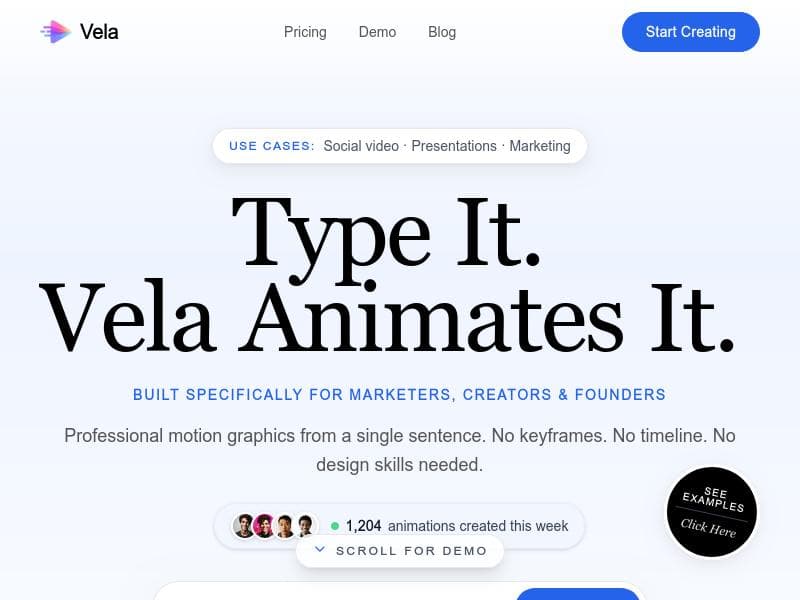
Vela is a cutting-edge AI motion graphics generator that transforms text descriptions into professional animated videos in under two minutes. Perfect for marketers, educators, and content creators, it offers chat-based refinement, animated maps, and multi-aspect ratio exports without requiring After Effects expertise.

Description
Vela lets you generate professional motion graphics just by typing. Describe the motion graphic you need — "a clean product launch animation with floating UI elements" or "a 3D map showing a flight path from Delhi to London" — and Vela builds and animates it for you. No After Effects. No keyframes. No design degree. Once it's generated, you keep refining it through chat. Say "change the background to dark mode" or "make the text entrance faster" — Vela updates it instantly.
Detailed Description
Vela is an innovative AI-powered motion graphics generator designed to simplify and accelerate the creation of professional animated videos. Its core purpose is to enable users to produce high-quality motion graphics from simple text descriptions in under two minutes, eliminating the need for complex software like Adobe After Effects. By leveraging advanced AI technology, Vela transforms plain English prompts into dynamic, visually appealing animated videos, making motion design accessible to creators of all skill levels. This tool is ideal for marketers, content creators, educators, and businesses looking to enhance their visual storytelling with minimal effort and time investment. One of Vela's standout features is its text-to-motion-graphics AI generation capability. Users simply describe the video they want, such as "a travel video about Tokyo with a modern feel," and Vela automatically designs and animates the content. The platform supports chat-based video refinement, allowing users to interactively tweak their videos by requesting changes in colors, styles, or adding elements like animated maps and travel routes. This conversational interface streamlines the editing process, making it intuitive and efficient. Vela also supports custom image uploads, enabling users to personalize their videos further by incorporating their own graphics or branding elements. Another key capability is its multi-aspect ratio export feature, which allows videos to be optimized for various social media platforms including YouTube (wide), TikTok (vertical), and Instagram (square). This versatility ensures that content is perfectly formatted for the target audience without additional manual adjustments. The platform excels in speed, generating complete motion graphics in under two minutes, which is a significant advantage for users needing quick turnaround times. Additionally, Vela offers animated maps and travel route visualizations, making it particularly useful for travel content creators, educators, and businesses that want to showcase geographic data or itineraries in an engaging way. Vela is best suited for digital marketers, social media managers, educators, small business owners, and independent creators who want to produce professional-grade animated videos without investing in expensive software or extensive training. Use cases include creating promotional videos, explainer animations, travel vlogs, educational content, and social media posts that require eye-catching motion graphics. Regarding pricing, Vela offers a free tier that allows users to explore its core functionalities at no cost, making it accessible for beginners and those testing the platform. While detailed pricing plans are not explicitly stated, the free offer suggests a freemium model with potential paid upgrades for advanced features, higher resolution exports, or extended video lengths. Compared to alternatives like After Effects, Runway ML, or Kaiber, Vela stands out for its simplicity, speed, and AI-driven text-to-video workflow. Unlike traditional motion graphics software that requires manual keyframing and design skills, Vela automates the entire process, drastically reducing the learning curve. Its chat-based refinement is a unique feature that enhances user control without complexity. However, it may have limitations in customization depth compared to professional-grade software, which could be a consideration for advanced users needing highly detailed animations. In summary, Vela is a powerful, user-friendly AI tool that democratizes motion graphics creation by combining rapid generation, easy refinement, and multi-platform export options. While it may not replace high-end video editing suites for complex projects, it offers an excellent solution for quick, professional animated videos tailored for social media and marketing needs.
Tool Features
- Text-to-motion-graphics AI generation
- Chat-based video refinement
- Animated maps and travel routes
- Multi-aspect ratio export (YouTube, TikTok, Instagram)
- Custom image upload support
- Under 2-minute generation time
Description
✦
Vela is a cutting-edge AI motion graphics generator that transforms text descriptions into professional animated videos in under two minutes. Perfect for marketers, educators, and content creators, it offers chat-based refinement, animated maps, and multi-aspect ratio exports without requiring After Effects expertise.
Vela lets you generate professional motion graphics just by typing. Describe the motion graphic you need — "a clean product launch animation with floating UI elements" or "a 3D map showing a flight path from Delhi to London" — and Vela builds and animates it for you. No After Effects. No keyframes. No design degree. Once it's generated, you keep refining it through chat. Say "change the background to dark mode" or "make the text entrance faster" — Vela updates it instantly.
Detailed Description
Vela is an innovative AI-powered motion graphics generator designed to simplify and accelerate the creation of professional animated videos. Its core purpose is to enable users to produce high-quality motion graphics from simple text descriptions in under two minutes, eliminating the need for complex software like Adobe After Effects. By leveraging advanced AI technology, Vela transforms plain English prompts into dynamic, visually appealing animated videos, making motion design accessible to creators of all skill levels. This tool is ideal for marketers, content creators, educators, and businesses looking to enhance their visual storytelling with minimal effort and time investment. One of Vela's standout features is its text-to-motion-graphics AI generation capability. Users simply describe the video they want, such as "a travel video about Tokyo with a modern feel," and Vela automatically designs and animates the content. The platform supports chat-based video refinement, allowing users to interactively tweak their videos by requesting changes in colors, styles, or adding elements like animated maps and travel routes. This conversational interface streamlines the editing process, making it intuitive and efficient. Vela also supports custom image uploads, enabling users to personalize their videos further by incorporating their own graphics or branding elements. Another key capability is its multi-aspect ratio export feature, which allows videos to be optimized for various social media platforms including YouTube (wide), TikTok (vertical), and Instagram (square). This versatility ensures that content is perfectly formatted for the target audience without additional manual adjustments. The platform excels in speed, generating complete motion graphics in under two minutes, which is a significant advantage for users needing quick turnaround times. Additionally, Vela offers animated maps and travel route visualizations, making it particularly useful for travel content creators, educators, and businesses that want to showcase geographic data or itineraries in an engaging way. Vela is best suited for digital marketers, social media managers, educators, small business owners, and independent creators who want to produce professional-grade animated videos without investing in expensive software or extensive training. Use cases include creating promotional videos, explainer animations, travel vlogs, educational content, and social media posts that require eye-catching motion graphics. Regarding pricing, Vela offers a free tier that allows users to explore its core functionalities at no cost, making it accessible for beginners and those testing the platform. While detailed pricing plans are not explicitly stated, the free offer suggests a freemium model with potential paid upgrades for advanced features, higher resolution exports, or extended video lengths. Compared to alternatives like After Effects, Runway ML, or Kaiber, Vela stands out for its simplicity, speed, and AI-driven text-to-video workflow. Unlike traditional motion graphics software that requires manual keyframing and design skills, Vela automates the entire process, drastically reducing the learning curve. Its chat-based refinement is a unique feature that enhances user control without complexity. However, it may have limitations in customization depth compared to professional-grade software, which could be a consideration for advanced users needing highly detailed animations. In summary, Vela is a powerful, user-friendly AI tool that democratizes motion graphics creation by combining rapid generation, easy refinement, and multi-platform export options. While it may not replace high-end video editing suites for complex projects, it offers an excellent solution for quick, professional animated videos tailored for social media and marketing needs.
Frequently Asked Questions
What is Vela?
Vela is an AI-powered motion graphics generator that creates professional animated videos from simple text descriptions quickly and easily, eliminating the need for complex video editing software.
How much does Vela cost?
Vela offers a free tier that allows users to access its core features at no cost. Additional pricing details for premium plans or advanced features are not explicitly provided but may be available on their website.
Who is Vela best for?
Vela is ideal for digital marketers, social media managers, educators, small business owners, and independent content creators who want to produce professional animated videos quickly without specialized skills.
What are the main features of Vela?
Key features include AI text-to-motion-graphics generation, chat-based video refinement, animated maps and travel routes, multi-aspect ratio export for platforms like YouTube, TikTok, and Instagram, custom image upload support, and rapid video generation under two minutes.
Does Vela offer a free trial?
Yes, Vela provides a free tier that lets users try out its main features without charge, enabling them to create and export animated videos.
What integrations does Vela support?
While specific third-party integrations are not detailed, Vela supports exporting videos in multiple aspect ratios suitable for popular platforms such as YouTube, TikTok, and Instagram, facilitating easy sharing and publishing.
How does Vela work?
Users input a text description of the desired video, select duration and aspect ratio, then Vela’s AI generates the motion graphic in under two minutes. Users can refine the video through a chat interface by requesting edits, adding animated maps, or uploading custom images before exporting the final product.
Socials
Use ToolReviews
0 reviews
No reviews yet. Be the first to share your experience.
Sponsored Tools











































Recommended Tools
Stay updated on latest Ai tools
Get the latest insights, Join our newsletter
Read and trusted by 50,000+ readers
Join the biggest AI Community
Our community and staff are here to help!
Your feedback will help Alice AI improve in future versions.








Submit your Tool


PoweredByAI.app is an AI Tools Directory helping individuals, businesses, and creators discover the best AI tools for writing, coding, design, productivity, and more.
© 2026 , Product of011BQ. All rights reserved.