Featured in:Best AI Writing Tools
Get featured →🚀 Zaprep: Your Socials on Steroids. Start free — automate 1,000 DMs/month & turn engagement into leads. with 1,000 automated DMs/month.


✦
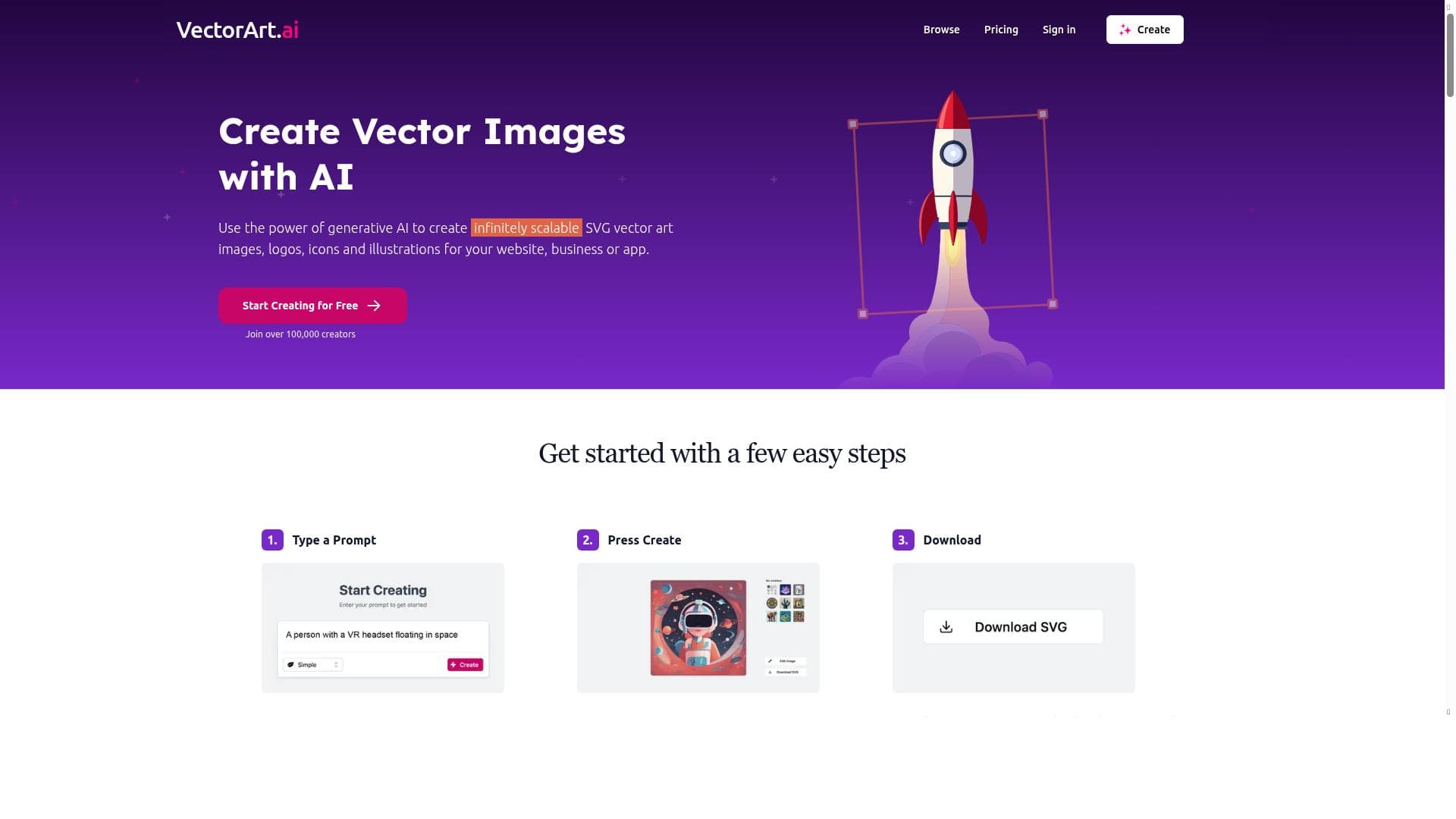
VectorArt.ai is a free AI-powered platform offering the largest library of AI-generated vector images and an intuitive vector art generator that creates unique SVG and PNG graphics from user prompts. Perfect for designers, marketers, and content creators, it streamlines vector image creation with unlimited downloads and no cost.

Description
Generate vector images with AI
Detailed Description
VectorArt.ai is an innovative AI-powered platform designed to generate high-quality vector images, illustrations, and clipart with ease. Its core purpose is to provide designers, marketers, content creators, and businesses with instant access to a vast library of AI-generated vector graphics while also enabling users to create unique images through AI-driven prompts. By leveraging advanced artificial intelligence models, VectorArt.ai simplifies the traditionally time-consuming and skill-intensive process of vector art creation, making it accessible to users of all skill levels. One of the standout features of VectorArt.ai is its extensive library, which is recognized as the largest collection of AI-generated vector images available online. Users can browse through thousands of SVG vector images, illustrations, and clipart across various styles and themes. This expansive library ensures that users can find graphics suitable for a wide range of projects, from web design and branding to presentations and social media content. Beyond browsing, the platform offers an AI vector art generator that allows users to create entirely new and unique vector images by inputting descriptive prompts. This capability harnesses the power of AI to interpret user input and generate custom vector graphics tailored to specific needs. VectorArt.ai supports downloading images in both SVG and PNG formats, providing flexibility depending on the user's project requirements. SVG files are particularly valuable for designers as they are scalable without loss of quality and easily editable in vector graphic software, while PNG files offer a convenient raster format for immediate use. The platform’s user-friendly interface ensures that even those without prior design experience can generate professional-quality vector art quickly. This tool is ideal for graphic designers, digital marketers, content creators, educators, and small business owners who require high-quality vector graphics but may lack the time or expertise to create them from scratch. For instance, marketers can quickly generate unique illustrations for campaigns, educators can enhance presentations with custom visuals, and designers can use the AI-generated vectors as inspiration or base elements for more complex projects. The ability to generate unlimited downloads without restrictions makes it especially appealing for users with frequent graphic needs. VectorArt.ai is offered entirely for free, which is a significant advantage compared to many other vector graphic platforms that require subscriptions or charge per download. This free access lowers the barrier to entry for individuals and small businesses looking to enhance their visual content without incurring additional costs. When compared to alternative vector graphic tools, VectorArt.ai stands out due to its AI-driven generation capabilities and the sheer volume of available AI-created vector images. Traditional vector graphic platforms often rely on user-generated content or manual design, which can be limiting and time-consuming. While some competitors offer AI art generation, few focus specifically on vector formats or provide such a comprehensive library of AI-generated vectors. However, as an AI-based tool, the quality and style of generated images may vary depending on the input prompts, and users might need to refine or edit the outputs further to meet precise design standards. One consideration is that VectorArt.ai currently does not mention integrations with popular design software or collaboration tools, which could be a limitation for teams requiring seamless workflow integration. Additionally, while the free pricing model is attractive, users should be aware that advanced customization options or premium features might be limited or unavailable. Overall, VectorArt.ai offers a powerful, accessible, and cost-effective solution for generating vector graphics using AI, making it a valuable resource for a wide audience seeking creative and scalable vector art solutions.
Tool Features
- Largest AI generated vector image library
- AI vector art generator
- Browse and download unlimited SVG vector images, illustrations, and clipart
- Create unique images with AI prompts
- Download images in SVG and PNG formats
Description
✦
VectorArt.ai is a free AI-powered platform offering the largest library of AI-generated vector images and an intuitive vector art generator that creates unique SVG and PNG graphics from user prompts. Perfect for designers, marketers, and content creators, it streamlines vector image creation with unlimited downloads and no cost.
Generate vector images with AI
Detailed Description
VectorArt.ai is an innovative AI-powered platform designed to generate high-quality vector images, illustrations, and clipart with ease. Its core purpose is to provide designers, marketers, content creators, and businesses with instant access to a vast library of AI-generated vector graphics while also enabling users to create unique images through AI-driven prompts. By leveraging advanced artificial intelligence models, VectorArt.ai simplifies the traditionally time-consuming and skill-intensive process of vector art creation, making it accessible to users of all skill levels. One of the standout features of VectorArt.ai is its extensive library, which is recognized as the largest collection of AI-generated vector images available online. Users can browse through thousands of SVG vector images, illustrations, and clipart across various styles and themes. This expansive library ensures that users can find graphics suitable for a wide range of projects, from web design and branding to presentations and social media content. Beyond browsing, the platform offers an AI vector art generator that allows users to create entirely new and unique vector images by inputting descriptive prompts. This capability harnesses the power of AI to interpret user input and generate custom vector graphics tailored to specific needs. VectorArt.ai supports downloading images in both SVG and PNG formats, providing flexibility depending on the user's project requirements. SVG files are particularly valuable for designers as they are scalable without loss of quality and easily editable in vector graphic software, while PNG files offer a convenient raster format for immediate use. The platform’s user-friendly interface ensures that even those without prior design experience can generate professional-quality vector art quickly. This tool is ideal for graphic designers, digital marketers, content creators, educators, and small business owners who require high-quality vector graphics but may lack the time or expertise to create them from scratch. For instance, marketers can quickly generate unique illustrations for campaigns, educators can enhance presentations with custom visuals, and designers can use the AI-generated vectors as inspiration or base elements for more complex projects. The ability to generate unlimited downloads without restrictions makes it especially appealing for users with frequent graphic needs. VectorArt.ai is offered entirely for free, which is a significant advantage compared to many other vector graphic platforms that require subscriptions or charge per download. This free access lowers the barrier to entry for individuals and small businesses looking to enhance their visual content without incurring additional costs. When compared to alternative vector graphic tools, VectorArt.ai stands out due to its AI-driven generation capabilities and the sheer volume of available AI-created vector images. Traditional vector graphic platforms often rely on user-generated content or manual design, which can be limiting and time-consuming. While some competitors offer AI art generation, few focus specifically on vector formats or provide such a comprehensive library of AI-generated vectors. However, as an AI-based tool, the quality and style of generated images may vary depending on the input prompts, and users might need to refine or edit the outputs further to meet precise design standards. One consideration is that VectorArt.ai currently does not mention integrations with popular design software or collaboration tools, which could be a limitation for teams requiring seamless workflow integration. Additionally, while the free pricing model is attractive, users should be aware that advanced customization options or premium features might be limited or unavailable. Overall, VectorArt.ai offers a powerful, accessible, and cost-effective solution for generating vector graphics using AI, making it a valuable resource for a wide audience seeking creative and scalable vector art solutions.
Frequently Asked Questions
What is VectorArt.ai?
VectorArt.ai is an AI-driven platform that generates vector images, illustrations, and clipart, providing users access to a vast library of AI-created vector graphics and tools to create unique images using AI prompts.
How much does VectorArt.ai cost?
VectorArt.ai is completely free to use, allowing unlimited browsing and downloading of vector images without any subscription or payment.
Who is VectorArt.ai best for?
It is ideal for graphic designers, digital marketers, content creators, educators, and small business owners who need high-quality vector graphics quickly and without extensive design skills.
What are the main features of VectorArt.ai?
Key features include the largest AI-generated vector image library, an AI vector art generator for creating custom images from prompts, unlimited browsing and downloading of SVG and PNG files, and a user-friendly interface.
Does VectorArt.ai offer a free trial?
VectorArt.ai is free to use with no trial required, providing full access to its features and image downloads at no cost.
What integrations does VectorArt.ai support?
Currently, VectorArt.ai does not specify any integrations with external design software or collaboration tools.
How does VectorArt.ai work?
Users can browse a large library of AI-generated vector images or create new vector graphics by entering descriptive prompts into the AI generator, then download the results in SVG or PNG formats for use in various projects.
Reviews
0 reviews
No reviews yet. Be the first to share your experience.
Sponsored Tools











































Recommended Tools
Stay updated on latest Ai tools
Get the latest insights, Join our newsletter
Read and trusted by 50,000+ readers
Join the biggest AI Community
Our community and staff are here to help!
Your feedback will help Alice AI improve in future versions.








Submit your Tool


PoweredByAI.app is an AI Tools Directory helping individuals, businesses, and creators discover the best AI tools for writing, coding, design, productivity, and more.
© 2026 , Product of011BQ. All rights reserved.