Featured in:Best AI Audio Tools
Get featured →🚀 Zaprep: Your Socials on Steroids. Start free — automate 1,000 DMs/month & turn engagement into leads. with 1,000 automated DMs/month.



✦
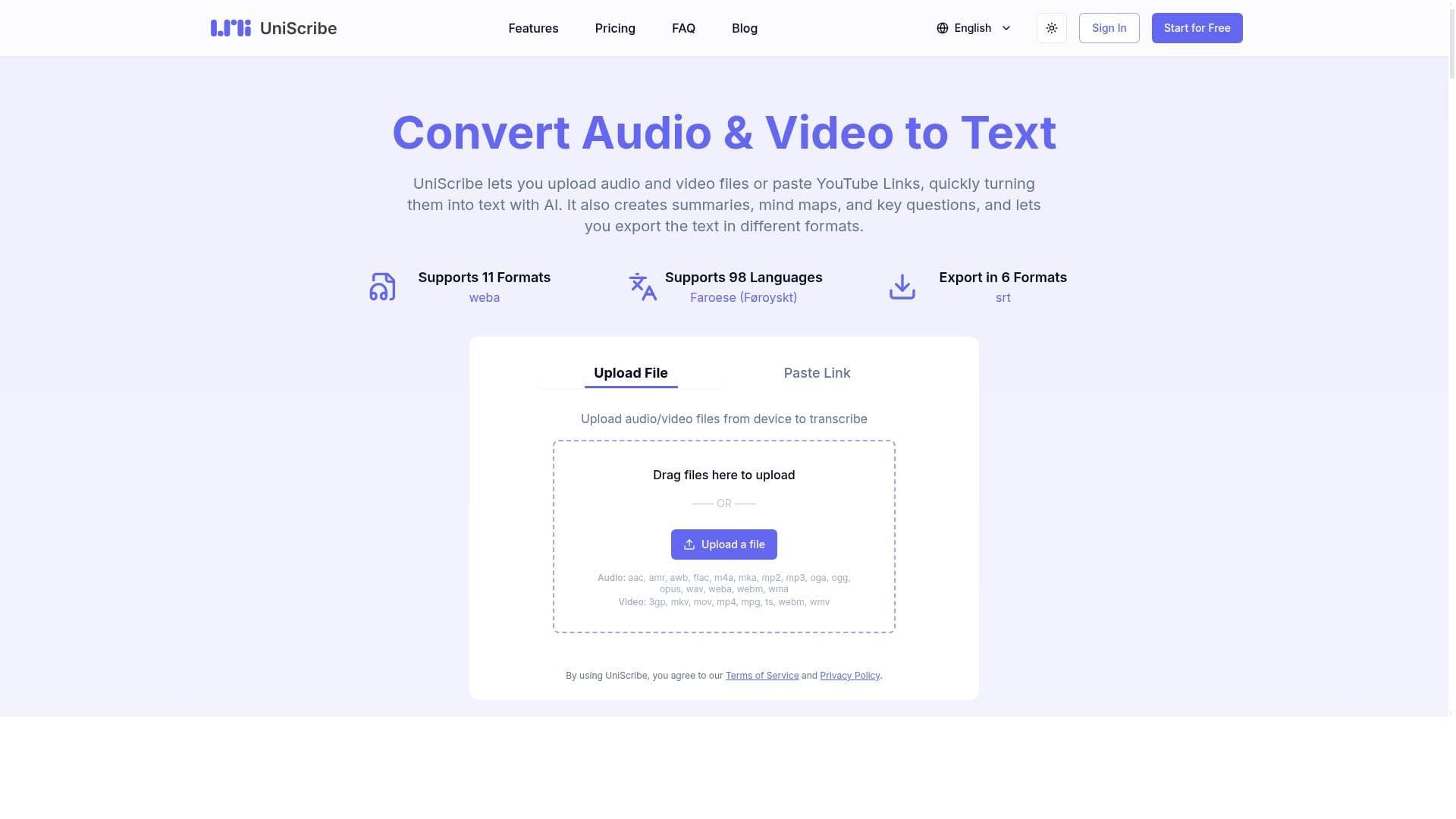
UniScribe is an AI-powered transcription platform that quickly converts audio and video files, including YouTube videos, into text and insightful summaries. Ideal for students, professionals, and content creators, it streamlines information extraction with features like mind maps and key questions, making complex content easy to digest and utilize.

Description
UniScribe is a platform that helps users quickly extract key information from lengthy local audio and video files or YouTube videos by converting them into text, empowered by AI.
Detailed Description
UniScribe is an advanced AI-powered platform designed to help users efficiently extract and distill key information from lengthy audio and video content. Whether you have local media files or YouTube videos, UniScribe enables you to convert spoken words into accurate, readable text transcripts quickly and effortlessly. Its core purpose is to simplify the process of extracting valuable insights from hours of audio or video material, saving users significant time and effort compared to manual transcription or note-taking. By leveraging cutting-edge AI transcription technology, UniScribe transforms complex multimedia content into accessible text, empowering users to better understand, analyze, and utilize the information contained within their recordings. At the heart of UniScribe are several powerful features designed to enhance productivity and comprehension. Users can upload audio and video files directly from their devices or simply paste YouTube video links to begin the transcription process. The AI engine rapidly converts the spoken content into text, maintaining high accuracy even with diverse accents and audio qualities. Beyond transcription, UniScribe offers the ability to generate concise summaries from the transcribed text, helping users quickly grasp the main points without reading the entire transcript. Additionally, the platform can create mind maps and key questions based on the content, facilitating deeper engagement and critical thinking. These tools are particularly useful for students, researchers, or professionals who need to organize information visually or prepare for discussions and presentations. Finally, users can export the transcriptions, summaries, and other generated content in multiple formats, ensuring compatibility with various workflows and applications. UniScribe is especially well-suited for a wide range of users who regularly work with audio and video content. Students can use it to transcribe lectures and create study materials, while journalists and content creators can quickly convert interviews and podcasts into editable text for articles or scripts. Researchers and analysts benefit from the summarization and mind mapping features to synthesize large volumes of spoken data. Corporate teams can utilize UniScribe to transcribe meetings, webinars, and training sessions, making information more accessible and actionable. The platform’s ease of use and versatility make it an invaluable tool for anyone looking to save time on transcription and gain deeper insights from multimedia content. UniScribe operates on a freemium pricing model, offering basic transcription and summarization capabilities for free, which is ideal for casual users or those wanting to test the platform’s core functions. Paid plans unlock advanced features such as longer transcription limits, priority processing speed, enhanced export options, and access to mind mapping and question generation tools. This tiered approach allows users to select a plan that fits their volume and feature needs without unnecessary expense. Compared to alternative transcription tools, UniScribe stands out due to its seamless integration of transcription with AI-driven summarization and mind mapping, providing a more comprehensive solution beyond simple text conversion. While many competitors focus solely on transcription accuracy or speed, UniScribe adds value by helping users interact with and understand the content more effectively. Its support for both local files and YouTube links also offers greater flexibility than some platforms restricted to one input type. However, as with any AI-based transcription service, accuracy can vary depending on audio quality and speaker clarity, so users should review transcripts for critical applications. Additionally, while the free tier is generous, heavy users may find the paid plans necessary to meet their demands. In summary, UniScribe is a robust and versatile AI transcription platform that goes beyond basic text conversion to include summarization, mind mapping, and question generation. It is ideal for students, professionals, and content creators who need to quickly extract and organize information from audio and video sources. With its freemium pricing and user-friendly interface, UniScribe offers a compelling solution for anyone looking to maximize the value of their multimedia content with minimal effort.
Tool Features
- Upload audio and video files or paste YouTube links
- Convert audio and video to text quickly with AI
- Create summaries from transcribed text
- Generate mind maps and key questions
- Export text in different formats
Description
✦
UniScribe is an AI-powered transcription platform that quickly converts audio and video files, including YouTube videos, into text and insightful summaries. Ideal for students, professionals, and content creators, it streamlines information extraction with features like mind maps and key questions, making complex content easy to digest and utilize.
UniScribe is a platform that helps users quickly extract key information from lengthy local audio and video files or YouTube videos by converting them into text, empowered by AI.
Detailed Description
UniScribe is an advanced AI-powered platform designed to help users efficiently extract and distill key information from lengthy audio and video content. Whether you have local media files or YouTube videos, UniScribe enables you to convert spoken words into accurate, readable text transcripts quickly and effortlessly. Its core purpose is to simplify the process of extracting valuable insights from hours of audio or video material, saving users significant time and effort compared to manual transcription or note-taking. By leveraging cutting-edge AI transcription technology, UniScribe transforms complex multimedia content into accessible text, empowering users to better understand, analyze, and utilize the information contained within their recordings. At the heart of UniScribe are several powerful features designed to enhance productivity and comprehension. Users can upload audio and video files directly from their devices or simply paste YouTube video links to begin the transcription process. The AI engine rapidly converts the spoken content into text, maintaining high accuracy even with diverse accents and audio qualities. Beyond transcription, UniScribe offers the ability to generate concise summaries from the transcribed text, helping users quickly grasp the main points without reading the entire transcript. Additionally, the platform can create mind maps and key questions based on the content, facilitating deeper engagement and critical thinking. These tools are particularly useful for students, researchers, or professionals who need to organize information visually or prepare for discussions and presentations. Finally, users can export the transcriptions, summaries, and other generated content in multiple formats, ensuring compatibility with various workflows and applications. UniScribe is especially well-suited for a wide range of users who regularly work with audio and video content. Students can use it to transcribe lectures and create study materials, while journalists and content creators can quickly convert interviews and podcasts into editable text for articles or scripts. Researchers and analysts benefit from the summarization and mind mapping features to synthesize large volumes of spoken data. Corporate teams can utilize UniScribe to transcribe meetings, webinars, and training sessions, making information more accessible and actionable. The platform’s ease of use and versatility make it an invaluable tool for anyone looking to save time on transcription and gain deeper insights from multimedia content. UniScribe operates on a freemium pricing model, offering basic transcription and summarization capabilities for free, which is ideal for casual users or those wanting to test the platform’s core functions. Paid plans unlock advanced features such as longer transcription limits, priority processing speed, enhanced export options, and access to mind mapping and question generation tools. This tiered approach allows users to select a plan that fits their volume and feature needs without unnecessary expense. Compared to alternative transcription tools, UniScribe stands out due to its seamless integration of transcription with AI-driven summarization and mind mapping, providing a more comprehensive solution beyond simple text conversion. While many competitors focus solely on transcription accuracy or speed, UniScribe adds value by helping users interact with and understand the content more effectively. Its support for both local files and YouTube links also offers greater flexibility than some platforms restricted to one input type. However, as with any AI-based transcription service, accuracy can vary depending on audio quality and speaker clarity, so users should review transcripts for critical applications. Additionally, while the free tier is generous, heavy users may find the paid plans necessary to meet their demands. In summary, UniScribe is a robust and versatile AI transcription platform that goes beyond basic text conversion to include summarization, mind mapping, and question generation. It is ideal for students, professionals, and content creators who need to quickly extract and organize information from audio and video sources. With its freemium pricing and user-friendly interface, UniScribe offers a compelling solution for anyone looking to maximize the value of their multimedia content with minimal effort.
Frequently Asked Questions
What is UniScribe?
UniScribe is an AI-driven platform that converts lengthy audio and video files, including YouTube videos, into text transcripts. It also offers features like summarization, mind mapping, and question generation to help users extract and organize key information efficiently.
How much does UniScribe cost?
UniScribe operates on a freemium model, providing basic transcription and summarization features for free. Paid plans offer additional capabilities such as longer transcription limits, faster processing, advanced export options, and access to mind mapping and question generation tools.
Who is UniScribe best for?
UniScribe is ideal for students, researchers, journalists, content creators, and professionals who need to transcribe and analyze audio or video content quickly. It is especially useful for those looking to save time on manual transcription and gain deeper insights through summaries and mind maps.
What are the main features of UniScribe?
Key features include uploading local audio and video files or pasting YouTube links, AI-powered transcription, creation of summaries from transcribed text, generation of mind maps and key questions, and exporting content in various formats.
Does UniScribe offer a free trial?
Yes, UniScribe offers a free tier that allows users to access basic transcription and summarization features without cost, enabling them to try the platform before upgrading to paid plans.
What integrations does UniScribe support?
UniScribe supports uploading local audio and video files directly and allows users to paste YouTube video links for transcription. While it does not currently list integrations with third-party apps, its export options facilitate compatibility with various workflows.
How does UniScribe work?
Users upload audio or video files or provide YouTube links, and UniScribe’s AI engine transcribes the spoken content into text quickly. The platform then enables users to generate summaries, mind maps, and key questions from the transcript, which can be exported in multiple formats for further use.
Socials
Use ToolReviews
0 reviews
No reviews yet. Be the first to share your experience.
Sponsored Tools











































Recommended Tools
Stay updated on latest Ai tools
Get the latest insights, Join our newsletter
Read and trusted by 50,000+ readers
Join the biggest AI Community
Our community and staff are here to help!
Your feedback will help Alice AI improve in future versions.








Submit your Tool


PoweredByAI.app is an AI Tools Directory helping individuals, businesses, and creators discover the best AI tools for writing, coding, design, productivity, and more.
© 2026 , Product of011BQ. All rights reserved.