Featured in:Best AI Writing Tools
Get featured →🚀 Zaprep: Your Socials on Steroids. Start free — automate 1,000 DMs/month & turn engagement into leads. with 1,000 automated DMs/month.



✦
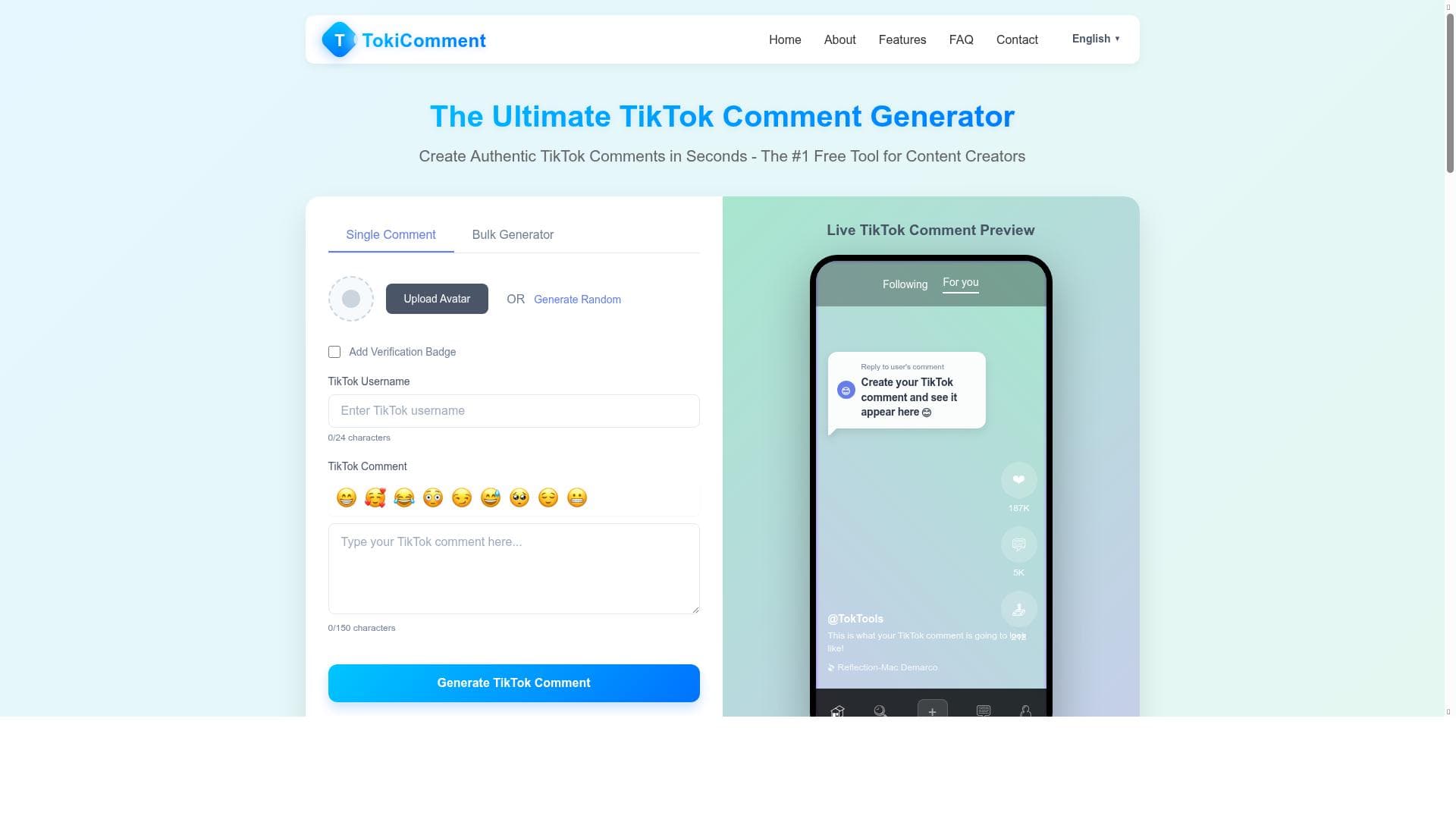
Tokicomment is a free, user-friendly toolkit that lets you create authentic TikTok comments, custom avatars, and engaging social media visuals without any design skills. Perfect for influencers, marketers, and meme creators, it streamlines content creation with instant high-quality downloads and unique personalization features.

Description
Tokicomment is a creative toolkit that helps users generate personalized content such as TikTok reactions, memes, and social media avatars. It offers features like adding emojis and stickers, creating custom avatars, and instant high-quality downloads. No design skills are needed. Check out https://tokicomment.com/ for more.
Detailed Description
Tokicomment is an innovative creative toolkit designed to help users generate personalized and authentic-looking social media content, with a particular focus on TikTok reactions, memes, and avatars. Its core purpose is to empower users—regardless of their design skills—to create engaging and visually appealing TikTok comment images and custom avatars that can be used to enhance social media presence, storytelling, or digital marketing efforts. By simplifying the content creation process, Tokicomment enables users to produce high-quality, customized visuals that resonate with their audience and boost engagement. One of the standout features of Tokicomment is its ability to create authentic-looking TikTok comments. Users can craft comments that appear genuine and natural, complete with options to add emojis, stickers, and verification badges, which add credibility and flair to the generated content. This feature is particularly useful for content creators, marketers, and social media managers who want to simulate social proof or highlight specific reactions in a visually compelling way. Additionally, Tokicomment offers a robust avatar customization tool that allows users to design unique social media avatars tailored to their personal or brand identity. The avatars can be personalized with various styles, accessories, and verification badges, enabling users to create a consistent and recognizable online persona. Another key capability is the instant export of high-quality TikTok comment images. Once the content is created, users can download their images immediately in high resolution, making it easy to share across multiple platforms without any loss of quality. This seamless export functionality eliminates the need for additional graphic design software or technical expertise, streamlining the content creation workflow. Furthermore, Tokicomment is completely free to use, which lowers the barrier to entry and makes it accessible to a wide range of users, from casual social media enthusiasts to professional marketers. Tokicomment is best suited for social media influencers, digital marketers, meme creators, and anyone looking to enhance their TikTok and broader social media content with personalized, eye-catching visuals. It is particularly valuable for those who want to simulate social interactions or reactions without relying on organic comments or who need to create engaging content quickly and efficiently. For meme creators and social media managers, the ability to add emojis, stickers, and verification badges adds a layer of customization that can help content stand out in crowded feeds. In terms of pricing, Tokicomment is entirely free, which is a significant advantage compared to many other social media content creation tools that require subscriptions or pay-per-use fees. This free access makes it an attractive option for users who want to experiment with content creation without financial commitment. While some alternatives may offer more extensive graphic design capabilities or integration with other platforms, Tokicomment’s focus on TikTok-specific content and ease of use sets it apart. However, there are some limitations to consider. Tokicomment is specialized for TikTok comment images and avatar creation, so users seeking a broader range of graphic design tools or multi-platform content creation might find it somewhat limited. Additionally, while the tool offers customization options, it may not support advanced editing features found in professional design software. Users should also be mindful of the ethical use of generated comments to avoid misleading audiences. Overall, Tokicomment is a powerful, user-friendly tool tailored for creating personalized TikTok reactions, memes, and avatars quickly and effectively. Its free access, authentic comment generation, and avatar customization make it a valuable asset for social media users aiming to boost engagement and create distinctive content without needing design expertise.
Tool Features
- Create authentic-looking TikTok comments
- Customize avatars
- Add verification badges
- Export high-quality TikTok comment images
- Free to use
Description
✦
Tokicomment is a free, user-friendly toolkit that lets you create authentic TikTok comments, custom avatars, and engaging social media visuals without any design skills. Perfect for influencers, marketers, and meme creators, it streamlines content creation with instant high-quality downloads and unique personalization features.
Tokicomment is a creative toolkit that helps users generate personalized content such as TikTok reactions, memes, and social media avatars. It offers features like adding emojis and stickers, creating custom avatars, and instant high-quality downloads. No design skills are needed. Check out https://tokicomment.com/ for more.
Detailed Description
Tokicomment is an innovative creative toolkit designed to help users generate personalized and authentic-looking social media content, with a particular focus on TikTok reactions, memes, and avatars. Its core purpose is to empower users—regardless of their design skills—to create engaging and visually appealing TikTok comment images and custom avatars that can be used to enhance social media presence, storytelling, or digital marketing efforts. By simplifying the content creation process, Tokicomment enables users to produce high-quality, customized visuals that resonate with their audience and boost engagement. One of the standout features of Tokicomment is its ability to create authentic-looking TikTok comments. Users can craft comments that appear genuine and natural, complete with options to add emojis, stickers, and verification badges, which add credibility and flair to the generated content. This feature is particularly useful for content creators, marketers, and social media managers who want to simulate social proof or highlight specific reactions in a visually compelling way. Additionally, Tokicomment offers a robust avatar customization tool that allows users to design unique social media avatars tailored to their personal or brand identity. The avatars can be personalized with various styles, accessories, and verification badges, enabling users to create a consistent and recognizable online persona. Another key capability is the instant export of high-quality TikTok comment images. Once the content is created, users can download their images immediately in high resolution, making it easy to share across multiple platforms without any loss of quality. This seamless export functionality eliminates the need for additional graphic design software or technical expertise, streamlining the content creation workflow. Furthermore, Tokicomment is completely free to use, which lowers the barrier to entry and makes it accessible to a wide range of users, from casual social media enthusiasts to professional marketers. Tokicomment is best suited for social media influencers, digital marketers, meme creators, and anyone looking to enhance their TikTok and broader social media content with personalized, eye-catching visuals. It is particularly valuable for those who want to simulate social interactions or reactions without relying on organic comments or who need to create engaging content quickly and efficiently. For meme creators and social media managers, the ability to add emojis, stickers, and verification badges adds a layer of customization that can help content stand out in crowded feeds. In terms of pricing, Tokicomment is entirely free, which is a significant advantage compared to many other social media content creation tools that require subscriptions or pay-per-use fees. This free access makes it an attractive option for users who want to experiment with content creation without financial commitment. While some alternatives may offer more extensive graphic design capabilities or integration with other platforms, Tokicomment’s focus on TikTok-specific content and ease of use sets it apart. However, there are some limitations to consider. Tokicomment is specialized for TikTok comment images and avatar creation, so users seeking a broader range of graphic design tools or multi-platform content creation might find it somewhat limited. Additionally, while the tool offers customization options, it may not support advanced editing features found in professional design software. Users should also be mindful of the ethical use of generated comments to avoid misleading audiences. Overall, Tokicomment is a powerful, user-friendly tool tailored for creating personalized TikTok reactions, memes, and avatars quickly and effectively. Its free access, authentic comment generation, and avatar customization make it a valuable asset for social media users aiming to boost engagement and create distinctive content without needing design expertise.
Frequently Asked Questions
What is tokicomment?
Tokicomment is a creative toolkit that enables users to generate personalized TikTok reactions, memes, and social media avatars. It allows for authentic-looking TikTok comments, avatar customization, adding emojis, stickers, and verification badges, and exporting high-quality images—all without requiring design skills.
How much does tokicomment cost?
Tokicomment is completely free to use, with no subscription or payment required.
Who is tokicomment best for?
Tokicomment is ideal for social media influencers, digital marketers, meme creators, and anyone looking to enhance their TikTok or social media content with personalized, engaging visuals quickly and easily.
What are the main features of tokicomment?
The main features include creating authentic-looking TikTok comments, customizing avatars, adding verification badges, incorporating emojis and stickers, and exporting high-quality TikTok comment images instantly.
Does tokicomment offer a free trial?
Tokicomment is free to use and does not require a trial period or payment to access its features.
What integrations does tokicomment support?
Tokicomment primarily functions as a standalone web-based tool and does not currently offer integrations with other platforms or software.
How does tokicomment work?
Users visit the Tokicomment website, select the type of content they want to create—such as TikTok comments or avatars—customize their content with emojis, stickers, and badges, and then instantly download the high-quality images for use on social media.
Reviews
0 reviews
No reviews yet. Be the first to share your experience.
Sponsored Tools







































Recommended Tools
Stay updated on latest Ai tools
Get the latest insights, Join our newsletter
Read and trusted by 50,000+ readers
Join the biggest AI Community
Our community and staff are here to help!
Your feedback will help Alice AI improve in future versions.







Submit your Tool


PoweredByAI.app is an AI Tools Directory helping individuals, businesses, and creators discover the best AI tools for writing, coding, design, productivity, and more.
© 2026 , Product of011BQ. All rights reserved.