

Is this your AI tool? Claim it today.
Verify ownership, manage your profile, and unlock growth features.
Tag Your Photos App offers a seamless way to organize and manage photo collections by tagging images across both mobile and PC platforms. Ideal for photographers, content creators, and everyday users, it enhances photo searchability and categorization, making finding specific photos quick and effortless.

Description
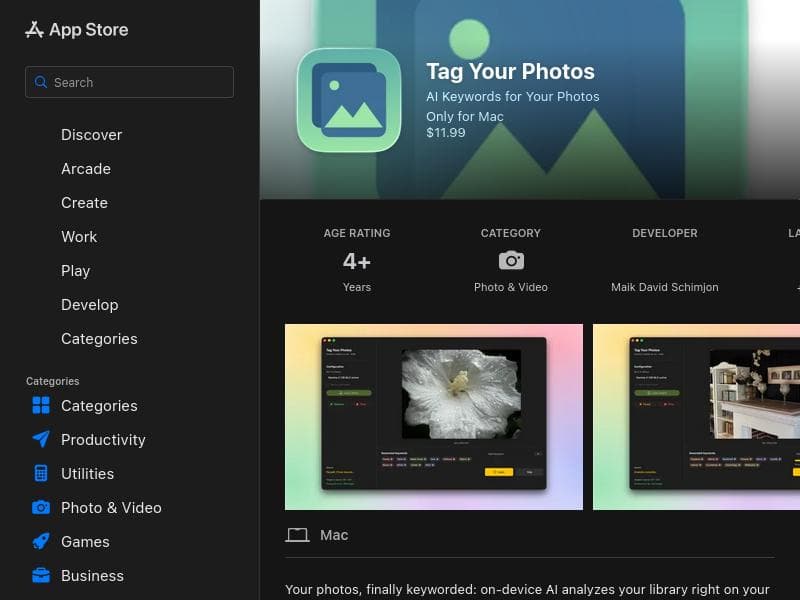
Most AI photo taggers upload your images to the cloud or bolt on as a separate tool. Tag Your Photos doesn't: -100% on-device (Gemma 4 12B via Apple MLX) — no cloud, no upload - Works directly on your Photos library — no exporting, no duplicates - Keywords land in Spotlight system-wide — searchable right from the iPhone/iPad home screen, not just inside the app - Stays general when unsure — no falsely specific guesses
Detailed Description
Tag Your Photos App is a versatile application designed to help users efficiently organize and manage their photo collections across both mobile devices and PCs. Its core purpose is to enhance the way users interact with their digital images by allowing them to tag photos with relevant keywords or labels. This tagging system significantly improves the searchability and categorization of photos, making it easier and faster to locate specific images within large collections. Whether you are a casual user with thousands of personal photos or a professional managing extensive image libraries, Tag Your Photos App offers a streamlined solution to keep your photos well-organized and accessible. One of the standout features of Tag Your Photos App is its compatibility across multiple platforms, including both PC and mobile devices. This cross-device functionality ensures that users can tag and organize their photos anytime, anywhere, without being limited to a single device. The app’s intuitive interface allows users to add descriptive tags to individual photos or batches of images, facilitating bulk organization. These tags can be customized to suit personal or professional needs, such as event names, locations, people, or themes. By leveraging this tagging system, the app enhances photo management by enabling users to filter and search their collections using these tags, drastically reducing the time spent scrolling through albums. Tag Your Photos App is particularly beneficial for photographers, content creators, social media managers, and anyone who deals with large volumes of images. For example, professional photographers can tag photos by client, shoot date, or project, simplifying workflow and client delivery. Social media managers can categorize images by campaign or platform, ensuring quick retrieval for posting schedules. Additionally, everyday users can tag family photos by event or person, making it easier to reminisce and share memories. The app’s ability to work seamlessly on both mobile and desktop platforms means users can organize photos on the go or during dedicated sessions at their workstation. Regarding pricing, Tag Your Photos App offers flexible plans to accommodate different user needs. While specific pricing details are not explicitly stated, the app is available through major app stores, suggesting options for free downloads with potential in-app purchases or subscription models for premium features. Users are encouraged to check the official website or app store listings for the most current pricing and plan options, which may include free trials or tiered subscriptions based on usage and feature access. When compared to alternative photo management tools, Tag Your Photos App stands out due to its straightforward tagging approach combined with cross-platform compatibility. Many photo organizers focus on automatic categorization using AI, but Tag Your Photos App empowers users with manual tagging control, which can be more precise and personalized. This makes it a preferred choice for users who want to maintain detailed and customized photo libraries. However, unlike some AI-driven tools, it may require more initial input from users to tag photos, which can be time-consuming for very large collections. Notable limitations include the potential learning curve for users unfamiliar with tagging systems and the absence of advanced AI features such as automatic facial recognition or scene detection. Additionally, the app’s effectiveness depends on consistent tagging practices by the user. Without regular tagging, the benefits of improved searchability and organization may diminish. Users should also consider the storage and backup solutions they use in conjunction with the app to ensure their photo libraries remain safe and accessible. In summary, Tag Your Photos App is a powerful and user-friendly solution for anyone looking to bring order to their photo collections. Its core strength lies in its manual tagging system that enhances photo searchability and management across devices. Ideal for professionals and casual users alike, it provides a flexible and efficient way to organize images, though users should be mindful of the manual effort required and the app’s current feature set compared to AI-powered competitors.
Tool Features
- Compatible with PC and mobile devices
- Allows tagging of photos for better organization
- Improves photo searchability and management
Description
Tag Your Photos App offers a seamless way to organize and manage photo collections by tagging images across both mobile and PC platforms. Ideal for photographers, content creators, and everyday users, it enhances photo searchability and categorization, making finding specific photos quick and effortless.
Most AI photo taggers upload your images to the cloud or bolt on as a separate tool. Tag Your Photos doesn't: -100% on-device (Gemma 4 12B via Apple MLX) — no cloud, no upload - Works directly on your Photos library — no exporting, no duplicates - Keywords land in Spotlight system-wide — searchable right from the iPhone/iPad home screen, not just inside the app - Stays general when unsure — no falsely specific guesses
Detailed Description
Tag Your Photos App is a versatile application designed to help users efficiently organize and manage their photo collections across both mobile devices and PCs. Its core purpose is to enhance the way users interact with their digital images by allowing them to tag photos with relevant keywords or labels. This tagging system significantly improves the searchability and categorization of photos, making it easier and faster to locate specific images within large collections. Whether you are a casual user with thousands of personal photos or a professional managing extensive image libraries, Tag Your Photos App offers a streamlined solution to keep your photos well-organized and accessible. One of the standout features of Tag Your Photos App is its compatibility across multiple platforms, including both PC and mobile devices. This cross-device functionality ensures that users can tag and organize their photos anytime, anywhere, without being limited to a single device. The app’s intuitive interface allows users to add descriptive tags to individual photos or batches of images, facilitating bulk organization. These tags can be customized to suit personal or professional needs, such as event names, locations, people, or themes. By leveraging this tagging system, the app enhances photo management by enabling users to filter and search their collections using these tags, drastically reducing the time spent scrolling through albums. Tag Your Photos App is particularly beneficial for photographers, content creators, social media managers, and anyone who deals with large volumes of images. For example, professional photographers can tag photos by client, shoot date, or project, simplifying workflow and client delivery. Social media managers can categorize images by campaign or platform, ensuring quick retrieval for posting schedules. Additionally, everyday users can tag family photos by event or person, making it easier to reminisce and share memories. The app’s ability to work seamlessly on both mobile and desktop platforms means users can organize photos on the go or during dedicated sessions at their workstation. Regarding pricing, Tag Your Photos App offers flexible plans to accommodate different user needs. While specific pricing details are not explicitly stated, the app is available through major app stores, suggesting options for free downloads with potential in-app purchases or subscription models for premium features. Users are encouraged to check the official website or app store listings for the most current pricing and plan options, which may include free trials or tiered subscriptions based on usage and feature access. When compared to alternative photo management tools, Tag Your Photos App stands out due to its straightforward tagging approach combined with cross-platform compatibility. Many photo organizers focus on automatic categorization using AI, but Tag Your Photos App empowers users with manual tagging control, which can be more precise and personalized. This makes it a preferred choice for users who want to maintain detailed and customized photo libraries. However, unlike some AI-driven tools, it may require more initial input from users to tag photos, which can be time-consuming for very large collections. Notable limitations include the potential learning curve for users unfamiliar with tagging systems and the absence of advanced AI features such as automatic facial recognition or scene detection. Additionally, the app’s effectiveness depends on consistent tagging practices by the user. Without regular tagging, the benefits of improved searchability and organization may diminish. Users should also consider the storage and backup solutions they use in conjunction with the app to ensure their photo libraries remain safe and accessible. In summary, Tag Your Photos App is a powerful and user-friendly solution for anyone looking to bring order to their photo collections. Its core strength lies in its manual tagging system that enhances photo searchability and management across devices. Ideal for professionals and casual users alike, it provides a flexible and efficient way to organize images, though users should be mindful of the manual effort required and the app’s current feature set compared to AI-powered competitors.
Frequently Asked Questions
What is Tag Your Photos App?
Tag Your Photos App is a cross-platform application designed to help users organize and manage their photo collections by tagging images, thereby improving photo searchability and categorization.
How much does Tag Your Photos App cost?
Pricing details are not explicitly provided, but the app is available on major app stores, likely offering free downloads with optional in-app purchases or subscription plans for premium features. Users should check the official website or app store for current pricing.
Who is Tag Your Photos App best for?
It is best suited for photographers, content creators, social media managers, and anyone managing large photo libraries who needs an efficient way to organize and quickly find images.
What are the main features of Tag Your Photos App?
Key features include compatibility with both PC and mobile devices, the ability to tag photos individually or in batches for better organization, and enhanced photo searchability through customizable tags.
Does Tag Your Photos App offer a free trial?
While specific information about a free trial is not provided, users can check the app store listings or official website for any available trial periods or free versions.
What integrations does Tag Your Photos App support?
The app primarily focuses on photo tagging and management across devices; specific third-party integrations are not detailed, so users should refer to the official resources for integration options.
How does Tag Your Photos App work?
Users tag their photos with descriptive labels using the app on their mobile or PC devices. These tags enable efficient categorization and searching, allowing users to quickly locate specific photos within large collections.
Socials
Use ToolReviews
No reviews yet. Be the first to share your experience.