

Is this your AI tool? Claim it today.
Verify ownership, manage your profile, and unlock growth features.
Tadata is an AI employee embedded within Slack that automates repetitive tasks and delivers personalized daily briefings to help teams work smarter. Ideal for sales and GTM operations teams, it learns user preferences to proactively suggest automations, all while operating seamlessly in the Slack environment where teams already collaborate.

Description
Tadata is the AI employee that lives in your Slack. It connects to your tools, learns your company and your preferences, and does work for your team.
Detailed Description
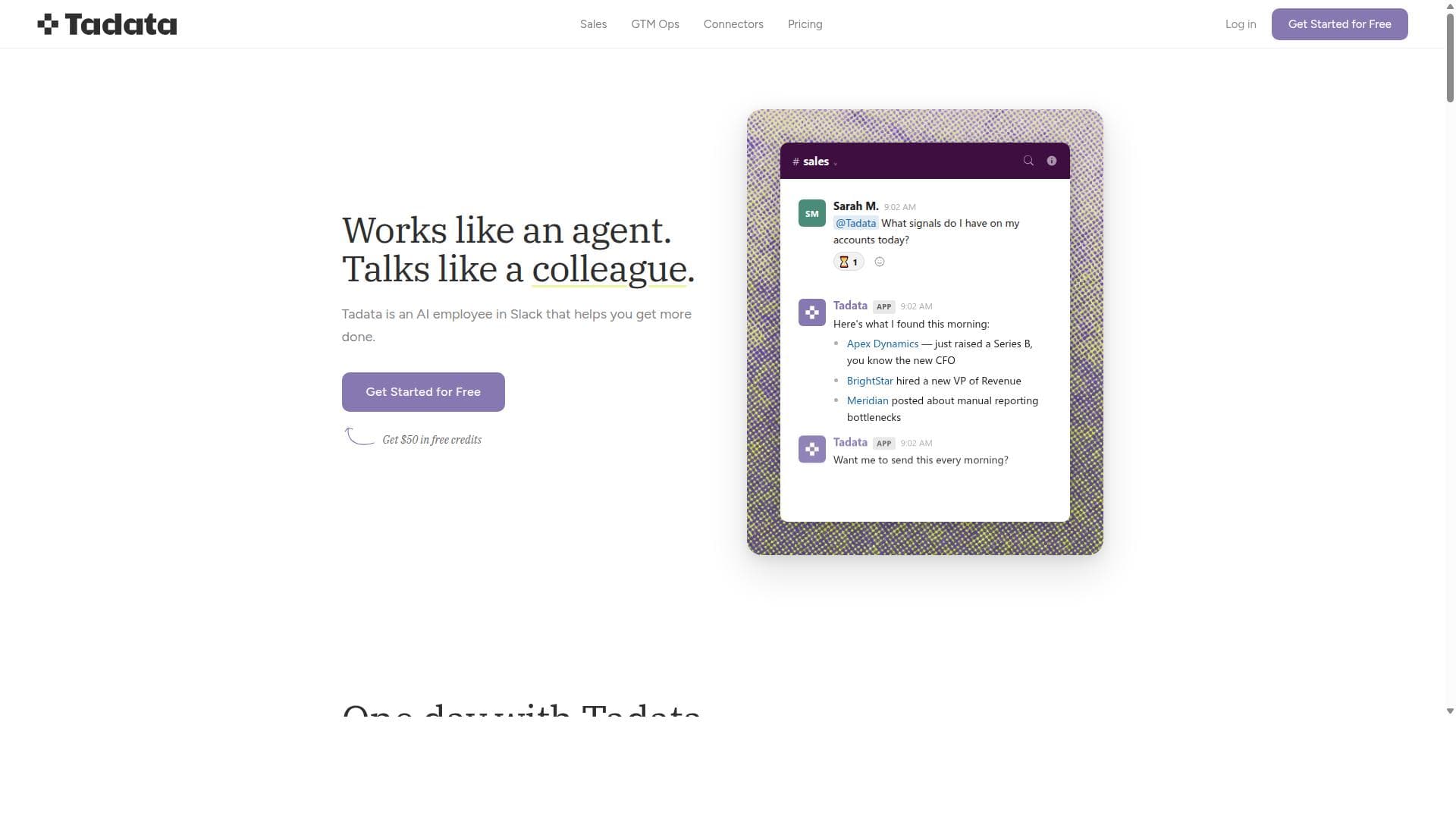
Tadata is an innovative AI-powered employee that integrates directly within Slack to help teams enhance productivity by automating research and repetitive tasks. Designed to function seamlessly within the communication platform where teams already collaborate, Tadata acts as a virtual assistant that continuously monitors your connected tools and workflows, providing timely updates and actionable insights without disrupting your existing processes. Its core purpose is to reduce the cognitive load on employees by handling routine tasks and delivering concise, relevant briefings, allowing teams to focus on higher-value work. One of Tadata’s standout features is its ability to provide morning briefings directly in Slack. These briefings include a summary of the day’s scheduled calls, meetings, important updates, and relevant news, all tailored to the user’s preferences. This helps users start their day with a clear understanding of priorities and context, reducing the need to manually gather information from multiple sources. Over time, Tadata learns individual user preferences and identifies repetitive work patterns, proactively suggesting automation opportunities that can save time and reduce errors. Beyond briefings, Tadata can draft follow-up emails, fill in CRM fields, and write next steps for projects or meetings, all pending user approval to maintain control and accuracy. This capability streamlines workflows by minimizing manual data entry and communication tasks. Tadata operates continuously in the background, monitoring connected tools and notifying users only when action is required, which helps avoid notification fatigue. Its deep integration within Slack ensures that all interactions happen in a familiar environment, eliminating the need to switch between multiple apps. Tadata is particularly well-suited for sales teams, GTM (Go-To-Market) operations, and other collaborative groups that rely heavily on Slack and CRM systems. Sales professionals benefit from automated follow-ups and CRM updates, while GTM ops teams can leverage Tadata’s briefings and task automation to keep projects on track. The tool’s ability to learn and adapt to user preferences makes it valuable for any team looking to optimize routine workflows and improve communication efficiency. Regarding pricing, Tadata offers a free tier that allows users to get started without upfront costs, including access to core features and a limited number of automation actions. Paid plans scale based on team size and feature requirements, offering enhanced automation capabilities, additional integrations, and priority support. This tiered pricing model makes Tadata accessible to startups and enterprises alike, providing flexibility to grow with the team’s needs. Compared to alternatives, Tadata’s unique selling point is its native Slack integration combined with continuous background operation across connected tools. While other AI assistants may require switching between apps or manual triggers, Tadata proactively works within the team’s existing communication hub, making adoption smoother and workflows more cohesive. Its focus on learning user preferences and suggesting automations with explicit user approval also distinguishes it from less personalized or more intrusive AI tools. However, potential users should consider that Tadata’s effectiveness depends on the quality and extent of integration with their existing tools and Slack environment. Teams heavily reliant on platforms outside of Slack or those with complex, highly customized workflows may face limitations in automation scope. Additionally, as with any AI assistant handling sensitive data, organizations should evaluate security and compliance aspects to ensure alignment with their policies. In summary, Tadata is a powerful AI employee designed to live within Slack, helping teams automate routine tasks, stay informed with personalized briefings, and ultimately get more done with less friction. Its continuous operation, user-centric automation suggestions, and seamless Slack integration make it an attractive solution for sales, GTM ops, and collaborative teams aiming to boost productivity and reduce manual workload.
Tool Features
- Provides morning briefings with today's calls, meetings, updates, and relevant news directly in Slack.
- Learns user preferences and identifies repetitive work to offer automation suggestions.
- Drafts follow-up emails, fills CRM fields, and writes next steps, pending user approval.
- Operates continuously in connected tools and notifies users when action is needed.
- Integrates seamlessly within Slack, the platform where teams already collaborate.
Description
Tadata is an AI employee embedded within Slack that automates repetitive tasks and delivers personalized daily briefings to help teams work smarter. Ideal for sales and GTM operations teams, it learns user preferences to proactively suggest automations, all while operating seamlessly in the Slack environment where teams already collaborate.
Tadata is the AI employee that lives in your Slack. It connects to your tools, learns your company and your preferences, and does work for your team.
Detailed Description
Tadata is an innovative AI-powered employee that integrates directly within Slack to help teams enhance productivity by automating research and repetitive tasks. Designed to function seamlessly within the communication platform where teams already collaborate, Tadata acts as a virtual assistant that continuously monitors your connected tools and workflows, providing timely updates and actionable insights without disrupting your existing processes. Its core purpose is to reduce the cognitive load on employees by handling routine tasks and delivering concise, relevant briefings, allowing teams to focus on higher-value work. One of Tadata’s standout features is its ability to provide morning briefings directly in Slack. These briefings include a summary of the day’s scheduled calls, meetings, important updates, and relevant news, all tailored to the user’s preferences. This helps users start their day with a clear understanding of priorities and context, reducing the need to manually gather information from multiple sources. Over time, Tadata learns individual user preferences and identifies repetitive work patterns, proactively suggesting automation opportunities that can save time and reduce errors. Beyond briefings, Tadata can draft follow-up emails, fill in CRM fields, and write next steps for projects or meetings, all pending user approval to maintain control and accuracy. This capability streamlines workflows by minimizing manual data entry and communication tasks. Tadata operates continuously in the background, monitoring connected tools and notifying users only when action is required, which helps avoid notification fatigue. Its deep integration within Slack ensures that all interactions happen in a familiar environment, eliminating the need to switch between multiple apps. Tadata is particularly well-suited for sales teams, GTM (Go-To-Market) operations, and other collaborative groups that rely heavily on Slack and CRM systems. Sales professionals benefit from automated follow-ups and CRM updates, while GTM ops teams can leverage Tadata’s briefings and task automation to keep projects on track. The tool’s ability to learn and adapt to user preferences makes it valuable for any team looking to optimize routine workflows and improve communication efficiency. Regarding pricing, Tadata offers a free tier that allows users to get started without upfront costs, including access to core features and a limited number of automation actions. Paid plans scale based on team size and feature requirements, offering enhanced automation capabilities, additional integrations, and priority support. This tiered pricing model makes Tadata accessible to startups and enterprises alike, providing flexibility to grow with the team’s needs. Compared to alternatives, Tadata’s unique selling point is its native Slack integration combined with continuous background operation across connected tools. While other AI assistants may require switching between apps or manual triggers, Tadata proactively works within the team’s existing communication hub, making adoption smoother and workflows more cohesive. Its focus on learning user preferences and suggesting automations with explicit user approval also distinguishes it from less personalized or more intrusive AI tools. However, potential users should consider that Tadata’s effectiveness depends on the quality and extent of integration with their existing tools and Slack environment. Teams heavily reliant on platforms outside of Slack or those with complex, highly customized workflows may face limitations in automation scope. Additionally, as with any AI assistant handling sensitive data, organizations should evaluate security and compliance aspects to ensure alignment with their policies. In summary, Tadata is a powerful AI employee designed to live within Slack, helping teams automate routine tasks, stay informed with personalized briefings, and ultimately get more done with less friction. Its continuous operation, user-centric automation suggestions, and seamless Slack integration make it an attractive solution for sales, GTM ops, and collaborative teams aiming to boost productivity and reduce manual workload.
Frequently Asked Questions
What is Tadata?
Tadata is an AI-powered assistant integrated within Slack that helps teams increase productivity by automating repetitive tasks, providing daily briefings, and managing routine workflows directly in the Slack environment.
How much does Tadata cost?
Tadata offers a free tier to get started with core features and a limited number of automations. Paid plans are available that scale based on team size and feature needs, providing enhanced automation capabilities and additional integrations.
Who is Tadata best for?
Tadata is best suited for sales teams, Go-To-Market operations, and collaborative groups that use Slack extensively and want to automate routine tasks like follow-ups, CRM updates, and daily briefings.
What are the main features of Tadata?
Key features include personalized morning briefings with calls, meetings, and news; learning user preferences to identify repetitive tasks; drafting follow-up emails and filling CRM fields pending approval; continuous operation across connected tools; and seamless Slack integration.
Does Tadata offer a free trial?
Yes, Tadata provides a free tier that allows users to try core functionalities and get started without any upfront cost.
What integrations does Tadata support?
Tadata integrates deeply with Slack and connects with various tools used by sales and GTM ops teams, including CRM systems, calendar apps, and communication platforms, enabling continuous monitoring and automation.
How does Tadata work?
Tadata runs continuously within Slack and connected tools, learning user preferences and workflows to provide timely briefings and automate repetitive tasks. It drafts communications and updates data fields, all subject to user approval, ensuring control and accuracy.
Socials
Use ToolReviews
No reviews yet. Be the first to share your experience.




















































