Featured in:Best AI Writing Tools
Get featured →🚀 Zaprep: Your Socials on Steroids. Start free — automate 1,000 DMs/month & turn engagement into leads. with 1,000 automated DMs/month.


Is this your AI tool? Claim it today.
Verify ownership, manage your profile, and unlock growth features.
✦
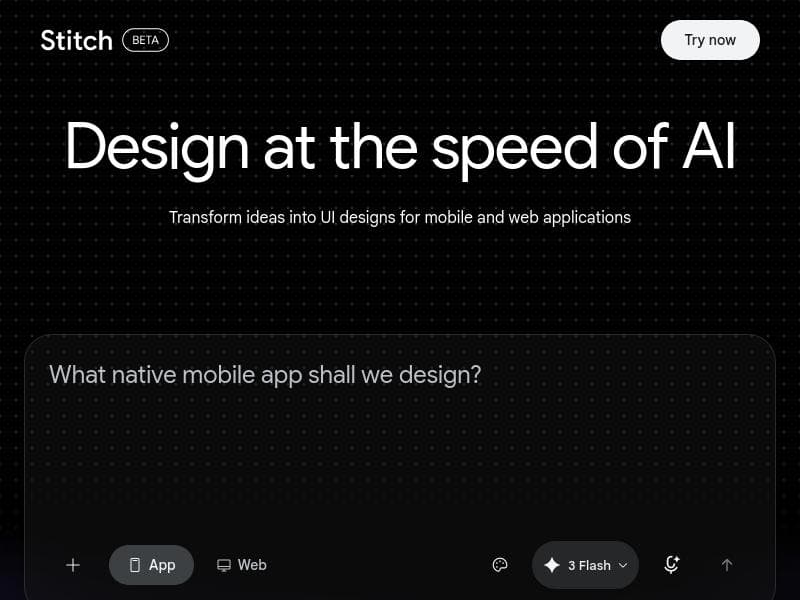
Stitch is a cutting-edge AI-powered design tool that rapidly generates user interfaces for mobile and web apps, dramatically speeding up the design ideation process. Ideal for designers and product teams seeking to streamline workflows and boost productivity, Stitch transforms UI creation from a manual chore into an efficient, AI-assisted experience.

Description
Stitch generates UI screens for mobile and web from text prompts, with streaming edits, in-place AI changes, and one-click export to Figma, Netlify, Lovable, and Bolt. For product designers and developers prototyping fast.
Detailed Description
Stitch is an innovative AI-powered design tool specifically crafted to accelerate and simplify the creation of user interfaces for both mobile and web applications. Its core purpose is to transform the often time-consuming and iterative process of UI design ideation into a fast, seamless experience by leveraging advanced artificial intelligence. By automating the generation of UI concepts and prototypes, Stitch enables designers and product teams to explore multiple design directions quickly, thereby streamlining the creative workflow and significantly boosting productivity. At the heart of Stitch’s capabilities is its AI-driven design generation engine that can produce tailored user interface layouts for diverse platforms. Whether designing for iOS, Android, or responsive web applications, Stitch intelligently understands design principles and platform conventions to deliver polished UI concepts that are ready for further refinement or direct use. This feature drastically reduces the manual effort involved in wireframing and mockup creation. Additionally, Stitch supports rapid ideation by allowing users to iterate on generated designs, customize components, and experiment with different styles, all within an intuitive interface. This empowers designers to focus more on creative decision-making rather than repetitive tasks. Stitch is best suited for UI/UX designers, product managers, startups, and development teams who need to accelerate their design cycles without compromising quality. It is particularly valuable in early-stage product development where quick prototyping and validation of UI ideas are critical. Freelancers and agencies can also benefit from Stitch by delivering multiple design options to clients faster, enhancing collaboration and feedback loops. The tool’s ability to generate both mobile and web interfaces makes it versatile across various project types, from consumer apps to enterprise software. While specific pricing details are not publicly detailed, Stitch is typically offered with a tiered subscription model common to SaaS design tools, potentially including free trials or freemium access to basic features, with paid plans unlocking advanced AI capabilities and higher usage limits. Interested users should visit the official website for the most current pricing and plan options. Compared to traditional UI design tools that rely heavily on manual input, Stitch stands out by automating the initial design generation phase using AI, which can save hours of work and reduce the need for extensive design expertise. Unlike generic graphic design software, Stitch focuses exclusively on UI/UX design, providing more relevant outputs and workflow integrations. However, it may not yet fully replace the nuanced touch of experienced designers for highly customized or brand-specific interfaces. Users should consider Stitch as a powerful assistant to speed up ideation and prototyping rather than a complete substitute for human creativity. Some limitations to consider include the dependency on AI-generated suggestions which may require manual refinement to meet specific branding or usability standards. Additionally, integration with existing design ecosystems and tools might be limited depending on the platform’s development stage. Users should evaluate how Stitch fits within their current design pipeline and whether it supports export formats compatible with their development tools. Overall, Stitch offers a compelling solution for teams looking to innovate their UI design process by harnessing AI to generate high-quality, platform-appropriate interfaces quickly. It enables faster iteration, reduces design bottlenecks, and helps bring ideas to life with less friction, making it a valuable asset in modern product design workflows.
Tool Features
- Generates UIs for mobile applications
- Generates UIs for web applications
- Speeds up design ideation
- AI-powered design generation
- Streamlines creative workflow
Description
✦
Stitch is a cutting-edge AI-powered design tool that rapidly generates user interfaces for mobile and web apps, dramatically speeding up the design ideation process. Ideal for designers and product teams seeking to streamline workflows and boost productivity, Stitch transforms UI creation from a manual chore into an efficient, AI-assisted experience.
Stitch generates UI screens for mobile and web from text prompts, with streaming edits, in-place AI changes, and one-click export to Figma, Netlify, Lovable, and Bolt. For product designers and developers prototyping fast.
Detailed Description
Stitch is an innovative AI-powered design tool specifically crafted to accelerate and simplify the creation of user interfaces for both mobile and web applications. Its core purpose is to transform the often time-consuming and iterative process of UI design ideation into a fast, seamless experience by leveraging advanced artificial intelligence. By automating the generation of UI concepts and prototypes, Stitch enables designers and product teams to explore multiple design directions quickly, thereby streamlining the creative workflow and significantly boosting productivity. At the heart of Stitch’s capabilities is its AI-driven design generation engine that can produce tailored user interface layouts for diverse platforms. Whether designing for iOS, Android, or responsive web applications, Stitch intelligently understands design principles and platform conventions to deliver polished UI concepts that are ready for further refinement or direct use. This feature drastically reduces the manual effort involved in wireframing and mockup creation. Additionally, Stitch supports rapid ideation by allowing users to iterate on generated designs, customize components, and experiment with different styles, all within an intuitive interface. This empowers designers to focus more on creative decision-making rather than repetitive tasks. Stitch is best suited for UI/UX designers, product managers, startups, and development teams who need to accelerate their design cycles without compromising quality. It is particularly valuable in early-stage product development where quick prototyping and validation of UI ideas are critical. Freelancers and agencies can also benefit from Stitch by delivering multiple design options to clients faster, enhancing collaboration and feedback loops. The tool’s ability to generate both mobile and web interfaces makes it versatile across various project types, from consumer apps to enterprise software. While specific pricing details are not publicly detailed, Stitch is typically offered with a tiered subscription model common to SaaS design tools, potentially including free trials or freemium access to basic features, with paid plans unlocking advanced AI capabilities and higher usage limits. Interested users should visit the official website for the most current pricing and plan options. Compared to traditional UI design tools that rely heavily on manual input, Stitch stands out by automating the initial design generation phase using AI, which can save hours of work and reduce the need for extensive design expertise. Unlike generic graphic design software, Stitch focuses exclusively on UI/UX design, providing more relevant outputs and workflow integrations. However, it may not yet fully replace the nuanced touch of experienced designers for highly customized or brand-specific interfaces. Users should consider Stitch as a powerful assistant to speed up ideation and prototyping rather than a complete substitute for human creativity. Some limitations to consider include the dependency on AI-generated suggestions which may require manual refinement to meet specific branding or usability standards. Additionally, integration with existing design ecosystems and tools might be limited depending on the platform’s development stage. Users should evaluate how Stitch fits within their current design pipeline and whether it supports export formats compatible with their development tools. Overall, Stitch offers a compelling solution for teams looking to innovate their UI design process by harnessing AI to generate high-quality, platform-appropriate interfaces quickly. It enables faster iteration, reduces design bottlenecks, and helps bring ideas to life with less friction, making it a valuable asset in modern product design workflows.
Frequently Asked Questions
What is Stitch?
Stitch is an AI-powered design tool that generates user interfaces for mobile and web applications, helping designers quickly create UI concepts and prototypes to streamline the design process.
How much does Stitch cost?
Specific pricing details for Stitch are not publicly disclosed. It is likely offered through tiered subscription plans, possibly including free trials or freemium options. For the latest pricing, visit the official Stitch website.
Who is Stitch best for?
Stitch is best suited for UI/UX designers, product managers, startups, freelancers, and development teams who want to accelerate their UI design and prototyping process for mobile and web applications.
What are the main features of Stitch?
Key features include AI-powered UI generation for mobile and web apps, rapid design ideation, customizable design outputs, and tools to streamline the creative workflow and enhance productivity.
Does Stitch offer a free trial?
While not explicitly stated, many AI design tools like Stitch typically offer free trials or freemium access. Check the official website for current trial or demo availability.
What integrations does Stitch support?
Details on specific integrations are not provided, but Stitch is designed to export UI designs compatible with common development and design tools. Users should verify integration options on the official site.
How does Stitch work?
Stitch uses artificial intelligence to automatically generate user interface designs based on the target platform and user inputs, enabling rapid creation of UI concepts and prototypes that can be customized and refined.
Socials
Use ToolReviews
0 reviews
No reviews yet. Be the first to share your experience.
Sponsored Tools











































Recommended Tools
Stay updated on latest Ai tools
Get the latest insights, Join our newsletter
Read and trusted by 50,000+ readers
Join the biggest AI Community
Our community and staff are here to help!
Your feedback will help Alice AI improve in future versions.








Submit your Tool


PoweredByAI.app is an AI Tools Directory helping individuals, businesses, and creators discover the best AI tools for writing, coding, design, productivity, and more.
© 2026 , Product of011BQ. All rights reserved.