🚀 Zaprep: Your Socials on Steroids. Start free — automate 1,000 DMs/month & turn engagement into leads. with 1,000 automated DMs/month.


Is this your AI tool? Claim it today.
Verify ownership, manage your profile, and unlock growth features.
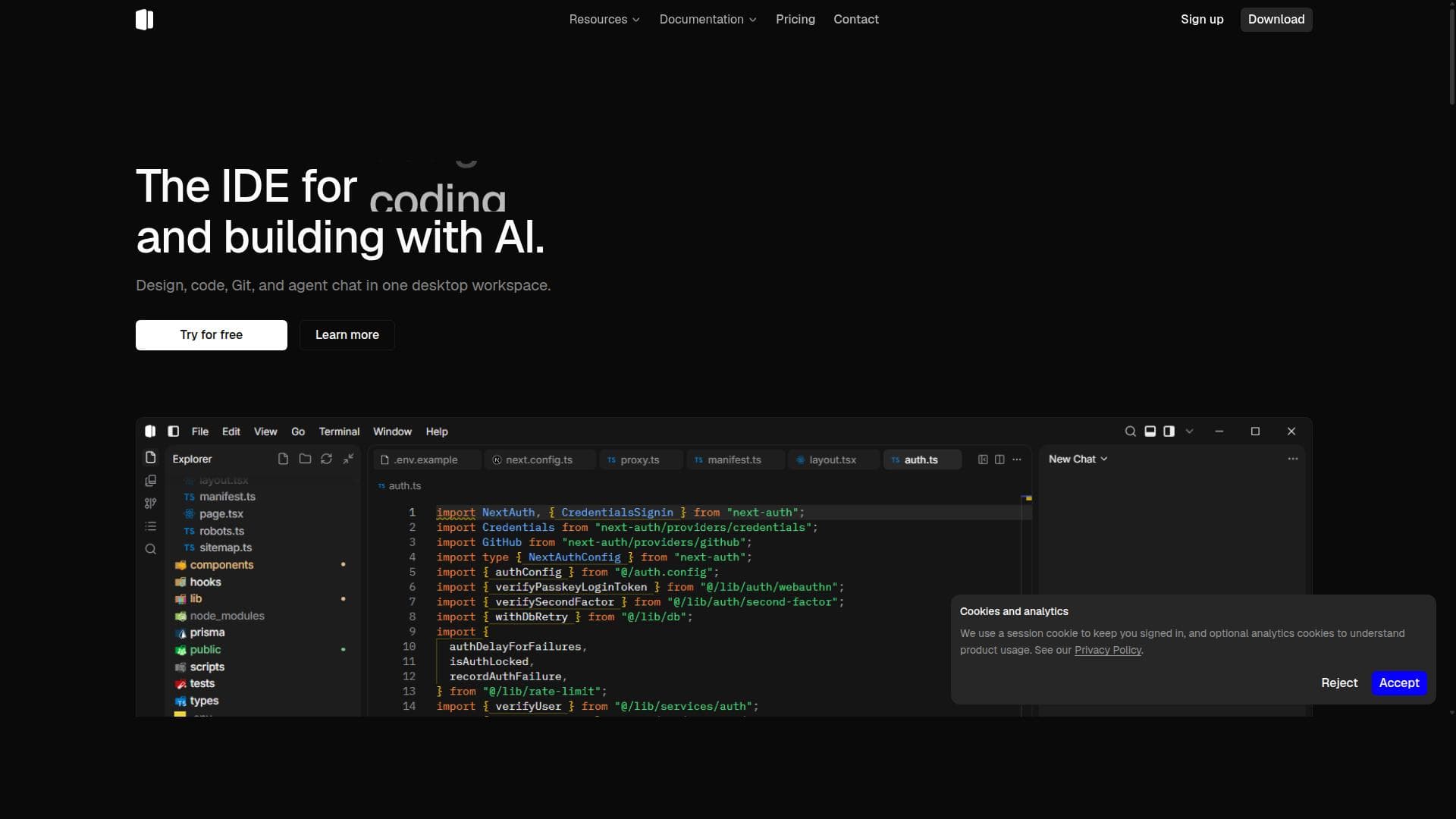
Shape is a unique agentic IDE that merges design, coding, Git, and AI chat into one Windows desktop app, tailored specifically for designers and programmers. It streamlines workflows by enabling seamless collaboration between visual design and code development, making it ideal for creative and technical professionals working on modern web projects.

Description
Shape is the agentic IDE for designers and programmers. Design, code, Git, and AI chat in one desktop app. Download for Windows.
Detailed Description
Shape is an agentic integrated development environment (IDE) uniquely crafted to bridge the gap between designers and programmers by combining design, coding, version control, and AI chat capabilities into a single, cohesive desktop application for Windows. Its core purpose is to streamline the creative and technical workflow by providing a unified platform where users can seamlessly switch between visual design and code development without the need to juggle multiple tools. This integration fosters a more efficient and collaborative environment, especially for teams and individuals working on web and software projects that require both design precision and robust coding practices. At the heart of Shape lies its AI coding agent, which assists developers by generating, reviewing, and optimizing code in real-time. This feature significantly accelerates development cycles and reduces the cognitive load on programmers by offering intelligent suggestions and automating routine coding tasks. Complementing this is a comprehensive set of visual design tools that empower designers to create and manipulate UI elements directly within the IDE. This eliminates the traditional handoff delays between design and development teams, enabling a more iterative and responsive workflow. Shape also integrates Git version control natively, allowing users to manage source code repositories, track changes, and collaborate with others without leaving the IDE. This built-in Git support simplifies version management and fosters better collaboration practices. The IDE is optimized for TypeScript and the modern web stack, making it particularly suitable for web developers who rely on these technologies. Its desktop application format for Windows ensures a stable, performant environment tailored for professional use. The tool is best suited for designers and programmers who work closely together or individuals who require a versatile environment that supports both visual and code-based workflows. Use cases include front-end web development, UI/UX design integration, rapid prototyping, and collaborative software projects where seamless interaction between design and code is critical. It is especially beneficial for teams looking to reduce context switching and improve productivity by consolidating multiple tools into one platform. Shape offers multiple pricing tiers to accommodate different user needs. There is a Free plan that provides essential features, making it accessible for hobbyists or those wanting to explore the tool. Paid plans include Plus at $15 per month, Pro at $50 per month, and Max at $150 per month, each unlocking progressively advanced features and capabilities suitable for professional and enterprise users. Pricing details and plan comparisons are available on their website. Compared to alternative IDEs and design tools, Shape stands out by integrating AI-assisted coding, visual design, and Git version control in a single application specifically tailored for Windows. While many IDEs focus solely on code or design tools focus exclusively on UI creation, Shape’s agentic approach offers a more holistic solution. However, it is currently limited to the Windows platform, which may restrict adoption for users on macOS or Linux. Additionally, while AI assistance is powerful, users should be aware that it may require oversight to ensure code quality and design accuracy. In summary, Shape is a powerful, integrated IDE that caters to the evolving needs of designers and programmers by combining AI, design tools, coding, and version control into one streamlined desktop application. Its focus on collaboration, efficiency, and modern web technologies makes it a compelling choice for professionals seeking to unify their creative and technical workflows.
Tool Features
- AI coding agent
- Visual design tools
- Built-in Git
- TypeScript and web stack support
- Desktop IDE for Windows
Description
Shape is a unique agentic IDE that merges design, coding, Git, and AI chat into one Windows desktop app, tailored specifically for designers and programmers. It streamlines workflows by enabling seamless collaboration between visual design and code development, making it ideal for creative and technical professionals working on modern web projects.
Shape is the agentic IDE for designers and programmers. Design, code, Git, and AI chat in one desktop app. Download for Windows.
Detailed Description
Shape is an agentic integrated development environment (IDE) uniquely crafted to bridge the gap between designers and programmers by combining design, coding, version control, and AI chat capabilities into a single, cohesive desktop application for Windows. Its core purpose is to streamline the creative and technical workflow by providing a unified platform where users can seamlessly switch between visual design and code development without the need to juggle multiple tools. This integration fosters a more efficient and collaborative environment, especially for teams and individuals working on web and software projects that require both design precision and robust coding practices. At the heart of Shape lies its AI coding agent, which assists developers by generating, reviewing, and optimizing code in real-time. This feature significantly accelerates development cycles and reduces the cognitive load on programmers by offering intelligent suggestions and automating routine coding tasks. Complementing this is a comprehensive set of visual design tools that empower designers to create and manipulate UI elements directly within the IDE. This eliminates the traditional handoff delays between design and development teams, enabling a more iterative and responsive workflow. Shape also integrates Git version control natively, allowing users to manage source code repositories, track changes, and collaborate with others without leaving the IDE. This built-in Git support simplifies version management and fosters better collaboration practices. The IDE is optimized for TypeScript and the modern web stack, making it particularly suitable for web developers who rely on these technologies. Its desktop application format for Windows ensures a stable, performant environment tailored for professional use. The tool is best suited for designers and programmers who work closely together or individuals who require a versatile environment that supports both visual and code-based workflows. Use cases include front-end web development, UI/UX design integration, rapid prototyping, and collaborative software projects where seamless interaction between design and code is critical. It is especially beneficial for teams looking to reduce context switching and improve productivity by consolidating multiple tools into one platform. Shape offers multiple pricing tiers to accommodate different user needs. There is a Free plan that provides essential features, making it accessible for hobbyists or those wanting to explore the tool. Paid plans include Plus at $15 per month, Pro at $50 per month, and Max at $150 per month, each unlocking progressively advanced features and capabilities suitable for professional and enterprise users. Pricing details and plan comparisons are available on their website. Compared to alternative IDEs and design tools, Shape stands out by integrating AI-assisted coding, visual design, and Git version control in a single application specifically tailored for Windows. While many IDEs focus solely on code or design tools focus exclusively on UI creation, Shape’s agentic approach offers a more holistic solution. However, it is currently limited to the Windows platform, which may restrict adoption for users on macOS or Linux. Additionally, while AI assistance is powerful, users should be aware that it may require oversight to ensure code quality and design accuracy. In summary, Shape is a powerful, integrated IDE that caters to the evolving needs of designers and programmers by combining AI, design tools, coding, and version control into one streamlined desktop application. Its focus on collaboration, efficiency, and modern web technologies makes it a compelling choice for professionals seeking to unify their creative and technical workflows.
Frequently Asked Questions
What is Shape?
Shape is an integrated development environment (IDE) designed for designers and programmers that combines visual design tools, AI-assisted coding, Git version control, and AI chat capabilities into a single desktop application for Windows.
How much does Shape cost?
Shape offers multiple pricing plans including a Free tier with essential features, Plus at $15 per month, Pro at $50 per month, and Max at $150 per month, each providing different levels of functionality to suit various user needs.
Who is Shape best for?
Shape is best suited for designers and programmers who need a unified platform to collaborate and work efficiently on web and software projects, especially those using TypeScript and modern web technologies on Windows.
What are the main features of Shape?
Key features include an AI coding agent that assists with code generation and optimization, visual design tools for UI creation, built-in Git version control, support for TypeScript and the web stack, and a desktop IDE optimized for Windows.
Does Shape offer a free trial?
Yes, Shape provides a Free plan that allows users to try essential features without cost, enabling them to explore the IDE before committing to a paid subscription.
What integrations does Shape support?
Shape integrates Git version control natively and supports web development technologies such as TypeScript, enabling seamless collaboration and development within the IDE environment.
How does Shape work?
Shape works by providing a single desktop application where users can design visually, write and edit code with AI assistance, manage Git repositories, and interact with an AI chat, all integrated to streamline the development and design workflow on Windows.
Reviews
No reviews yet. Be the first to share your experience.
Sponsored Tools











































Recommended Tools
Stay updated on latest Ai tools
Get the latest insights, Join our newsletter
Read and trusted by 50,000+ readers
Join the biggest AI Community
Our community and staff are here to help!
Your feedback will help Alice AI improve in future versions.








Submit your Tool


PoweredByAI.app is an AI Tools Directory helping individuals, businesses, and creators discover the best AI tools for writing, coding, design, productivity, and more.
© 2026 , Product of011BQ. All rights reserved.