Featured in:Best AI Writing Tools
Get featured →🚀 Zaprep: Your Socials on Steroids. Start free — automate 1,000 DMs/month & turn engagement into leads. with 1,000 automated DMs/month.


Is this your AI tool? Claim it today.
Verify ownership, manage your profile, and unlock growth features.
✦
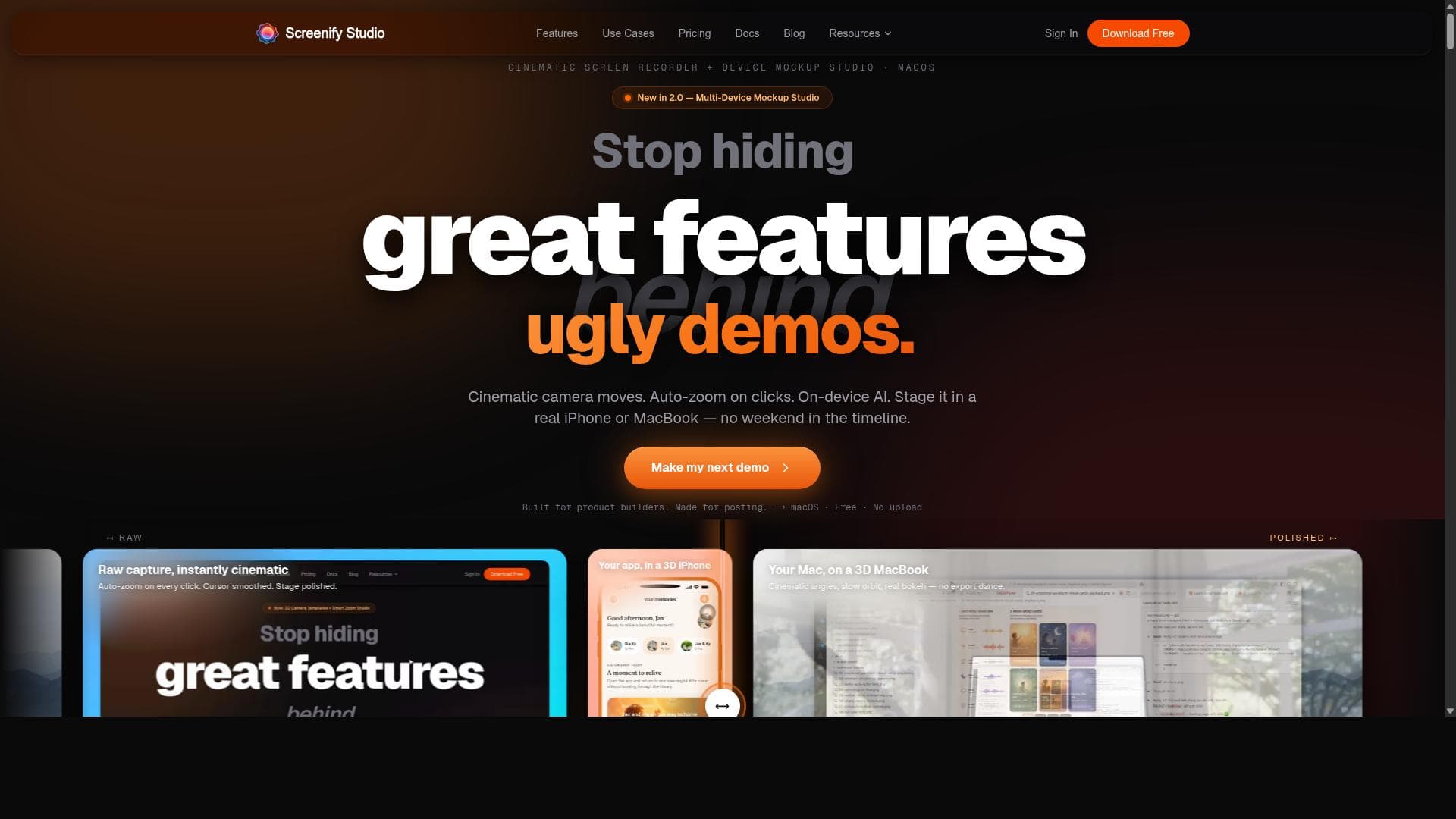
Screenify Studio is a Mac-exclusive screen recorder that transforms rough captures into cinematic, polished product demos with smart focus and authentic device mockups. It’s perfect for indie hackers and technical founders who want professional presentations without the hassle of complex editing.

Description
Screenify Studio is a Mac screen recorder that turns rough recordings into polished product demos — without the editing tax. Describe a demo in plain English and an AI drives a real browser to record it, then adds cinematic 3D camera moves, spotlights, and callouts. Prefer full control? A deep editor with manual zoom keyframes. Stage recordings in a photoreal 3D MacBook, iPhone, or iPad, add on-device AI captions, or drive it all from a CLI an agent like Claude Code can run. Free to start.
Detailed Description
Screenify Studio is a specialized screen recording application designed exclusively for macOS 13 and above, aimed at transforming basic screen captures into polished, professional-quality product demos. Its core purpose is to simplify the creation of engaging video presentations for indie hackers, technical founders, and builders who prefer to avoid the complexities of traditional video editing. By focusing on ease of use and high-quality output, Screenify Studio enables users to showcase software features, tutorials, and product walkthroughs with cinematic flair and minimal effort. One of the standout features of Screenify Studio is its cinematic motion capability, which adds smooth, visually appealing transitions and movements to screen recordings. This feature helps make demos more dynamic and engaging, moving beyond static or choppy captures. Complementing this is the smart focus functionality, which intelligently highlights the most important areas of the screen during playback. This ensures viewers’ attention is directed exactly where it matters, enhancing clarity and comprehension without manual editing. Additionally, Screenify Studio offers device mockups that stage recordings within authentic iPhone or MacBook frames. This not only elevates the visual appeal but also contextualizes the demo, making it easier for audiences to relate to the product environment. Screenify Studio is particularly well-suited for indie hackers, startup founders, and technical professionals who need to create high-quality demos quickly without investing time in complex editing software. It caters to those who want to focus on building and presenting their products rather than mastering video production. Typical use cases include software tutorials, feature highlights, onboarding videos, and marketing demos. By streamlining the recording and enhancement process, Screenify Studio helps users produce content that looks professionally crafted, boosting credibility and user engagement. Regarding pricing, Screenify Studio offers a free tier that allows users to get started without any upfront cost, making it accessible for beginners and those evaluating the tool. For more advanced needs, there is a Pro subscription priced at $19 per month, which unlocks additional features and capabilities. For users seeking a one-time investment, a Pro Lifetime license is available for $149, providing permanent access to all Pro features without recurring fees. This flexible pricing structure accommodates different budgets and usage patterns, from casual users to power users. Compared to other screen recording tools, Screenify Studio stands out by focusing exclusively on macOS and optimizing the experience for technical founders who dislike editing. While many alternatives offer extensive editing suites, Screenify Studio prioritizes automation and intelligent enhancements like smart focus and cinematic motion, reducing the learning curve and time investment. The inclusion of real device mockups also differentiates it by providing a ready-made professional context for demos, which many competitors lack or require manual setup. However, there are some considerations to keep in mind. Screenify Studio is macOS-only and requires version 13 or higher, which limits its availability to users on older Macs or other operating systems. Additionally, while it excels at creating polished demos quickly, it may not satisfy users who need highly customized or complex video editing features beyond its scope. Integration options are currently limited, so users relying on extensive third-party workflows might find it less flexible. Despite these limitations, Screenify Studio offers a compelling solution for its target audience, delivering a streamlined, high-quality demo creation experience that saves time and enhances presentation impact.
Tool Features
- Cinematic motion for screen recordings
- Smart focus to highlight important areas
- Device mockups staging in real iPhone or MacBook frames
- Polished product demos creation
- Made specifically for MacOS 13+
- Ideal for builders who dislike editing
Description
✦
Screenify Studio is a Mac-exclusive screen recorder that transforms rough captures into cinematic, polished product demos with smart focus and authentic device mockups. It’s perfect for indie hackers and technical founders who want professional presentations without the hassle of complex editing.
Screenify Studio is a Mac screen recorder that turns rough recordings into polished product demos — without the editing tax. Describe a demo in plain English and an AI drives a real browser to record it, then adds cinematic 3D camera moves, spotlights, and callouts. Prefer full control? A deep editor with manual zoom keyframes. Stage recordings in a photoreal 3D MacBook, iPhone, or iPad, add on-device AI captions, or drive it all from a CLI an agent like Claude Code can run. Free to start.
Detailed Description
Screenify Studio is a specialized screen recording application designed exclusively for macOS 13 and above, aimed at transforming basic screen captures into polished, professional-quality product demos. Its core purpose is to simplify the creation of engaging video presentations for indie hackers, technical founders, and builders who prefer to avoid the complexities of traditional video editing. By focusing on ease of use and high-quality output, Screenify Studio enables users to showcase software features, tutorials, and product walkthroughs with cinematic flair and minimal effort. One of the standout features of Screenify Studio is its cinematic motion capability, which adds smooth, visually appealing transitions and movements to screen recordings. This feature helps make demos more dynamic and engaging, moving beyond static or choppy captures. Complementing this is the smart focus functionality, which intelligently highlights the most important areas of the screen during playback. This ensures viewers’ attention is directed exactly where it matters, enhancing clarity and comprehension without manual editing. Additionally, Screenify Studio offers device mockups that stage recordings within authentic iPhone or MacBook frames. This not only elevates the visual appeal but also contextualizes the demo, making it easier for audiences to relate to the product environment. Screenify Studio is particularly well-suited for indie hackers, startup founders, and technical professionals who need to create high-quality demos quickly without investing time in complex editing software. It caters to those who want to focus on building and presenting their products rather than mastering video production. Typical use cases include software tutorials, feature highlights, onboarding videos, and marketing demos. By streamlining the recording and enhancement process, Screenify Studio helps users produce content that looks professionally crafted, boosting credibility and user engagement. Regarding pricing, Screenify Studio offers a free tier that allows users to get started without any upfront cost, making it accessible for beginners and those evaluating the tool. For more advanced needs, there is a Pro subscription priced at $19 per month, which unlocks additional features and capabilities. For users seeking a one-time investment, a Pro Lifetime license is available for $149, providing permanent access to all Pro features without recurring fees. This flexible pricing structure accommodates different budgets and usage patterns, from casual users to power users. Compared to other screen recording tools, Screenify Studio stands out by focusing exclusively on macOS and optimizing the experience for technical founders who dislike editing. While many alternatives offer extensive editing suites, Screenify Studio prioritizes automation and intelligent enhancements like smart focus and cinematic motion, reducing the learning curve and time investment. The inclusion of real device mockups also differentiates it by providing a ready-made professional context for demos, which many competitors lack or require manual setup. However, there are some considerations to keep in mind. Screenify Studio is macOS-only and requires version 13 or higher, which limits its availability to users on older Macs or other operating systems. Additionally, while it excels at creating polished demos quickly, it may not satisfy users who need highly customized or complex video editing features beyond its scope. Integration options are currently limited, so users relying on extensive third-party workflows might find it less flexible. Despite these limitations, Screenify Studio offers a compelling solution for its target audience, delivering a streamlined, high-quality demo creation experience that saves time and enhances presentation impact.
Frequently Asked Questions
What is Screenify Studio?
Screenify Studio is a macOS screen recording application designed to turn basic screen captures into polished, professional product demos. It features cinematic motion, smart focus, and device mockups to help users create engaging presentations quickly and easily.
How much does Screenify Studio cost?
Screenify Studio offers a free plan with basic features, a Pro subscription at $19 per month for advanced capabilities, and a Pro Lifetime license for a one-time payment of $149, providing permanent access to all Pro features.
Who is Screenify Studio best for?
It is ideal for indie hackers, startup founders, and technical professionals who want to create high-quality product demos and tutorials on Mac without spending time on complex video editing.
What are the main features of Screenify Studio?
Key features include cinematic motion for smooth video transitions, smart focus to highlight important screen areas, device mockups that stage recordings in real iPhone or MacBook frames, and an overall streamlined workflow tailored for macOS 13+.
Does Screenify Studio offer a free trial?
Yes, Screenify Studio provides a free plan that allows users to try out the core features without any cost before upgrading to Pro plans.
What integrations does Screenify Studio support?
Currently, Screenify Studio focuses on standalone functionality for macOS and does not offer extensive third-party integrations, emphasizing simplicity and ease of use.
How does Screenify Studio work?
Users record their screen on a Mac running macOS 13 or higher, then apply cinematic motion effects, smart focus highlights, and device mockups within the app to create polished product demos without manual editing.
Reviews
0 reviews
No reviews yet. Be the first to share your experience.
Sponsored Tools











































Recommended Tools
Stay updated on latest Ai tools
Get the latest insights, Join our newsletter
Read and trusted by 50,000+ readers
Join the biggest AI Community
Our community and staff are here to help!
Your feedback will help Alice AI improve in future versions.








Submit your Tool


PoweredByAI.app is an AI Tools Directory helping individuals, businesses, and creators discover the best AI tools for writing, coding, design, productivity, and more.
© 2026 , Product of011BQ. All rights reserved.