Featured in:Best AI Transcription Tools
Get featured →🚀 Zaprep: Your Socials on Steroids. Start free — automate 1,000 DMs/month & turn engagement into leads. with 1,000 automated DMs/month.


Is this your AI tool? Claim it today.
Verify ownership, manage your profile, and unlock growth features.
✦
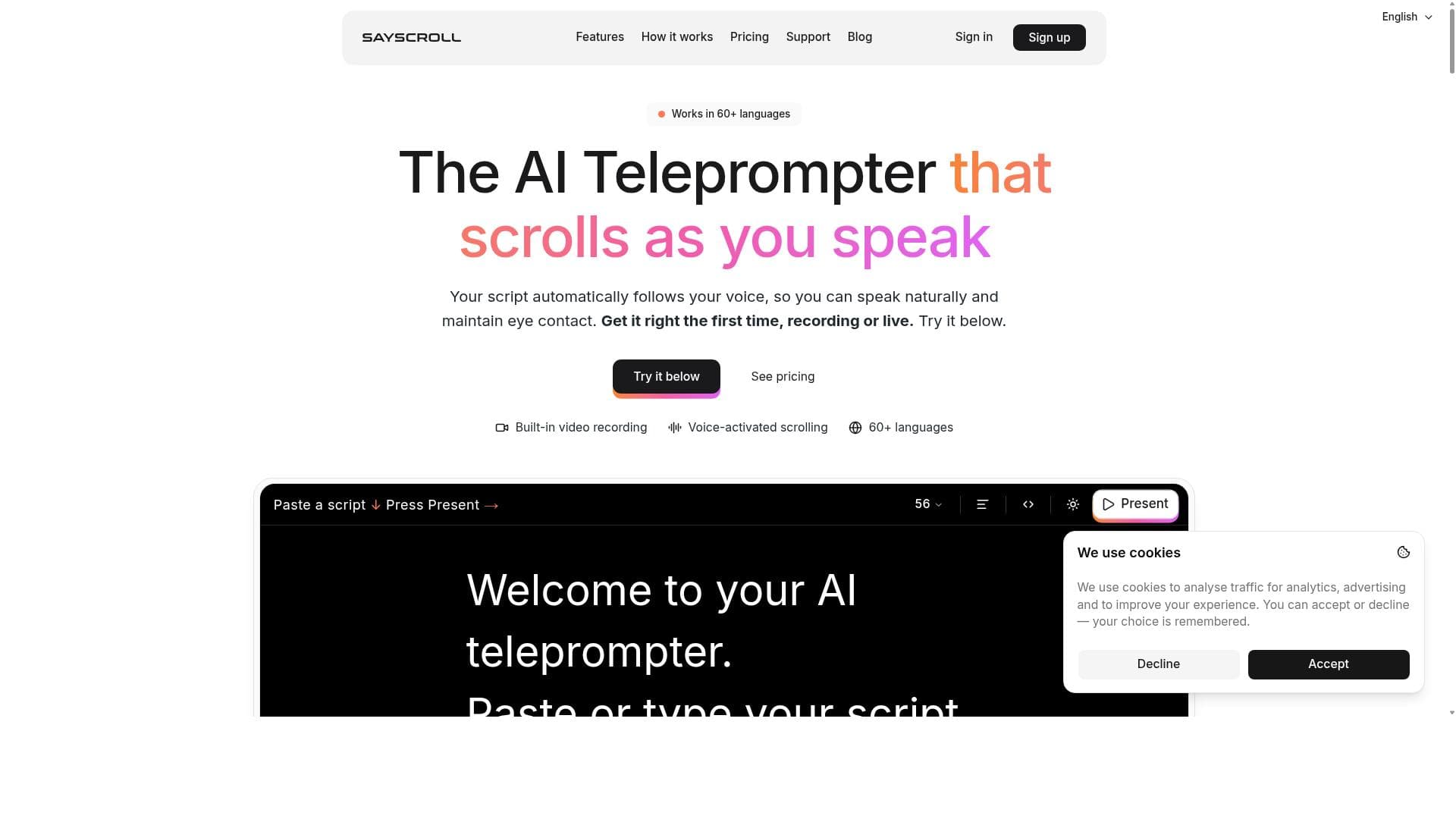
Sayscroll is a cutting-edge AI teleprompter that uses real-time speech recognition to scroll text automatically as you speak, supporting over 60 languages and enabling video recording directly in your browser. Ideal for content creators, educators, and multilingual professionals, it streamlines presentations and recordings with seamless voice-controlled teleprompting.

Description
SAYSCROLL is an AI teleprompter that follows your voice, so you can speak naturally instead of constantly adjusting your scroll speed. It supports 60+ languages and works across videos, demos, presentations, and live content. - Built-in video recorder —Record yourself while reading your script - Improvise —The prompter waits while you go off script - Browser based —No downloads or setup - Studio-ready controls —Text size, column width, alignment, +mirror controls for pro screens
Detailed Description
Sayscroll is an innovative AI-powered teleprompter designed to enhance the experience of public speaking, video recording, and live presentations by automatically scrolling text in real-time as you speak. Unlike traditional teleprompters that require manual scrolling or preset speeds, Sayscroll leverages advanced real-time speech recognition technology to follow your voice precisely, ensuring the script moves seamlessly in sync with your natural speaking pace. This core functionality makes it an invaluable tool for content creators, educators, marketers, and anyone who frequently delivers scripted content on camera or in front of an audience. At its heart, Sayscroll is a browser-based teleprompter that supports over 60 languages, making it uniquely versatile for multilingual users or those working in diverse linguistic environments. The platform not only listens to your speech and scrolls the text accordingly but also allows you to record video directly within your browser, eliminating the need for separate recording software. This integration streamlines the entire process from script reading to video creation, saving time and simplifying workflows. Key features of Sayscroll include real-time speech recognition that accurately detects your spoken words and adjusts the scrolling speed dynamically, providing a natural and uninterrupted reading experience. The voice-controlled teleprompter scrolling means you don’t have to worry about manually advancing the text or using external devices to control the script flow. Its support for more than 60 languages ensures that users across the globe can utilize the tool effectively, whether they are speaking English, Spanish, French, German, or many other languages. The in-browser video recording feature is particularly useful for vloggers, educators, and remote professionals who want to produce polished videos without complicated setups. Additionally, the multilingual teleprompter functionality supports scripts in multiple languages, which is ideal for international presentations or language learning. Sayscroll is best suited for professionals who require a smooth and efficient teleprompting experience. This includes video creators who want to maintain eye contact with the camera while delivering scripted content, educators conducting online classes or lectures, corporate presenters preparing webinars or pitches, and public speakers who want to rehearse or deliver speeches flawlessly. It is also a great tool for language learners and translators who need to practice reading and speaking in different languages. The tool’s browser-based nature means it is accessible on various devices without the need for installation, making it convenient for users on the go. Regarding pricing, Sayscroll offers a free tier that allows users to try the core features without commitment, making it accessible for casual users and those wanting to test its capabilities. For more advanced features, longer recording times, or professional use, premium plans are available, typically offering enhanced functionality and priority support. Specific pricing details can be found on their website, but the free option ensures users can evaluate the tool’s value before upgrading. When compared to alternatives, Sayscroll stands out due to its real-time speech recognition and automatic scrolling, which many traditional teleprompters lack. Most conventional teleprompters require manual control or preset speeds that don’t adapt to natural speech variations. While some competitors offer teleprompter apps with video recording, Sayscroll’s combination of multilingual support, browser-based accessibility, and AI-driven scrolling provides a superior and more flexible user experience. However, users should consider that being browser-based means it relies on a stable internet connection and browser compatibility, which might be a limitation in some environments. Notable limitations include the dependency on accurate speech recognition, which can be affected by background noise, strong accents, or speech impediments. While the tool supports many languages, the quality of recognition might vary depending on the language and dialect. Additionally, as a relatively new AI-powered teleprompter, some advanced customization features found in dedicated hardware teleprompters might be absent. Users should also be aware of privacy considerations when recording video in-browser and ensure compliance with any relevant data protection regulations. Overall, Sayscroll offers a cutting-edge, user-friendly teleprompter solution that significantly improves the ease and professionalism of scripted speaking engagements, especially for multilingual and remote users.
Tool Features
- Real-time speech recognition
- Voice-controlled teleprompter scrolling
- Supports 60+ languages
- Records video in browser
- Multilingual teleprompter
- Auto scroll teleprompter
Description
✦
Sayscroll is a cutting-edge AI teleprompter that uses real-time speech recognition to scroll text automatically as you speak, supporting over 60 languages and enabling video recording directly in your browser. Ideal for content creators, educators, and multilingual professionals, it streamlines presentations and recordings with seamless voice-controlled teleprompting.
SAYSCROLL is an AI teleprompter that follows your voice, so you can speak naturally instead of constantly adjusting your scroll speed. It supports 60+ languages and works across videos, demos, presentations, and live content. - Built-in video recorder —Record yourself while reading your script - Improvise —The prompter waits while you go off script - Browser based —No downloads or setup - Studio-ready controls —Text size, column width, alignment, +mirror controls for pro screens
Detailed Description
Sayscroll is an innovative AI-powered teleprompter designed to enhance the experience of public speaking, video recording, and live presentations by automatically scrolling text in real-time as you speak. Unlike traditional teleprompters that require manual scrolling or preset speeds, Sayscroll leverages advanced real-time speech recognition technology to follow your voice precisely, ensuring the script moves seamlessly in sync with your natural speaking pace. This core functionality makes it an invaluable tool for content creators, educators, marketers, and anyone who frequently delivers scripted content on camera or in front of an audience. At its heart, Sayscroll is a browser-based teleprompter that supports over 60 languages, making it uniquely versatile for multilingual users or those working in diverse linguistic environments. The platform not only listens to your speech and scrolls the text accordingly but also allows you to record video directly within your browser, eliminating the need for separate recording software. This integration streamlines the entire process from script reading to video creation, saving time and simplifying workflows. Key features of Sayscroll include real-time speech recognition that accurately detects your spoken words and adjusts the scrolling speed dynamically, providing a natural and uninterrupted reading experience. The voice-controlled teleprompter scrolling means you don’t have to worry about manually advancing the text or using external devices to control the script flow. Its support for more than 60 languages ensures that users across the globe can utilize the tool effectively, whether they are speaking English, Spanish, French, German, or many other languages. The in-browser video recording feature is particularly useful for vloggers, educators, and remote professionals who want to produce polished videos without complicated setups. Additionally, the multilingual teleprompter functionality supports scripts in multiple languages, which is ideal for international presentations or language learning. Sayscroll is best suited for professionals who require a smooth and efficient teleprompting experience. This includes video creators who want to maintain eye contact with the camera while delivering scripted content, educators conducting online classes or lectures, corporate presenters preparing webinars or pitches, and public speakers who want to rehearse or deliver speeches flawlessly. It is also a great tool for language learners and translators who need to practice reading and speaking in different languages. The tool’s browser-based nature means it is accessible on various devices without the need for installation, making it convenient for users on the go. Regarding pricing, Sayscroll offers a free tier that allows users to try the core features without commitment, making it accessible for casual users and those wanting to test its capabilities. For more advanced features, longer recording times, or professional use, premium plans are available, typically offering enhanced functionality and priority support. Specific pricing details can be found on their website, but the free option ensures users can evaluate the tool’s value before upgrading. When compared to alternatives, Sayscroll stands out due to its real-time speech recognition and automatic scrolling, which many traditional teleprompters lack. Most conventional teleprompters require manual control or preset speeds that don’t adapt to natural speech variations. While some competitors offer teleprompter apps with video recording, Sayscroll’s combination of multilingual support, browser-based accessibility, and AI-driven scrolling provides a superior and more flexible user experience. However, users should consider that being browser-based means it relies on a stable internet connection and browser compatibility, which might be a limitation in some environments. Notable limitations include the dependency on accurate speech recognition, which can be affected by background noise, strong accents, or speech impediments. While the tool supports many languages, the quality of recognition might vary depending on the language and dialect. Additionally, as a relatively new AI-powered teleprompter, some advanced customization features found in dedicated hardware teleprompters might be absent. Users should also be aware of privacy considerations when recording video in-browser and ensure compliance with any relevant data protection regulations. Overall, Sayscroll offers a cutting-edge, user-friendly teleprompter solution that significantly improves the ease and professionalism of scripted speaking engagements, especially for multilingual and remote users.
Frequently Asked Questions
What is Sayscroll?
Sayscroll is an AI-powered teleprompter that uses real-time speech recognition to automatically scroll text in sync with your voice as you speak. It supports over 60 languages and allows users to record video directly in their browser, making it a versatile tool for presentations, video creation, and multilingual communication.
How much does Sayscroll cost?
Sayscroll offers a free tier that lets users access core features and try the platform without commitment. For advanced features, longer recording times, and professional use, premium plans are available. Detailed pricing information can be found on the Sayscroll website.
Who is Sayscroll best for?
Sayscroll is ideal for video creators, educators, corporate presenters, public speakers, and multilingual professionals who need a smooth, voice-controlled teleprompter experience. It is especially useful for those who want to record videos or deliver presentations in multiple languages with ease.
What are the main features of Sayscroll?
The main features include real-time speech recognition for automatic teleprompter scrolling, support for over 60 languages, in-browser video recording, voice-controlled text scrolling, and a multilingual teleprompter interface that adapts to various languages and dialects.
Does Sayscroll offer a free trial?
Yes, Sayscroll provides a free tier that allows users to try its core features at no cost, enabling them to evaluate the tool before deciding to upgrade to a premium plan.
What integrations does Sayscroll support?
Sayscroll primarily operates as a browser-based standalone teleprompter and video recorder. While it does not currently advertise specific third-party integrations, its web-based nature allows easy use alongside other tools and platforms.
How does Sayscroll work?
Sayscroll uses AI-driven real-time speech recognition to listen to your voice as you speak and automatically scroll the teleprompter text in sync with your speech. This eliminates the need for manual scrolling and ensures a natural reading pace. Users can also record video directly in their browser while using the teleprompter.
Reviews
0 reviews
No reviews yet. Be the first to share your experience.
Sponsored Tools











































Recommended Tools
Stay updated on latest Ai tools
Get the latest insights, Join our newsletter
Read and trusted by 50,000+ readers
Join the biggest AI Community
Our community and staff are here to help!
Your feedback will help Alice AI improve in future versions.








Submit your Tool


PoweredByAI.app is an AI Tools Directory helping individuals, businesses, and creators discover the best AI tools for writing, coding, design, productivity, and more.
© 2026 , Product of011BQ. All rights reserved.