🚀 Zaprep: Your Socials on Steroids. Start free — automate 1,000 DMs/month & turn engagement into leads. with 1,000 automated DMs/month.


Is this your AI tool? Claim it today.
Verify ownership, manage your profile, and unlock growth features.
RepoDoc uniquely combines AI-powered documentation generation with interactive GitHub repository visualization, making it effortless to create and explore comprehensive codebase documentation. Ideal for developers and teams seeking to streamline onboarding and maintain clear project insights, RepoDoc offers a free, all-in-one solution that transforms raw code into engaging, understandable documentation.

Description
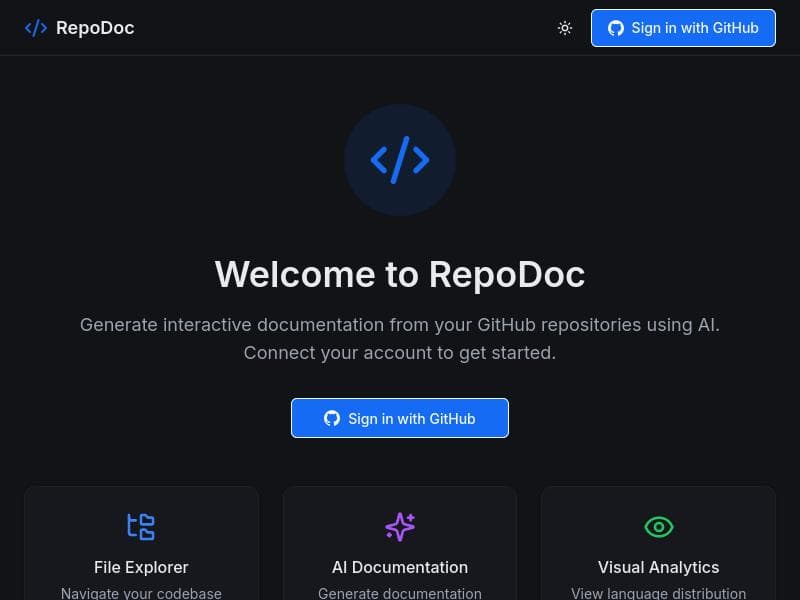
Auto-generate beautiful, interactive documentation from any GitHub repository. Visualize your codebase with AI-powered insights.
Detailed Description
RepoDoc is an innovative AI-powered tool designed to transform the way developers and teams document and understand their codebases. Its core purpose is to automatically generate visually appealing and interactive documentation directly from any GitHub repository. By leveraging advanced AI models, RepoDoc provides deep insights into the structure and components of codebases, enabling users to explore and comprehend complex projects with ease. This tool bridges the gap between raw code and human-readable documentation, making it invaluable for both new contributors and seasoned developers seeking to maintain clarity in their projects. At the heart of RepoDoc are several key features that set it apart. First, its AI-powered documentation generation automatically creates comprehensive and well-organized documentation without manual effort. This includes detailed explanations of code modules, functions, and dependencies, all generated by analyzing the repository's content. Second, RepoDoc offers GitHub repository visualization, presenting the codebase in an intuitive graphical format that highlights relationships and hierarchies within the project. This visualization aids in quickly grasping the overall architecture and pinpointing areas of interest. Third, the tool supports interactive codebase exploration, allowing users to navigate through different parts of the repository seamlessly, enhancing understanding and speeding up onboarding processes. Lastly, RepoDoc can automatically generate README files, ensuring that every project has a professional and informative introduction that is kept up to date with the latest code changes. RepoDoc is best suited for software developers, engineering teams, open-source contributors, and project managers who need to maintain clear and accessible documentation. It is particularly useful for projects with large or complex codebases where manual documentation is time-consuming and prone to becoming outdated. Startups and enterprises alike can benefit from RepoDoc’s ability to streamline knowledge sharing and reduce the learning curve for new team members. Open-source maintainers can also leverage the tool to improve community engagement by providing high-quality documentation that encourages contributions. One of the most attractive aspects of RepoDoc is its pricing model — it is offered completely free of charge. This makes it accessible to individual developers, hobbyists, and organizations of all sizes without any financial barrier. Users can immediately integrate RepoDoc into their workflow without worrying about subscription fees or usage limits, making it an excellent choice for those seeking cost-effective documentation solutions. When compared to alternative documentation tools, RepoDoc stands out due to its seamless integration with GitHub and its AI-driven approach. Unlike traditional static documentation generators that require manual input and maintenance, RepoDoc automates the entire process, saving significant time and effort. Its interactive visualization capabilities also provide a more engaging and informative experience than simple text-based documentation. However, while many competitors focus solely on README generation or static site creation, RepoDoc’s combination of features offers a more holistic solution. Despite its strengths, potential users should consider some limitations. As an AI-powered tool, the quality of generated documentation may vary depending on the complexity and style of the codebase. Some highly specialized or unconventional projects might require manual adjustments to the documentation for optimal clarity. Additionally, since RepoDoc currently focuses on GitHub repositories, users relying on other version control platforms may find integration options limited. Finally, as a free tool, advanced enterprise features such as dedicated support or custom branding might not be available. Overall, RepoDoc is a powerful and accessible solution for anyone looking to enhance their code documentation effortlessly. Its AI-driven capabilities, combined with interactive exploration and visualization, make it a standout choice for improving codebase transparency and collaboration.
Tool Features
- AI-powered documentation generation
- GitHub repository visualization
- Interactive codebase exploration
- Automatic README generation
Description
RepoDoc uniquely combines AI-powered documentation generation with interactive GitHub repository visualization, making it effortless to create and explore comprehensive codebase documentation. Ideal for developers and teams seeking to streamline onboarding and maintain clear project insights, RepoDoc offers a free, all-in-one solution that transforms raw code into engaging, understandable documentation.
Auto-generate beautiful, interactive documentation from any GitHub repository. Visualize your codebase with AI-powered insights.
Detailed Description
RepoDoc is an innovative AI-powered tool designed to transform the way developers and teams document and understand their codebases. Its core purpose is to automatically generate visually appealing and interactive documentation directly from any GitHub repository. By leveraging advanced AI models, RepoDoc provides deep insights into the structure and components of codebases, enabling users to explore and comprehend complex projects with ease. This tool bridges the gap between raw code and human-readable documentation, making it invaluable for both new contributors and seasoned developers seeking to maintain clarity in their projects. At the heart of RepoDoc are several key features that set it apart. First, its AI-powered documentation generation automatically creates comprehensive and well-organized documentation without manual effort. This includes detailed explanations of code modules, functions, and dependencies, all generated by analyzing the repository's content. Second, RepoDoc offers GitHub repository visualization, presenting the codebase in an intuitive graphical format that highlights relationships and hierarchies within the project. This visualization aids in quickly grasping the overall architecture and pinpointing areas of interest. Third, the tool supports interactive codebase exploration, allowing users to navigate through different parts of the repository seamlessly, enhancing understanding and speeding up onboarding processes. Lastly, RepoDoc can automatically generate README files, ensuring that every project has a professional and informative introduction that is kept up to date with the latest code changes. RepoDoc is best suited for software developers, engineering teams, open-source contributors, and project managers who need to maintain clear and accessible documentation. It is particularly useful for projects with large or complex codebases where manual documentation is time-consuming and prone to becoming outdated. Startups and enterprises alike can benefit from RepoDoc’s ability to streamline knowledge sharing and reduce the learning curve for new team members. Open-source maintainers can also leverage the tool to improve community engagement by providing high-quality documentation that encourages contributions. One of the most attractive aspects of RepoDoc is its pricing model — it is offered completely free of charge. This makes it accessible to individual developers, hobbyists, and organizations of all sizes without any financial barrier. Users can immediately integrate RepoDoc into their workflow without worrying about subscription fees or usage limits, making it an excellent choice for those seeking cost-effective documentation solutions. When compared to alternative documentation tools, RepoDoc stands out due to its seamless integration with GitHub and its AI-driven approach. Unlike traditional static documentation generators that require manual input and maintenance, RepoDoc automates the entire process, saving significant time and effort. Its interactive visualization capabilities also provide a more engaging and informative experience than simple text-based documentation. However, while many competitors focus solely on README generation or static site creation, RepoDoc’s combination of features offers a more holistic solution. Despite its strengths, potential users should consider some limitations. As an AI-powered tool, the quality of generated documentation may vary depending on the complexity and style of the codebase. Some highly specialized or unconventional projects might require manual adjustments to the documentation for optimal clarity. Additionally, since RepoDoc currently focuses on GitHub repositories, users relying on other version control platforms may find integration options limited. Finally, as a free tool, advanced enterprise features such as dedicated support or custom branding might not be available. Overall, RepoDoc is a powerful and accessible solution for anyone looking to enhance their code documentation effortlessly. Its AI-driven capabilities, combined with interactive exploration and visualization, make it a standout choice for improving codebase transparency and collaboration.
Frequently Asked Questions
What is RepoDoc?
RepoDoc is an AI-powered tool that automatically generates beautiful, interactive documentation from any GitHub repository, allowing users to visualize and explore their codebases with AI-driven insights.
How much does RepoDoc cost?
RepoDoc is completely free to use, with no subscription fees or usage limits.
Who is RepoDoc best for?
RepoDoc is ideal for software developers, engineering teams, open-source contributors, and project managers who want to streamline documentation and better understand complex codebases.
What are the main features of RepoDoc?
The main features include AI-powered documentation generation, GitHub repository visualization, interactive codebase exploration, and automatic README file creation.
Does RepoDoc offer a free trial?
Since RepoDoc is free to use, there is no need for a trial period; users can access all features immediately without cost.
What integrations does RepoDoc support?
RepoDoc integrates directly with GitHub repositories, enabling seamless documentation generation and visualization from any GitHub-hosted project.
How does RepoDoc work?
RepoDoc analyzes the code within a GitHub repository using AI models to automatically generate detailed documentation, visualize the codebase structure, and create interactive exploration tools, all accessible through its user interface.
Reviews
No reviews yet. Be the first to share your experience.
Sponsored Tools







































Recommended Tools
Stay updated on latest Ai tools
Get the latest insights, Join our newsletter
Read and trusted by 50,000+ readers
Join the biggest AI Community
Our community and staff are here to help!
Your feedback will help Alice AI improve in future versions.







Submit your Tool


PoweredByAI.app is an AI Tools Directory helping individuals, businesses, and creators discover the best AI tools for writing, coding, design, productivity, and more.
© 2026 , Product of011BQ. All rights reserved.