Featured in:Best AI Writing Tools
Get featured →🚀 Zaprep: Your Socials on Steroids. Start free — automate 1,000 DMs/month & turn engagement into leads. with 1,000 automated DMs/month.
Pro Thumbnail Inspirations


Is this your AI tool? Claim it today.
Verify ownership, manage your profile, and unlock growth features.
✦
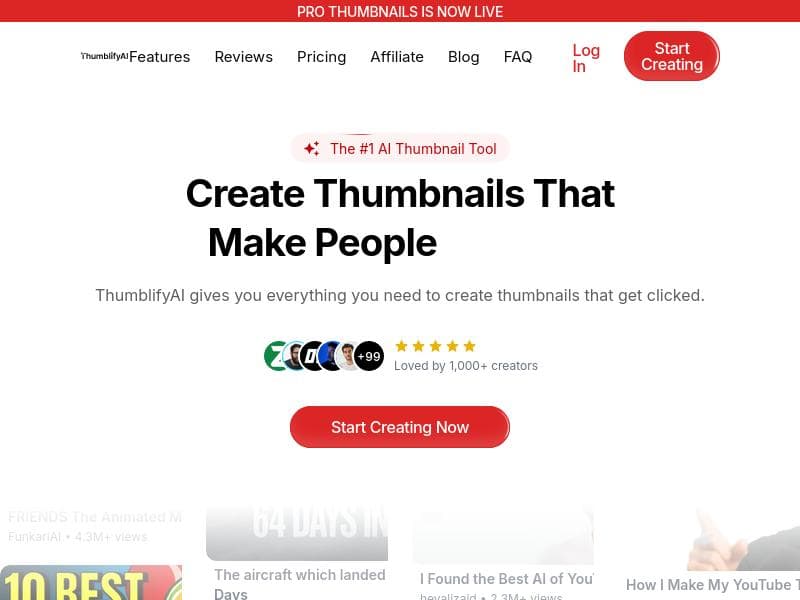
Pro Thumbnail Inspirations harnesses AI to deliver real-time, high-performing YouTube thumbnail ideas tailored to your niche, eliminating guesswork and boosting video clicks. Ideal for creators of all skill levels, it quickly generates eye-catching thumbnails that drive engagement without requiring design expertise.

Description
Get proven thumbnail ideas based on your niche and favorite creators. This feature scans YouTube and shows you thumbnails that are performing right now, so you can stop guessing and start creating what actually gets clicks.
Detailed Description
Pro Thumbnail Inspirations is an innovative AI-powered tool designed to help content creators, especially YouTubers, craft compelling and clickable video thumbnails. Its core purpose is to eliminate the guesswork involved in thumbnail design by providing users with proven, high-performing thumbnail ideas tailored to their specific niche and favorite creators. By scanning YouTube in real-time, the tool identifies thumbnails that are currently attracting views and engagement, allowing creators to draw inspiration from what is trending and effective. This approach ensures that users can create thumbnails that resonate with their target audience and increase their video's click-through rates. The tool's key features revolve around its AI-driven thumbnail generation capabilities. It quickly produces eye-catching thumbnails without requiring any prior design skills, making it accessible to beginners and professionals alike. The AI analyzes visual elements, color schemes, and layouts that are performing well on YouTube, then generates thumbnail suggestions that users can customize or replicate. This not only speeds up the content creation process but also enhances the visual appeal of videos, which is critical for standing out in a crowded platform. Additionally, Pro Thumbnail Inspirations helps boost video views by focusing on thumbnails that have a proven track record of attracting clicks, thereby improving overall channel performance. Pro Thumbnail Inspirations is best suited for YouTubers, video marketers, social media managers, and digital content creators who want to optimize their video thumbnails without investing extensive time or resources into graphic design. It is particularly valuable for creators who may lack design expertise but understand the importance of a strong visual hook to capture viewer attention. Use cases include generating thumbnail ideas for new video uploads, refreshing thumbnails for existing videos to increase engagement, and researching competitors’ thumbnail strategies to stay ahead in the niche. Regarding pricing, Pro Thumbnail Inspirations offers a freemium model, allowing users to access basic features at no cost while providing premium options for advanced capabilities and additional customization. This pricing structure makes it easy for creators to try the tool and evaluate its benefits before committing to a paid plan. The freemium access typically includes a limited number of thumbnail inspirations and AI-generated suggestions, while paid tiers unlock more frequent updates, higher volume usage, and enhanced design tools. Compared to alternative thumbnail creation tools, Pro Thumbnail Inspirations stands out due to its real-time data-driven approach. While many thumbnail makers rely solely on templates or manual design, this tool leverages AI to analyze current YouTube trends and performance metrics, offering more strategic and effective thumbnail ideas. This makes it a more dynamic and results-oriented solution. However, unlike full-fledged graphic design software, it may have limitations in terms of advanced customization or integration with broader video editing suites. Notable limitations include the dependency on YouTube’s public data and trends, which means the tool’s effectiveness is tied to the platform’s algorithm and available thumbnail information. Additionally, while it simplifies thumbnail creation, users seeking highly unique or brand-specific designs might still need to use complementary graphic design tools. Overall, Pro Thumbnail Inspirations is a powerful assistant for creators focused on maximizing video visibility through optimized thumbnails, balancing ease of use with data-driven insights to enhance content performance.
Tool Features
- AI-powered thumbnail generation
- Creates eye-catching thumbnails quickly
- No design skills needed
- Boosts video views with standout thumbnails
Description
✦
Pro Thumbnail Inspirations harnesses AI to deliver real-time, high-performing YouTube thumbnail ideas tailored to your niche, eliminating guesswork and boosting video clicks. Ideal for creators of all skill levels, it quickly generates eye-catching thumbnails that drive engagement without requiring design expertise.
Get proven thumbnail ideas based on your niche and favorite creators. This feature scans YouTube and shows you thumbnails that are performing right now, so you can stop guessing and start creating what actually gets clicks.
Detailed Description
Pro Thumbnail Inspirations is an innovative AI-powered tool designed to help content creators, especially YouTubers, craft compelling and clickable video thumbnails. Its core purpose is to eliminate the guesswork involved in thumbnail design by providing users with proven, high-performing thumbnail ideas tailored to their specific niche and favorite creators. By scanning YouTube in real-time, the tool identifies thumbnails that are currently attracting views and engagement, allowing creators to draw inspiration from what is trending and effective. This approach ensures that users can create thumbnails that resonate with their target audience and increase their video's click-through rates. The tool's key features revolve around its AI-driven thumbnail generation capabilities. It quickly produces eye-catching thumbnails without requiring any prior design skills, making it accessible to beginners and professionals alike. The AI analyzes visual elements, color schemes, and layouts that are performing well on YouTube, then generates thumbnail suggestions that users can customize or replicate. This not only speeds up the content creation process but also enhances the visual appeal of videos, which is critical for standing out in a crowded platform. Additionally, Pro Thumbnail Inspirations helps boost video views by focusing on thumbnails that have a proven track record of attracting clicks, thereby improving overall channel performance. Pro Thumbnail Inspirations is best suited for YouTubers, video marketers, social media managers, and digital content creators who want to optimize their video thumbnails without investing extensive time or resources into graphic design. It is particularly valuable for creators who may lack design expertise but understand the importance of a strong visual hook to capture viewer attention. Use cases include generating thumbnail ideas for new video uploads, refreshing thumbnails for existing videos to increase engagement, and researching competitors’ thumbnail strategies to stay ahead in the niche. Regarding pricing, Pro Thumbnail Inspirations offers a freemium model, allowing users to access basic features at no cost while providing premium options for advanced capabilities and additional customization. This pricing structure makes it easy for creators to try the tool and evaluate its benefits before committing to a paid plan. The freemium access typically includes a limited number of thumbnail inspirations and AI-generated suggestions, while paid tiers unlock more frequent updates, higher volume usage, and enhanced design tools. Compared to alternative thumbnail creation tools, Pro Thumbnail Inspirations stands out due to its real-time data-driven approach. While many thumbnail makers rely solely on templates or manual design, this tool leverages AI to analyze current YouTube trends and performance metrics, offering more strategic and effective thumbnail ideas. This makes it a more dynamic and results-oriented solution. However, unlike full-fledged graphic design software, it may have limitations in terms of advanced customization or integration with broader video editing suites. Notable limitations include the dependency on YouTube’s public data and trends, which means the tool’s effectiveness is tied to the platform’s algorithm and available thumbnail information. Additionally, while it simplifies thumbnail creation, users seeking highly unique or brand-specific designs might still need to use complementary graphic design tools. Overall, Pro Thumbnail Inspirations is a powerful assistant for creators focused on maximizing video visibility through optimized thumbnails, balancing ease of use with data-driven insights to enhance content performance.
Frequently Asked Questions
What is Pro Thumbnail Inspirations?
Pro Thumbnail Inspirations is an AI-powered tool that scans YouTube to identify trending and high-performing video thumbnails, providing users with proven thumbnail ideas tailored to their niche and favorite creators to help increase video clicks.
How much does Pro Thumbnail Inspirations cost?
Pro Thumbnail Inspirations offers a freemium pricing model, allowing free access to basic features with options to upgrade to paid plans for advanced capabilities, more frequent updates, and higher usage limits.
Who is Pro Thumbnail Inspirations best for?
It is best suited for YouTubers, video marketers, social media managers, and digital content creators who want to create effective, eye-catching thumbnails quickly without needing graphic design skills.
What are the main features of Pro Thumbnail Inspirations?
The main features include AI-powered thumbnail generation, real-time scanning of YouTube for trending thumbnails, quick creation of eye-catching thumbnails, no design skills required, and tools to boost video views through standout visuals.
Does Pro Thumbnail Inspirations offer a free trial?
Yes, the tool offers a freemium version that allows users to try basic features for free, effectively serving as a free trial before deciding to upgrade to premium plans.
What integrations does Pro Thumbnail Inspirations support?
Currently, Pro Thumbnail Inspirations primarily functions as a standalone web-based tool focused on YouTube thumbnail inspiration and does not list specific integrations with other platforms or software.
How does Pro Thumbnail Inspirations work?
The tool uses AI to scan YouTube in real-time, analyzing thumbnails that are performing well based on engagement and views. It then generates thumbnail ideas tailored to the user's niche and preferences, enabling quick creation of effective, clickable thumbnails.
Reviews
0 reviews
No reviews yet. Be the first to share your experience.
Sponsored Tools











































Recommended Tools
Stay updated on latest Ai tools
Get the latest insights, Join our newsletter
Read and trusted by 50,000+ readers
Join the biggest AI Community
Our community and staff are here to help!
Your feedback will help Alice AI improve in future versions.








Submit your Tool


PoweredByAI.app is an AI Tools Directory helping individuals, businesses, and creators discover the best AI tools for writing, coding, design, productivity, and more.
© 2026 , Product of011BQ. All rights reserved.