🚀 Zaprep: Your Socials on Steroids. Start free — automate 1,000 DMs/month & turn engagement into leads. with 1,000 automated DMs/month.


Is this your AI tool? Claim it today.
Verify ownership, manage your profile, and unlock growth features.
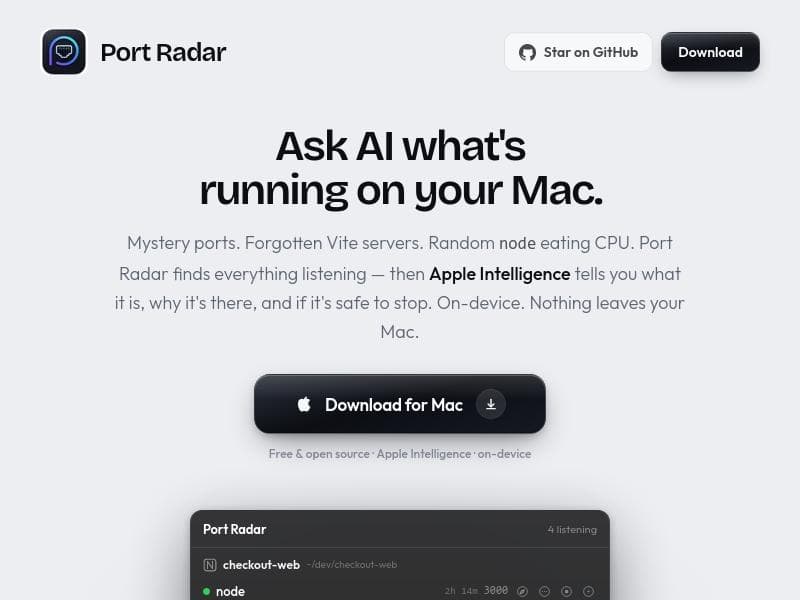
Port Radar is a free, open-source macOS app that uses AI to identify and explain every localhost process running on your machine, helping developers and power users understand and manage their local network activity effortlessly. With one-click Cloudflare tunnels, it also enables instant public URLs for local apps—all while ensuring complete on-device privacy.

Description
Port Radar is a native macOS menu bar app that shows you exactly what’s running on your ports—in plain English. Spot Vite, Next.js, Docker, forgotten apps, and anything else quietly using resources, then stop it with a single click. Apple Intelligence answers "what is this, is it safe to stop?" right on your device, so nothing leaves your Mac. Plus one click Cloudflare tunnels to share a local site as a live link.
Detailed Description
Port Radar is a sophisticated macOS application designed to provide developers and power users with comprehensive visibility into all localhost processes running on their machines. Its core purpose is to identify every active port and the associated process, then leverage Apple Intelligence to explain what each process is, why it is running, and whether it is safe to stop it. This level of insight is invaluable for troubleshooting, optimizing system performance, and ensuring security by monitoring unexpected or unknown processes. The app integrates seamlessly into the macOS menu bar, offering real-time updates and easy access without disrupting workflow. One of the standout features of Port Radar is its use of Apple Intelligence, which provides contextual explanations for each detected process. This AI-powered insight helps users understand the purpose of each service or server running locally, such as forgotten development servers, background node processes consuming CPU, or other network listeners. This eliminates guesswork and reduces the risk of accidentally terminating critical system or application processes. Additionally, Port Radar offers one-click Cloudflare tunnels, enabling users to instantly create live public URLs for any local app. This feature is particularly useful for developers who want to share their local development environment or demos without complex network configurations. Privacy and security are paramount with Port Radar, as it operates entirely on-device. No data leaves the user's Mac, ensuring sensitive information about running processes and network activity remains private. This on-device operation also means the tool is fast and responsive, without reliance on external servers or cloud services. Furthermore, Port Radar is free and open source, making it accessible to a broad audience and allowing the community to contribute to its development and transparency. Port Radar is best suited for software developers, system administrators, and technical users who frequently work with local servers, development environments, or need to monitor network activity on their Macs. Use cases include identifying and managing forgotten or zombie processes, diagnosing performance issues related to network services, securely exposing local apps to the internet for testing or collaboration, and gaining a clearer understanding of what is running on their machine at any given time. The tool is completely free to download and use, with no paid tiers or subscriptions. Its open-source nature means users can audit the code, customize it, or contribute improvements. Compared to alternatives, Port Radar’s unique combination of AI-driven process explanation, privacy-first on-device operation, and integrated Cloudflare tunneling sets it apart. Many other port or process monitoring tools lack intelligent explanations or require cloud connectivity, which can raise privacy concerns. However, there are some considerations to keep in mind. Port Radar is currently exclusive to macOS, limiting its use to Apple users. While the AI explanations are powered by Apple Intelligence, the depth of detail may vary depending on the process and available metadata. Users unfamiliar with network ports or local development environments might need some technical background to fully leverage the tool’s capabilities. Additionally, while the Cloudflare tunnel feature is convenient, it depends on Cloudflare’s infrastructure, which may have limitations or require an internet connection. In summary, Port Radar is a powerful, privacy-conscious tool that brings AI-powered clarity to local network processes on macOS. Its free, open-source model combined with innovative features like one-click public URL creation makes it an essential utility for developers and technical users seeking to understand and control what’s running on their Macs.
Tool Features
- Finds every localhost process in your menu bar
- Apple Intelligence explains what each process is
- One-click Cloudflare tunnels for live public URLs
- On-device operation ensuring privacy
- Free and open source
Description
Port Radar is a free, open-source macOS app that uses AI to identify and explain every localhost process running on your machine, helping developers and power users understand and manage their local network activity effortlessly. With one-click Cloudflare tunnels, it also enables instant public URLs for local apps—all while ensuring complete on-device privacy.
Port Radar is a native macOS menu bar app that shows you exactly what’s running on your ports—in plain English. Spot Vite, Next.js, Docker, forgotten apps, and anything else quietly using resources, then stop it with a single click. Apple Intelligence answers "what is this, is it safe to stop?" right on your device, so nothing leaves your Mac. Plus one click Cloudflare tunnels to share a local site as a live link.
Detailed Description
Port Radar is a sophisticated macOS application designed to provide developers and power users with comprehensive visibility into all localhost processes running on their machines. Its core purpose is to identify every active port and the associated process, then leverage Apple Intelligence to explain what each process is, why it is running, and whether it is safe to stop it. This level of insight is invaluable for troubleshooting, optimizing system performance, and ensuring security by monitoring unexpected or unknown processes. The app integrates seamlessly into the macOS menu bar, offering real-time updates and easy access without disrupting workflow. One of the standout features of Port Radar is its use of Apple Intelligence, which provides contextual explanations for each detected process. This AI-powered insight helps users understand the purpose of each service or server running locally, such as forgotten development servers, background node processes consuming CPU, or other network listeners. This eliminates guesswork and reduces the risk of accidentally terminating critical system or application processes. Additionally, Port Radar offers one-click Cloudflare tunnels, enabling users to instantly create live public URLs for any local app. This feature is particularly useful for developers who want to share their local development environment or demos without complex network configurations. Privacy and security are paramount with Port Radar, as it operates entirely on-device. No data leaves the user's Mac, ensuring sensitive information about running processes and network activity remains private. This on-device operation also means the tool is fast and responsive, without reliance on external servers or cloud services. Furthermore, Port Radar is free and open source, making it accessible to a broad audience and allowing the community to contribute to its development and transparency. Port Radar is best suited for software developers, system administrators, and technical users who frequently work with local servers, development environments, or need to monitor network activity on their Macs. Use cases include identifying and managing forgotten or zombie processes, diagnosing performance issues related to network services, securely exposing local apps to the internet for testing or collaboration, and gaining a clearer understanding of what is running on their machine at any given time. The tool is completely free to download and use, with no paid tiers or subscriptions. Its open-source nature means users can audit the code, customize it, or contribute improvements. Compared to alternatives, Port Radar’s unique combination of AI-driven process explanation, privacy-first on-device operation, and integrated Cloudflare tunneling sets it apart. Many other port or process monitoring tools lack intelligent explanations or require cloud connectivity, which can raise privacy concerns. However, there are some considerations to keep in mind. Port Radar is currently exclusive to macOS, limiting its use to Apple users. While the AI explanations are powered by Apple Intelligence, the depth of detail may vary depending on the process and available metadata. Users unfamiliar with network ports or local development environments might need some technical background to fully leverage the tool’s capabilities. Additionally, while the Cloudflare tunnel feature is convenient, it depends on Cloudflare’s infrastructure, which may have limitations or require an internet connection. In summary, Port Radar is a powerful, privacy-conscious tool that brings AI-powered clarity to local network processes on macOS. Its free, open-source model combined with innovative features like one-click public URL creation makes it an essential utility for developers and technical users seeking to understand and control what’s running on their Macs.
Frequently Asked Questions
What is Port Radar?
Port Radar is a macOS application that detects every localhost process running on your machine and uses Apple Intelligence to explain what each process is, why it is running, and whether it is safe to stop. It also provides one-click Cloudflare tunnels to create live public URLs for local apps.
How much does Port Radar cost?
Port Radar is completely free to use. It is an open-source project, so there are no subscription fees or paid plans.
Who is Port Radar best for?
Port Radar is ideal for software developers, system administrators, and technical users who want to monitor, understand, and manage local network processes on their macOS machines.
What are the main features of Port Radar?
Key features include detecting all localhost processes in the macOS menu bar, AI-powered explanations of each process using Apple Intelligence, one-click Cloudflare tunnels for generating live public URLs, on-device operation ensuring privacy, and being free and open source.
Does Port Radar offer a free trial?
Port Radar is free and open source, so no trial is necessary. Users can download and use the full application without any cost.
What integrations does Port Radar support?
Port Radar integrates with Cloudflare tunnels to enable one-click creation of live public URLs for local apps. It primarily operates on-device and does not require additional integrations.
How does Port Radar work?
Port Radar scans all active localhost ports on your Mac and identifies the processes listening on them. It then uses Apple Intelligence to provide detailed explanations about each process, including its purpose and safety. The app runs entirely on your device, ensuring privacy, and offers easy Cloudflare tunnel creation to expose local apps publicly.
Socials
Use ToolReviews
No reviews yet. Be the first to share your experience.
Sponsored Tools











































Recommended Tools
Stay updated on latest Ai tools
Get the latest insights, Join our newsletter
Read and trusted by 50,000+ readers
Join the biggest AI Community
Our community and staff are here to help!
Your feedback will help Alice AI improve in future versions.








Submit your Tool


PoweredByAI.app is an AI Tools Directory helping individuals, businesses, and creators discover the best AI tools for writing, coding, design, productivity, and more.
© 2026 , Product of011BQ. All rights reserved.