Featured in:Best AI Writing Tools
Get featured →🚀 Zaprep: Your Socials on Steroids. Start free — automate 1,000 DMs/month & turn engagement into leads. with 1,000 automated DMs/month.


✦
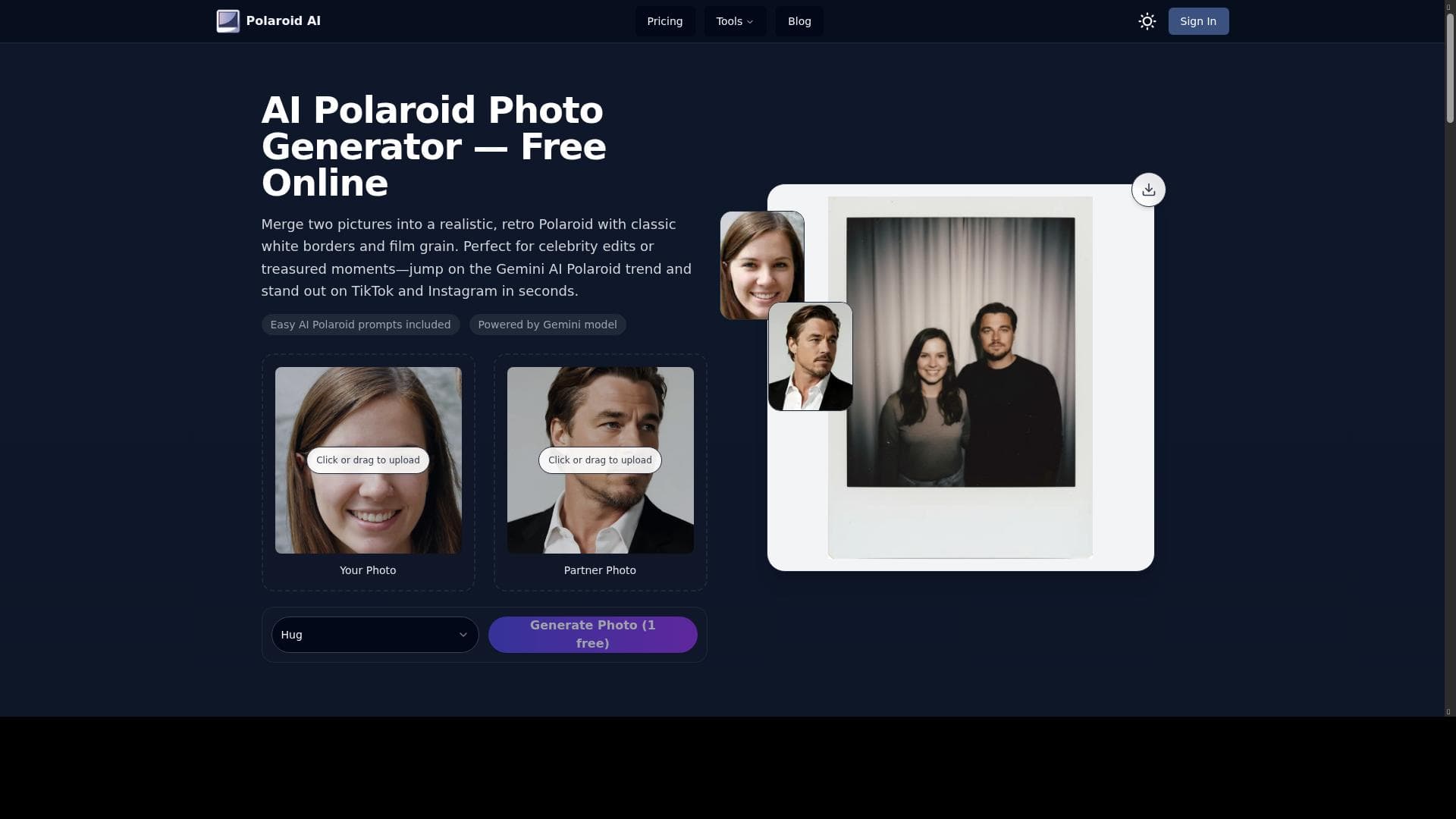
Polaroid AI leverages advanced artificial intelligence to craft authentic vintage Polaroid-style collages by seamlessly combining two photos with customizable filters, borders, and text. Ideal for creative professionals and marketers, it transforms ordinary images into nostalgic, eye-catching visuals with ease and precision.

Description
AI tools create vintage Polaroid-style collages by combining two photos, adding filters, borders, and customizable text.
Detailed Description
Polaroid AI is a cutting-edge digital tool designed to recreate the nostalgic charm of vintage Polaroid-style collages using advanced artificial intelligence technology. At its core, the platform enables users to combine two photos seamlessly into a single collage, enhanced with authentic Polaroid-inspired filters, customizable borders, and text overlays. This unique blend of AI-powered image generation and creative customization allows users to produce visually striking, retro-themed collages that evoke the classic instant-photo aesthetic, making it an ideal solution for both personal and professional creative projects. The tool’s key features revolve around its sophisticated AI algorithms that intelligently merge images, ensuring smooth transitions and balanced compositions. Users can apply a variety of vintage filters that mimic the color tones and textures of traditional Polaroid prints, adding depth and character to their collages. Additionally, Polaroid AI offers a user-friendly interface designed to simplify the creative process, allowing even those with minimal graphic design experience to craft polished, professional-quality visuals quickly. Customizable text options and adjustable borders provide further personalization, enabling users to tailor each collage to their specific style or branding needs. Polaroid AI is particularly well-suited for creative professionals such as graphic designers, photographers, and marketers who want to produce eye-catching promotional materials, social media content, or digital storytelling assets with a nostalgic flair. Marketers can leverage the tool to create engaging visuals that resonate emotionally with audiences, while photographers and artists can use it to showcase their work in a distinctive format. Beyond professional use, the platform is accessible to hobbyists and social media enthusiasts eager to add a vintage touch to their personal photo collections or posts. The pricing model for Polaroid AI follows a freemium approach, offering basic features for free to allow users to explore the tool’s capabilities without upfront costs. This free tier typically includes access to essential filters, borders, and text customization options, with some limitations on output resolution or the number of collages created. For users requiring enhanced functionality, higher resolution exports, or additional creative assets, premium subscription plans are available. These paid tiers provide expanded feature sets and priority customer support, catering to the needs of professionals who rely on the tool for regular content creation. When compared to alternative image editing and collage-making tools, Polaroid AI stands out due to its specialized focus on vintage Polaroid-style aesthetics combined with AI-driven image synthesis. While many graphic design platforms offer collage capabilities, few integrate AI to optimize image blending and apply authentic retro effects automatically. This specialization makes Polaroid AI a unique choice for users seeking a quick, high-quality solution for vintage-style photo collages without the complexity of traditional photo-editing software. However, potential users should consider certain limitations. The tool’s focus on combining only two photos per collage may restrict more complex multi-image layouts. Additionally, while the AI-generated filters and effects are impressive, users looking for extensive manual control over every design element might find the customization options somewhat limited compared to full-featured graphic design suites. Integration options with other creative software or social media platforms are also not extensively detailed, which could affect workflow for users needing seamless content distribution. Overall, Polaroid AI offers a powerful, easy-to-use platform for creating nostalgic, vintage-style photo collages enhanced by AI technology. Its balance of automation and customization makes it an excellent choice for creative professionals and marketers aiming to produce distinctive, emotionally engaging visuals quickly and efficiently.
Tool Features
- Advanced AI-powered image generation
- User-friendly interface for easy content creation
- Optimized for creative professionals and marketers
Description
✦
Polaroid AI leverages advanced artificial intelligence to craft authentic vintage Polaroid-style collages by seamlessly combining two photos with customizable filters, borders, and text. Ideal for creative professionals and marketers, it transforms ordinary images into nostalgic, eye-catching visuals with ease and precision.
AI tools create vintage Polaroid-style collages by combining two photos, adding filters, borders, and customizable text.
Detailed Description
Polaroid AI is a cutting-edge digital tool designed to recreate the nostalgic charm of vintage Polaroid-style collages using advanced artificial intelligence technology. At its core, the platform enables users to combine two photos seamlessly into a single collage, enhanced with authentic Polaroid-inspired filters, customizable borders, and text overlays. This unique blend of AI-powered image generation and creative customization allows users to produce visually striking, retro-themed collages that evoke the classic instant-photo aesthetic, making it an ideal solution for both personal and professional creative projects. The tool’s key features revolve around its sophisticated AI algorithms that intelligently merge images, ensuring smooth transitions and balanced compositions. Users can apply a variety of vintage filters that mimic the color tones and textures of traditional Polaroid prints, adding depth and character to their collages. Additionally, Polaroid AI offers a user-friendly interface designed to simplify the creative process, allowing even those with minimal graphic design experience to craft polished, professional-quality visuals quickly. Customizable text options and adjustable borders provide further personalization, enabling users to tailor each collage to their specific style or branding needs. Polaroid AI is particularly well-suited for creative professionals such as graphic designers, photographers, and marketers who want to produce eye-catching promotional materials, social media content, or digital storytelling assets with a nostalgic flair. Marketers can leverage the tool to create engaging visuals that resonate emotionally with audiences, while photographers and artists can use it to showcase their work in a distinctive format. Beyond professional use, the platform is accessible to hobbyists and social media enthusiasts eager to add a vintage touch to their personal photo collections or posts. The pricing model for Polaroid AI follows a freemium approach, offering basic features for free to allow users to explore the tool’s capabilities without upfront costs. This free tier typically includes access to essential filters, borders, and text customization options, with some limitations on output resolution or the number of collages created. For users requiring enhanced functionality, higher resolution exports, or additional creative assets, premium subscription plans are available. These paid tiers provide expanded feature sets and priority customer support, catering to the needs of professionals who rely on the tool for regular content creation. When compared to alternative image editing and collage-making tools, Polaroid AI stands out due to its specialized focus on vintage Polaroid-style aesthetics combined with AI-driven image synthesis. While many graphic design platforms offer collage capabilities, few integrate AI to optimize image blending and apply authentic retro effects automatically. This specialization makes Polaroid AI a unique choice for users seeking a quick, high-quality solution for vintage-style photo collages without the complexity of traditional photo-editing software. However, potential users should consider certain limitations. The tool’s focus on combining only two photos per collage may restrict more complex multi-image layouts. Additionally, while the AI-generated filters and effects are impressive, users looking for extensive manual control over every design element might find the customization options somewhat limited compared to full-featured graphic design suites. Integration options with other creative software or social media platforms are also not extensively detailed, which could affect workflow for users needing seamless content distribution. Overall, Polaroid AI offers a powerful, easy-to-use platform for creating nostalgic, vintage-style photo collages enhanced by AI technology. Its balance of automation and customization makes it an excellent choice for creative professionals and marketers aiming to produce distinctive, emotionally engaging visuals quickly and efficiently.
Frequently Asked Questions
What is polaroid ai?
Polaroid AI is an AI-powered tool that creates vintage Polaroid-style collages by combining two photos, applying retro filters, adding borders, and enabling customizable text to produce nostalgic, visually appealing images.
How much does polaroid ai cost?
Polaroid AI offers a freemium pricing model, allowing users to access basic features for free with limitations, while premium subscription plans unlock advanced features, higher resolution exports, and additional creative assets.
Who is polaroid ai best for?
Polaroid AI is best suited for creative professionals such as graphic designers, photographers, and marketers, as well as hobbyists and social media users who want to create vintage-style photo collages with ease.
What are the main features of polaroid ai?
The main features include advanced AI-powered image generation that combines two photos seamlessly, vintage Polaroid-style filters, customizable borders, text overlays, and a user-friendly interface optimized for quick content creation.
Does polaroid ai offer a free trial?
Yes, Polaroid AI provides a free tier with access to essential features, allowing users to try the tool and create basic collages before opting for premium plans.
What integrations does polaroid ai support?
Currently, Polaroid AI focuses on standalone collage creation and does not prominently feature integrations with other software or platforms, so users typically export images manually for use elsewhere.
How does polaroid ai work?
Polaroid AI uses advanced AI algorithms to merge two photos into a single vintage-style collage, automatically applying retro filters and borders, while allowing users to add customizable text and adjust design elements through an intuitive interface.
Reviews
0 reviews
No reviews yet. Be the first to share your experience.
Sponsored Tools







































Recommended Tools
Stay updated on latest Ai tools
Get the latest insights, Join our newsletter
Read and trusted by 50,000+ readers
Join the biggest AI Community
Our community and staff are here to help!
Your feedback will help Alice AI improve in future versions.







Submit your Tool


PoweredByAI.app is an AI Tools Directory helping individuals, businesses, and creators discover the best AI tools for writing, coding, design, productivity, and more.
© 2026 , Product of011BQ. All rights reserved.