Featured in:Best AI Writing Tools
Get featured →🚀 Zaprep: Your Socials on Steroids. Start free — automate 1,000 DMs/month & turn engagement into leads. with 1,000 automated DMs/month.



✦
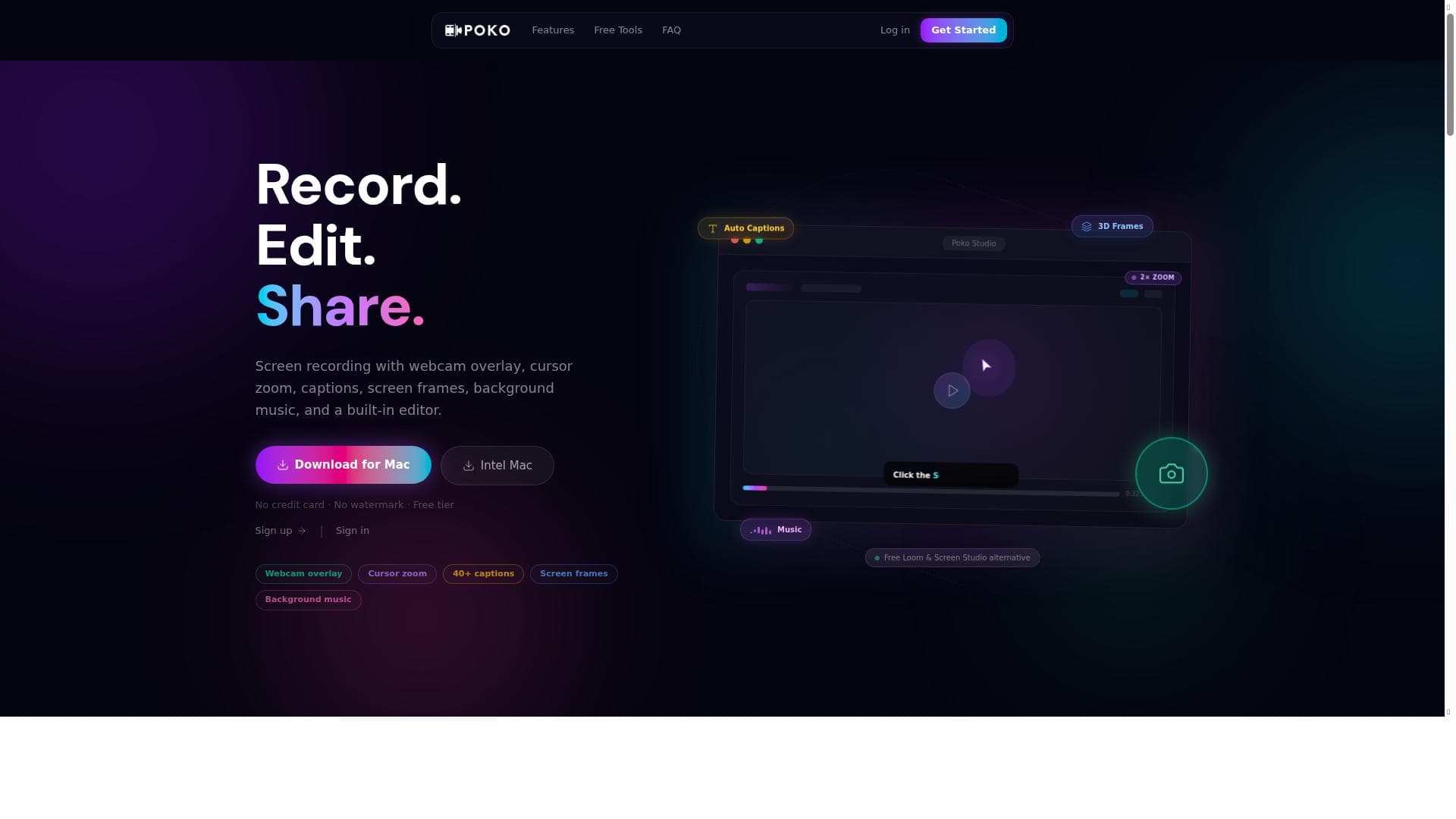
Poko is a comprehensive free screen recorder that combines webcam overlay, auto captions, cursor zoom effects, and a built-in video editor into one seamless platform. Ideal for educators, marketers, and remote teams, it offers powerful video creation and sharing tools without the need for separate editing software, making it a standout alternative to Loom and Screen Studio.

Description
Poko is a free screen recorder that offers webcam overlay, cursor zoom effects, auto captions, screen frames, background music, and a built-in video editor. It serves as the best free alternative to Loom and Screen Studio, providing a comprehensive tool for recording, editing, and sharing videos without the need for separate editing software.
Detailed Description
Poko is a versatile and user-friendly free screen recording tool designed to simplify the process of creating, editing, and sharing video content. Its core purpose is to provide an all-in-one solution for screen capture that integrates powerful editing features directly within the platform, eliminating the need for separate video editing software. Whether you're recording tutorials, presentations, or gameplay, Poko offers a seamless experience that caters to both beginners and more advanced users. By combining recording and editing capabilities, it streamlines video production workflows and enhances content quality with minimal effort. One of Poko's standout features is its webcam overlay, which allows users to record their screen alongside a live video feed of themselves. This is particularly useful for creating engaging instructional videos, product demos, or personalized messages. The cursor zoom effects help draw attention to specific areas on the screen, making it easier for viewers to follow along with detailed explanations or software walkthroughs. Additionally, Poko automatically generates captions, improving accessibility and viewer comprehension without requiring manual transcription. The tool also offers customizable screen frames to add a professional touch to recordings, as well as background music options to enhance the overall viewing experience. Its built-in video editor is robust, enabling users to trim clips, add annotations, and adjust audio levels directly within the app. Once videos are finalized, Poko provides shareable links and an embeddable player, facilitating easy distribution across websites, social media, or internal communication platforms. Poko is ideal for educators, content creators, marketers, remote teams, and anyone who needs to produce high-quality video content quickly and efficiently. Teachers can create engaging lessons with webcam and screen capture combined, while marketers can produce polished product demos or explainer videos without outsourcing editing. Remote teams benefit from the ability to record and share updates or tutorials with clear visual and audio elements. Its intuitive interface and comprehensive feature set make it accessible for users with varying levels of technical expertise. Regarding pricing, Poko operates on a freemium model. The free tier offers a generous set of features sufficient for most casual and semi-professional users, including full access to the screen recorder, webcam overlay, auto captions, and basic editing tools. For users requiring advanced capabilities, such as extended recording times, premium background music tracks, or enhanced sharing options, paid plans are available. These plans provide additional storage, priority support, and more customization options, making Poko scalable for growing needs. When compared to alternatives like Loom and Screen Studio, Poko stands out by offering a more comprehensive free package that integrates both recording and editing without forcing users to switch between multiple apps. While Loom is known for its ease of use and Screen Studio for its editing features, Poko combines these strengths into a single platform. This makes it an excellent choice for users seeking a cost-effective yet powerful tool. However, Poko may have fewer third-party integrations than some competitors, which could be a consideration for users relying heavily on extensive app ecosystems. Notable limitations include occasional performance issues on lower-end devices when handling high-resolution recordings or complex edits. Additionally, while the auto-captioning feature is convenient, it may require manual corrections for accuracy in specialized or technical content. Users should also be aware that some advanced features are gated behind paid plans, which might limit functionality for those strictly using the free version. Overall, Poko offers a compelling balance of features and usability, making it a top contender in the free screen recording and video editing space.
Tool Features
- Webcam overlay
- Cursor zoom effects
- Auto captions
- Screen frames
- Background music
- Built-in video editor
- Shareable links
- Embeddable player
Description
✦
Poko is a comprehensive free screen recorder that combines webcam overlay, auto captions, cursor zoom effects, and a built-in video editor into one seamless platform. Ideal for educators, marketers, and remote teams, it offers powerful video creation and sharing tools without the need for separate editing software, making it a standout alternative to Loom and Screen Studio.
Poko is a free screen recorder that offers webcam overlay, cursor zoom effects, auto captions, screen frames, background music, and a built-in video editor. It serves as the best free alternative to Loom and Screen Studio, providing a comprehensive tool for recording, editing, and sharing videos without the need for separate editing software.
Detailed Description
Poko is a versatile and user-friendly free screen recording tool designed to simplify the process of creating, editing, and sharing video content. Its core purpose is to provide an all-in-one solution for screen capture that integrates powerful editing features directly within the platform, eliminating the need for separate video editing software. Whether you're recording tutorials, presentations, or gameplay, Poko offers a seamless experience that caters to both beginners and more advanced users. By combining recording and editing capabilities, it streamlines video production workflows and enhances content quality with minimal effort. One of Poko's standout features is its webcam overlay, which allows users to record their screen alongside a live video feed of themselves. This is particularly useful for creating engaging instructional videos, product demos, or personalized messages. The cursor zoom effects help draw attention to specific areas on the screen, making it easier for viewers to follow along with detailed explanations or software walkthroughs. Additionally, Poko automatically generates captions, improving accessibility and viewer comprehension without requiring manual transcription. The tool also offers customizable screen frames to add a professional touch to recordings, as well as background music options to enhance the overall viewing experience. Its built-in video editor is robust, enabling users to trim clips, add annotations, and adjust audio levels directly within the app. Once videos are finalized, Poko provides shareable links and an embeddable player, facilitating easy distribution across websites, social media, or internal communication platforms. Poko is ideal for educators, content creators, marketers, remote teams, and anyone who needs to produce high-quality video content quickly and efficiently. Teachers can create engaging lessons with webcam and screen capture combined, while marketers can produce polished product demos or explainer videos without outsourcing editing. Remote teams benefit from the ability to record and share updates or tutorials with clear visual and audio elements. Its intuitive interface and comprehensive feature set make it accessible for users with varying levels of technical expertise. Regarding pricing, Poko operates on a freemium model. The free tier offers a generous set of features sufficient for most casual and semi-professional users, including full access to the screen recorder, webcam overlay, auto captions, and basic editing tools. For users requiring advanced capabilities, such as extended recording times, premium background music tracks, or enhanced sharing options, paid plans are available. These plans provide additional storage, priority support, and more customization options, making Poko scalable for growing needs. When compared to alternatives like Loom and Screen Studio, Poko stands out by offering a more comprehensive free package that integrates both recording and editing without forcing users to switch between multiple apps. While Loom is known for its ease of use and Screen Studio for its editing features, Poko combines these strengths into a single platform. This makes it an excellent choice for users seeking a cost-effective yet powerful tool. However, Poko may have fewer third-party integrations than some competitors, which could be a consideration for users relying heavily on extensive app ecosystems. Notable limitations include occasional performance issues on lower-end devices when handling high-resolution recordings or complex edits. Additionally, while the auto-captioning feature is convenient, it may require manual corrections for accuracy in specialized or technical content. Users should also be aware that some advanced features are gated behind paid plans, which might limit functionality for those strictly using the free version. Overall, Poko offers a compelling balance of features and usability, making it a top contender in the free screen recording and video editing space.
Frequently Asked Questions
What is Poko?
Poko is a free screen recording tool that allows users to capture their screen with webcam overlay, add cursor zoom effects, auto-generate captions, and edit videos within the same platform. It is designed to simplify video creation and sharing without requiring additional software.
How much does Poko cost?
Poko operates on a freemium pricing model, offering a robust free tier with essential recording and editing features. Paid plans are available for users who need extended recording times, premium features, additional storage, and enhanced sharing options.
Who is Poko best for?
Poko is best suited for educators, content creators, marketers, remote teams, and anyone looking to produce professional-quality videos quickly and easily. Its features cater to users of all skill levels who want an integrated recording and editing solution.
What are the main features of Poko?
Key features include webcam overlay, cursor zoom effects, automatic captions, customizable screen frames, background music options, a built-in video editor, shareable links, and an embeddable video player.
Does Poko offer a free trial?
Poko offers a free tier that provides access to many core features without time limitations, effectively serving as a free trial. Paid plans can be explored for additional advanced functionalities.
What integrations does Poko support?
While Poko primarily focuses on an all-in-one recording and editing experience, it supports sharing videos via shareable links and embeddable players. It has fewer third-party integrations compared to some competitors, focusing on simplicity and ease of use.
How does Poko work?
Users start by recording their screen with optional webcam overlay and cursor effects. After recording, they can use Poko’s built-in editor to trim, add captions, insert background music, and customize the video. Finished videos can then be shared via links or embedded on websites.
Reviews
0 reviews
No reviews yet. Be the first to share your experience.
Sponsored Tools











































Recommended Tools
Stay updated on latest Ai tools
Get the latest insights, Join our newsletter
Read and trusted by 50,000+ readers
Join the biggest AI Community
Our community and staff are here to help!
Your feedback will help Alice AI improve in future versions.








Submit your Tool


PoweredByAI.app is an AI Tools Directory helping individuals, businesses, and creators discover the best AI tools for writing, coding, design, productivity, and more.
© 2026 , Product of011BQ. All rights reserved.