Featured in:Best AI Writing Tools
Get featured →🚀 Zaprep: Your Socials on Steroids. Start free — automate 1,000 DMs/month & turn engagement into leads. with 1,000 automated DMs/month.


Is this your AI tool? Claim it today.
Verify ownership, manage your profile, and unlock growth features.
✦
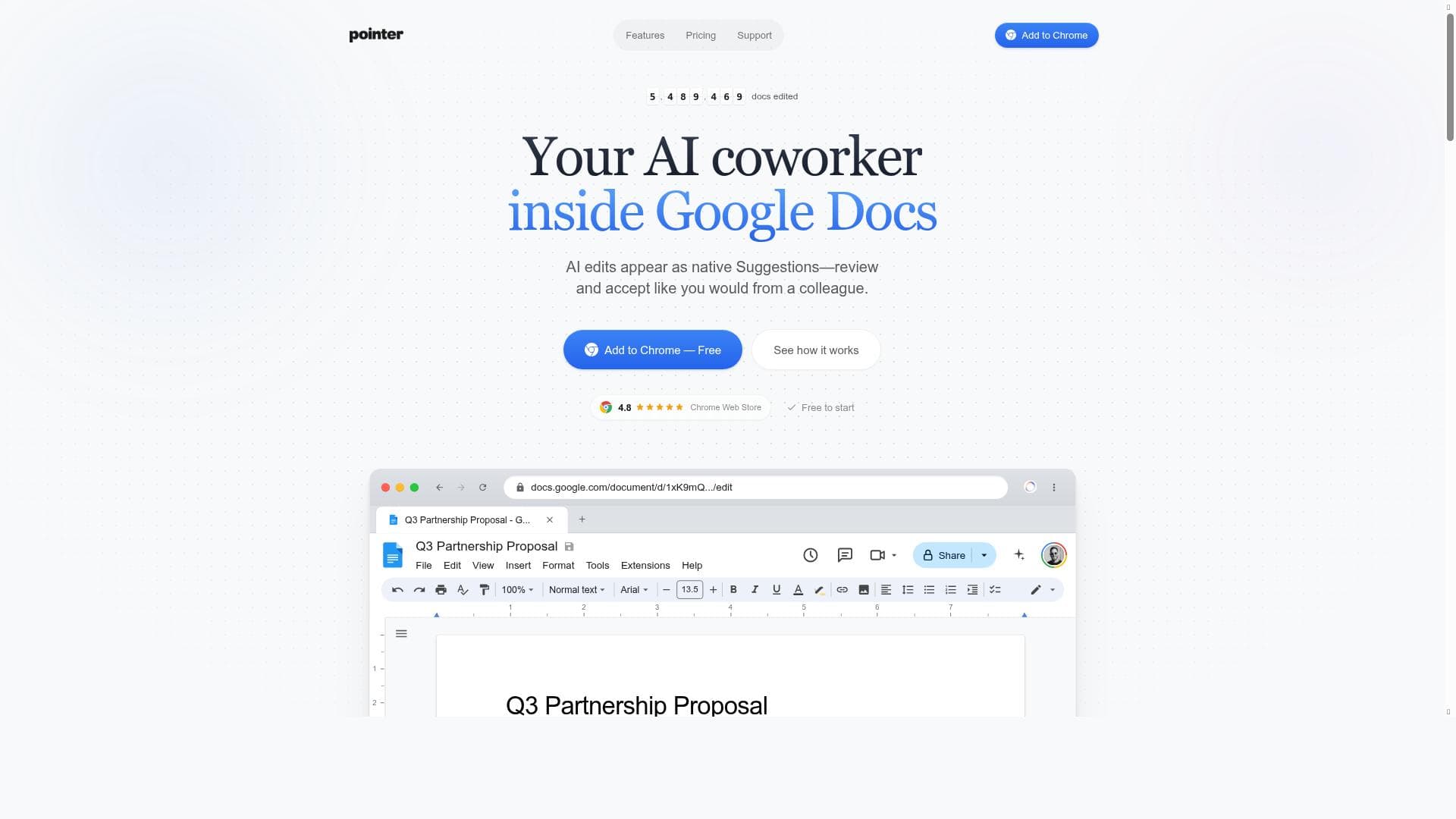
Pointer is a powerful AI copilot that integrates directly into Google Docs, offering smart, real-time editing suggestions powered by Claude AI. Ideal for professionals, students, and teams, it streamlines document refinement by acting like a native collaborator, eliminating the hassle of manual copy-pasting and formatting fixes.

Description
Pointer is your AI copilot, working directly within Google Docs to offer smart, real-time edits. Say goodbye to manual copy-pasting from ChatGPT and fixing broken text formatting. Enjoy efficient, polished suggestions that you can easily approve.
Detailed Description
Pointer is an innovative AI-powered assistant designed to seamlessly integrate with Google Docs, serving as a real-time copilot for document editing and refinement. Its core purpose is to enhance the writing and editing process by providing intelligent, context-aware suggestions directly within the Google Docs environment. This eliminates the need for users to switch between multiple applications, such as copying text from ChatGPT and manually fixing formatting issues, streamlining workflow and boosting productivity. By functioning as a native collaborator, Pointer enables users to receive polished, professional edits that can be easily reviewed and accepted or rejected, making document creation more efficient and less error-prone. At the heart of Pointer’s capabilities is its integration with Claude AI, a powerful language model that drives its smart editing features. Pointer offers native Suggestions in Google Docs, meaning edits appear as if made by a human collaborator, preserving the document’s formatting and style. Users can interact with these suggestions by accepting or rejecting them, and each edit comes with an explanation to help understand the rationale behind the change. This transparency fosters trust in the AI’s recommendations and allows users to maintain control over their content. Additionally, Pointer’s real-time functionality ensures that suggestions are provided instantly as users write or review their documents, enabling a smooth and uninterrupted creative process. Pointer is particularly well-suited for professionals, students, writers, and teams who rely heavily on Google Docs for their document creation and collaboration needs. For content creators, it serves as a valuable assistant to refine grammar, clarity, and style without interrupting their writing flow. Teams benefit from its collaborative nature, as Pointer acts like an additional team member providing consistent editing support. Students can leverage Pointer to improve essays and assignments, gaining insights into better phrasing and structure. Its ease of use and direct integration into an already popular platform make it accessible to users of all skill levels. The pricing model for Pointer follows a freemium approach, allowing users to access basic features at no cost, which is ideal for casual users or those wanting to test the tool’s capabilities. Premium plans unlock advanced functionalities, such as more in-depth editing suggestions, higher usage limits, and priority support. This tiered pricing ensures that both individual users and organizations can find a plan that fits their needs and budget. Detailed pricing information is available on the Pointer website, enabling prospective users to make informed decisions. Compared to other AI writing assistants, Pointer’s unique selling point is its deep integration with Google Docs and its use of Claude AI, which is known for generating nuanced and contextually appropriate language suggestions. Unlike standalone AI tools that require copy-pasting text back and forth, Pointer operates natively within the document, preserving formatting and reducing friction. This sets it apart from competitors like Grammarly or standalone ChatGPT interfaces, which either focus primarily on grammar or require external interaction. Pointer’s approach offers a more collaborative and seamless editing experience. However, users should consider that Pointer’s effectiveness depends on the quality of the underlying AI model and the complexity of the document. While Claude AI is powerful, it may occasionally suggest edits that require human judgment to accept or reject. Additionally, as a Google Docs add-on, Pointer’s functionality is limited to that platform, which might not suit users who work extensively in other document editors. Privacy-conscious users should also review Pointer’s data handling policies to ensure compliance with their organizational standards. In summary, Pointer is a sophisticated AI copilot designed to enhance document editing within Google Docs by providing smart, real-time, and contextually aware suggestions. Its seamless integration, powered by Claude AI, makes it an invaluable tool for individuals and teams seeking to improve writing quality and efficiency without disrupting their workflow. With flexible pricing and a user-friendly interface, Pointer stands out as a practical solution for modern document collaboration and editing needs.
Tool Features
- Integrates directly into Google Docs
- Powered by Claude AI
- Provides native Suggestions for document editing
- Allows users to accept or reject AI edits with explanations
- Functions like a collaborator in Google Docs
Description
✦
Pointer is a powerful AI copilot that integrates directly into Google Docs, offering smart, real-time editing suggestions powered by Claude AI. Ideal for professionals, students, and teams, it streamlines document refinement by acting like a native collaborator, eliminating the hassle of manual copy-pasting and formatting fixes.
Pointer is your AI copilot, working directly within Google Docs to offer smart, real-time edits. Say goodbye to manual copy-pasting from ChatGPT and fixing broken text formatting. Enjoy efficient, polished suggestions that you can easily approve.
Detailed Description
Pointer is an innovative AI-powered assistant designed to seamlessly integrate with Google Docs, serving as a real-time copilot for document editing and refinement. Its core purpose is to enhance the writing and editing process by providing intelligent, context-aware suggestions directly within the Google Docs environment. This eliminates the need for users to switch between multiple applications, such as copying text from ChatGPT and manually fixing formatting issues, streamlining workflow and boosting productivity. By functioning as a native collaborator, Pointer enables users to receive polished, professional edits that can be easily reviewed and accepted or rejected, making document creation more efficient and less error-prone. At the heart of Pointer’s capabilities is its integration with Claude AI, a powerful language model that drives its smart editing features. Pointer offers native Suggestions in Google Docs, meaning edits appear as if made by a human collaborator, preserving the document’s formatting and style. Users can interact with these suggestions by accepting or rejecting them, and each edit comes with an explanation to help understand the rationale behind the change. This transparency fosters trust in the AI’s recommendations and allows users to maintain control over their content. Additionally, Pointer’s real-time functionality ensures that suggestions are provided instantly as users write or review their documents, enabling a smooth and uninterrupted creative process. Pointer is particularly well-suited for professionals, students, writers, and teams who rely heavily on Google Docs for their document creation and collaboration needs. For content creators, it serves as a valuable assistant to refine grammar, clarity, and style without interrupting their writing flow. Teams benefit from its collaborative nature, as Pointer acts like an additional team member providing consistent editing support. Students can leverage Pointer to improve essays and assignments, gaining insights into better phrasing and structure. Its ease of use and direct integration into an already popular platform make it accessible to users of all skill levels. The pricing model for Pointer follows a freemium approach, allowing users to access basic features at no cost, which is ideal for casual users or those wanting to test the tool’s capabilities. Premium plans unlock advanced functionalities, such as more in-depth editing suggestions, higher usage limits, and priority support. This tiered pricing ensures that both individual users and organizations can find a plan that fits their needs and budget. Detailed pricing information is available on the Pointer website, enabling prospective users to make informed decisions. Compared to other AI writing assistants, Pointer’s unique selling point is its deep integration with Google Docs and its use of Claude AI, which is known for generating nuanced and contextually appropriate language suggestions. Unlike standalone AI tools that require copy-pasting text back and forth, Pointer operates natively within the document, preserving formatting and reducing friction. This sets it apart from competitors like Grammarly or standalone ChatGPT interfaces, which either focus primarily on grammar or require external interaction. Pointer’s approach offers a more collaborative and seamless editing experience. However, users should consider that Pointer’s effectiveness depends on the quality of the underlying AI model and the complexity of the document. While Claude AI is powerful, it may occasionally suggest edits that require human judgment to accept or reject. Additionally, as a Google Docs add-on, Pointer’s functionality is limited to that platform, which might not suit users who work extensively in other document editors. Privacy-conscious users should also review Pointer’s data handling policies to ensure compliance with their organizational standards. In summary, Pointer is a sophisticated AI copilot designed to enhance document editing within Google Docs by providing smart, real-time, and contextually aware suggestions. Its seamless integration, powered by Claude AI, makes it an invaluable tool for individuals and teams seeking to improve writing quality and efficiency without disrupting their workflow. With flexible pricing and a user-friendly interface, Pointer stands out as a practical solution for modern document collaboration and editing needs.
Frequently Asked Questions
What is Pointer?
Pointer is an AI-powered assistant that integrates directly into Google Docs to provide smart, real-time editing suggestions. It acts like a collaborator, helping users improve their documents with polished, context-aware edits that can be easily accepted or rejected.
How much does Pointer cost?
Pointer offers a freemium pricing model, allowing users to access basic features for free. Premium plans with advanced editing capabilities and higher usage limits are available for users who need more comprehensive support.
Who is Pointer best for?
Pointer is ideal for professionals, students, writers, and teams who frequently use Google Docs for document creation and collaboration. It benefits anyone looking to improve writing quality and efficiency without disrupting their workflow.
What are the main features of Pointer?
Key features include direct integration with Google Docs, real-time native Suggestions powered by Claude AI, the ability to accept or reject edits with explanations, and functioning as a collaborative partner within documents.
Does Pointer offer a free trial?
Yes, Pointer’s freemium plan allows users to try the tool’s basic features at no cost, providing an opportunity to evaluate its capabilities before opting for a premium subscription.
What integrations does Pointer support?
Pointer is specifically designed to integrate directly within Google Docs, leveraging the platform’s native Suggestions feature to provide seamless editing assistance.
How does Pointer work?
Pointer uses Claude AI to analyze the content of your Google Docs in real time, generating contextually relevant editing suggestions that appear as native edits. Users can review these suggestions and choose to accept or reject them, streamlining the editing process.
Socials
Use ToolReviews
0 reviews
No reviews yet. Be the first to share your experience.
Sponsored Tools











































Recommended Tools
Stay updated on latest Ai tools
Get the latest insights, Join our newsletter
Read and trusted by 50,000+ readers
Join the biggest AI Community
Our community and staff are here to help!
Your feedback will help Alice AI improve in future versions.








Submit your Tool


PoweredByAI.app is an AI Tools Directory helping individuals, businesses, and creators discover the best AI tools for writing, coding, design, productivity, and more.
© 2026 , Product of011BQ. All rights reserved.