🚀 Zaprep: Your Socials on Steroids. Start free — automate 1,000 DMs/month & turn engagement into leads. with 1,000 automated DMs/month.


Is this your AI tool? Claim it today.
Verify ownership, manage your profile, and unlock growth features.
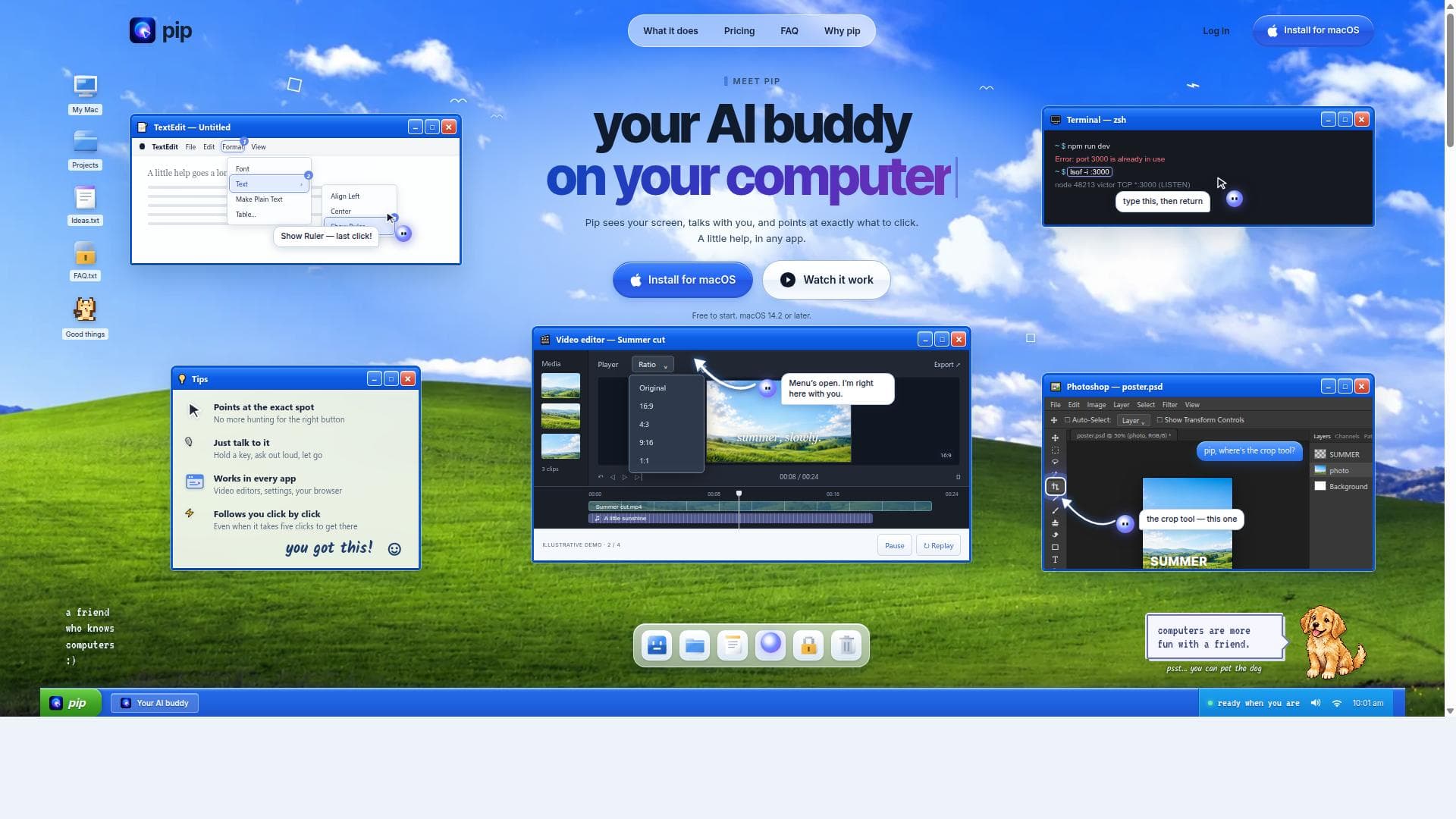
Pip is a groundbreaking AI buddy for Mac that visually guides you through your screen and talks you through every click, making complex tasks simple across all apps. Ideal for beginners and professionals alike, it offers hands-free voice interaction and step-by-step assistance, transforming how you navigate your computer.

Description
Pip is an AI buddy for your Mac. It sees your screen, talks you through it, and points at exactly where to click, even when it takes several clicks.
Detailed Description
Pip is an innovative AI-powered assistant designed specifically for Mac users, serving as a real-time, interactive buddy that helps you navigate your computer with ease. Its core purpose is to provide on-screen guidance by visually pointing to exact spots on your screen where you need to click, while simultaneously talking you through the process. This unique combination of visual cues and conversational interaction makes Pip a powerful tool for anyone who wants to learn software, troubleshoot issues, or simply get tasks done more efficiently without confusion or frustration. Unlike traditional help systems or static tutorials, Pip actively follows your actions click by click, even when multiple steps are involved, ensuring you never lose track of what to do next. One of Pip’s standout features is its ability to work seamlessly across every app on your Mac. Whether you're editing a video, adjusting system settings, or browsing the web, Pip can see your screen context and provide precise guidance tailored to the app you’re using. This universal compatibility removes the need to switch between different help tools or manuals. Pip also supports voice interaction, allowing you to hold a key and ask questions out loud, making the assistance feel natural and hands-free. This voice feature is particularly useful when your hands are busy or when you want quick answers without typing. The AI’s capability to track your clicks through complex multi-step processes means it can guide you through workflows that would otherwise require extensive searching or trial and error. Pip is best suited for Mac users who want an intuitive, interactive assistant to help them master software or complete tasks efficiently. This includes beginners who are still learning their way around macOS and various applications, professionals who use complex software like video editors or design tools, and anyone who prefers guided, step-by-step help over reading manuals or watching static tutorials. For educators and trainers, Pip could serve as a valuable teaching aid by providing students with personalized, on-screen instructions. Additionally, support teams could leverage Pip to offer remote assistance or create interactive onboarding experiences. Regarding pricing, Pip offers a free-to-start model compatible with macOS 14.2 or later, allowing users to try the core functionalities without upfront cost. While specific pricing tiers or subscription details are not explicitly stated, the free access lowers the barrier to entry and encourages users to experience the AI buddy firsthand. This approach suggests that advanced features or extended usage might be available through paid plans, typical of modern SaaS tools, but prospective users should check the official website for the latest pricing information. When compared to alternatives, Pip stands out due to its unique screen-aware AI that not only listens and responds but also visually points to exact UI elements, a feature rarely found in other AI assistants. Many help tools rely on text instructions or video tutorials that do not adapt in real-time to your screen context. Pip’s ability to follow your clicks through multiple steps and work universally across all apps on your Mac makes it more versatile and interactive than traditional help systems or generic voice assistants. However, unlike some AI tools that integrate deeply with cloud services or offer extensive automation, Pip’s focus is primarily on guided assistance and user interaction. Potential limitations include its current exclusivity to macOS 14.2 or later, which restricts usage to relatively recent Mac hardware and software. Users on older systems or other operating systems will not be able to benefit from Pip. Additionally, while Pip’s voice interaction is a powerful feature, it may require a quiet environment or clear speech to function optimally. As an AI tool that visually points on your screen, it may also require accessibility permissions and could have a learning curve for users unfamiliar with AI assistants. Finally, since Pip relies on real-time screen analysis, performance could vary depending on system resources and app complexity. Overall, Pip offers a fresh, interactive approach to computer assistance by combining AI-driven voice interaction with precise visual guidance. It is an excellent choice for Mac users seeking a hands-on, conversational helper that adapts to any app and guides them through complex tasks effortlessly.
Tool Features
- Points at the exact spot on your screen to guide you
- Allows voice interaction by holding a key and asking out loud
- Works in every app including video editors, settings, and browsers
- Follows you click by click even through multiple steps
Description
Pip is a groundbreaking AI buddy for Mac that visually guides you through your screen and talks you through every click, making complex tasks simple across all apps. Ideal for beginners and professionals alike, it offers hands-free voice interaction and step-by-step assistance, transforming how you navigate your computer.
Pip is an AI buddy for your Mac. It sees your screen, talks you through it, and points at exactly where to click, even when it takes several clicks.
Detailed Description
Pip is an innovative AI-powered assistant designed specifically for Mac users, serving as a real-time, interactive buddy that helps you navigate your computer with ease. Its core purpose is to provide on-screen guidance by visually pointing to exact spots on your screen where you need to click, while simultaneously talking you through the process. This unique combination of visual cues and conversational interaction makes Pip a powerful tool for anyone who wants to learn software, troubleshoot issues, or simply get tasks done more efficiently without confusion or frustration. Unlike traditional help systems or static tutorials, Pip actively follows your actions click by click, even when multiple steps are involved, ensuring you never lose track of what to do next. One of Pip’s standout features is its ability to work seamlessly across every app on your Mac. Whether you're editing a video, adjusting system settings, or browsing the web, Pip can see your screen context and provide precise guidance tailored to the app you’re using. This universal compatibility removes the need to switch between different help tools or manuals. Pip also supports voice interaction, allowing you to hold a key and ask questions out loud, making the assistance feel natural and hands-free. This voice feature is particularly useful when your hands are busy or when you want quick answers without typing. The AI’s capability to track your clicks through complex multi-step processes means it can guide you through workflows that would otherwise require extensive searching or trial and error. Pip is best suited for Mac users who want an intuitive, interactive assistant to help them master software or complete tasks efficiently. This includes beginners who are still learning their way around macOS and various applications, professionals who use complex software like video editors or design tools, and anyone who prefers guided, step-by-step help over reading manuals or watching static tutorials. For educators and trainers, Pip could serve as a valuable teaching aid by providing students with personalized, on-screen instructions. Additionally, support teams could leverage Pip to offer remote assistance or create interactive onboarding experiences. Regarding pricing, Pip offers a free-to-start model compatible with macOS 14.2 or later, allowing users to try the core functionalities without upfront cost. While specific pricing tiers or subscription details are not explicitly stated, the free access lowers the barrier to entry and encourages users to experience the AI buddy firsthand. This approach suggests that advanced features or extended usage might be available through paid plans, typical of modern SaaS tools, but prospective users should check the official website for the latest pricing information. When compared to alternatives, Pip stands out due to its unique screen-aware AI that not only listens and responds but also visually points to exact UI elements, a feature rarely found in other AI assistants. Many help tools rely on text instructions or video tutorials that do not adapt in real-time to your screen context. Pip’s ability to follow your clicks through multiple steps and work universally across all apps on your Mac makes it more versatile and interactive than traditional help systems or generic voice assistants. However, unlike some AI tools that integrate deeply with cloud services or offer extensive automation, Pip’s focus is primarily on guided assistance and user interaction. Potential limitations include its current exclusivity to macOS 14.2 or later, which restricts usage to relatively recent Mac hardware and software. Users on older systems or other operating systems will not be able to benefit from Pip. Additionally, while Pip’s voice interaction is a powerful feature, it may require a quiet environment or clear speech to function optimally. As an AI tool that visually points on your screen, it may also require accessibility permissions and could have a learning curve for users unfamiliar with AI assistants. Finally, since Pip relies on real-time screen analysis, performance could vary depending on system resources and app complexity. Overall, Pip offers a fresh, interactive approach to computer assistance by combining AI-driven voice interaction with precise visual guidance. It is an excellent choice for Mac users seeking a hands-on, conversational helper that adapts to any app and guides them through complex tasks effortlessly.
Frequently Asked Questions
What is Pip?
Pip is an AI-powered assistant for Mac that sees your screen, talks you through tasks, and points exactly where to click, even through multiple steps, providing real-time, interactive guidance across all apps.
How much does Pip cost?
Pip offers a free-to-start model compatible with macOS 14.2 or later. While detailed pricing plans are not explicitly listed, users can try core features for free and should check the official website for any paid subscription options.
Who is Pip best for?
Pip is ideal for Mac users ranging from beginners learning the system to professionals using complex software. It’s also useful for educators, trainers, and support teams needing interactive, step-by-step on-screen guidance.
What are the main features of Pip?
Key features include precise on-screen pointing to guide clicks, voice interaction by holding a key and speaking, universal compatibility with every Mac app including video editors and browsers, and the ability to follow users click by click through multi-step processes.
Does Pip offer a free trial?
Yes, Pip is free to start, allowing users to experience its core functionalities without upfront cost on macOS 14.2 or later.
What integrations does Pip support?
Pip works universally across all apps on your Mac, including video editors, system settings, browsers, and more, without requiring specific integrations.
How does Pip work?
Pip uses AI to analyze your Mac’s screen in real-time, providing spoken guidance and visually pointing to exact UI elements where you need to click. It listens to your voice commands when you hold a key, follows your clicks through multiple steps, and adapts its assistance to whatever app you’re using.
Socials
Use ToolReviews
No reviews yet. Be the first to share your experience.
Sponsored Tools











































Recommended Tools
Stay updated on latest Ai tools
Get the latest insights, Join our newsletter
Read and trusted by 50,000+ readers
Join the biggest AI Community
Our community and staff are here to help!
Your feedback will help Alice AI improve in future versions.








Submit your Tool


PoweredByAI.app is an AI Tools Directory helping individuals, businesses, and creators discover the best AI tools for writing, coding, design, productivity, and more.
© 2026 , Product of011BQ. All rights reserved.