🚀 Zaprep: Your Socials on Steroids. Start free — automate 1,000 DMs/month & turn engagement into leads. with 1,000 automated DMs/month.


Is this your AI tool? Claim it today.
Verify ownership, manage your profile, and unlock growth features.
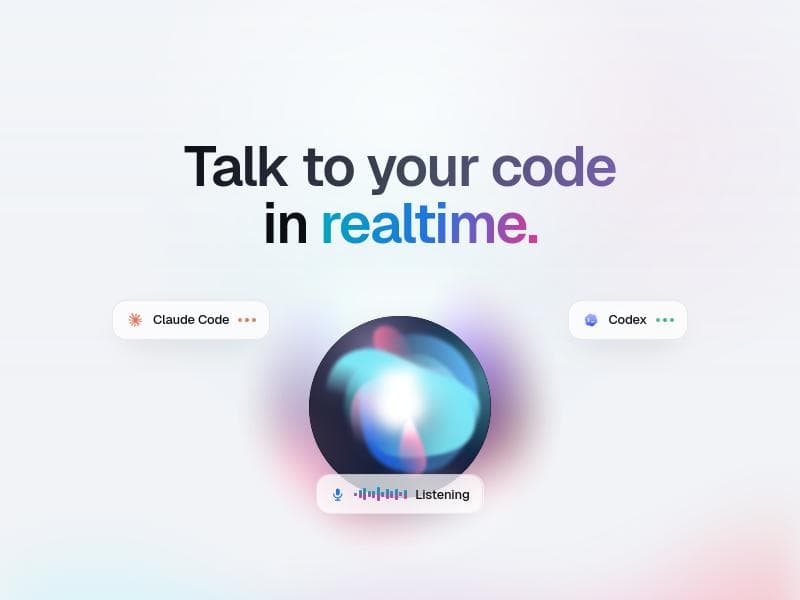
Perla is a groundbreaking macOS app that transforms software development by enabling hands-free, real-time voice interaction with AI coding agents Claude Code and Codex. Perfect for developers seeking a natural, eyes-free coding experience, Perla lives in the MacBook notch and lets you talk to your codebase as if briefing a teammate.

Description
Claude Code and Codex has a voice now.. Introducing Perla #AI is a native macOS app that lives in your notch and lets you talk to your coding agents in real time. Say what you want, and it runs Claude Code or Codex, talks back, and works with you in a real back and forth. Hands free. It doesn't replace your agents. It drives them, and gives them a voice. perla.sh
Detailed Description
Perla is an innovative macOS application designed to revolutionize the way developers interact with their codebases by leveraging voice commands. Built natively with SwiftUI, Perla serves as a voice layer interface for advanced AI coding assistants Claude Code and Codex, enabling users to build, navigate, and modify software projects hands-free and in real time. Positioned uniquely in the MacBook's notch area, Perla offers seamless accessibility without disrupting the developer's workflow, allowing them to speak naturally to their codebase as if briefing a teammate. This approach transforms traditional coding by removing the dependency on keyboard and mouse inputs, making coding more intuitive and accessible. At its core, Perla provides a full voice cockpit that is not only reactive but also proactive and steerable. Users can start coding agents, direct their actions, ask questions about the code, and stop processes entirely through voice commands. This hands-free and eyes-free interaction model significantly enhances productivity, especially in scenarios where multitasking or physical constraints limit traditional input methods. The app listens continuously, interpreting natural language instructions to run coding agents that can generate, refactor, or analyze code on the fly. This real-time voice interaction empowers developers to maintain focus on problem-solving rather than on the mechanics of coding. Key features of Perla include its integration with Claude Code and Codex, two powerful AI coding engines that provide the intelligence behind the voice commands. The app’s placement in the MacBook notch ensures it is always within reach without occupying screen real estate, offering a non-intrusive yet readily available interface. Its voice cockpit is designed to be aware of the coding context, enabling it to proactively suggest actions or clarify commands, thus reducing errors and improving communication efficiency. The ability to start, steer, ask, and stop coding agents by voice allows for dynamic interaction with the codebase, facilitating tasks such as code generation, debugging, and documentation. Perla is ideally suited for macOS developers who seek to enhance their coding workflow through voice interaction. It is particularly beneficial for those who prefer hands-free operation due to accessibility needs, multitasking environments, or simply a desire for a more natural coding experience. Use cases include live coding sessions, pair programming where one developer dictates changes, or scenarios where developers want to minimize context switching between coding and other tasks. Additionally, Perla can serve as an accessibility tool for developers with physical impairments, enabling them to code effectively without traditional input devices. Regarding pricing, Perla is accessible through its official Product Hunt page and website, though specific pricing details are not explicitly stated in the available information. Potential users are encouraged to check the official site for the latest updates on plans, trials, or subscription models. Given its specialized nature and integration with premium AI models like Claude Code and Codex, pricing may reflect the advanced capabilities it offers. Compared to alternatives, Perla stands out by focusing exclusively on voice interaction for coding on macOS, leveraging the MacBook notch for a unique user interface element. While other AI coding assistants exist, few offer such an integrated, hands-free voice cockpit experience that is context-aware and proactive. This makes Perla a pioneering tool in voice-driven software development, differentiating itself from text-based AI coding tools or general voice assistants that lack deep coding integration. However, users should consider certain limitations. As a macOS-native app, Perla is restricted to Apple hardware, which may limit its accessibility to developers on other platforms. Its reliance on voice commands may also pose challenges in noisy environments or for users uncomfortable with voice interaction. Additionally, the effectiveness of the AI coding agents depends on the quality of the underlying Claude Code and Codex models, which may have occasional inaccuracies or require user oversight. Despite these considerations, Perla offers a compelling, cutting-edge approach to coding that could redefine developer productivity and accessibility.
Tool Features
- Voice layer for Claude Code and Codex
- Lives in your MacBook notch for easy access
- Hands-free and eyes-free coding interaction
- Start, steer, ask, and stop coding agents by voice
- Full voice cockpit that is aware, steerable, and proactive
Description
Perla is a groundbreaking macOS app that transforms software development by enabling hands-free, real-time voice interaction with AI coding agents Claude Code and Codex. Perfect for developers seeking a natural, eyes-free coding experience, Perla lives in the MacBook notch and lets you talk to your codebase as if briefing a teammate.
Claude Code and Codex has a voice now.. Introducing Perla #AI is a native macOS app that lives in your notch and lets you talk to your coding agents in real time. Say what you want, and it runs Claude Code or Codex, talks back, and works with you in a real back and forth. Hands free. It doesn't replace your agents. It drives them, and gives them a voice. perla.sh
Detailed Description
Perla is an innovative macOS application designed to revolutionize the way developers interact with their codebases by leveraging voice commands. Built natively with SwiftUI, Perla serves as a voice layer interface for advanced AI coding assistants Claude Code and Codex, enabling users to build, navigate, and modify software projects hands-free and in real time. Positioned uniquely in the MacBook's notch area, Perla offers seamless accessibility without disrupting the developer's workflow, allowing them to speak naturally to their codebase as if briefing a teammate. This approach transforms traditional coding by removing the dependency on keyboard and mouse inputs, making coding more intuitive and accessible. At its core, Perla provides a full voice cockpit that is not only reactive but also proactive and steerable. Users can start coding agents, direct their actions, ask questions about the code, and stop processes entirely through voice commands. This hands-free and eyes-free interaction model significantly enhances productivity, especially in scenarios where multitasking or physical constraints limit traditional input methods. The app listens continuously, interpreting natural language instructions to run coding agents that can generate, refactor, or analyze code on the fly. This real-time voice interaction empowers developers to maintain focus on problem-solving rather than on the mechanics of coding. Key features of Perla include its integration with Claude Code and Codex, two powerful AI coding engines that provide the intelligence behind the voice commands. The app’s placement in the MacBook notch ensures it is always within reach without occupying screen real estate, offering a non-intrusive yet readily available interface. Its voice cockpit is designed to be aware of the coding context, enabling it to proactively suggest actions or clarify commands, thus reducing errors and improving communication efficiency. The ability to start, steer, ask, and stop coding agents by voice allows for dynamic interaction with the codebase, facilitating tasks such as code generation, debugging, and documentation. Perla is ideally suited for macOS developers who seek to enhance their coding workflow through voice interaction. It is particularly beneficial for those who prefer hands-free operation due to accessibility needs, multitasking environments, or simply a desire for a more natural coding experience. Use cases include live coding sessions, pair programming where one developer dictates changes, or scenarios where developers want to minimize context switching between coding and other tasks. Additionally, Perla can serve as an accessibility tool for developers with physical impairments, enabling them to code effectively without traditional input devices. Regarding pricing, Perla is accessible through its official Product Hunt page and website, though specific pricing details are not explicitly stated in the available information. Potential users are encouraged to check the official site for the latest updates on plans, trials, or subscription models. Given its specialized nature and integration with premium AI models like Claude Code and Codex, pricing may reflect the advanced capabilities it offers. Compared to alternatives, Perla stands out by focusing exclusively on voice interaction for coding on macOS, leveraging the MacBook notch for a unique user interface element. While other AI coding assistants exist, few offer such an integrated, hands-free voice cockpit experience that is context-aware and proactive. This makes Perla a pioneering tool in voice-driven software development, differentiating itself from text-based AI coding tools or general voice assistants that lack deep coding integration. However, users should consider certain limitations. As a macOS-native app, Perla is restricted to Apple hardware, which may limit its accessibility to developers on other platforms. Its reliance on voice commands may also pose challenges in noisy environments or for users uncomfortable with voice interaction. Additionally, the effectiveness of the AI coding agents depends on the quality of the underlying Claude Code and Codex models, which may have occasional inaccuracies or require user oversight. Despite these considerations, Perla offers a compelling, cutting-edge approach to coding that could redefine developer productivity and accessibility.
Frequently Asked Questions
What is Perla?
Perla is a native macOS SwiftUI application that acts as a voice interface for AI coding assistants Claude Code and Codex, allowing developers to interact with their codebase hands-free by using voice commands in real time.
How much does Perla cost?
Specific pricing details for Perla are not publicly disclosed; interested users should visit the official website or Product Hunt page for the latest information on plans, subscriptions, or free trials.
Who is Perla best for?
Perla is best suited for macOS developers who want to enhance productivity through voice-driven coding, including those with accessibility needs, multitasking professionals, or anyone seeking a more natural, hands-free way to interact with their code.
What are the main features of Perla?
Perla’s main features include a voice layer for Claude Code and Codex AI agents, placement in the MacBook notch for easy access, hands-free and eyes-free coding interaction, the ability to start, steer, ask, and stop coding agents by voice, and a proactive, context-aware voice cockpit.
Does Perla offer a free trial?
Information about a free trial for Perla is not explicitly provided; users should check the official website or Product Hunt listing for any trial offers or demo availability.
What integrations does Perla support?
Perla integrates directly with Claude Code and Codex AI coding agents, enabling voice-driven interaction with these powerful AI models to generate, analyze, and modify code.
How does Perla work?
Perla works by continuously listening to voice commands through its interface located in the MacBook notch, interpreting natural language instructions to control AI coding agents that perform coding tasks live and hands-free within the developer’s codebase.
Socials
Use ToolReviews
No reviews yet. Be the first to share your experience.
Sponsored Tools











































Recommended Tools
Stay updated on latest Ai tools
Get the latest insights, Join our newsletter
Read and trusted by 50,000+ readers
Join the biggest AI Community
Our community and staff are here to help!
Your feedback will help Alice AI improve in future versions.








Submit your Tool


PoweredByAI.app is an AI Tools Directory helping individuals, businesses, and creators discover the best AI tools for writing, coding, design, productivity, and more.
© 2026 , Product of011BQ. All rights reserved.