Featured in:Best AI Writing Tools
Get featured →🚀 Zaprep: Your Socials on Steroids. Start free — automate 1,000 DMs/month & turn engagement into leads. with 1,000 automated DMs/month.
Paperguide AI Writer


Is this your AI tool? Claim it today.
Verify ownership, manage your profile, and unlock growth features.
✦
Paperguide AI Writer is a specialized AI writing assistant tailored for academic and research-based documents, offering advanced citation management and customizable formatting. Ideal for students, researchers, and professionals, it streamlines the creation of well-structured papers, essays, and articles with collaborative and AI-guided writing modes.

Description
Effortlessly write well-researched articles, academic papers, and essays with Paperguide AI Writer.
Detailed Description
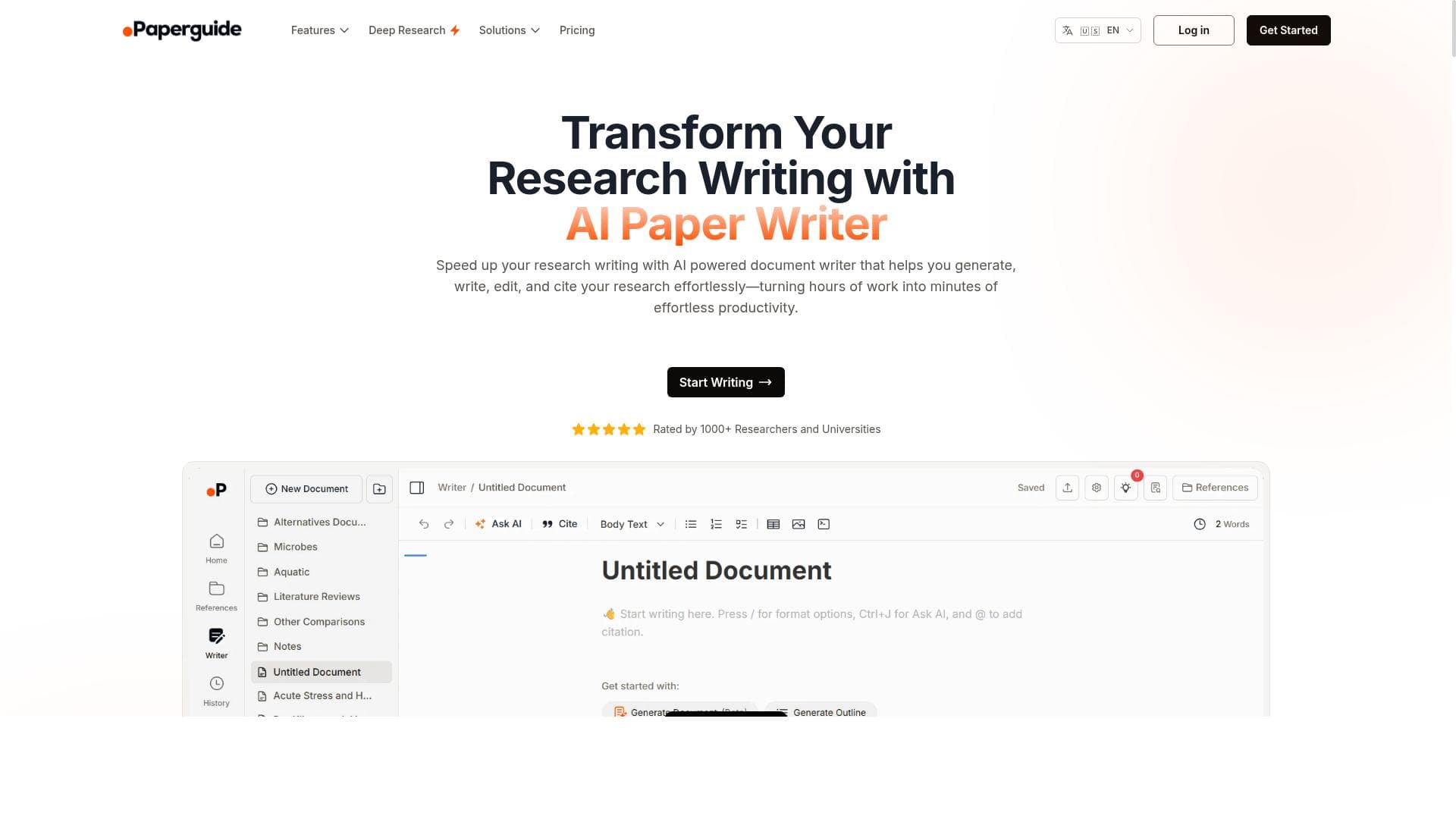
Paperguide AI Writer is an advanced AI-powered writing assistant designed to streamline the creation of well-researched academic papers, essays, articles, and other scholarly documents. Its core purpose is to help users efficiently generate high-quality written content by combining AI-driven assistance with customizable writing tools. Whether you are a student, researcher, or professional writer, Paperguide AI Writer offers a comprehensive platform to support the entire writing process from initial outline generation to final document export. One of the standout features of Paperguide AI Writer is its ability to generate detailed document outlines and full-length documents based on user instructions. This allows users to quickly structure their work and develop content that aligns with their research goals. The tool supports a wide range of document types including research papers, literature reviews, case studies, essays, and articles, making it versatile for various academic and professional writing needs. Additionally, Paperguide AI Writer includes robust citation management capabilities, enabling users to insert citations both automatically and manually. It supports multiple citation styles, which can be customized according to the requirements of different academic disciplines or publication standards. Beyond text generation, Paperguide AI Writer allows users to enrich their documents by adding images, tables, and code blocks, facilitating the inclusion of visual data and technical information. The platform also offers version history functionality, which is critical for tracking changes and recovering previous document versions, ensuring that no work is lost during the writing process. Collaboration is another key aspect, with options for AI-guided content generation as well as manual writing modes, allowing teams or individual users to work flexibly according to their preferences. Paperguide AI Writer is best suited for students, academics, researchers, and content creators who require a reliable and efficient tool to produce scholarly documents. It is particularly valuable for those who need to manage complex citations and maintain rigorous academic standards. Use cases include drafting research proposals, writing comprehensive literature reviews, preparing case studies, and composing essays or articles for publication. The platform operates on a freemium pricing model, providing basic features for free with options to upgrade for enhanced capabilities. This approach allows users to explore the tool’s core functions without upfront costs, making it accessible to a broad audience. Paid plans typically unlock advanced citation management, additional export options, and extended AI assistance. Compared to other AI writing tools, Paperguide AI Writer distinguishes itself through its strong emphasis on academic writing and citation management. While many AI writing assistants focus primarily on general content creation, Paperguide integrates features tailored specifically for scholarly work, such as customizable citation styles and support for academic formatting. However, users should be aware that, like all AI writing tools, it may require careful review and editing to ensure accuracy and adherence to specific academic guidelines. In summary, Paperguide AI Writer offers a powerful, user-friendly platform for producing well-structured, research-backed documents. Its combination of AI-driven writing assistance, citation management, and collaborative features makes it a valuable resource for anyone engaged in academic or professional writing. While it may not replace the nuanced expertise of human authorship, it significantly reduces the time and effort involved in drafting and organizing complex documents.
Tool Features
- Write research papers, literature reviews, case studies, essays, or articles with AI assistance
- Generate document outlines and full documents based on user instructions
- Citation management with automatic and manual citation insertion
- Customizable document settings including citation styles and AI knowledge sources
- Supports adding images, tables, and code blocks
- Export documents in docx format
- Version history for document recovery
- Collaborative AI-guided content generation and manual writing modes
Description
✦
Paperguide AI Writer is a specialized AI writing assistant tailored for academic and research-based documents, offering advanced citation management and customizable formatting. Ideal for students, researchers, and professionals, it streamlines the creation of well-structured papers, essays, and articles with collaborative and AI-guided writing modes.
Effortlessly write well-researched articles, academic papers, and essays with Paperguide AI Writer.
Detailed Description
Paperguide AI Writer is an advanced AI-powered writing assistant designed to streamline the creation of well-researched academic papers, essays, articles, and other scholarly documents. Its core purpose is to help users efficiently generate high-quality written content by combining AI-driven assistance with customizable writing tools. Whether you are a student, researcher, or professional writer, Paperguide AI Writer offers a comprehensive platform to support the entire writing process from initial outline generation to final document export. One of the standout features of Paperguide AI Writer is its ability to generate detailed document outlines and full-length documents based on user instructions. This allows users to quickly structure their work and develop content that aligns with their research goals. The tool supports a wide range of document types including research papers, literature reviews, case studies, essays, and articles, making it versatile for various academic and professional writing needs. Additionally, Paperguide AI Writer includes robust citation management capabilities, enabling users to insert citations both automatically and manually. It supports multiple citation styles, which can be customized according to the requirements of different academic disciplines or publication standards. Beyond text generation, Paperguide AI Writer allows users to enrich their documents by adding images, tables, and code blocks, facilitating the inclusion of visual data and technical information. The platform also offers version history functionality, which is critical for tracking changes and recovering previous document versions, ensuring that no work is lost during the writing process. Collaboration is another key aspect, with options for AI-guided content generation as well as manual writing modes, allowing teams or individual users to work flexibly according to their preferences. Paperguide AI Writer is best suited for students, academics, researchers, and content creators who require a reliable and efficient tool to produce scholarly documents. It is particularly valuable for those who need to manage complex citations and maintain rigorous academic standards. Use cases include drafting research proposals, writing comprehensive literature reviews, preparing case studies, and composing essays or articles for publication. The platform operates on a freemium pricing model, providing basic features for free with options to upgrade for enhanced capabilities. This approach allows users to explore the tool’s core functions without upfront costs, making it accessible to a broad audience. Paid plans typically unlock advanced citation management, additional export options, and extended AI assistance. Compared to other AI writing tools, Paperguide AI Writer distinguishes itself through its strong emphasis on academic writing and citation management. While many AI writing assistants focus primarily on general content creation, Paperguide integrates features tailored specifically for scholarly work, such as customizable citation styles and support for academic formatting. However, users should be aware that, like all AI writing tools, it may require careful review and editing to ensure accuracy and adherence to specific academic guidelines. In summary, Paperguide AI Writer offers a powerful, user-friendly platform for producing well-structured, research-backed documents. Its combination of AI-driven writing assistance, citation management, and collaborative features makes it a valuable resource for anyone engaged in academic or professional writing. While it may not replace the nuanced expertise of human authorship, it significantly reduces the time and effort involved in drafting and organizing complex documents.
Frequently Asked Questions
What is Paperguide AI Writer?
Paperguide AI Writer is an AI-powered writing assistant designed to help users effortlessly create well-researched academic papers, essays, articles, and other scholarly documents with features like outline generation, citation management, and collaborative writing modes.
How much does Paperguide AI Writer cost?
Paperguide AI Writer offers a freemium pricing model, providing free access to basic features with options to upgrade to paid plans for enhanced capabilities such as advanced citation management and additional export formats.
Who is Paperguide AI Writer best for?
It is best suited for students, researchers, academics, and professional writers who need to produce well-structured, citation-rich academic documents like research papers, literature reviews, case studies, and essays.
What are the main features of Paperguide AI Writer?
Key features include AI-assisted writing for various document types, automatic and manual citation insertion with customizable styles, document outline generation, support for images, tables, and code blocks, version history for document recovery, and collaborative AI-guided and manual writing modes.
Does Paperguide AI Writer offer a free trial?
Yes, Paperguide AI Writer offers a freemium plan that allows users to access basic features for free, which acts as a trial to explore the platform before opting for paid upgrades.
What integrations does Paperguide AI Writer support?
While specific third-party integrations are not detailed, Paperguide AI Writer supports exporting documents in docx format, enabling compatibility with popular word processors and academic tools.
How does Paperguide AI Writer work?
Users input instructions or content prompts, and Paperguide AI Writer generates document outlines or full documents using AI. It manages citations automatically or manually, allows customization of document settings, and supports collaborative editing with version control.
Socials
Use ToolReviews
0 reviews
No reviews yet. Be the first to share your experience.
Sponsored Tools











































Recommended Tools
Stay updated on latest Ai tools
Get the latest insights, Join our newsletter
Read and trusted by 50,000+ readers
Join the biggest AI Community
Our community and staff are here to help!
Your feedback will help Alice AI improve in future versions.








Submit your Tool


PoweredByAI.app is an AI Tools Directory helping individuals, businesses, and creators discover the best AI tools for writing, coding, design, productivity, and more.
© 2026 , Product of011BQ. All rights reserved.