Featured in:Best AI Writing Tools
Get featured →AI Styling Studio — Infinite avatar looks from just 1 photo. Try it now.
OpusClip ReframeAnything


✦
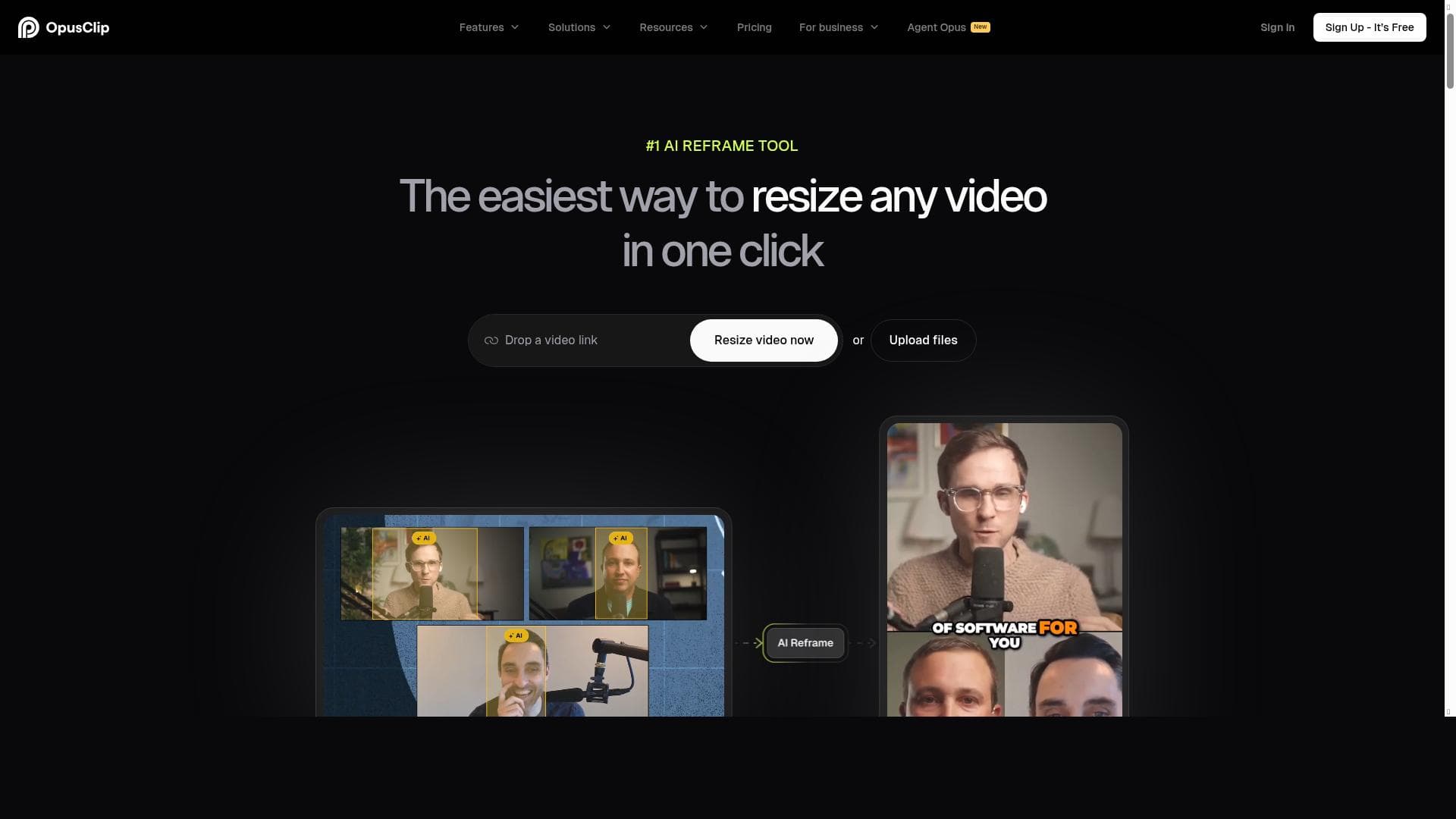
OpusClip ReframeAnything leverages advanced AI to automatically resize and reframe videos for any social platform with just one click, making it effortless to create perfectly formatted, engaging social videos. Ideal for content creators and marketers, it eliminates the need for manual editing, enabling instant production of social-ready videos tailored to diverse aspect ratios.

Description
OpusClip ReframeAnything is the most advanced AI reframe model that resizes any video for any social platform in just 1 click. It tracks key actions and applies the best layouts to your video. No editing skills needed—create social-ready videos instantly.
Detailed Description
OpusClip ReframeAnything is an innovative AI-powered video editing tool designed to simplify and automate the process of resizing and reframing videos for various social media platforms. Its core purpose is to enable content creators, marketers, and social media managers to quickly adapt their video content to different aspect ratios and formats without requiring any manual editing skills. By leveraging advanced AI algorithms, OpusClip ReframeAnything intelligently tracks key actions and subjects within a video and applies the most suitable layouts and crops, ensuring that the essential content remains in focus regardless of the target platform's specifications. This capability is particularly valuable in today's digital landscape where video content must be optimized for platforms ranging from Instagram Stories and TikTok to YouTube Shorts and Facebook feeds, each with unique size and format requirements. The tool's standout features include one-click automatic video resizing, which drastically reduces the time and effort traditionally needed to manually crop or reformat videos. It supports multiple aspect ratios such as 1:1, 9:16, 16:9, and others, allowing users to produce platform-specific videos from a single source file seamlessly. Integration with OpusClip enhances its functionality by providing a streamlined workflow for video content creation and editing. The AI model behind ReframeAnything is designed to detect and follow key visual elements and actions within the footage, intelligently repositioning the frame to maintain viewer engagement and narrative coherence. This eliminates the guesswork and technical challenges often associated with manual reframing. The user interface is intuitive and accessible, making it ideal for creators with varying levels of video editing experience. OpusClip ReframeAnything is best suited for video content creators, social media marketers, influencers, and small to medium-sized businesses looking to maximize their video reach across multiple platforms without investing in complex editing software or professional editors. It is particularly useful for those who produce a high volume of video content and need to quickly adapt it for different audience segments or social channels. Use cases include repurposing long-form videos into short clips optimized for mobile viewing, creating engaging social ads, and tailoring video content for platform-specific storytelling formats. Its ease of use and automation make it a valuable tool for individuals and teams aiming to maintain a consistent and professional video presence online. Regarding pricing, OpusClip ReframeAnything offers a freemium model, allowing users to access basic features at no cost with the option to upgrade for enhanced capabilities or higher usage limits. This approach provides an accessible entry point for new users to test the tool’s functionality before committing financially. Detailed pricing tiers and feature distinctions are typically available on the official website, catering to different user needs from casual creators to professional marketers. When compared to alternative video resizing and reframing tools, OpusClip ReframeAnything stands out due to its advanced AI-driven approach that automates the detection of key video elements and applies optimal layouts intelligently. Many competing tools require manual input or lack the precision in tracking important actions within the video, resulting in less effective reframing. Additionally, its seamless integration with the OpusClip ecosystem provides a more comprehensive content creation experience. However, some limitations may include dependency on the AI’s interpretation of video content, which might occasionally misalign with user preferences, and potential constraints on video length or resolution in the free plan. Users should also consider that while the tool excels at reframing, it may not replace full-featured video editors for complex post-production needs. Overall, OpusClip ReframeAnything is a powerful and user-friendly solution for anyone looking to efficiently produce social media-ready videos tailored to multiple platforms. Its AI capabilities significantly reduce the technical barriers to video adaptation, making it an essential tool for modern digital content strategies.
Tool Features
- Auto video resizing in one click
- Supports different aspect ratios
- Integrated with OpusClip
- Easy to use for video content creators
Description
✦
OpusClip ReframeAnything leverages advanced AI to automatically resize and reframe videos for any social platform with just one click, making it effortless to create perfectly formatted, engaging social videos. Ideal for content creators and marketers, it eliminates the need for manual editing, enabling instant production of social-ready videos tailored to diverse aspect ratios.
OpusClip ReframeAnything is the most advanced AI reframe model that resizes any video for any social platform in just 1 click. It tracks key actions and applies the best layouts to your video. No editing skills needed—create social-ready videos instantly.
Detailed Description
OpusClip ReframeAnything is an innovative AI-powered video editing tool designed to simplify and automate the process of resizing and reframing videos for various social media platforms. Its core purpose is to enable content creators, marketers, and social media managers to quickly adapt their video content to different aspect ratios and formats without requiring any manual editing skills. By leveraging advanced AI algorithms, OpusClip ReframeAnything intelligently tracks key actions and subjects within a video and applies the most suitable layouts and crops, ensuring that the essential content remains in focus regardless of the target platform's specifications. This capability is particularly valuable in today's digital landscape where video content must be optimized for platforms ranging from Instagram Stories and TikTok to YouTube Shorts and Facebook feeds, each with unique size and format requirements. The tool's standout features include one-click automatic video resizing, which drastically reduces the time and effort traditionally needed to manually crop or reformat videos. It supports multiple aspect ratios such as 1:1, 9:16, 16:9, and others, allowing users to produce platform-specific videos from a single source file seamlessly. Integration with OpusClip enhances its functionality by providing a streamlined workflow for video content creation and editing. The AI model behind ReframeAnything is designed to detect and follow key visual elements and actions within the footage, intelligently repositioning the frame to maintain viewer engagement and narrative coherence. This eliminates the guesswork and technical challenges often associated with manual reframing. The user interface is intuitive and accessible, making it ideal for creators with varying levels of video editing experience. OpusClip ReframeAnything is best suited for video content creators, social media marketers, influencers, and small to medium-sized businesses looking to maximize their video reach across multiple platforms without investing in complex editing software or professional editors. It is particularly useful for those who produce a high volume of video content and need to quickly adapt it for different audience segments or social channels. Use cases include repurposing long-form videos into short clips optimized for mobile viewing, creating engaging social ads, and tailoring video content for platform-specific storytelling formats. Its ease of use and automation make it a valuable tool for individuals and teams aiming to maintain a consistent and professional video presence online. Regarding pricing, OpusClip ReframeAnything offers a freemium model, allowing users to access basic features at no cost with the option to upgrade for enhanced capabilities or higher usage limits. This approach provides an accessible entry point for new users to test the tool’s functionality before committing financially. Detailed pricing tiers and feature distinctions are typically available on the official website, catering to different user needs from casual creators to professional marketers. When compared to alternative video resizing and reframing tools, OpusClip ReframeAnything stands out due to its advanced AI-driven approach that automates the detection of key video elements and applies optimal layouts intelligently. Many competing tools require manual input or lack the precision in tracking important actions within the video, resulting in less effective reframing. Additionally, its seamless integration with the OpusClip ecosystem provides a more comprehensive content creation experience. However, some limitations may include dependency on the AI’s interpretation of video content, which might occasionally misalign with user preferences, and potential constraints on video length or resolution in the free plan. Users should also consider that while the tool excels at reframing, it may not replace full-featured video editors for complex post-production needs. Overall, OpusClip ReframeAnything is a powerful and user-friendly solution for anyone looking to efficiently produce social media-ready videos tailored to multiple platforms. Its AI capabilities significantly reduce the technical barriers to video adaptation, making it an essential tool for modern digital content strategies.
Frequently Asked Questions
What is OpusClip ReframeAnything?
OpusClip ReframeAnything is an AI-powered video editing tool that automatically resizes and reframes videos to fit various social media platforms by tracking key actions and applying optimal layouts, all with a single click.
How much does OpusClip ReframeAnything cost?
OpusClip ReframeAnything offers a freemium pricing model, allowing users to access basic features for free with options to upgrade for additional capabilities and higher usage limits.
Who is OpusClip ReframeAnything best for?
It is best suited for video content creators, social media marketers, influencers, and businesses who need to quickly adapt videos for multiple social platforms without advanced editing skills.
What are the main features of OpusClip ReframeAnything?
Key features include one-click automatic video resizing, support for multiple aspect ratios, AI-driven tracking of key video actions, optimal layout application, and integration with the OpusClip platform.
Does OpusClip ReframeAnything offer a free trial?
Yes, the tool offers a freemium plan that allows users to try basic features for free, providing an opportunity to evaluate its capabilities before upgrading.
What integrations does OpusClip ReframeAnything support?
OpusClip ReframeAnything is integrated with the OpusClip platform, enabling a streamlined workflow for video content creation and editing.
How does OpusClip ReframeAnything work?
It uses advanced AI to analyze videos, track key actions and subjects, then automatically resize and reframe the footage into the best layouts for different social media aspect ratios with just one click.
Socials
Use ToolReviews
0 reviews
No reviews yet. Be the first to share your experience.
Sponsored Tools


































Recommended Tools
Stay updated on latest Ai tools
Get the latest insights, Join our newsletter
Read and trusted by 50,000+ readers
Join the biggest AI Community
Our community and staff are here to help!
Your feedback will help Alice AI improve in future versions.







Submit your Tool

PoweredByAI.app is an AI Tools Directory helping individuals, businesses, and creators discover the best AI tools for writing, coding, design, productivity, and more.
© 2026 , Product of011BQ. All rights reserved.