
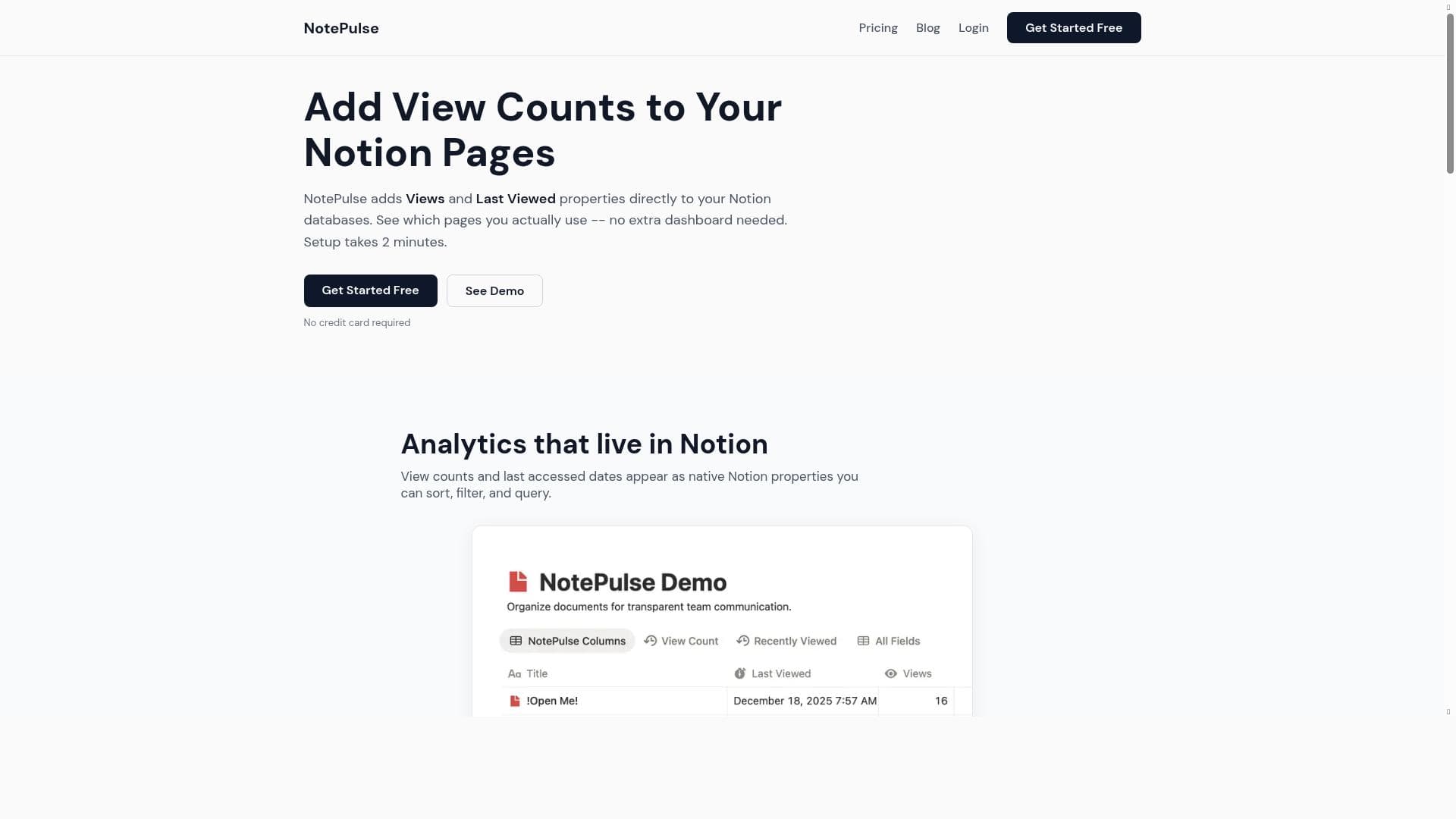


NotePulse uniquely tracks how you interact with your Notion workspace by adding usage analytics directly to your pages, helping you identify which notes are actively used and which have gone stale. Ideal for productivity enthusiasts and teams, it offers quick setup and actionable insights to optimize your knowledge management effortlessly.

Description
Know how you think NotePulse helps you understand how you use Notion: which pages you revisit, where your thinking actually happens, and what knowledge you've let go stale. Know how you think NotePulse helps you understand how you use Notion: which pages you revisit, where your thinking actually happens, and what knowledge you've let go stale.Know how you think NotePulse helps you understand how you use Notion: which pages you revisit, where your thinking actually happens, and what knowledge you've let go stale.
Detailed Description
NotePulse is an innovative AI-powered tool designed to help users gain deep insights into how they interact with their Notion workspace. Its core purpose is to illuminate patterns in your usage of Notion by tracking which pages you revisit most frequently, identifying where your active thinking and engagement occur, and highlighting knowledge that has become stale or underutilized. By providing this level of visibility, NotePulse empowers users to optimize their workflows, maintain an organized knowledge base, and ensure that valuable information remains fresh and actionable. At the heart of NotePulse are several key features that seamlessly integrate with Notion databases. It automatically adds a 'Views' property to your Notion pages, which counts how many times each page has been accessed. Alongside this, it introduces a 'Last Viewed' property that records the most recent date a page was opened. These properties enable users to track the actual usage of their pages over time, distinguishing frequently referenced notes from those that have been neglected. This data-driven approach helps users prioritize updates, archive outdated content, or reorganize their workspace to better reflect their current needs. Setting up NotePulse is remarkably straightforward, requiring only about two minutes to get started. The quick setup process involves connecting your Notion account and selecting the databases you want to monitor. Once configured, NotePulse runs in the background, continuously updating the usage metrics without any manual input. This ease of use makes it accessible to a broad audience, from individual knowledge workers to teams managing complex projects. NotePulse is especially beneficial for productivity enthusiasts, knowledge workers, project managers, and anyone who relies heavily on Notion for organization and information management. For example, content creators can identify which drafts or research pages they revisit most often, helping them focus their efforts on high-impact materials. Teams can use NotePulse to monitor collaborative spaces, ensuring that critical documents remain active and relevant. Additionally, users looking to declutter their workspace can leverage the insights to archive or delete pages that have not been used recently, streamlining their digital environment. The pricing model for NotePulse follows a freemium approach, allowing users to access core features at no cost while offering premium capabilities or higher usage limits through paid plans. This structure provides flexibility for casual users to explore the tool’s benefits without upfront investment, while power users and organizations can opt for enhanced functionality as needed. Compared to alternatives, NotePulse stands out by focusing specifically on usage analytics within Notion, rather than general productivity tracking or note-taking enhancements. While other tools may offer task management or automation features, NotePulse’s unique value lies in its ability to quantify and visualize how knowledge is consumed and maintained within Notion. This specialized focus makes it a valuable complement to existing productivity suites. However, users should consider that NotePulse’s effectiveness depends on consistent use of Notion and may require some adaptation for those with highly dynamic or non-standard database structures. Additionally, as it tracks page views and last accessed dates, privacy-conscious users should review data handling policies to ensure alignment with their preferences. Overall, NotePulse offers a compelling solution for anyone seeking to better understand and optimize their Notion workspace through actionable insights and minimal setup.
Tool Features
- Adds Views property to Notion databases
- Adds Last Viewed property to Notion databases
- Helps track which Notion pages are actually used
- Quick setup process taking 2 minutes
Description
NotePulse uniquely tracks how you interact with your Notion workspace by adding usage analytics directly to your pages, helping you identify which notes are actively used and which have gone stale. Ideal for productivity enthusiasts and teams, it offers quick setup and actionable insights to optimize your knowledge management effortlessly.
Know how you think NotePulse helps you understand how you use Notion: which pages you revisit, where your thinking actually happens, and what knowledge you've let go stale. Know how you think NotePulse helps you understand how you use Notion: which pages you revisit, where your thinking actually happens, and what knowledge you've let go stale.Know how you think NotePulse helps you understand how you use Notion: which pages you revisit, where your thinking actually happens, and what knowledge you've let go stale.
Detailed Description
NotePulse is an innovative AI-powered tool designed to help users gain deep insights into how they interact with their Notion workspace. Its core purpose is to illuminate patterns in your usage of Notion by tracking which pages you revisit most frequently, identifying where your active thinking and engagement occur, and highlighting knowledge that has become stale or underutilized. By providing this level of visibility, NotePulse empowers users to optimize their workflows, maintain an organized knowledge base, and ensure that valuable information remains fresh and actionable. At the heart of NotePulse are several key features that seamlessly integrate with Notion databases. It automatically adds a 'Views' property to your Notion pages, which counts how many times each page has been accessed. Alongside this, it introduces a 'Last Viewed' property that records the most recent date a page was opened. These properties enable users to track the actual usage of their pages over time, distinguishing frequently referenced notes from those that have been neglected. This data-driven approach helps users prioritize updates, archive outdated content, or reorganize their workspace to better reflect their current needs. Setting up NotePulse is remarkably straightforward, requiring only about two minutes to get started. The quick setup process involves connecting your Notion account and selecting the databases you want to monitor. Once configured, NotePulse runs in the background, continuously updating the usage metrics without any manual input. This ease of use makes it accessible to a broad audience, from individual knowledge workers to teams managing complex projects. NotePulse is especially beneficial for productivity enthusiasts, knowledge workers, project managers, and anyone who relies heavily on Notion for organization and information management. For example, content creators can identify which drafts or research pages they revisit most often, helping them focus their efforts on high-impact materials. Teams can use NotePulse to monitor collaborative spaces, ensuring that critical documents remain active and relevant. Additionally, users looking to declutter their workspace can leverage the insights to archive or delete pages that have not been used recently, streamlining their digital environment. The pricing model for NotePulse follows a freemium approach, allowing users to access core features at no cost while offering premium capabilities or higher usage limits through paid plans. This structure provides flexibility for casual users to explore the tool’s benefits without upfront investment, while power users and organizations can opt for enhanced functionality as needed. Compared to alternatives, NotePulse stands out by focusing specifically on usage analytics within Notion, rather than general productivity tracking or note-taking enhancements. While other tools may offer task management or automation features, NotePulse’s unique value lies in its ability to quantify and visualize how knowledge is consumed and maintained within Notion. This specialized focus makes it a valuable complement to existing productivity suites. However, users should consider that NotePulse’s effectiveness depends on consistent use of Notion and may require some adaptation for those with highly dynamic or non-standard database structures. Additionally, as it tracks page views and last accessed dates, privacy-conscious users should review data handling policies to ensure alignment with their preferences. Overall, NotePulse offers a compelling solution for anyone seeking to better understand and optimize their Notion workspace through actionable insights and minimal setup.
Frequently Asked Questions
What is NotePulse?
NotePulse is an AI-powered tool that integrates with Notion to track how you use your pages by adding properties like 'Views' and 'Last Viewed' to your databases. It helps you understand which pages you revisit frequently, where your active thinking happens, and which knowledge has become stale.
How much does NotePulse cost?
NotePulse offers a freemium pricing model, allowing users to access basic features for free, with premium plans available for enhanced capabilities or higher usage limits.
Who is NotePulse best for?
NotePulse is ideal for productivity enthusiasts, knowledge workers, project managers, content creators, and teams who rely on Notion for organizing information and want to gain insights into their usage patterns to optimize their workflows.
What are the main features of NotePulse?
The main features include adding a 'Views' property to count page visits, a 'Last Viewed' property to track the most recent access date, tracking actual usage of Notion pages, and a quick setup process that takes about two minutes.
Does NotePulse offer a free trial?
NotePulse operates on a freemium model, so users can start using its core features for free without a time-limited trial.
What integrations does NotePulse support?
NotePulse integrates directly with Notion by adding properties to your Notion databases. It does not currently list integrations with other platforms.
How does NotePulse work?
After a quick setup connecting your Notion account, NotePulse automatically adds 'Views' and 'Last Viewed' properties to your databases and continuously tracks page usage, updating these metrics to provide insights into how often and when you access your Notion pages.
Reviews
No reviews yet. Be the first to share your experience.















































