

Is this your AI tool? Claim it today.
Verify ownership, manage your profile, and unlock growth features.
NativeDoc is an all-in-one document command center that streamlines editing, organizing, and AI-powered analysis within a single platform. Ideal for professionals and students alike, it eliminates app-switching by combining powerful PDF tools and intelligent features like summarization and translation, boosting productivity and control over your documents.

Description
The definitive command center for your documents. NativeDoc unifies your entire workflow — from professional editing and organizing to deep AI analysis and studying — into one seamless environment. Stop switching apps and control your data from a single, intelligent hub.
Detailed Description
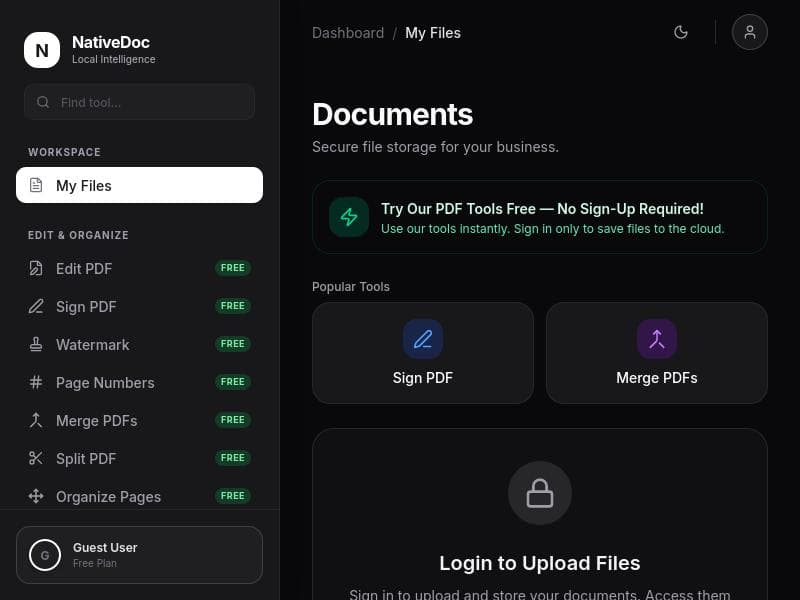
NativeDoc is a comprehensive document management and editing platform designed to serve as the ultimate command center for all your document-related workflows. Its core purpose is to unify the entire document lifecycle—from creation and professional editing to organization, deep AI-powered analysis, and study—within a single, seamless environment. By consolidating multiple document tools into one intelligent hub, NativeDoc eliminates the need to switch between different applications, thereby streamlining productivity and enhancing control over your data. Whether you are working with PDFs or other document formats, NativeDoc offers a robust, intuitive interface that empowers users to manage their documents efficiently and intelligently. At the heart of NativeDoc are its powerful features tailored to meet diverse document handling needs. Users can edit PDFs directly within the platform, making changes to text, images, and formatting without requiring external software. The tool also supports merging multiple PDFs into a single file, which is ideal for compiling reports or combining related documents. Splitting PDFs is equally straightforward, allowing users to extract specific pages or sections as needed. To optimize file sizes for easier sharing and storage, NativeDoc includes a compression feature that reduces PDF size while maintaining quality. Additionally, users can digitally sign PDFs, facilitating secure approvals and agreements. The platform supports translation of PDFs, enabling users to work with documents in multiple languages seamlessly. For quick comprehension and review, NativeDoc offers document summarization powered by AI, which distills lengthy texts into concise summaries. Finally, watermarking capabilities allow users to protect their documents by adding custom marks, enhancing security and branding. NativeDoc is best suited for professionals, students, educators, researchers, and businesses that require a centralized, efficient way to handle document workflows. Legal professionals and contract managers benefit from the signing and editing features, while students and researchers can leverage AI-powered summarization and translation for studying and cross-language research. Small to medium-sized businesses appreciate the all-in-one nature of NativeDoc, which reduces reliance on multiple tools and simplifies document collaboration and management. The platform is also valuable for content creators and editors who need precise control over PDF content and formatting. NativeDoc operates on a freemium pricing model, offering a free tier that provides access to essential features, allowing users to experience the platform’s core capabilities without upfront costs. Paid plans unlock advanced functionalities, higher usage limits, and priority support, catering to power users and organizations with more demanding document workflows. This flexible pricing approach makes NativeDoc accessible to a wide range of users, from individuals to enterprises. Compared to alternative document management and PDF editing tools, NativeDoc stands out by integrating a broad spectrum of features into a single platform enhanced with AI capabilities. While many tools focus solely on editing or organizing, NativeDoc combines editing, merging, splitting, compressing, signing, translating, summarizing, and watermarking in one place. Its AI-driven analysis and study tools further differentiate it by adding intelligent insights and automation. This holistic approach reduces the need for multiple subscriptions and software, offering better value and convenience. However, potential users should consider that as a relatively new and evolving platform, NativeDoc may have limitations regarding integration with some niche or legacy systems. Additionally, while the AI features are powerful, users should verify the accuracy of translations and summaries for critical documents. The freemium model means some advanced features require paid plans, which might be a consideration for budget-conscious users. Overall, NativeDoc represents a cutting-edge, all-encompassing solution for document management that balances ease of use with sophisticated AI enhancements, making it a compelling choice for anyone looking to optimize their document workflows.
Tool Features
- Edit PDF
- Merge PDF
- Split PDF
- Compress PDF
- Sign PDF
- Translate PDF
- Summarize documents
- Watermark
Description
NativeDoc is an all-in-one document command center that streamlines editing, organizing, and AI-powered analysis within a single platform. Ideal for professionals and students alike, it eliminates app-switching by combining powerful PDF tools and intelligent features like summarization and translation, boosting productivity and control over your documents.
The definitive command center for your documents. NativeDoc unifies your entire workflow — from professional editing and organizing to deep AI analysis and studying — into one seamless environment. Stop switching apps and control your data from a single, intelligent hub.
Detailed Description
NativeDoc is a comprehensive document management and editing platform designed to serve as the ultimate command center for all your document-related workflows. Its core purpose is to unify the entire document lifecycle—from creation and professional editing to organization, deep AI-powered analysis, and study—within a single, seamless environment. By consolidating multiple document tools into one intelligent hub, NativeDoc eliminates the need to switch between different applications, thereby streamlining productivity and enhancing control over your data. Whether you are working with PDFs or other document formats, NativeDoc offers a robust, intuitive interface that empowers users to manage their documents efficiently and intelligently. At the heart of NativeDoc are its powerful features tailored to meet diverse document handling needs. Users can edit PDFs directly within the platform, making changes to text, images, and formatting without requiring external software. The tool also supports merging multiple PDFs into a single file, which is ideal for compiling reports or combining related documents. Splitting PDFs is equally straightforward, allowing users to extract specific pages or sections as needed. To optimize file sizes for easier sharing and storage, NativeDoc includes a compression feature that reduces PDF size while maintaining quality. Additionally, users can digitally sign PDFs, facilitating secure approvals and agreements. The platform supports translation of PDFs, enabling users to work with documents in multiple languages seamlessly. For quick comprehension and review, NativeDoc offers document summarization powered by AI, which distills lengthy texts into concise summaries. Finally, watermarking capabilities allow users to protect their documents by adding custom marks, enhancing security and branding. NativeDoc is best suited for professionals, students, educators, researchers, and businesses that require a centralized, efficient way to handle document workflows. Legal professionals and contract managers benefit from the signing and editing features, while students and researchers can leverage AI-powered summarization and translation for studying and cross-language research. Small to medium-sized businesses appreciate the all-in-one nature of NativeDoc, which reduces reliance on multiple tools and simplifies document collaboration and management. The platform is also valuable for content creators and editors who need precise control over PDF content and formatting. NativeDoc operates on a freemium pricing model, offering a free tier that provides access to essential features, allowing users to experience the platform’s core capabilities without upfront costs. Paid plans unlock advanced functionalities, higher usage limits, and priority support, catering to power users and organizations with more demanding document workflows. This flexible pricing approach makes NativeDoc accessible to a wide range of users, from individuals to enterprises. Compared to alternative document management and PDF editing tools, NativeDoc stands out by integrating a broad spectrum of features into a single platform enhanced with AI capabilities. While many tools focus solely on editing or organizing, NativeDoc combines editing, merging, splitting, compressing, signing, translating, summarizing, and watermarking in one place. Its AI-driven analysis and study tools further differentiate it by adding intelligent insights and automation. This holistic approach reduces the need for multiple subscriptions and software, offering better value and convenience. However, potential users should consider that as a relatively new and evolving platform, NativeDoc may have limitations regarding integration with some niche or legacy systems. Additionally, while the AI features are powerful, users should verify the accuracy of translations and summaries for critical documents. The freemium model means some advanced features require paid plans, which might be a consideration for budget-conscious users. Overall, NativeDoc represents a cutting-edge, all-encompassing solution for document management that balances ease of use with sophisticated AI enhancements, making it a compelling choice for anyone looking to optimize their document workflows.
Frequently Asked Questions
What is NativeDoc?
NativeDoc is a unified document management platform that combines professional editing, organizing, and AI-driven analysis tools into one seamless environment, allowing users to handle all aspects of their document workflows without switching between multiple apps.
How much does NativeDoc cost?
NativeDoc offers a freemium pricing model with a free tier providing access to basic features. Paid plans are available that unlock advanced functionalities, higher usage limits, and priority support, catering to more intensive or professional use cases.
Who is NativeDoc best for?
NativeDoc is ideal for professionals, students, educators, researchers, and businesses that require efficient document editing, management, and AI-powered analysis. It suits anyone looking to streamline PDF workflows and enhance productivity through an all-in-one platform.
What are the main features of NativeDoc?
Key features include PDF editing, merging, splitting, compressing, signing, translating, summarizing documents using AI, and watermarking. These capabilities cover a wide range of document management needs within a single platform.
Does NativeDoc offer a free trial?
Yes, NativeDoc provides a free tier that allows users to try essential features at no cost, enabling them to evaluate the platform before opting for paid plans.
What integrations does NativeDoc support?
While NativeDoc primarily focuses on providing a comprehensive in-platform experience, specific third-party integrations are limited or evolving. Users should check the latest updates on the NativeDoc website for current integration options.
How does NativeDoc work?
NativeDoc works by centralizing all document-related tasks in one intelligent hub. Users upload or create documents, then use built-in tools to edit, organize, analyze, and study their content. AI features assist with summarization and translation, while traditional PDF tools handle merging, splitting, signing, and watermarking.
Socials
Use ToolReviews
No reviews yet. Be the first to share your experience.















































