🚀 Zaprep: Your Socials on Steroids. Start free — automate 1,000 DMs/month & turn engagement into leads. with 1,000 automated DMs/month.


Is this your AI tool? Claim it today.
Verify ownership, manage your profile, and unlock growth features.
MashuPack is a browser-based tool that converts local code repositories into clean, structured text files optimized for AI chat models like ChatGPT and Claude. It offers precise file selection and runs entirely locally, making it ideal for developers and AI practitioners seeking secure, efficient code context preparation without uploading their repos.

Description
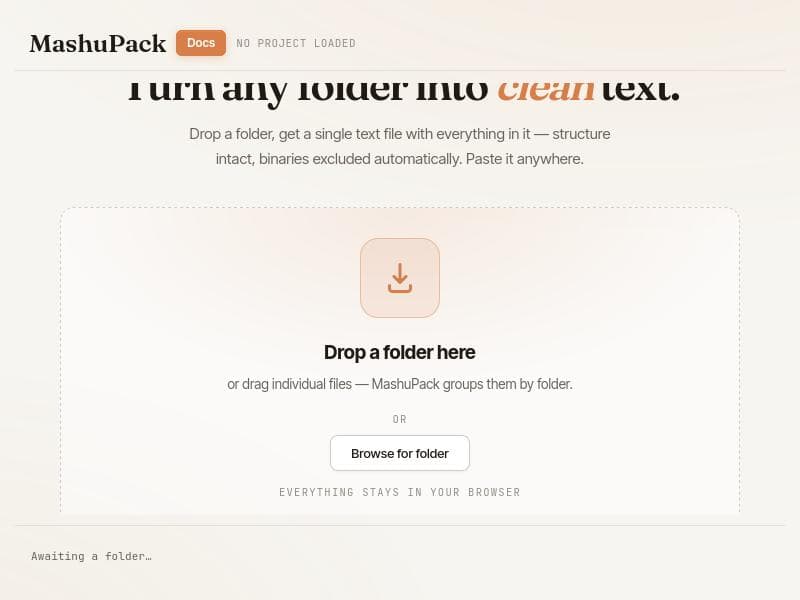
Select the exact parts of a repository and compile them into one clean text file for ChatGPT and Claude or Gemini. MashuPack is built for browser-based AI workflows where file-count limits, upload friction, and messy context assembly keep getting in the way. It makes code context portable, intentional, and easy to control.
Detailed Description
MashuPack is a specialized browser-based application designed to transform local code repositories into clean, structured text files optimized for AI chat models such as ChatGPT and Claude. Its core purpose is to facilitate developers, AI practitioners, and technical writers in preparing code context in a format that is easily digestible by conversational AI, enabling more effective code understanding, review, and assistance. Unlike traditional tools that require uploading repositories to a backend server, MashuPack operates entirely within the user's browser, ensuring privacy and security by keeping all data local and eliminating the need for any repository upload or backend processing. One of MashuPack's standout features is its granular file and folder selection capability. Users can precisely choose which files or subsystems within a repository they want to include in the export, allowing for tailored context preparation rather than exporting the entire codebase. This selective export is particularly useful for large projects where only specific modules or components are relevant to the AI interaction. After selection, MashuPack compiles the chosen files into a single, well-structured text file formatted to maximize compatibility and clarity for AI chat models like ChatGPT and Claude. This structured export helps AI models better parse and understand the code, improving the quality of AI-generated responses. The tool also provides a preview feature where users can inspect the files, view statistics, and understand the composition of their selection before exporting. This preview helps ensure that the exported context is exactly what the user intends to share with the AI, reducing errors and enhancing workflow efficiency. Additionally, MashuPack includes options to download the entire project as a ZIP archive, independent of the current selection, offering flexibility for different use cases. MashuPack is best suited for developers, AI researchers, and technical content creators who frequently interact with AI chatbots for code-related tasks. For example, software engineers seeking AI assistance for debugging, code explanation, or refactoring can prepare focused code snippets quickly. AI trainers and prompt engineers can use MashuPack to curate precise code contexts to improve AI model training or prompt design. Technical writers and educators can also benefit by exporting clean code examples for documentation or instructional purposes. Regarding pricing, MashuPack is offered completely free of charge, with no subscription or payment required. This zero-cost model makes it accessible to individual developers and teams alike without financial barriers. The tool’s web-based nature means there is no installation required, and it can be accessed instantly via any modern browser. Compared to alternatives, MashuPack’s key differentiator is its privacy-first, client-side operation that avoids any backend upload or cloud storage of code repositories. Many other tools require uploading code to servers, which can raise security and confidentiality concerns, especially for proprietary or sensitive projects. Additionally, MashuPack’s focus on producing a single, structured text file optimized for AI chat models sets it apart from generic code export or snippet tools. Its integration of file preview, selection granularity, and export tailored specifically for AI conversational contexts provides a streamlined, purpose-built workflow. However, MashuPack does have some limitations to consider. Since it runs entirely in the browser, performance may be constrained by the user's device capabilities, especially with very large repositories. It does not currently support direct integration with version control systems or cloud repositories, requiring manual loading of local folders. Also, while it supports export for popular AI chat models like ChatGPT and Claude, it may not yet accommodate every AI platform or custom model format. Users should also note that it focuses on text export rather than advanced code analysis or transformation features. In summary, MashuPack is a powerful, privacy-conscious tool designed to bridge the gap between local codebases and AI chat models by enabling precise, structured export of code context. Its ease of use, zero cost, and browser-based operation make it an excellent choice for developers and AI users looking to enhance their AI-assisted coding workflows without compromising security or convenience.
Tool Features
- Select exact files and folders before export
- Export one structured text file for ChatGPT and Claude
- Runs entirely in the browser
- No repo upload or backend required
- Preview files, stats, and composition before export
Description
MashuPack is a browser-based tool that converts local code repositories into clean, structured text files optimized for AI chat models like ChatGPT and Claude. It offers precise file selection and runs entirely locally, making it ideal for developers and AI practitioners seeking secure, efficient code context preparation without uploading their repos.
Select the exact parts of a repository and compile them into one clean text file for ChatGPT and Claude or Gemini. MashuPack is built for browser-based AI workflows where file-count limits, upload friction, and messy context assembly keep getting in the way. It makes code context portable, intentional, and easy to control.
Detailed Description
MashuPack is a specialized browser-based application designed to transform local code repositories into clean, structured text files optimized for AI chat models such as ChatGPT and Claude. Its core purpose is to facilitate developers, AI practitioners, and technical writers in preparing code context in a format that is easily digestible by conversational AI, enabling more effective code understanding, review, and assistance. Unlike traditional tools that require uploading repositories to a backend server, MashuPack operates entirely within the user's browser, ensuring privacy and security by keeping all data local and eliminating the need for any repository upload or backend processing. One of MashuPack's standout features is its granular file and folder selection capability. Users can precisely choose which files or subsystems within a repository they want to include in the export, allowing for tailored context preparation rather than exporting the entire codebase. This selective export is particularly useful for large projects where only specific modules or components are relevant to the AI interaction. After selection, MashuPack compiles the chosen files into a single, well-structured text file formatted to maximize compatibility and clarity for AI chat models like ChatGPT and Claude. This structured export helps AI models better parse and understand the code, improving the quality of AI-generated responses. The tool also provides a preview feature where users can inspect the files, view statistics, and understand the composition of their selection before exporting. This preview helps ensure that the exported context is exactly what the user intends to share with the AI, reducing errors and enhancing workflow efficiency. Additionally, MashuPack includes options to download the entire project as a ZIP archive, independent of the current selection, offering flexibility for different use cases. MashuPack is best suited for developers, AI researchers, and technical content creators who frequently interact with AI chatbots for code-related tasks. For example, software engineers seeking AI assistance for debugging, code explanation, or refactoring can prepare focused code snippets quickly. AI trainers and prompt engineers can use MashuPack to curate precise code contexts to improve AI model training or prompt design. Technical writers and educators can also benefit by exporting clean code examples for documentation or instructional purposes. Regarding pricing, MashuPack is offered completely free of charge, with no subscription or payment required. This zero-cost model makes it accessible to individual developers and teams alike without financial barriers. The tool’s web-based nature means there is no installation required, and it can be accessed instantly via any modern browser. Compared to alternatives, MashuPack’s key differentiator is its privacy-first, client-side operation that avoids any backend upload or cloud storage of code repositories. Many other tools require uploading code to servers, which can raise security and confidentiality concerns, especially for proprietary or sensitive projects. Additionally, MashuPack’s focus on producing a single, structured text file optimized for AI chat models sets it apart from generic code export or snippet tools. Its integration of file preview, selection granularity, and export tailored specifically for AI conversational contexts provides a streamlined, purpose-built workflow. However, MashuPack does have some limitations to consider. Since it runs entirely in the browser, performance may be constrained by the user's device capabilities, especially with very large repositories. It does not currently support direct integration with version control systems or cloud repositories, requiring manual loading of local folders. Also, while it supports export for popular AI chat models like ChatGPT and Claude, it may not yet accommodate every AI platform or custom model format. Users should also note that it focuses on text export rather than advanced code analysis or transformation features. In summary, MashuPack is a powerful, privacy-conscious tool designed to bridge the gap between local codebases and AI chat models by enabling precise, structured export of code context. Its ease of use, zero cost, and browser-based operation make it an excellent choice for developers and AI users looking to enhance their AI-assisted coding workflows without compromising security or convenience.
Frequently Asked Questions
What is MashuPack?
MashuPack is a browser-based application that transforms local code repositories into clean, structured text files optimized for AI chat models such as ChatGPT and Claude. It allows users to select specific files or subsystems and export them as a single text file, all while keeping operations local without uploading code to any backend.
How much does MashuPack cost?
MashuPack is completely free to use with no subscription or payment required. It is accessible directly through a web browser without any cost.
Who is MashuPack best for?
MashuPack is ideal for developers, AI researchers, prompt engineers, and technical writers who need to prepare precise code context for AI chat models. It is especially useful for those who want to maintain privacy by keeping their code local and avoid uploading repositories to external servers.
What are the main features of MashuPack?
Key features include selective file and folder export, compiling selected code into one structured text file optimized for ChatGPT and Claude, running entirely in the browser with no backend or repo upload, previewing files and export composition before exporting, and the ability to download the full project as a ZIP archive.
Does MashuPack offer a free trial?
MashuPack is free to use with no trial period needed since it does not require any payment or subscription.
What integrations does MashuPack support?
Currently, MashuPack operates as a standalone browser tool and does not offer direct integrations with version control systems or cloud repositories. Users manually load local folders into the browser for processing.
How does MashuPack work?
MashuPack runs entirely in the user's web browser. Users load a local code repository folder, select specific files or folders they want to include, preview the selection and file stats, then export the chosen code as one clean, structured text file optimized for AI chat models like ChatGPT and Claude — all without uploading any data to external servers.
Reviews
No reviews yet. Be the first to share your experience.
Sponsored Tools











































Recommended Tools
Stay updated on latest Ai tools
Get the latest insights, Join our newsletter
Read and trusted by 50,000+ readers
Join the biggest AI Community
Our community and staff are here to help!
Your feedback will help Alice AI improve in future versions.








Submit your Tool


PoweredByAI.app is an AI Tools Directory helping individuals, businesses, and creators discover the best AI tools for writing, coding, design, productivity, and more.
© 2026 , Product of011BQ. All rights reserved.