

Is this your AI tool? Claim it today.
Verify ownership, manage your profile, and unlock growth features.
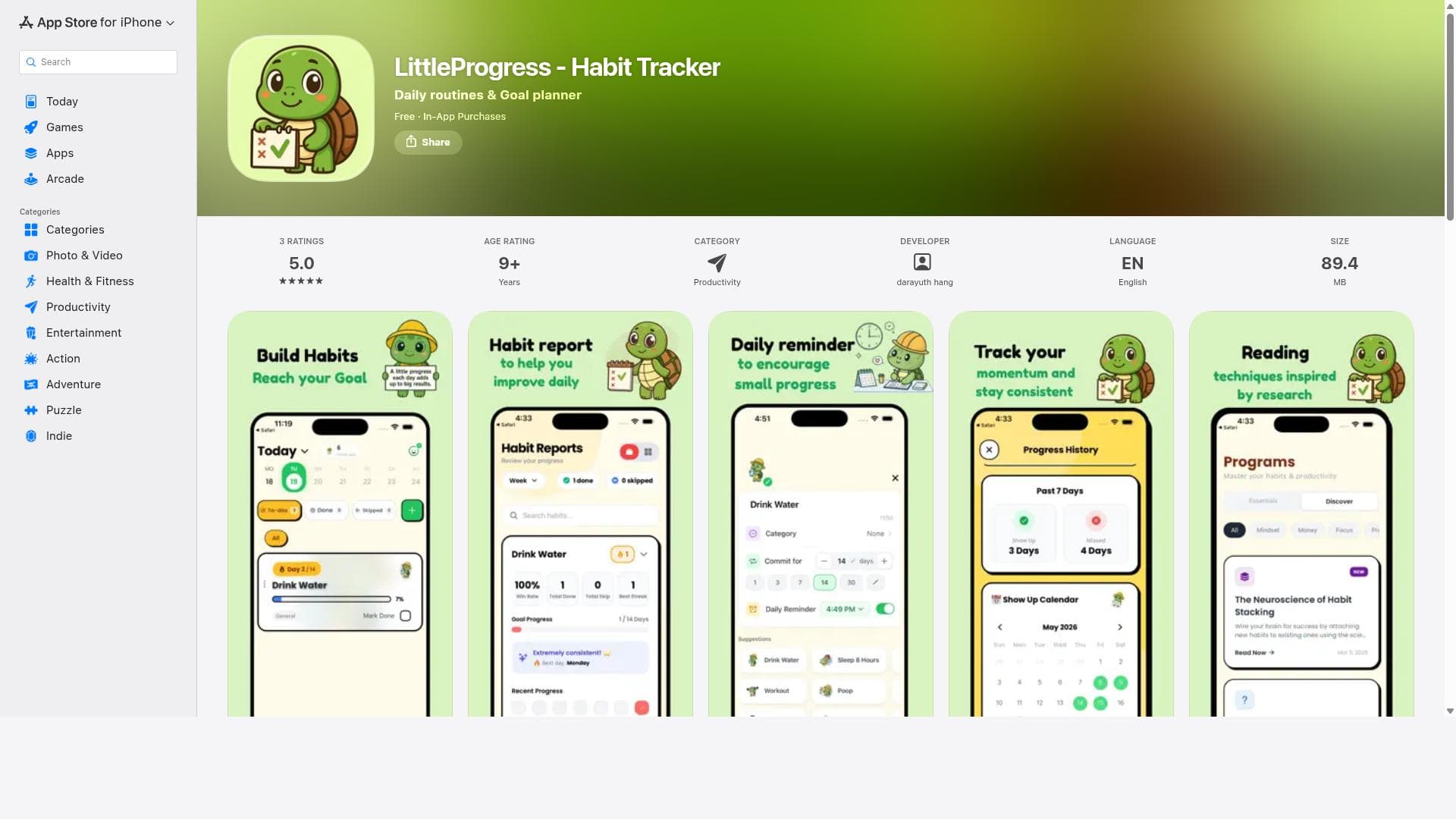
LittleProgress is a sleek habit tracker app designed exclusively for Apple users, offering intuitive daily tracking and motivating progress visualizations to help build lasting habits. Ideal for individuals seeking a simple yet powerful tool to foster personal growth across iPhone, iPad, and Mac devices.

Description
It’s a habit tracker with an AI coach.
Detailed Description
LittleProgress is a comprehensive habit tracker app designed to assist users in building and maintaining positive habits through consistent tracking and clear progress visualization. Its core purpose is to empower individuals to foster personal growth by monitoring daily activities and encouraging habit formation over time. By providing an intuitive interface and actionable insights, LittleProgress helps users stay motivated and accountable in their journey toward self-improvement. The app offers several key features that make habit tracking both effective and engaging. Central to its functionality is the ability to track daily habits, allowing users to log their activities and monitor their consistency. This daily tracking is complemented by progress visualization tools, which graphically represent habit streaks, completion rates, and overall progress. Such visual feedback serves as a motivational tool, helping users see tangible evidence of their efforts and encouraging continued commitment. LittleProgress supports consistent habit building by enabling users to set reminders, customize habit goals, and review historical data to identify patterns and areas for improvement. Additionally, the app is available across multiple Apple platforms, including iPhone, iPad, and Mac, ensuring seamless synchronization and accessibility regardless of the device being used. LittleProgress is best suited for individuals who are serious about personal development and want a reliable tool to help them establish and maintain new habits. Whether you are a student aiming to improve study routines, a professional seeking better work-life balance, or anyone looking to adopt healthier lifestyle choices, LittleProgress offers a structured approach to habit formation. Specific use cases include tracking exercise routines, meditation sessions, reading habits, water intake, or any other daily activity users wish to cultivate. Its cross-device availability makes it ideal for users who switch between Apple devices throughout their day. Regarding pricing, LittleProgress is available on the Apple App Store, typically offering a free version with basic habit tracking features. There may be premium plans or in-app purchases that unlock advanced functionalities such as detailed analytics, additional customization options, or ad-free experiences. Users should check the App Store listing for the most current pricing and subscription details, as these can vary over time. Compared to alternatives, LittleProgress stands out due to its clean and user-friendly design tailored specifically for Apple ecosystems. While many habit trackers exist, LittleProgress’s strength lies in its simplicity combined with powerful visualization tools that make progress easy to understand at a glance. Unlike some habit apps that overwhelm users with complex features, LittleProgress focuses on core habit-building essentials, making it accessible for beginners yet robust enough for experienced users. However, it may not offer extensive integrations with third-party apps or platforms, which some competitors provide. Notable limitations include its exclusivity to Apple devices, which means Android or Windows users cannot access the app. Additionally, while the app supports multiple devices within the Apple ecosystem, it may lack collaborative features or social sharing options found in other habit trackers. Users seeking deep customization or integration with fitness trackers and calendars might find LittleProgress somewhat limited. Nonetheless, for users invested in the Apple environment looking for a straightforward, effective habit tracker, LittleProgress remains a compelling choice.
Tool Features
- Habit tracking to monitor daily activities
- Progress visualization to encourage habit formation
- Supports consistent habit building
- Available on iPhone, iPad, and Mac
Description
LittleProgress is a sleek habit tracker app designed exclusively for Apple users, offering intuitive daily tracking and motivating progress visualizations to help build lasting habits. Ideal for individuals seeking a simple yet powerful tool to foster personal growth across iPhone, iPad, and Mac devices.
It’s a habit tracker with an AI coach.
Detailed Description
LittleProgress is a comprehensive habit tracker app designed to assist users in building and maintaining positive habits through consistent tracking and clear progress visualization. Its core purpose is to empower individuals to foster personal growth by monitoring daily activities and encouraging habit formation over time. By providing an intuitive interface and actionable insights, LittleProgress helps users stay motivated and accountable in their journey toward self-improvement. The app offers several key features that make habit tracking both effective and engaging. Central to its functionality is the ability to track daily habits, allowing users to log their activities and monitor their consistency. This daily tracking is complemented by progress visualization tools, which graphically represent habit streaks, completion rates, and overall progress. Such visual feedback serves as a motivational tool, helping users see tangible evidence of their efforts and encouraging continued commitment. LittleProgress supports consistent habit building by enabling users to set reminders, customize habit goals, and review historical data to identify patterns and areas for improvement. Additionally, the app is available across multiple Apple platforms, including iPhone, iPad, and Mac, ensuring seamless synchronization and accessibility regardless of the device being used. LittleProgress is best suited for individuals who are serious about personal development and want a reliable tool to help them establish and maintain new habits. Whether you are a student aiming to improve study routines, a professional seeking better work-life balance, or anyone looking to adopt healthier lifestyle choices, LittleProgress offers a structured approach to habit formation. Specific use cases include tracking exercise routines, meditation sessions, reading habits, water intake, or any other daily activity users wish to cultivate. Its cross-device availability makes it ideal for users who switch between Apple devices throughout their day. Regarding pricing, LittleProgress is available on the Apple App Store, typically offering a free version with basic habit tracking features. There may be premium plans or in-app purchases that unlock advanced functionalities such as detailed analytics, additional customization options, or ad-free experiences. Users should check the App Store listing for the most current pricing and subscription details, as these can vary over time. Compared to alternatives, LittleProgress stands out due to its clean and user-friendly design tailored specifically for Apple ecosystems. While many habit trackers exist, LittleProgress’s strength lies in its simplicity combined with powerful visualization tools that make progress easy to understand at a glance. Unlike some habit apps that overwhelm users with complex features, LittleProgress focuses on core habit-building essentials, making it accessible for beginners yet robust enough for experienced users. However, it may not offer extensive integrations with third-party apps or platforms, which some competitors provide. Notable limitations include its exclusivity to Apple devices, which means Android or Windows users cannot access the app. Additionally, while the app supports multiple devices within the Apple ecosystem, it may lack collaborative features or social sharing options found in other habit trackers. Users seeking deep customization or integration with fitness trackers and calendars might find LittleProgress somewhat limited. Nonetheless, for users invested in the Apple environment looking for a straightforward, effective habit tracker, LittleProgress remains a compelling choice.
Frequently Asked Questions
What is LittleProgress?
LittleProgress is a habit tracker app that helps users build and maintain positive habits by tracking daily activities and visualizing progress over time. It is designed to encourage consistent habit formation and personal growth.
How much does LittleProgress cost?
LittleProgress is available on the Apple App Store, typically offering a free version with basic features. There may be optional premium subscriptions or in-app purchases for advanced features. Pricing details can be found on the app’s store page.
Who is LittleProgress best for?
LittleProgress is best suited for Apple users who want a straightforward and effective tool to track and build habits. It is ideal for students, professionals, and anyone looking to improve daily routines and personal growth.
What are the main features of LittleProgress?
The main features include daily habit tracking, progress visualization through graphs and charts, reminders to maintain consistency, customizable habit goals, and availability across iPhone, iPad, and Mac devices.
Does LittleProgress offer a free trial?
LittleProgress generally offers a free version with core habit tracking features. Details about free trials for premium plans, if available, can be found on the app’s listing in the Apple App Store.
What integrations does LittleProgress support?
LittleProgress primarily functions as a standalone app within the Apple ecosystem. It does not prominently advertise integrations with third-party apps or services, focusing instead on core habit tracking features.
How does LittleProgress work?
Users create and customize habits they want to build, then log their daily completion of these habits within the app. LittleProgress tracks this data and provides visual progress reports to motivate users to maintain consistency and achieve their goals.
Socials
Use ToolReviews
No reviews yet. Be the first to share your experience.




















































