🚀 Zaprep: Your Socials on Steroids. Start free — automate 1,000 DMs/month & turn engagement into leads. with 1,000 automated DMs/month.


Is this your AI tool? Claim it today.
Verify ownership, manage your profile, and unlock growth features.
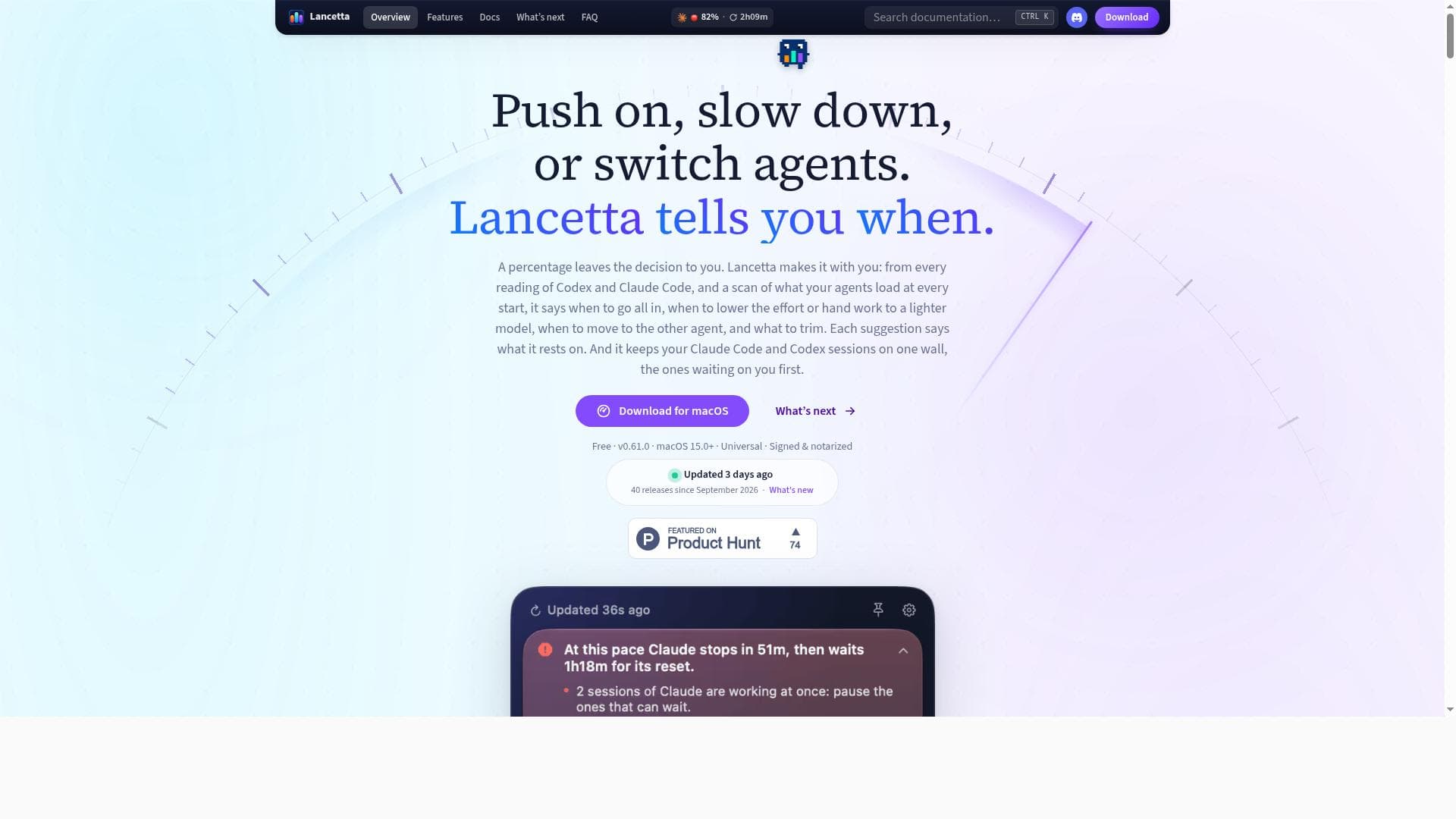
Lancetta is a native macOS menu-bar app that uniquely monitors and guides developers on managing Codex and Claude Code AI model usage in real time. By providing actionable advice on when to push forward, slow down, or switch coding agents, it helps Mac-based developers optimize token consumption and avoid rate limits seamlessly from their desktop.

Description
Lancetta is a native macOS menu-bar app that tells you when and how to use Claude Code and Codex. From every quota reading it says what to do next: spend a window about to reset unused, slow down before an agent stops, move to the other agent while it has room. It checks what your agents load at every start, frees the background processes they leave behind, and keeps every session on one wall, the ones waiting on you first. Reading quota spends zero tokens. Free, signed, macOS 15+.
Detailed Description
Lancetta is a specialized native macOS menu-bar application designed to provide developers with real-time monitoring and intelligent guidance for managing usage of AI coding models, specifically OpenAI's Codex and Anthropic's Claude Code. Its core purpose is to optimize the way developers interact with these AI agents by tracking token consumption and quota limits directly from the desktop environment, enabling more efficient and cost-effective coding workflows. By offering actionable advice on when to push forward, slow down, or switch between Codex and Claude Code, Lancetta helps users avoid hitting rate limits and maximizes the utility of their AI coding resources. At the heart of Lancetta’s functionality is its seamless integration into the macOS menu bar, providing unobtrusive yet immediate access to critical usage data. It continuously monitors the token usage and quota status of Codex and Claude Code, displaying real-time readings that allow developers to keep a close eye on their AI model consumption without interrupting their coding sessions. The app’s intelligent advisory system analyzes these quota readings and issues recommendations such as pushing on when there is ample quota, slowing down to conserve tokens, or switching agents to balance workload and extend overall usage time. This dynamic guidance ensures developers can maintain productivity while avoiding unexpected interruptions caused by rate limits. Lancetta’s user interface is built with SwiftUI, which guarantees a native, smooth, and visually consistent experience on macOS. The app not only shows token usage and quota warnings but also highlights maintenance alerts and usage patterns, helping developers manage multiple concurrent coding sessions effectively. For instance, it can suggest pausing less urgent tasks or delegating routine work to a lighter model, thereby optimizing token expenditure across projects. This level of granular control and insight is particularly valuable for developers who rely heavily on AI coding agents and need to manage their API usage budgets carefully. The tool is best suited for professional developers, AI engineers, and coding teams who integrate Codex and Claude Code into their development pipelines. It is especially useful for those working on complex projects requiring sustained AI assistance, as it prevents workflow disruptions due to quota exhaustion. By providing a desktop-native solution, Lancetta eliminates the need to switch contexts or check external dashboards, streamlining the monitoring process and enabling faster decision-making. Use cases include managing AI-assisted code generation, debugging, and code review tasks where token usage can fluctuate unpredictably. Regarding pricing, Lancetta’s website does not explicitly list pricing tiers or subscription models, suggesting it may currently be offered as a free or trial-based tool, or pricing details may be provided upon request or through direct contact. Potential users should check the official website for the latest information on plans and licensing. Compared to alternatives, Lancetta stands out by focusing exclusively on quota guidance for Codex and Claude Code within a native macOS environment. While other tools may offer broader AI model management or API monitoring features, Lancetta’s unique selling point is its real-time, actionable advice integrated directly into the macOS menu bar, combined with a smooth SwiftUI interface. This makes it more convenient and context-aware for Mac users than web-based dashboards or generic API monitoring tools. However, its specialization means it may not support other AI models or platforms beyond Codex and Claude Code. Notable limitations include its exclusivity to macOS, which restricts usage to Apple desktop users. Additionally, since it focuses on quota and token monitoring, it does not provide direct AI coding functionalities or code generation capabilities itself. Users must already have access to Codex and Claude Code APIs to benefit from Lancetta’s monitoring and guidance. Furthermore, the lack of publicly available pricing information may require potential users to inquire directly for commercial use details. Despite these considerations, Lancetta offers a highly targeted and efficient solution for developers seeking to optimize their AI coding model usage on macOS.
Tool Features
- Native macOS menu-bar app
- Monitors quota usage for Codex and Claude Code
- Provides usage advice to push on, slow down, or switch agents
- Displays real-time token usage and rate limit warnings
- Helps optimize AI model usage for coding tasks
- Integrates with SwiftUI for seamless macOS experience
Description
Lancetta is a native macOS menu-bar app that uniquely monitors and guides developers on managing Codex and Claude Code AI model usage in real time. By providing actionable advice on when to push forward, slow down, or switch coding agents, it helps Mac-based developers optimize token consumption and avoid rate limits seamlessly from their desktop.
Lancetta is a native macOS menu-bar app that tells you when and how to use Claude Code and Codex. From every quota reading it says what to do next: spend a window about to reset unused, slow down before an agent stops, move to the other agent while it has room. It checks what your agents load at every start, frees the background processes they leave behind, and keeps every session on one wall, the ones waiting on you first. Reading quota spends zero tokens. Free, signed, macOS 15+.
Detailed Description
Lancetta is a specialized native macOS menu-bar application designed to provide developers with real-time monitoring and intelligent guidance for managing usage of AI coding models, specifically OpenAI's Codex and Anthropic's Claude Code. Its core purpose is to optimize the way developers interact with these AI agents by tracking token consumption and quota limits directly from the desktop environment, enabling more efficient and cost-effective coding workflows. By offering actionable advice on when to push forward, slow down, or switch between Codex and Claude Code, Lancetta helps users avoid hitting rate limits and maximizes the utility of their AI coding resources. At the heart of Lancetta’s functionality is its seamless integration into the macOS menu bar, providing unobtrusive yet immediate access to critical usage data. It continuously monitors the token usage and quota status of Codex and Claude Code, displaying real-time readings that allow developers to keep a close eye on their AI model consumption without interrupting their coding sessions. The app’s intelligent advisory system analyzes these quota readings and issues recommendations such as pushing on when there is ample quota, slowing down to conserve tokens, or switching agents to balance workload and extend overall usage time. This dynamic guidance ensures developers can maintain productivity while avoiding unexpected interruptions caused by rate limits. Lancetta’s user interface is built with SwiftUI, which guarantees a native, smooth, and visually consistent experience on macOS. The app not only shows token usage and quota warnings but also highlights maintenance alerts and usage patterns, helping developers manage multiple concurrent coding sessions effectively. For instance, it can suggest pausing less urgent tasks or delegating routine work to a lighter model, thereby optimizing token expenditure across projects. This level of granular control and insight is particularly valuable for developers who rely heavily on AI coding agents and need to manage their API usage budgets carefully. The tool is best suited for professional developers, AI engineers, and coding teams who integrate Codex and Claude Code into their development pipelines. It is especially useful for those working on complex projects requiring sustained AI assistance, as it prevents workflow disruptions due to quota exhaustion. By providing a desktop-native solution, Lancetta eliminates the need to switch contexts or check external dashboards, streamlining the monitoring process and enabling faster decision-making. Use cases include managing AI-assisted code generation, debugging, and code review tasks where token usage can fluctuate unpredictably. Regarding pricing, Lancetta’s website does not explicitly list pricing tiers or subscription models, suggesting it may currently be offered as a free or trial-based tool, or pricing details may be provided upon request or through direct contact. Potential users should check the official website for the latest information on plans and licensing. Compared to alternatives, Lancetta stands out by focusing exclusively on quota guidance for Codex and Claude Code within a native macOS environment. While other tools may offer broader AI model management or API monitoring features, Lancetta’s unique selling point is its real-time, actionable advice integrated directly into the macOS menu bar, combined with a smooth SwiftUI interface. This makes it more convenient and context-aware for Mac users than web-based dashboards or generic API monitoring tools. However, its specialization means it may not support other AI models or platforms beyond Codex and Claude Code. Notable limitations include its exclusivity to macOS, which restricts usage to Apple desktop users. Additionally, since it focuses on quota and token monitoring, it does not provide direct AI coding functionalities or code generation capabilities itself. Users must already have access to Codex and Claude Code APIs to benefit from Lancetta’s monitoring and guidance. Furthermore, the lack of publicly available pricing information may require potential users to inquire directly for commercial use details. Despite these considerations, Lancetta offers a highly targeted and efficient solution for developers seeking to optimize their AI coding model usage on macOS.
Frequently Asked Questions
What is Lancetta?
Lancetta is a native macOS menu-bar application designed to monitor and guide the usage of AI coding models Codex and Claude Code. It provides real-time quota readings and advises users on how to optimize token usage by pushing on, slowing down, or switching between these AI agents.
How much does Lancetta cost?
Lancetta’s website does not publicly list pricing details. Interested users should visit the official site or contact the developers directly for information on pricing and plans.
Who is Lancetta best for?
Lancetta is ideal for professional developers, AI engineers, and coding teams using Codex and Claude Code on macOS who want to efficiently manage their AI model usage and avoid rate limits during coding tasks.
What are the main features of Lancetta?
Key features include a native macOS menu-bar interface, real-time monitoring of Codex and Claude Code token usage and quotas, intelligent advice on when to push on, slow down, or switch agents, rate limit warnings, and integration with SwiftUI for a seamless user experience.
Does Lancetta offer a free trial?
There is no explicit information about a free trial on the Lancetta website. Users should check the official site for the most current details regarding trial availability.
What integrations does Lancetta support?
Lancetta integrates directly with Codex and Claude Code AI models by monitoring their quota usage. It is built with SwiftUI for macOS but does not list integrations with other platforms or AI models.
How does Lancetta work?
Lancetta runs as a menu-bar app on macOS, continuously tracking token usage and quota status for Codex and Claude Code. It analyzes this data in real time and provides users with actionable guidance on whether to continue using a model, slow down, or switch to optimize token consumption and avoid hitting rate limits.
Socials
Use ToolReviews
No reviews yet. Be the first to share your experience.
Sponsored Tools











































Recommended Tools
Stay updated on latest Ai tools
Get the latest insights, Join our newsletter
Read and trusted by 50,000+ readers
Join the biggest AI Community
Our community and staff are here to help!
Your feedback will help Alice AI improve in future versions.








Submit your Tool


PoweredByAI.app is an AI Tools Directory helping individuals, businesses, and creators discover the best AI tools for writing, coding, design, productivity, and more.
© 2026 , Product of011BQ. All rights reserved.