Featured in:Best AI Writing Tools
Get featured →🚀 Zaprep: Your Socials on Steroids. Start free — automate 1,000 DMs/month & turn engagement into leads. with 1,000 automated DMs/month.



✦
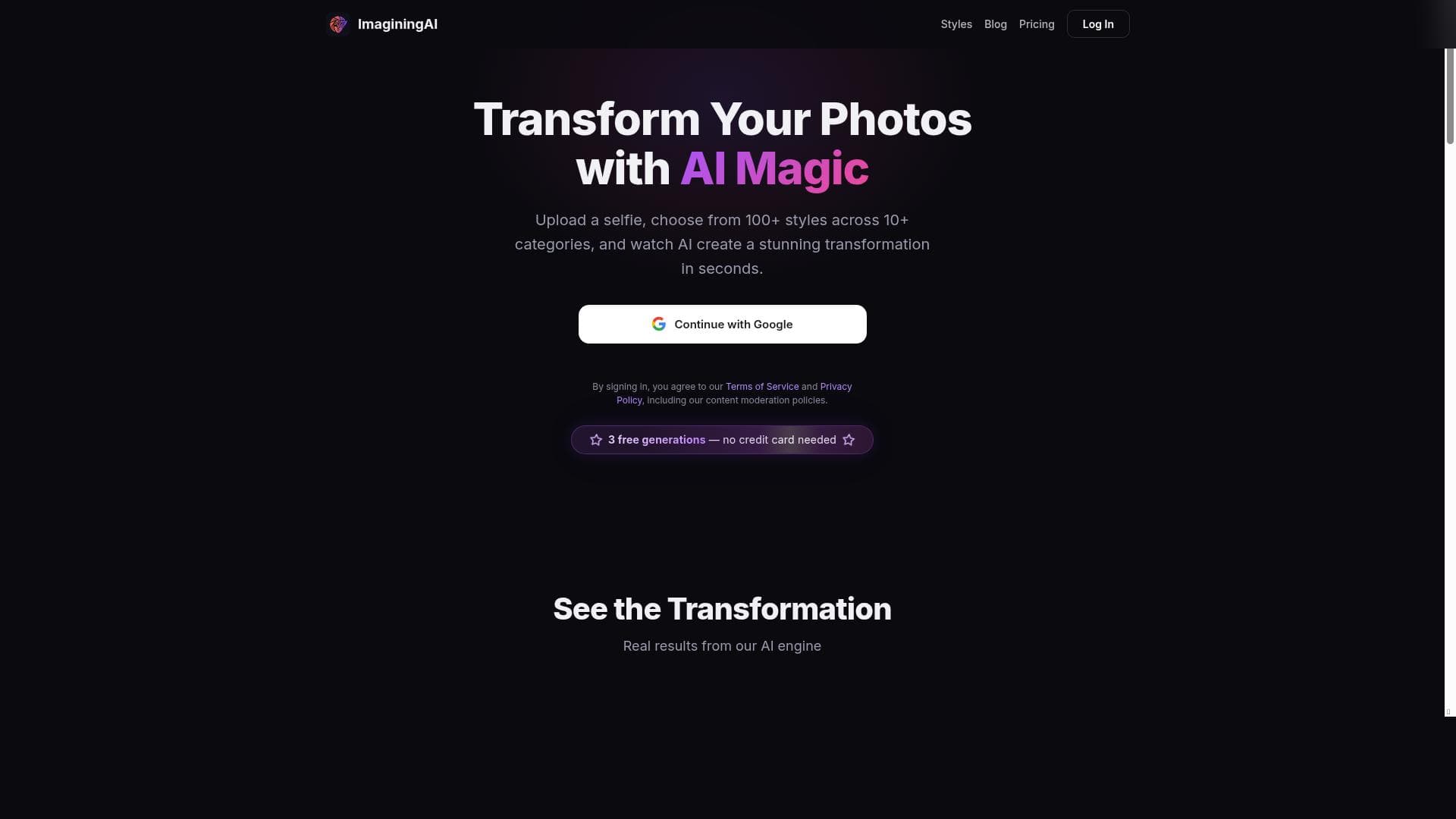
ImaginingAI is a versatile AI-powered photo transformation app that lets users instantly convert selfies into stunning artworks using over 165 curated styles across 17 categories. Perfect for creatives, social media enthusiasts, and casual users alike, it offers high-quality, content-safe AI portraits with no sign-up and three free tries to get started.

Description
ImaginingAI is an AI-powered photo transformation app that lets you upload a selfie and choose from 165+ artistic styles across 17 categories including Artistic, Cinematic, Professional, Fantasy, Anime, and more. It generates stunning AI portraits in seconds while preserving facial features and ensuring content safety. The platform offers 3 free generations with no credit card required and no sign-up needed to start. Transform your ordinary photos into extraordinary artwork with just one tap.
Detailed Description
ImaginingAI is a cutting-edge AI-powered photo transformation application designed to turn ordinary selfies into extraordinary works of art. At its core, the tool leverages advanced artificial intelligence models to apply a vast array of artistic styles to user-uploaded photos, enabling users to explore creative visual renditions with ease and speed. By simply uploading one to three selfies, users can select from over 165 unique artistic styles spread across 17 diverse categories such as Artistic, Cinematic, Professional, Fantasy, and Anime. This extensive variety ensures that users can find a style that perfectly matches their aesthetic preferences or creative goals. The platform’s AI technology not only transforms images but also meticulously preserves facial features to maintain the subject’s identity and realism, which is a critical aspect for users seeking high-quality portrait transformations. Additionally, ImaginingAI emphasizes content safety by curating styles that avoid inappropriate or unsafe outputs, making it a reliable choice for users of all ages and backgrounds. ImaginingAI’s key features include more than 40 AI transformation styles that cover a wide spectrum of artistic expressions, from classic paintings and cinematic looks to fantasy and anime-inspired visuals. The ability to upload multiple selfies enhances the AI’s accuracy in recognizing facial details, resulting in more precise and personalized transformations. One of the most appealing aspects of ImaginingAI is its instant processing capability, delivering AI-generated portraits within seconds, which caters to users who value efficiency and immediacy. The platform also offers a frictionless user experience by not requiring any sign-up or credit card information to start using the service, allowing users to try out three free generations without any commitment. This freemium model lowers the barrier to entry and encourages experimentation with different styles before opting for paid plans. ImaginingAI is ideal for a broad audience including digital artists, social media enthusiasts, content creators, and anyone interested in exploring AI-driven artistic photo editing. Influencers and marketers can use the tool to create visually striking profile pictures or promotional images that stand out on social platforms. Hobbyists and casual users will appreciate the ease of transforming their selfies into professional-quality artwork without needing technical skills or expensive software. The platform’s diverse style categories also make it suitable for creative professionals seeking inspiration or unique visual assets for projects in advertising, gaming, or entertainment. Regarding pricing, ImaginingAI operates on a freemium basis. New users receive three free image generations with no sign-up or payment required, providing a risk-free opportunity to evaluate the tool’s capabilities. For extended use, paid plans unlock additional generations and potentially premium styles, although specific pricing details are not explicitly stated on the website. This flexible pricing approach allows users to scale their usage according to their needs and budget. When compared to alternatives in the AI photo transformation space, ImaginingAI stands out due to its combination of a large variety of curated artistic styles, rapid processing times, and strong emphasis on facial feature preservation and content safety. Many competing tools offer fewer styles or require account creation and payment upfront, which can deter casual users. However, some alternatives may provide more extensive customization options or integration capabilities, areas where ImaginingAI currently has limited offerings. Notable limitations of ImaginingAI include the cap on free image generations, which may restrict users who want to experiment extensively without subscribing. Additionally, while the platform supports multiple selfies for better accuracy, it does not currently offer batch processing or integration with third-party apps, which could be a drawback for professional users needing streamlined workflows. Finally, the lack of detailed pricing transparency may require users to contact support for comprehensive plan information. Despite these considerations, ImaginingAI remains a powerful and accessible tool for anyone looking to enhance their photos with AI-driven artistic transformations quickly and safely.
Tool Features
- 40+ AI transformation styles
- Multiple style categories: Artistic, Cinematic, Professional, Fantasy, Anime
- Upload 1-3 selfies for better accuracy
- Instant AI-generated results in seconds
- No sign-up required for free trial
- Advanced facial feature preservation
- Content-safe curated styles only
Description
✦
ImaginingAI is a versatile AI-powered photo transformation app that lets users instantly convert selfies into stunning artworks using over 165 curated styles across 17 categories. Perfect for creatives, social media enthusiasts, and casual users alike, it offers high-quality, content-safe AI portraits with no sign-up and three free tries to get started.
ImaginingAI is an AI-powered photo transformation app that lets you upload a selfie and choose from 165+ artistic styles across 17 categories including Artistic, Cinematic, Professional, Fantasy, Anime, and more. It generates stunning AI portraits in seconds while preserving facial features and ensuring content safety. The platform offers 3 free generations with no credit card required and no sign-up needed to start. Transform your ordinary photos into extraordinary artwork with just one tap.
Detailed Description
ImaginingAI is a cutting-edge AI-powered photo transformation application designed to turn ordinary selfies into extraordinary works of art. At its core, the tool leverages advanced artificial intelligence models to apply a vast array of artistic styles to user-uploaded photos, enabling users to explore creative visual renditions with ease and speed. By simply uploading one to three selfies, users can select from over 165 unique artistic styles spread across 17 diverse categories such as Artistic, Cinematic, Professional, Fantasy, and Anime. This extensive variety ensures that users can find a style that perfectly matches their aesthetic preferences or creative goals. The platform’s AI technology not only transforms images but also meticulously preserves facial features to maintain the subject’s identity and realism, which is a critical aspect for users seeking high-quality portrait transformations. Additionally, ImaginingAI emphasizes content safety by curating styles that avoid inappropriate or unsafe outputs, making it a reliable choice for users of all ages and backgrounds. ImaginingAI’s key features include more than 40 AI transformation styles that cover a wide spectrum of artistic expressions, from classic paintings and cinematic looks to fantasy and anime-inspired visuals. The ability to upload multiple selfies enhances the AI’s accuracy in recognizing facial details, resulting in more precise and personalized transformations. One of the most appealing aspects of ImaginingAI is its instant processing capability, delivering AI-generated portraits within seconds, which caters to users who value efficiency and immediacy. The platform also offers a frictionless user experience by not requiring any sign-up or credit card information to start using the service, allowing users to try out three free generations without any commitment. This freemium model lowers the barrier to entry and encourages experimentation with different styles before opting for paid plans. ImaginingAI is ideal for a broad audience including digital artists, social media enthusiasts, content creators, and anyone interested in exploring AI-driven artistic photo editing. Influencers and marketers can use the tool to create visually striking profile pictures or promotional images that stand out on social platforms. Hobbyists and casual users will appreciate the ease of transforming their selfies into professional-quality artwork without needing technical skills or expensive software. The platform’s diverse style categories also make it suitable for creative professionals seeking inspiration or unique visual assets for projects in advertising, gaming, or entertainment. Regarding pricing, ImaginingAI operates on a freemium basis. New users receive three free image generations with no sign-up or payment required, providing a risk-free opportunity to evaluate the tool’s capabilities. For extended use, paid plans unlock additional generations and potentially premium styles, although specific pricing details are not explicitly stated on the website. This flexible pricing approach allows users to scale their usage according to their needs and budget. When compared to alternatives in the AI photo transformation space, ImaginingAI stands out due to its combination of a large variety of curated artistic styles, rapid processing times, and strong emphasis on facial feature preservation and content safety. Many competing tools offer fewer styles or require account creation and payment upfront, which can deter casual users. However, some alternatives may provide more extensive customization options or integration capabilities, areas where ImaginingAI currently has limited offerings. Notable limitations of ImaginingAI include the cap on free image generations, which may restrict users who want to experiment extensively without subscribing. Additionally, while the platform supports multiple selfies for better accuracy, it does not currently offer batch processing or integration with third-party apps, which could be a drawback for professional users needing streamlined workflows. Finally, the lack of detailed pricing transparency may require users to contact support for comprehensive plan information. Despite these considerations, ImaginingAI remains a powerful and accessible tool for anyone looking to enhance their photos with AI-driven artistic transformations quickly and safely.
Frequently Asked Questions
What is ImaginingAI?
ImaginingAI is an AI-driven photo transformation app that allows users to upload selfies and apply over 165 artistic styles across 17 categories, creating unique AI-generated portraits while preserving facial features and ensuring content safety.
How much does ImaginingAI cost?
ImaginingAI offers a freemium pricing model where users can generate up to three images for free without signing up or providing payment details. Paid plans are available for extended use, though specific pricing details are not publicly listed on the website.
Who is ImaginingAI best for?
ImaginingAI is ideal for digital artists, social media influencers, content creators, and casual users who want to quickly transform selfies into artistic portraits without technical expertise or expensive software.
What are the main features of ImaginingAI?
Key features include over 40 AI transformation styles, 17 style categories such as Artistic, Cinematic, Fantasy, and Anime, the ability to upload 1-3 selfies for enhanced accuracy, instant AI-generated results, no sign-up required for free use, advanced facial feature preservation, and content-safe curated styles.
Does ImaginingAI offer a free trial?
Yes, ImaginingAI provides a free trial allowing users to generate up to three AI-transformed images without any sign-up or credit card information.
What integrations does ImaginingAI support?
Currently, ImaginingAI does not list any third-party integrations or API support; it is primarily a standalone web-based application.
How does ImaginingAI work?
Users upload one to three selfies, select from a wide range of artistic styles, and the AI processes the images instantly to generate transformed portraits that preserve facial features and adhere to content safety standards.
Socials
Use ToolReviews
0 reviews
No reviews yet. Be the first to share your experience.
Sponsored Tools











































Recommended Tools
Stay updated on latest Ai tools
Get the latest insights, Join our newsletter
Read and trusted by 50,000+ readers
Join the biggest AI Community
Our community and staff are here to help!
Your feedback will help Alice AI improve in future versions.








Submit your Tool


PoweredByAI.app is an AI Tools Directory helping individuals, businesses, and creators discover the best AI tools for writing, coding, design, productivity, and more.
© 2026 , Product of011BQ. All rights reserved.