Featured in:Best AI Video Tools
Get featured →🚀 Zaprep: Your Socials on Steroids. Start free — automate 1,000 DMs/month & turn engagement into leads. with 1,000 automated DMs/month.



✦
Gemini Omni Flash AI Video Generator uniquely enables any-to-any media input conversion into synchronized, high-resolution AI videos, making it perfect for creators seeking effortless, versatile video production. Its online accessibility and free trial empower users to produce professional-quality videos from text, images, audio, or video without technical barriers.
Description
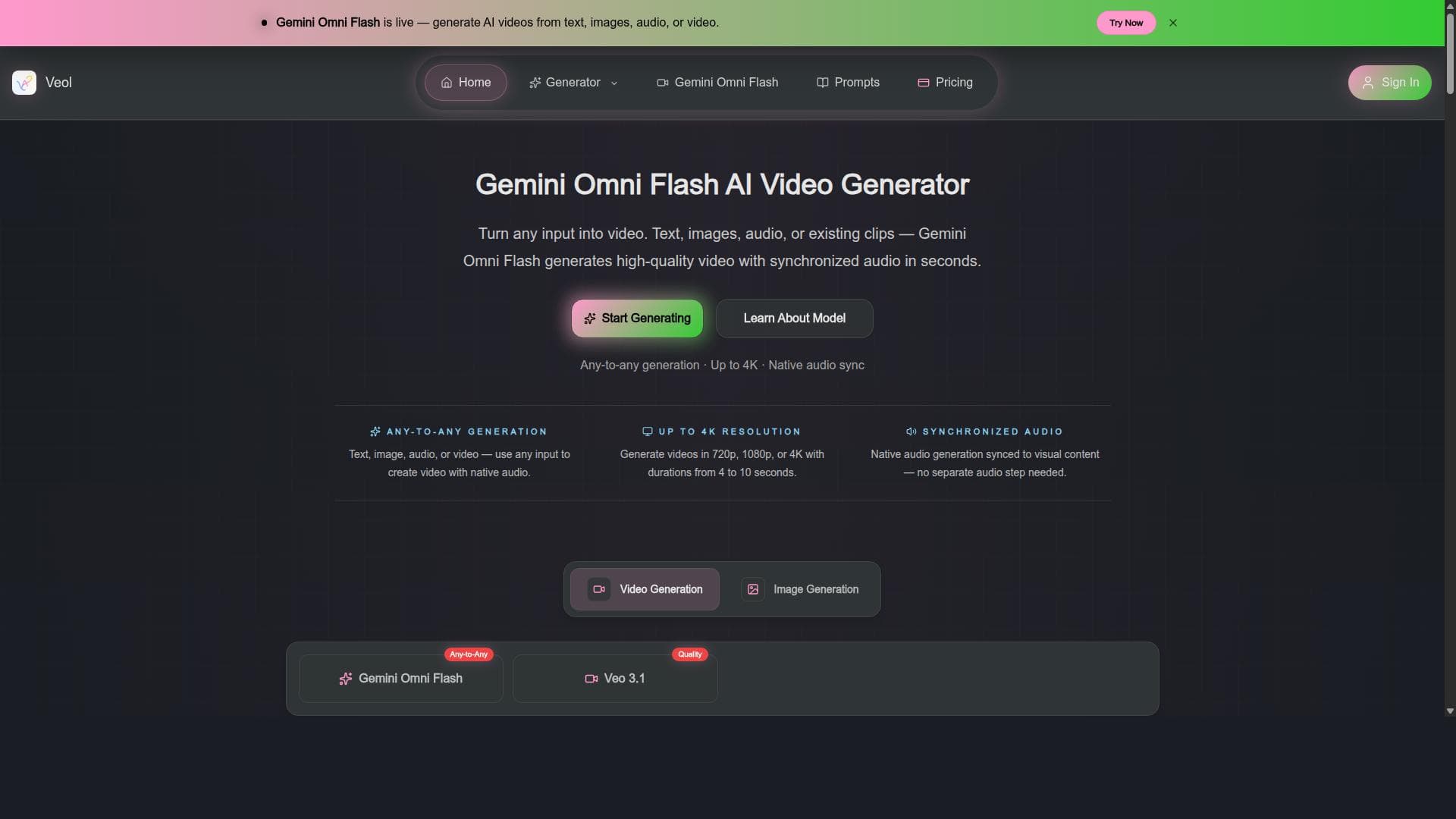
Gemini Omni Flash AI Video Generator allows users to create AI-generated videos using various input types including text, images, audio, or video. It supports any-to-any generation with synchronized audio and video output up to 4K resolution. The tool is accessible online and free to try, making it a versatile solution for generating high-quality AI videos effortlessly.
Detailed Description
Gemini Omni Flash AI Video Generator is an advanced online platform designed to empower users to create high-quality AI-generated videos effortlessly. Its core purpose is to transform various types of input—text, images, audio, or video—into fully synchronized video content with audio, supporting resolutions up to 4K. This versatility allows creators, marketers, educators, and content producers to generate compelling video material without the need for extensive video editing skills or expensive production equipment. By leveraging cutting-edge AI technology, Gemini Omni Flash streamlines the video creation process, making it accessible to both novices and professionals alike. The tool’s standout feature is its any-to-any generation capability, meaning users can input any supported media type and convert it into a video format seamlessly. For example, a user can input a text script and generate a video with synchronized voiceover and visuals, or upload an image and create a dynamic video presentation around it. The synchronization of audio and video ensures that the output is polished and professional, suitable for a wide range of applications. Additionally, the platform supports video outputs up to 4K resolution, catering to users who require high-definition content for commercial or personal use. Being an online tool, it requires no software installation and offers a free trial, allowing users to explore its features before committing. Gemini Omni Flash AI Video Generator is ideal for content creators, digital marketers, educators, social media managers, and businesses looking to produce engaging video content quickly and cost-effectively. Marketers can use it to generate promotional videos from simple text or audio scripts, while educators can create instructional videos by transforming lecture notes or images into engaging visual content. Social media influencers and video bloggers benefit from its ability to create diverse video formats without complex editing tools. Its ease of use and flexibility make it a valuable asset for anyone needing to produce videos regularly but lacking advanced video production expertise. Regarding pricing, Gemini Omni Flash AI Video Generator offers a free trial accessible online, allowing users to test its capabilities without upfront costs. While detailed pricing plans are not explicitly stated, the free trial provides an opportunity to evaluate the tool’s performance and output quality. Users interested in extended features or higher usage limits may need to explore subscription or pay-as-you-go options, which are common in AI video generation platforms. The availability of a free trial lowers the barrier to entry and encourages experimentation with AI-driven video creation. Compared to alternatives, Gemini Omni Flash stands out due to its comprehensive any-to-any input support and synchronized audio-video output at up to 4K resolution. Many AI video generators focus solely on text-to-video or image-to-video conversions, but Gemini Omni Flash’s multi-input flexibility offers broader creative possibilities. Its online accessibility and free trial further enhance its appeal against competitors that require downloads or upfront payments. However, some competing tools may offer more extensive customization options or integrations with other software platforms, which users should consider based on their specific needs. Notable limitations include the potential learning curve associated with mastering the best input formats and settings to optimize video output quality. While the tool is designed for ease of use, users unfamiliar with AI video generation might need some experimentation to achieve desired results. Additionally, as with many AI-generated media tools, there may be occasional inconsistencies in audio-video synchronization or output quality depending on the complexity of the input. Users should also verify the terms of the free trial and any usage restrictions to avoid unexpected limitations. Overall, Gemini Omni Flash AI Video Generator offers a powerful, flexible, and accessible solution for creating AI-generated videos across diverse media inputs, making it a valuable tool for a wide range of video production needs.
Tool Features
- Generate AI videos from text, image, audio, or video input
- Supports any-to-any generation
- Synchronized audio with video output
- Up to 4K video resolution
- Free to try online
Description
✦
Gemini Omni Flash AI Video Generator uniquely enables any-to-any media input conversion into synchronized, high-resolution AI videos, making it perfect for creators seeking effortless, versatile video production. Its online accessibility and free trial empower users to produce professional-quality videos from text, images, audio, or video without technical barriers.
Gemini Omni Flash AI Video Generator allows users to create AI-generated videos using various input types including text, images, audio, or video. It supports any-to-any generation with synchronized audio and video output up to 4K resolution. The tool is accessible online and free to try, making it a versatile solution for generating high-quality AI videos effortlessly.
Detailed Description
Gemini Omni Flash AI Video Generator is an advanced online platform designed to empower users to create high-quality AI-generated videos effortlessly. Its core purpose is to transform various types of input—text, images, audio, or video—into fully synchronized video content with audio, supporting resolutions up to 4K. This versatility allows creators, marketers, educators, and content producers to generate compelling video material without the need for extensive video editing skills or expensive production equipment. By leveraging cutting-edge AI technology, Gemini Omni Flash streamlines the video creation process, making it accessible to both novices and professionals alike. The tool’s standout feature is its any-to-any generation capability, meaning users can input any supported media type and convert it into a video format seamlessly. For example, a user can input a text script and generate a video with synchronized voiceover and visuals, or upload an image and create a dynamic video presentation around it. The synchronization of audio and video ensures that the output is polished and professional, suitable for a wide range of applications. Additionally, the platform supports video outputs up to 4K resolution, catering to users who require high-definition content for commercial or personal use. Being an online tool, it requires no software installation and offers a free trial, allowing users to explore its features before committing. Gemini Omni Flash AI Video Generator is ideal for content creators, digital marketers, educators, social media managers, and businesses looking to produce engaging video content quickly and cost-effectively. Marketers can use it to generate promotional videos from simple text or audio scripts, while educators can create instructional videos by transforming lecture notes or images into engaging visual content. Social media influencers and video bloggers benefit from its ability to create diverse video formats without complex editing tools. Its ease of use and flexibility make it a valuable asset for anyone needing to produce videos regularly but lacking advanced video production expertise. Regarding pricing, Gemini Omni Flash AI Video Generator offers a free trial accessible online, allowing users to test its capabilities without upfront costs. While detailed pricing plans are not explicitly stated, the free trial provides an opportunity to evaluate the tool’s performance and output quality. Users interested in extended features or higher usage limits may need to explore subscription or pay-as-you-go options, which are common in AI video generation platforms. The availability of a free trial lowers the barrier to entry and encourages experimentation with AI-driven video creation. Compared to alternatives, Gemini Omni Flash stands out due to its comprehensive any-to-any input support and synchronized audio-video output at up to 4K resolution. Many AI video generators focus solely on text-to-video or image-to-video conversions, but Gemini Omni Flash’s multi-input flexibility offers broader creative possibilities. Its online accessibility and free trial further enhance its appeal against competitors that require downloads or upfront payments. However, some competing tools may offer more extensive customization options or integrations with other software platforms, which users should consider based on their specific needs. Notable limitations include the potential learning curve associated with mastering the best input formats and settings to optimize video output quality. While the tool is designed for ease of use, users unfamiliar with AI video generation might need some experimentation to achieve desired results. Additionally, as with many AI-generated media tools, there may be occasional inconsistencies in audio-video synchronization or output quality depending on the complexity of the input. Users should also verify the terms of the free trial and any usage restrictions to avoid unexpected limitations. Overall, Gemini Omni Flash AI Video Generator offers a powerful, flexible, and accessible solution for creating AI-generated videos across diverse media inputs, making it a valuable tool for a wide range of video production needs.
Frequently Asked Questions
What is Gemini Omni Flash AI Video Generator?
Gemini Omni Flash AI Video Generator is an online tool that creates AI-generated videos from various input types including text, images, audio, or video, supporting synchronized audio-video output up to 4K resolution.
How much does Gemini Omni Flash AI Video Generator cost?
The tool offers a free trial online, allowing users to test its features without upfront payment. Detailed pricing plans beyond the free trial are not explicitly provided and may require contacting the provider for more information.
Who is Gemini Omni Flash AI Video Generator best for?
It is best suited for content creators, marketers, educators, social media managers, and businesses who need to produce high-quality AI-generated videos quickly and easily from diverse media inputs.
What are the main features of Gemini Omni Flash AI Video Generator?
Key features include generating AI videos from text, image, audio, or video input; any-to-any generation capability; synchronized audio with video output; support for up to 4K video resolution; and free online trial access.
Does Gemini Omni Flash AI Video Generator offer a free trial?
Yes, the tool is accessible online with a free trial, enabling users to explore its video generation capabilities before committing to a paid plan.
What integrations does Gemini Omni Flash AI Video Generator support?
Specific integrations are not detailed, but as an online platform, it likely supports standard media file inputs and outputs compatible with common video editing and sharing platforms.
How does Gemini Omni Flash AI Video Generator work?
Users upload or input text, images, audio, or video into the platform, which then uses AI algorithms to generate synchronized video content with audio, producing high-resolution videos up to 4K, all accessible via an online interface.
Reviews
0 reviews
No reviews yet. Be the first to share your experience.
Sponsored Tools











































Recommended Tools
Stay updated on latest Ai tools
Get the latest insights, Join our newsletter
Read and trusted by 50,000+ readers
Join the biggest AI Community
Our community and staff are here to help!
Your feedback will help Alice AI improve in future versions.








Submit your Tool


PoweredByAI.app is an AI Tools Directory helping individuals, businesses, and creators discover the best AI tools for writing, coding, design, productivity, and more.
© 2026 , Product of011BQ. All rights reserved.