Featured in:Best AI Transcription Tools
Get featured →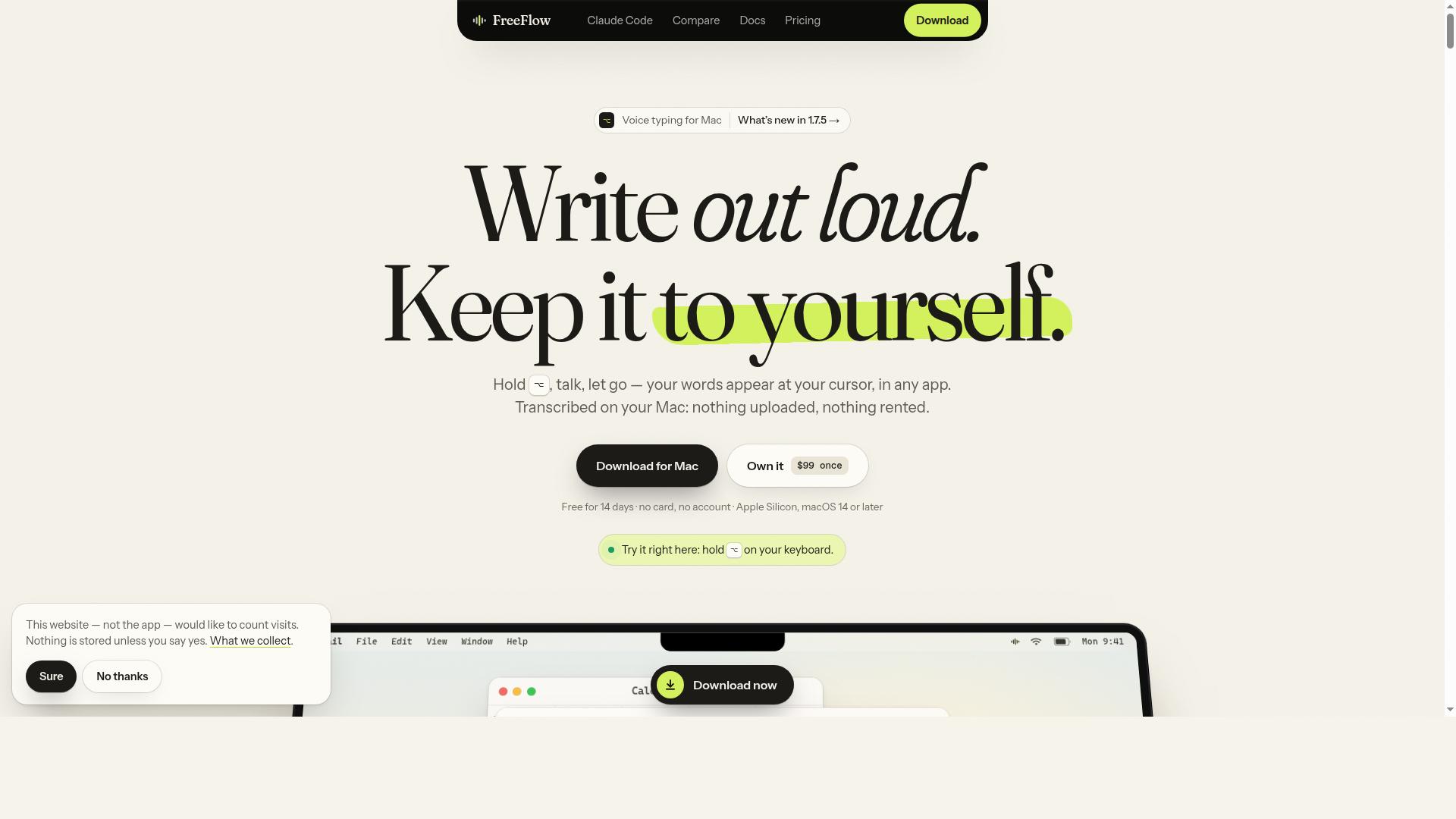


Is this your AI tool? Claim it today.
Verify ownership, manage your profile, and unlock growth features.
✦
FreeFlow Dictation is a macOS-exclusive, fully offline voice dictation software that transcribes speech directly into any Mac app with no cloud involvement. Ideal for privacy-conscious users and professionals, it offers multiple speech models, extensive language support, and a one-time purchase with free updates.

Description
Hold ⌥, speak, release: text lands in any Mac app, transcribed on the Neural Engine. No account, no cloud, no telemetry. Connect Claude Code and answer its plans and questions by voice from a card. 14-day trial, then $99 once for 3 Macs.
Detailed Description
FreeFlow Dictation is a powerful on-device voice dictation software designed exclusively for macOS users. Its core purpose is to enable seamless, real-time speech-to-text transcription directly on a Mac without relying on cloud services or requiring an internet connection. By simply holding down the option key and speaking, users can have their spoken words transcribed instantly into any application on their Mac, making it an efficient tool for writers, professionals, and anyone who prefers voice input over typing. This offline-first approach ensures maximum privacy and security since no audio data is uploaded or stored externally, and no user account is necessary to use the software. The software supports six advanced speech models, including NVIDIA Parakeet versions 2 and 3, Cohere Transcribe, and OpenAI’s Whisper models (Small, Large Turbo, and Large). This variety allows users to select the model that best fits their accuracy and speed needs. Parakeet V3 supports 25 languages, while Whisper models extend support to 99 languages, making FreeFlow Dictation highly versatile for multilingual users. Additional features include a personal dictionary to customize recognition of specific terms or names and text replacements to automate common phrases or corrections. Users can create multiple dictation modes, each with its own model, language, and formatting preferences, enabling tailored workflows for different tasks. FreeFlow Dictation also integrates on-device formatting powered by Apple Intelligence available in macOS 14, enhancing the transcription output with smart punctuation and capitalization. It offers a searchable local history of dictation sessions for easy retrieval and review, as well as an incognito mode for private dictations that do not save history. The software further supports voice commands for answering Claude Code’s plans, questions, and permission cards, and includes a feature to read selected text aloud using a keyboard shortcut, enhancing accessibility and productivity. This tool is ideal for professionals such as writers, journalists, students, and anyone who frequently needs to convert speech to text on a Mac without compromising privacy. It is particularly useful for those working in environments with limited or no internet access, or for users concerned about data security and cloud dependency. The ability to dictate directly into any Mac app without switching contexts or using external devices streamlines workflows and reduces friction. FreeFlow Dictation is available for a one-time purchase price of $99, which covers installation on up to three Macs and includes all future updates. This pricing model is attractive compared to subscription-based dictation software, offering long-term value without recurring fees. A 14-day free trial is available with no credit card required, allowing users to evaluate the software risk-free. Compared to alternatives that rely heavily on cloud processing, FreeFlow Dictation stands out with its fully offline operation and strong emphasis on user privacy. While some competitors may offer more extensive integrations or additional AI-powered features, FreeFlow’s simplicity, speed, and local processing make it a compelling choice for Mac users prioritizing security and control. However, users should note that it is currently limited to macOS 14 or later on Apple Silicon Macs, which may restrict compatibility for some. In summary, FreeFlow Dictation offers a robust, privacy-focused dictation experience on Mac with multiple speech models, extensive language support, and customizable dictation modes. Its one-time purchase pricing and offline functionality make it an excellent tool for professionals seeking reliable, secure voice-to-text transcription without cloud dependency.
Tool Features
- 100% on-device transcription
- Works offline
- Six speech models (Parakeet V3 and V2, Cohere Transcribe, Whisper Small, Large Turbo and Large)
- Supports 25 languages on Parakeet V3, 99 on Whisper
- Personal dictionary and text replacements
- Dictation modes with per-mode model, language and formatting
- On-device formatting with Apple Intelligence (macOS 26)
- Searchable local history and Incognito mode
Description
✦
FreeFlow Dictation is a macOS-exclusive, fully offline voice dictation software that transcribes speech directly into any Mac app with no cloud involvement. Ideal for privacy-conscious users and professionals, it offers multiple speech models, extensive language support, and a one-time purchase with free updates.
Hold ⌥, speak, release: text lands in any Mac app, transcribed on the Neural Engine. No account, no cloud, no telemetry. Connect Claude Code and answer its plans and questions by voice from a card. 14-day trial, then $99 once for 3 Macs.
Detailed Description
FreeFlow Dictation is a powerful on-device voice dictation software designed exclusively for macOS users. Its core purpose is to enable seamless, real-time speech-to-text transcription directly on a Mac without relying on cloud services or requiring an internet connection. By simply holding down the option key and speaking, users can have their spoken words transcribed instantly into any application on their Mac, making it an efficient tool for writers, professionals, and anyone who prefers voice input over typing. This offline-first approach ensures maximum privacy and security since no audio data is uploaded or stored externally, and no user account is necessary to use the software. The software supports six advanced speech models, including NVIDIA Parakeet versions 2 and 3, Cohere Transcribe, and OpenAI’s Whisper models (Small, Large Turbo, and Large). This variety allows users to select the model that best fits their accuracy and speed needs. Parakeet V3 supports 25 languages, while Whisper models extend support to 99 languages, making FreeFlow Dictation highly versatile for multilingual users. Additional features include a personal dictionary to customize recognition of specific terms or names and text replacements to automate common phrases or corrections. Users can create multiple dictation modes, each with its own model, language, and formatting preferences, enabling tailored workflows for different tasks. FreeFlow Dictation also integrates on-device formatting powered by Apple Intelligence available in macOS 14, enhancing the transcription output with smart punctuation and capitalization. It offers a searchable local history of dictation sessions for easy retrieval and review, as well as an incognito mode for private dictations that do not save history. The software further supports voice commands for answering Claude Code’s plans, questions, and permission cards, and includes a feature to read selected text aloud using a keyboard shortcut, enhancing accessibility and productivity. This tool is ideal for professionals such as writers, journalists, students, and anyone who frequently needs to convert speech to text on a Mac without compromising privacy. It is particularly useful for those working in environments with limited or no internet access, or for users concerned about data security and cloud dependency. The ability to dictate directly into any Mac app without switching contexts or using external devices streamlines workflows and reduces friction. FreeFlow Dictation is available for a one-time purchase price of $99, which covers installation on up to three Macs and includes all future updates. This pricing model is attractive compared to subscription-based dictation software, offering long-term value without recurring fees. A 14-day free trial is available with no credit card required, allowing users to evaluate the software risk-free. Compared to alternatives that rely heavily on cloud processing, FreeFlow Dictation stands out with its fully offline operation and strong emphasis on user privacy. While some competitors may offer more extensive integrations or additional AI-powered features, FreeFlow’s simplicity, speed, and local processing make it a compelling choice for Mac users prioritizing security and control. However, users should note that it is currently limited to macOS 14 or later on Apple Silicon Macs, which may restrict compatibility for some. In summary, FreeFlow Dictation offers a robust, privacy-focused dictation experience on Mac with multiple speech models, extensive language support, and customizable dictation modes. Its one-time purchase pricing and offline functionality make it an excellent tool for professionals seeking reliable, secure voice-to-text transcription without cloud dependency.
Frequently Asked Questions
What is FreeFlow Dictation?
FreeFlow Dictation is an on-device voice dictation software for macOS that allows users to transcribe speech into text directly within any Mac application without using the cloud or requiring an internet connection.
How much does FreeFlow Dictation cost?
FreeFlow Dictation is available for a one-time payment of $99, which includes installation on up to three Macs and all future updates. There is also a 14-day free trial available with no credit card required.
Who is FreeFlow Dictation best for?
It is best suited for Mac users who need fast, accurate voice-to-text transcription while prioritizing privacy and offline functionality, such as writers, journalists, students, and professionals working in sensitive or low-connectivity environments.
What are the main features of FreeFlow Dictation?
Key features include 100% on-device transcription, offline operation, six speech models (including NVIDIA Parakeet and OpenAI Whisper), support for up to 99 languages, personal dictionary and text replacements, customizable dictation modes, on-device formatting with Apple Intelligence, searchable local history, and an incognito mode.
Does FreeFlow Dictation offer a free trial?
Yes, FreeFlow Dictation offers a 14-day free trial with no credit card required, allowing users to test the software before purchasing.
What integrations does FreeFlow Dictation support?
FreeFlow Dictation works with any Mac application that accepts text input, enabling seamless dictation directly into documents, emails, notes, and more without needing special integrations.
How does FreeFlow Dictation work?
Users hold down the option key and speak; the software transcribes the speech locally on the Mac using advanced AI models and inserts the text directly into the active application. All processing happens offline, ensuring privacy and security.
Reviews
0 reviews
No reviews yet. Be the first to share your experience.
Sponsored Tools


















Recommended Tools
Stay updated on latest Ai tools
Get the latest insights, Join our newsletter
Read and trusted by 50,000+ readers
Join the biggest AI Community
Our community and staff are here to help!
Your feedback will help Alice AI improve in future versions.