Featured in:Best AI Writing Tools
Get featured →🚀 Zaprep: Your Socials on Steroids. Start free — automate 1,000 DMs/month & turn engagement into leads. with 1,000 automated DMs/month.



✦
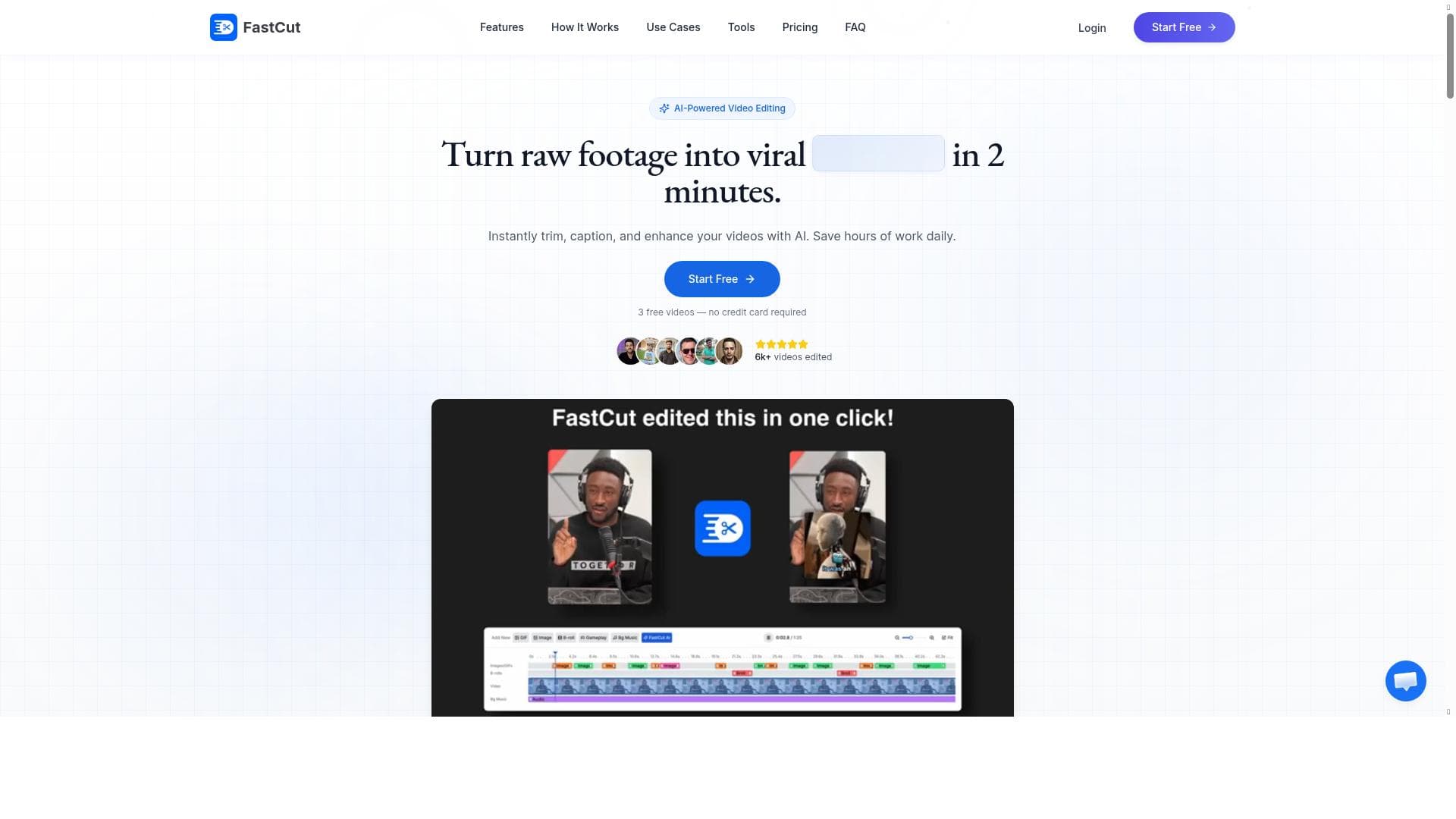
FastCut is an AI-driven video editing tool that enables content creators to produce polished short-form videos with a single click. Featuring automated captions, B-roll insertion, and easy orientation adjustments, it’s perfect for creators seeking fast, professional reels without any editing skills.

Description
and can even change orientation effortlessly.FastCut is an AI-powered tool designed to help content creators create short-form videos with just a single click. It seamlessly incorporates time-synced animated captions and emojis from a variety of pre-designed templates, including options like the Alex Hormozi template. FastCut offers the flexibility to integrate video overlays (b-rolls) into videos using AI or manual methods. Additionally, users can adjust the orientation of their videos as needed.
Detailed Description
FastCut is an AI-powered video editing tool specifically designed to simplify and accelerate the creation of short-form videos, making it an ideal solution for content creators who want to produce engaging reels and clips with minimal effort. Its core purpose is to enable users to generate professional-quality videos with just a single click, eliminating the need for complex editing skills or time-consuming manual processes. By leveraging artificial intelligence, FastCut automates key editing tasks such as captioning, emoji integration, and video overlay insertion, allowing creators to focus on content rather than technical details. One of FastCut's standout features is its AI-driven captioning system, which automatically generates time-synced animated captions that enhance viewer engagement and accessibility. These captions are not only accurate but also visually appealing, with a variety of pre-designed templates available, including popular styles like the Alex Hormozi template. This allows creators to maintain a consistent and professional look across their videos without having to design captions from scratch. Additionally, FastCut supports the seamless integration of emojis within captions, adding a dynamic and expressive layer to the content. Beyond captions, FastCut offers flexible options for incorporating B-roll footage or video overlays. Users can either rely on AI to intelligently suggest and insert relevant B-roll clips or manually select overlays to enrich their videos. This feature helps in creating more visually compelling stories by adding context or emphasizing key points. Sound design is also a priority, with FastCut providing built-in sound effects and music integration capabilities. Users can easily add background music or sound effects to complement their visuals, further enhancing the overall production quality. Another notable capability is FastCut's ability to adjust video orientation effortlessly. Whether content needs to be formatted for vertical, horizontal, or square layouts, FastCut allows users to switch orientations without hassle, ensuring their videos are optimized for different social media platforms and viewing experiences. The entire process is designed to be intuitive, requiring no prior video editing knowledge, which makes FastCut accessible to beginners and professionals alike. FastCut operates on a freemium pricing model, offering a free tier that provides access to core features, allowing users to test the platform and create basic videos without cost. For those seeking advanced templates, additional music and sound effects, or higher usage limits, premium plans are available at competitive rates. This pricing structure makes FastCut a scalable solution for individual creators, small businesses, and marketing teams looking to streamline their video production workflows. Compared to traditional video editing software, which often demands significant time investment and technical expertise, FastCut stands out by automating complex tasks and providing ready-made assets tailored for short-form content. While other AI video tools may focus solely on captioning or clip assembly, FastCut combines multiple functionalities—captioning, B-roll insertion, sound design, and orientation adjustment—into one cohesive platform. However, users should be aware that while FastCut excels at quick reel creation, it may have limitations for highly customized or long-form video projects that require granular control over every editing element. In summary, FastCut is a powerful, user-friendly AI video editing assistant that empowers content creators to produce polished, engaging short-form videos rapidly. Its blend of automated captioning, creative templates, flexible overlay options, and sound integration makes it a versatile tool for social media influencers, marketers, educators, and anyone looking to boost their video content output without the steep learning curve of traditional editing software.
Tool Features
- AI captions
- B-roll insertion
- Sound effects
- Music integration
- One-click reel creation
- No editing skills needed
Description
✦
FastCut is an AI-driven video editing tool that enables content creators to produce polished short-form videos with a single click. Featuring automated captions, B-roll insertion, and easy orientation adjustments, it’s perfect for creators seeking fast, professional reels without any editing skills.
and can even change orientation effortlessly.FastCut is an AI-powered tool designed to help content creators create short-form videos with just a single click. It seamlessly incorporates time-synced animated captions and emojis from a variety of pre-designed templates, including options like the Alex Hormozi template. FastCut offers the flexibility to integrate video overlays (b-rolls) into videos using AI or manual methods. Additionally, users can adjust the orientation of their videos as needed.
Detailed Description
FastCut is an AI-powered video editing tool specifically designed to simplify and accelerate the creation of short-form videos, making it an ideal solution for content creators who want to produce engaging reels and clips with minimal effort. Its core purpose is to enable users to generate professional-quality videos with just a single click, eliminating the need for complex editing skills or time-consuming manual processes. By leveraging artificial intelligence, FastCut automates key editing tasks such as captioning, emoji integration, and video overlay insertion, allowing creators to focus on content rather than technical details. One of FastCut's standout features is its AI-driven captioning system, which automatically generates time-synced animated captions that enhance viewer engagement and accessibility. These captions are not only accurate but also visually appealing, with a variety of pre-designed templates available, including popular styles like the Alex Hormozi template. This allows creators to maintain a consistent and professional look across their videos without having to design captions from scratch. Additionally, FastCut supports the seamless integration of emojis within captions, adding a dynamic and expressive layer to the content. Beyond captions, FastCut offers flexible options for incorporating B-roll footage or video overlays. Users can either rely on AI to intelligently suggest and insert relevant B-roll clips or manually select overlays to enrich their videos. This feature helps in creating more visually compelling stories by adding context or emphasizing key points. Sound design is also a priority, with FastCut providing built-in sound effects and music integration capabilities. Users can easily add background music or sound effects to complement their visuals, further enhancing the overall production quality. Another notable capability is FastCut's ability to adjust video orientation effortlessly. Whether content needs to be formatted for vertical, horizontal, or square layouts, FastCut allows users to switch orientations without hassle, ensuring their videos are optimized for different social media platforms and viewing experiences. The entire process is designed to be intuitive, requiring no prior video editing knowledge, which makes FastCut accessible to beginners and professionals alike. FastCut operates on a freemium pricing model, offering a free tier that provides access to core features, allowing users to test the platform and create basic videos without cost. For those seeking advanced templates, additional music and sound effects, or higher usage limits, premium plans are available at competitive rates. This pricing structure makes FastCut a scalable solution for individual creators, small businesses, and marketing teams looking to streamline their video production workflows. Compared to traditional video editing software, which often demands significant time investment and technical expertise, FastCut stands out by automating complex tasks and providing ready-made assets tailored for short-form content. While other AI video tools may focus solely on captioning or clip assembly, FastCut combines multiple functionalities—captioning, B-roll insertion, sound design, and orientation adjustment—into one cohesive platform. However, users should be aware that while FastCut excels at quick reel creation, it may have limitations for highly customized or long-form video projects that require granular control over every editing element. In summary, FastCut is a powerful, user-friendly AI video editing assistant that empowers content creators to produce polished, engaging short-form videos rapidly. Its blend of automated captioning, creative templates, flexible overlay options, and sound integration makes it a versatile tool for social media influencers, marketers, educators, and anyone looking to boost their video content output without the steep learning curve of traditional editing software.
Frequently Asked Questions
What is FastCut?
FastCut is an AI-powered video editing tool designed to help content creators quickly produce short-form videos with automated captions, emoji integration, B-roll overlays, and sound effects, all accessible through an intuitive one-click interface.
How much does FastCut cost?
FastCut offers a freemium pricing model, allowing users to access basic features for free, with premium plans available that unlock additional templates, sound effects, and higher usage limits.
Who is FastCut best for?
FastCut is ideal for social media influencers, marketers, educators, and any content creators who want to quickly generate engaging short-form videos without needing advanced video editing skills.
What are the main features of FastCut?
Key features include AI-generated time-synced animated captions, emoji integration, B-roll insertion via AI or manual selection, sound effects and music integration, one-click reel creation, and effortless video orientation adjustment.
Does FastCut offer a free trial?
Yes, FastCut’s freemium plan allows users to try the tool for free with access to core features, enabling them to create and export videos without an upfront cost.
What integrations does FastCut support?
While FastCut primarily operates as a standalone platform, it supports importing user videos and media for editing. Specific third-party integrations are not prominently featured but may be expanded in future updates.
How does FastCut work?
Users upload their video content to FastCut, then the AI automatically generates animated captions and suggests B-roll overlays. Users can customize templates, add sound effects or music, adjust orientation, and create a finished short-form video with a single click.
Socials
Use ToolReviews
0 reviews
No reviews yet. Be the first to share your experience.
Sponsored Tools






































Recommended Tools
Stay updated on latest Ai tools
Get the latest insights, Join our newsletter
Read and trusted by 50,000+ readers
Join the biggest AI Community
Our community and staff are here to help!
Your feedback will help Alice AI improve in future versions.







Submit your Tool


PoweredByAI.app is an AI Tools Directory helping individuals, businesses, and creators discover the best AI tools for writing, coding, design, productivity, and more.
© 2026 , Product of011BQ. All rights reserved.