

Is this your AI tool? Claim it today.
Verify ownership, manage your profile, and unlock growth features.
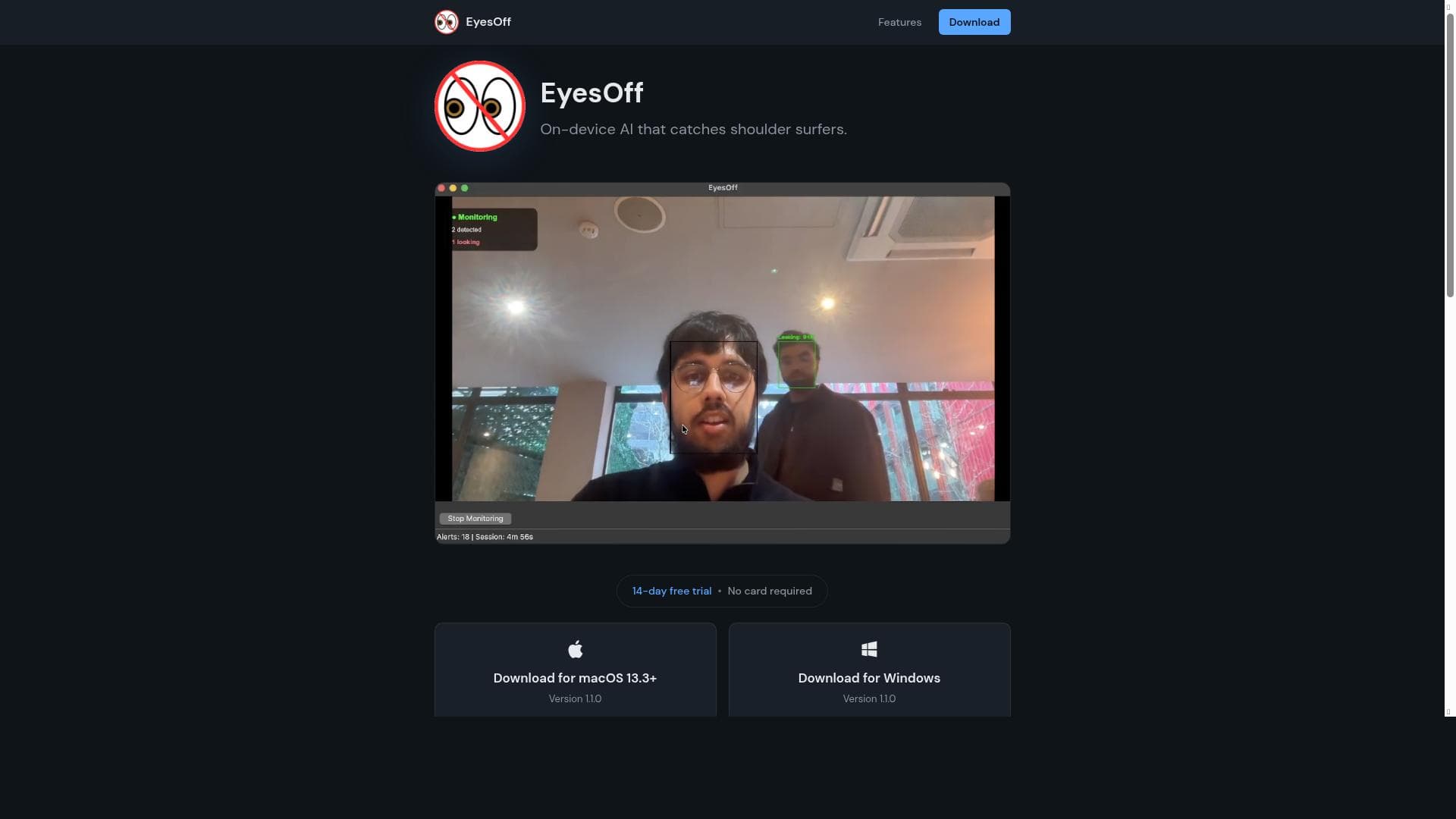
EyesOff is a privacy-focused macOS app that uses a local neural network to detect when others are looking at your screen, alerting you in real time without sending any data off your device. Ideal for professionals and privacy-conscious users, it offers customizable alerts and runs efficiently on any webcam with minimal CPU impact.

Description
EyesOff is a privacy focused macOS app which makes use of a locally running neural network (YuNet), to notify you if other people are looking at your screen. YuNet runs fully on-device with no data leaving your computer.
Detailed Description
EyesOff is a specialized macOS application designed to enhance user privacy by monitoring and alerting users when others attempt to look at their computer screen. At its core, EyesOff leverages a locally running neural network called YuNet, which performs real-time gaze detection entirely on the user's device. This means that no data is sent to external servers, ensuring maximum privacy and security. The app is built to be lightweight and efficient, running seamlessly in the background without significant impact on system performance. Its primary purpose is to protect sensitive information from prying eyes, making it an essential tool for professionals and privacy-conscious individuals alike. The key features of EyesOff revolve around its advanced gaze detection capabilities. It continuously monitors the environment via any connected webcam and instantly notifies the user if someone else is looking at the screen. Users can customize how they receive these alerts, choosing between popup windows, system notifications, or even launching a custom application to respond to the detected gaze. This flexibility allows users to tailor the app’s behavior to their workflow and preferences. Another standout feature is the app’s commitment to privacy: all processing happens locally on the device, with no data leaving the computer, which differentiates it from cloud-based surveillance tools. Additionally, EyesOff offers user control over when monitoring is active, enabling users to pause or resume detection as needed. The underlying AI model is designed to be lightweight, minimizing CPU usage and ensuring that the app does not interfere with other tasks or drain system resources. EyesOff is particularly well-suited for professionals working with confidential or sensitive information, such as lawyers, financial advisors, journalists, or anyone frequently handling private data on their Mac. It is also valuable for individuals working in shared or public spaces who want to prevent shoulder surfing or accidental exposure of their screen contents. The app’s unobtrusive design and customizable alert system make it adaptable to various environments, from quiet offices to busy cafes. By providing real-time notifications, EyesOff empowers users to take immediate action to protect their privacy, whether by locking their screen, moving to a more secure location, or simply being aware of their surroundings. The pricing model for EyesOff is freemium, allowing users to try the basic functionality at no cost, which is ideal for evaluating the app’s effectiveness before committing financially. The free version provides core gaze detection and alert features, while premium plans likely unlock advanced customization options, additional alert modes, or extended monitoring capabilities. This tiered approach ensures accessibility for casual users while offering enhanced features for power users or enterprise clients. Compared to alternative privacy or screen monitoring tools, EyesOff stands out due to its exclusive focus on gaze detection combined with strict on-device processing. Many competing solutions rely on cloud-based AI, raising concerns about data privacy and latency. Others may require specialized hardware or have higher system requirements. EyesOff’s compatibility with any standard webcam and its minimal CPU footprint make it a practical choice for most Mac users. However, unlike broader surveillance software, it does not record video or track user activity beyond gaze detection, which may be a limitation for those seeking comprehensive monitoring solutions. One consideration when using EyesOff is that its effectiveness depends on webcam quality and environmental factors such as lighting and camera angle. In low-light conditions or with low-resolution webcams, detection accuracy might decrease. Additionally, since it is currently macOS-exclusive, users on other operating systems cannot benefit from its features. Users should also be mindful of privacy implications when enabling continuous camera monitoring, even though processing is local. Overall, EyesOff offers a unique, privacy-first approach to screen security, combining AI innovation with user-centric design to help protect sensitive information in everyday computing scenarios.
Tool Features
- Real-time gaze detection alerts you when someone looks at your screen
- Multiple alert modes: popup, notification, or launch a custom app
- 100% on-device processing — nothing leaves your computer
- You control when monitoring is active
- Lightweight AI model with minimal CPU usage
- Works with any webcam
Description
EyesOff is a privacy-focused macOS app that uses a local neural network to detect when others are looking at your screen, alerting you in real time without sending any data off your device. Ideal for professionals and privacy-conscious users, it offers customizable alerts and runs efficiently on any webcam with minimal CPU impact.
EyesOff is a privacy focused macOS app which makes use of a locally running neural network (YuNet), to notify you if other people are looking at your screen. YuNet runs fully on-device with no data leaving your computer.
Detailed Description
EyesOff is a specialized macOS application designed to enhance user privacy by monitoring and alerting users when others attempt to look at their computer screen. At its core, EyesOff leverages a locally running neural network called YuNet, which performs real-time gaze detection entirely on the user's device. This means that no data is sent to external servers, ensuring maximum privacy and security. The app is built to be lightweight and efficient, running seamlessly in the background without significant impact on system performance. Its primary purpose is to protect sensitive information from prying eyes, making it an essential tool for professionals and privacy-conscious individuals alike. The key features of EyesOff revolve around its advanced gaze detection capabilities. It continuously monitors the environment via any connected webcam and instantly notifies the user if someone else is looking at the screen. Users can customize how they receive these alerts, choosing between popup windows, system notifications, or even launching a custom application to respond to the detected gaze. This flexibility allows users to tailor the app’s behavior to their workflow and preferences. Another standout feature is the app’s commitment to privacy: all processing happens locally on the device, with no data leaving the computer, which differentiates it from cloud-based surveillance tools. Additionally, EyesOff offers user control over when monitoring is active, enabling users to pause or resume detection as needed. The underlying AI model is designed to be lightweight, minimizing CPU usage and ensuring that the app does not interfere with other tasks or drain system resources. EyesOff is particularly well-suited for professionals working with confidential or sensitive information, such as lawyers, financial advisors, journalists, or anyone frequently handling private data on their Mac. It is also valuable for individuals working in shared or public spaces who want to prevent shoulder surfing or accidental exposure of their screen contents. The app’s unobtrusive design and customizable alert system make it adaptable to various environments, from quiet offices to busy cafes. By providing real-time notifications, EyesOff empowers users to take immediate action to protect their privacy, whether by locking their screen, moving to a more secure location, or simply being aware of their surroundings. The pricing model for EyesOff is freemium, allowing users to try the basic functionality at no cost, which is ideal for evaluating the app’s effectiveness before committing financially. The free version provides core gaze detection and alert features, while premium plans likely unlock advanced customization options, additional alert modes, or extended monitoring capabilities. This tiered approach ensures accessibility for casual users while offering enhanced features for power users or enterprise clients. Compared to alternative privacy or screen monitoring tools, EyesOff stands out due to its exclusive focus on gaze detection combined with strict on-device processing. Many competing solutions rely on cloud-based AI, raising concerns about data privacy and latency. Others may require specialized hardware or have higher system requirements. EyesOff’s compatibility with any standard webcam and its minimal CPU footprint make it a practical choice for most Mac users. However, unlike broader surveillance software, it does not record video or track user activity beyond gaze detection, which may be a limitation for those seeking comprehensive monitoring solutions. One consideration when using EyesOff is that its effectiveness depends on webcam quality and environmental factors such as lighting and camera angle. In low-light conditions or with low-resolution webcams, detection accuracy might decrease. Additionally, since it is currently macOS-exclusive, users on other operating systems cannot benefit from its features. Users should also be mindful of privacy implications when enabling continuous camera monitoring, even though processing is local. Overall, EyesOff offers a unique, privacy-first approach to screen security, combining AI innovation with user-centric design to help protect sensitive information in everyday computing scenarios.
Frequently Asked Questions
What is EyesOff?
EyesOff is a macOS application that uses a locally running neural network called YuNet to detect when someone else is looking at your computer screen and notifies you in real time, helping protect your privacy.
How much does EyesOff cost?
EyesOff follows a freemium pricing model, offering basic gaze detection features for free, with premium plans available that provide additional customization and advanced functionalities.
Who is EyesOff best for?
EyesOff is ideal for professionals handling sensitive information, such as lawyers, journalists, and financial advisors, as well as anyone working in shared or public spaces who wants to prevent screen snooping.
What are the main features of EyesOff?
Key features include real-time gaze detection alerts, multiple alert modes (popup, notification, or launching a custom app), 100% on-device processing with no data leaving your computer, user-controlled monitoring activation, lightweight AI model with minimal CPU usage, and compatibility with any webcam.
Does EyesOff offer a free trial?
Yes, EyesOff offers a free version with core features so users can try the app before upgrading to premium plans.
What integrations does EyesOff support?
EyesOff supports launching custom applications as an alert response, allowing integration with other tools or workflows, but it does not currently offer direct integrations with third-party software platforms.
How does EyesOff work?
EyesOff uses the YuNet neural network running locally on your Mac to analyze webcam input in real time, detecting when someone’s gaze is directed at your screen and then triggering alerts based on your chosen notification settings.
Socials
Use ToolReviews
No reviews yet. Be the first to share your experience.




















































