Featured in:Best AI Writing Tools
Get featured →🚀 Zaprep: Your Socials on Steroids. Start free — automate 1,000 DMs/month & turn engagement into leads. with 1,000 automated DMs/month.



✦
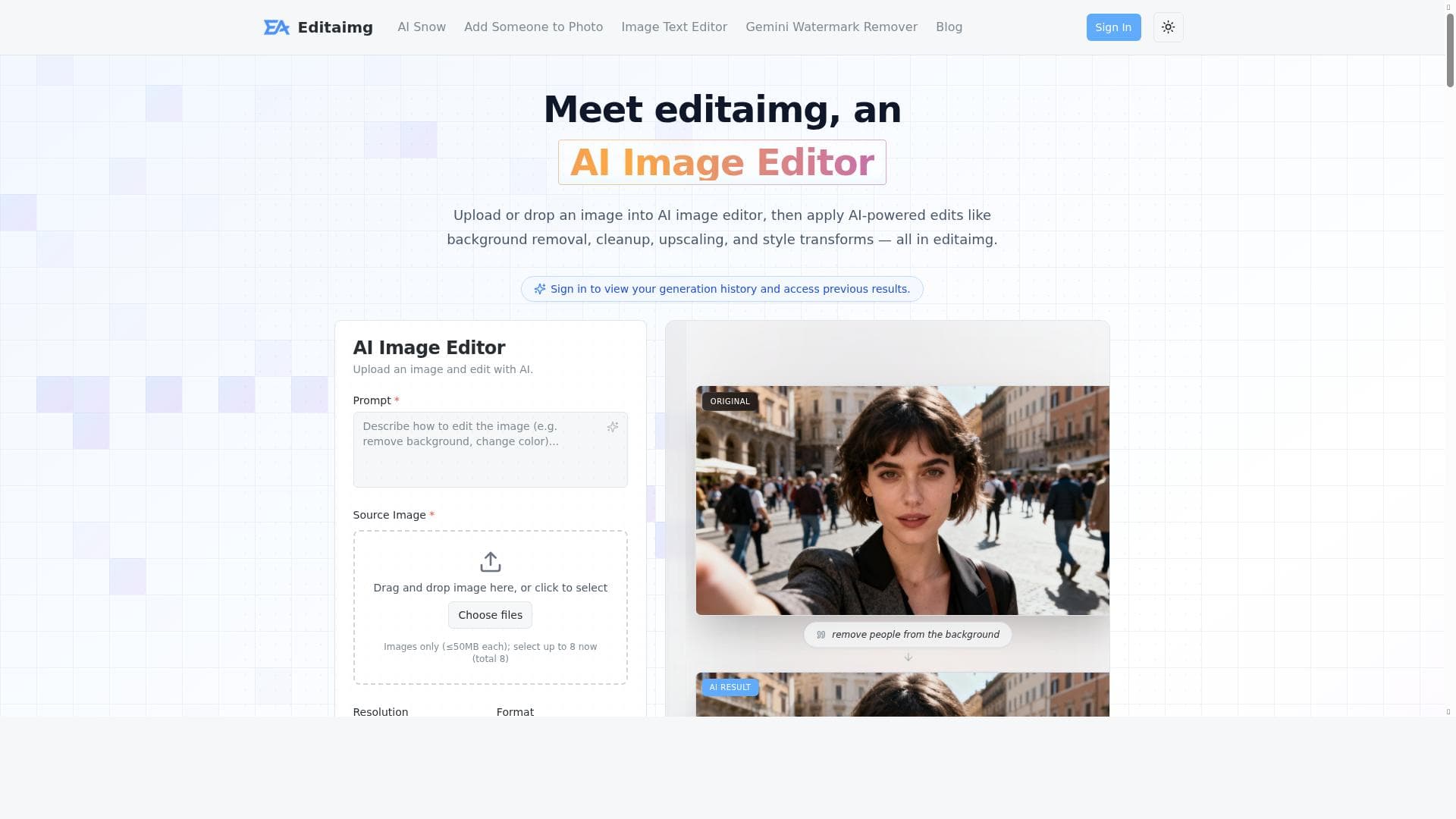
Editaimg revolutionizes photo editing by allowing users to modify and enhance images simply by describing changes in text. Ideal for both personal and business users, it combines professional tools with an intuitive interface to deliver fast, high-quality results without the complexity of traditional editors.

Description
AI image editor for text-based photo modification and enhancement.
Detailed Description
Editaimg is an advanced AI-powered image editor designed to simplify and enhance the process of photo modification and enhancement through text-based commands. Its core purpose is to enable users to edit images by describing the desired changes in natural language, making professional-grade photo editing accessible to both novices and experts without the need for complex manual adjustments. By leveraging cutting-edge artificial intelligence, Editaimg transforms user input into precise image edits, streamlining workflows for content creators, marketers, photographers, and businesses seeking efficient visual content enhancement. At the heart of Editaimg are its professional image editing tools that cover a broad spectrum of functionalities. Users can perform tasks such as adjusting brightness, contrast, and saturation, removing unwanted objects, applying filters, resizing, cropping, and retouching images with ease. The platform supports multiple image formats, ensuring compatibility with common file types like JPEG, PNG, TIFF, and more. Its user-friendly interface is designed to be intuitive, allowing users to input text commands describing the edits they want, which the AI then interprets and applies accurately. This text-based editing approach reduces the learning curve typically associated with traditional photo editing software. Editaimg is suitable for a wide range of users and use cases. Individual users can enhance personal photos, create visually appealing social media content, or prepare images for blogs and websites. Small businesses and marketing teams benefit from its ability to quickly produce polished visuals for advertisements, product showcases, and promotional materials without requiring dedicated graphic design resources. Photographers and content creators can use Editaimg to speed up their post-processing workflows, enabling faster turnaround times while maintaining high-quality results. The platform operates on a freemium pricing model, offering a free tier that allows users to access basic editing features and a limited number of image edits per month. Paid plans unlock advanced tools, higher resolution outputs, priority processing, and increased usage limits, catering to professional users and businesses with more demanding requirements. This flexible pricing structure makes Editaimg accessible to casual users while providing scalability for growing needs. Compared to traditional photo editing software like Adobe Photoshop or Lightroom, Editaimg stands out by eliminating the need for manual tool navigation and complex adjustments. Its AI-driven text-based editing is more accessible for users without technical expertise, speeding up the editing process significantly. While other AI image editors exist, Editaimg's combination of professional-grade tools, multi-format support, and user-friendly natural language interface offers a unique balance of power and simplicity. However, it may not yet match the full depth of control available in high-end desktop editors for highly specialized or intricate image manipulation. Notable limitations include potential inaccuracies in interpreting ambiguous or complex text commands, which may require some trial and error to perfect. Additionally, while the freemium model is generous, heavy users or professionals may find the need to upgrade to paid plans to access the full feature set and higher output quality. Integration options with other software and platforms are currently limited, which could impact workflows relying on seamless toolchains. Despite these considerations, Editaimg remains a compelling solution for anyone looking to enhance images quickly and intuitively using AI-powered text commands.
Tool Features
- Professional image editing tools
- User-friendly interface
- Supports multiple image formats
- Enhance and transform photos
- Suitable for personal and business use
Description
✦
Editaimg revolutionizes photo editing by allowing users to modify and enhance images simply by describing changes in text. Ideal for both personal and business users, it combines professional tools with an intuitive interface to deliver fast, high-quality results without the complexity of traditional editors.
AI image editor for text-based photo modification and enhancement.
Detailed Description
Editaimg is an advanced AI-powered image editor designed to simplify and enhance the process of photo modification and enhancement through text-based commands. Its core purpose is to enable users to edit images by describing the desired changes in natural language, making professional-grade photo editing accessible to both novices and experts without the need for complex manual adjustments. By leveraging cutting-edge artificial intelligence, Editaimg transforms user input into precise image edits, streamlining workflows for content creators, marketers, photographers, and businesses seeking efficient visual content enhancement. At the heart of Editaimg are its professional image editing tools that cover a broad spectrum of functionalities. Users can perform tasks such as adjusting brightness, contrast, and saturation, removing unwanted objects, applying filters, resizing, cropping, and retouching images with ease. The platform supports multiple image formats, ensuring compatibility with common file types like JPEG, PNG, TIFF, and more. Its user-friendly interface is designed to be intuitive, allowing users to input text commands describing the edits they want, which the AI then interprets and applies accurately. This text-based editing approach reduces the learning curve typically associated with traditional photo editing software. Editaimg is suitable for a wide range of users and use cases. Individual users can enhance personal photos, create visually appealing social media content, or prepare images for blogs and websites. Small businesses and marketing teams benefit from its ability to quickly produce polished visuals for advertisements, product showcases, and promotional materials without requiring dedicated graphic design resources. Photographers and content creators can use Editaimg to speed up their post-processing workflows, enabling faster turnaround times while maintaining high-quality results. The platform operates on a freemium pricing model, offering a free tier that allows users to access basic editing features and a limited number of image edits per month. Paid plans unlock advanced tools, higher resolution outputs, priority processing, and increased usage limits, catering to professional users and businesses with more demanding requirements. This flexible pricing structure makes Editaimg accessible to casual users while providing scalability for growing needs. Compared to traditional photo editing software like Adobe Photoshop or Lightroom, Editaimg stands out by eliminating the need for manual tool navigation and complex adjustments. Its AI-driven text-based editing is more accessible for users without technical expertise, speeding up the editing process significantly. While other AI image editors exist, Editaimg's combination of professional-grade tools, multi-format support, and user-friendly natural language interface offers a unique balance of power and simplicity. However, it may not yet match the full depth of control available in high-end desktop editors for highly specialized or intricate image manipulation. Notable limitations include potential inaccuracies in interpreting ambiguous or complex text commands, which may require some trial and error to perfect. Additionally, while the freemium model is generous, heavy users or professionals may find the need to upgrade to paid plans to access the full feature set and higher output quality. Integration options with other software and platforms are currently limited, which could impact workflows relying on seamless toolchains. Despite these considerations, Editaimg remains a compelling solution for anyone looking to enhance images quickly and intuitively using AI-powered text commands.
Frequently Asked Questions
What is Editaimg?
Editaimg is an AI-powered image editor that enables users to modify and enhance photos through text-based commands, simplifying professional-grade photo editing for both novices and experts.
How much does Editaimg cost?
Editaimg offers a freemium pricing model with a free tier providing basic editing features and limited usage. Paid plans unlock advanced tools, higher resolution outputs, and increased usage limits for professional and business users.
Who is Editaimg best for?
Editaimg is ideal for individual users looking to enhance personal photos, content creators, marketers, small businesses, and photographers seeking efficient, high-quality image editing without complex software.
What are the main features of Editaimg?
Key features include professional image editing tools, a user-friendly text-based interface, support for multiple image formats, and the ability to enhance and transform photos quickly and accurately.
Does Editaimg offer a free trial?
Yes, Editaimg provides a free tier that allows users to try basic editing features and experience the platform before opting for paid plans.
What integrations does Editaimg support?
Currently, Editaimg has limited integration options with other software or platforms, focusing primarily on standalone image editing through its web interface.
How does Editaimg work?
Users input text commands describing the desired edits, and Editaimg's AI interprets these instructions to apply precise modifications to the uploaded images, streamlining the editing process.
Reviews
0 reviews
No reviews yet. Be the first to share your experience.
Sponsored Tools







































Recommended Tools
Stay updated on latest Ai tools
Get the latest insights, Join our newsletter
Read and trusted by 50,000+ readers
Join the biggest AI Community
Our community and staff are here to help!
Your feedback will help Alice AI improve in future versions.







Submit your Tool


PoweredByAI.app is an AI Tools Directory helping individuals, businesses, and creators discover the best AI tools for writing, coding, design, productivity, and more.
© 2026 , Product of011BQ. All rights reserved.