Featured in:Best AI Transcription Tools
Get featured →🚀 Zaprep: Your Socials on Steroids. Start free — automate 1,000 DMs/month & turn engagement into leads. with 1,000 automated DMs/month.
DictionDaddy


✦
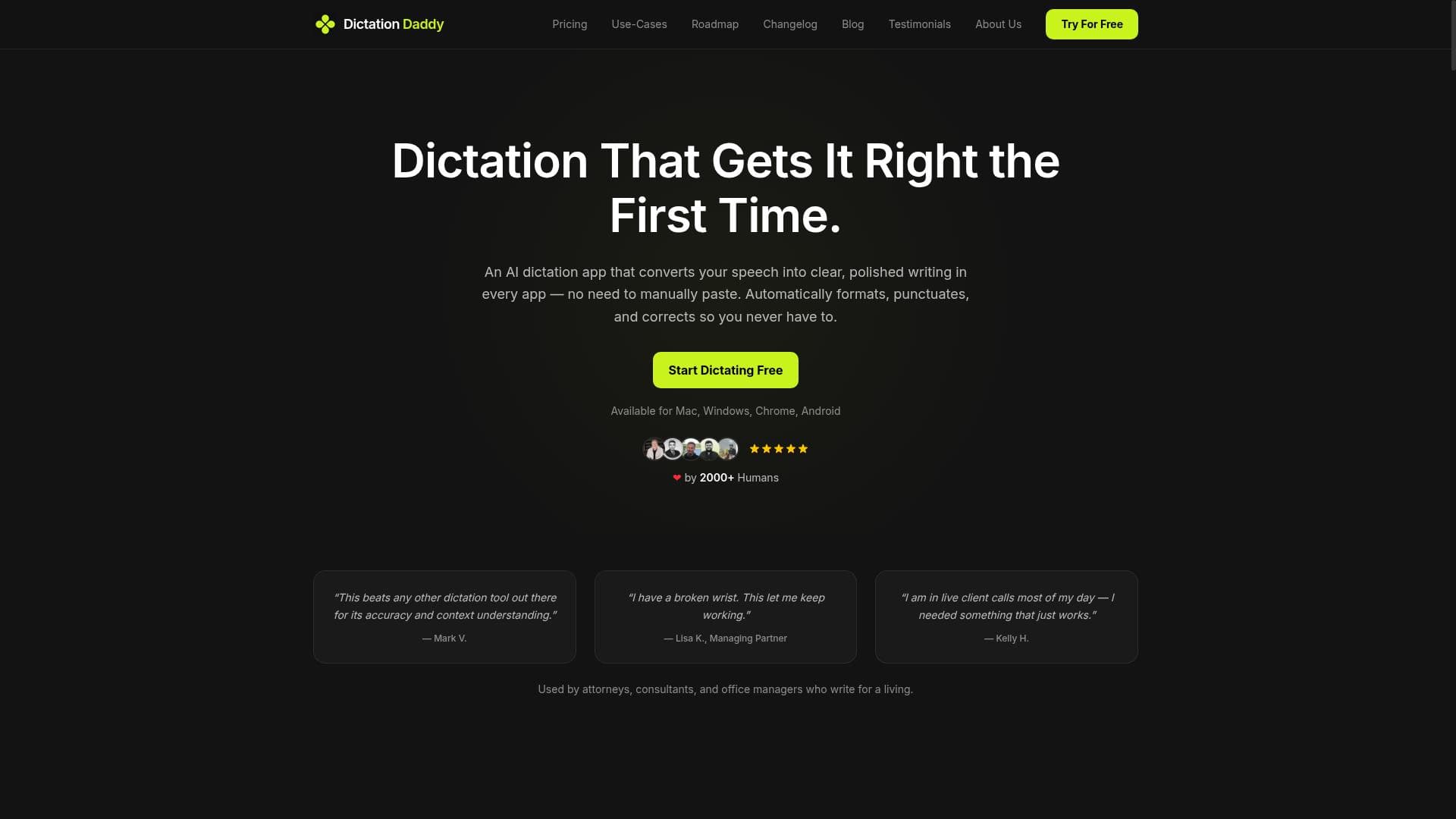
DictionDaddy is a powerful AI-driven dictation tool that delivers the highest accuracy in converting speech to polished text across any application. Ideal for professionals and students alike, it auto-punctuates, formats, and corrects your voice transcriptions seamlessly on Mac, Windows, Chrome, and Android platforms—all for free.

Description
Dictation Tool With Highest Accuracy. An AI-powered dictation tool that transcribes your voice with highest accuracy directly into any applications like Emails, Slack, WhatsApp, with proper formatting, punctuation and more.
Detailed Description
DictionDaddy is an advanced AI-powered dictation tool designed to transform spoken words into highly accurate, polished written text across a wide range of applications. Its core purpose is to streamline the process of converting voice to text with exceptional accuracy, making it easier for users to communicate efficiently without the need for manual typing. Whether you are composing emails, chatting on Slack, sending messages on WhatsApp, or working within any other application, DictionDaddy seamlessly transcribes your voice input directly into the desired platform with proper formatting, punctuation, and corrections applied automatically. This makes it an invaluable tool for professionals, students, and anyone who frequently needs to produce written content quickly and accurately from speech. One of the standout features of DictionDaddy is its ability to convert voice into polished writing in virtually every app. Unlike many dictation tools that require specific environments or apps, DictionDaddy integrates smoothly across Mac, Windows, Chrome browsers, and Android devices, ensuring broad accessibility. The tool’s AI engine auto-punctuates speech-to-text conversions, eliminating the need for users to manually insert commas, periods, question marks, or other punctuation marks. Additionally, it automatically formats and corrects the text, improving readability and professionalism without extra effort. This includes fixing common speech recognition errors, capitalizing proper nouns, and maintaining consistent grammar throughout the transcription. These capabilities collectively enhance the quality of the output, making it suitable for formal and informal communication alike. DictionDaddy is best suited for professionals who rely heavily on written communication but prefer speaking over typing, such as business executives, customer support agents, content creators, and remote workers. It is also highly beneficial for students and educators who want to quickly capture lecture notes or draft documents. Specific use cases include drafting emails hands-free during busy workdays, composing messages on social platforms without switching contexts, transcribing meetings or interviews, and generating written content on the go. Its compatibility with multiple platforms ensures users can maintain productivity regardless of their device or preferred software. Regarding pricing, DictionDaddy offers its services for free, making it accessible to a broad audience without financial barriers. This free access encourages users to adopt the tool for everyday dictation needs without worrying about subscription fees or usage limits. While the free model is generous, users should verify if any premium features or enterprise plans exist for enhanced capabilities or higher usage thresholds. When compared to alternative dictation tools, DictionDaddy stands out due to its high accuracy, automatic punctuation, and formatting features that work across numerous applications and platforms. Many competing tools either require integration within specific apps or lack the advanced formatting and correction features that DictionDaddy provides. Its multi-platform support ensures users are not confined to a single ecosystem, a significant advantage over dictation software limited to Windows or macOS only. However, some alternatives may offer deeper integrations with specialized software or additional language support, which users should consider based on their specific needs. Notable limitations of DictionDaddy include potential variability in transcription accuracy depending on the user's accent, background noise, or speech clarity, which is a common challenge for all voice recognition technologies. Additionally, while it supports multiple platforms, users should confirm compatibility with their specific device versions and applications. Since the tool is free, advanced enterprise features, dedicated customer support, or offline functionality may be limited or unavailable. Users requiring these capabilities might need to explore paid alternatives or supplementary tools. Overall, DictionDaddy offers a robust, accessible solution for high-accuracy dictation with convenient cross-platform support and intelligent text refinement, making it a valuable asset for anyone looking to enhance their productivity through voice-driven writing.
Tool Features
- Converts voice into polished writing in every app
- Auto-punctuates speech to text
- Automatically formats and corrects text
- Supports Mac, Windows, Chrome, and Android platforms
Description
✦
DictionDaddy is a powerful AI-driven dictation tool that delivers the highest accuracy in converting speech to polished text across any application. Ideal for professionals and students alike, it auto-punctuates, formats, and corrects your voice transcriptions seamlessly on Mac, Windows, Chrome, and Android platforms—all for free.
Dictation Tool With Highest Accuracy. An AI-powered dictation tool that transcribes your voice with highest accuracy directly into any applications like Emails, Slack, WhatsApp, with proper formatting, punctuation and more.
Detailed Description
DictionDaddy is an advanced AI-powered dictation tool designed to transform spoken words into highly accurate, polished written text across a wide range of applications. Its core purpose is to streamline the process of converting voice to text with exceptional accuracy, making it easier for users to communicate efficiently without the need for manual typing. Whether you are composing emails, chatting on Slack, sending messages on WhatsApp, or working within any other application, DictionDaddy seamlessly transcribes your voice input directly into the desired platform with proper formatting, punctuation, and corrections applied automatically. This makes it an invaluable tool for professionals, students, and anyone who frequently needs to produce written content quickly and accurately from speech. One of the standout features of DictionDaddy is its ability to convert voice into polished writing in virtually every app. Unlike many dictation tools that require specific environments or apps, DictionDaddy integrates smoothly across Mac, Windows, Chrome browsers, and Android devices, ensuring broad accessibility. The tool’s AI engine auto-punctuates speech-to-text conversions, eliminating the need for users to manually insert commas, periods, question marks, or other punctuation marks. Additionally, it automatically formats and corrects the text, improving readability and professionalism without extra effort. This includes fixing common speech recognition errors, capitalizing proper nouns, and maintaining consistent grammar throughout the transcription. These capabilities collectively enhance the quality of the output, making it suitable for formal and informal communication alike. DictionDaddy is best suited for professionals who rely heavily on written communication but prefer speaking over typing, such as business executives, customer support agents, content creators, and remote workers. It is also highly beneficial for students and educators who want to quickly capture lecture notes or draft documents. Specific use cases include drafting emails hands-free during busy workdays, composing messages on social platforms without switching contexts, transcribing meetings or interviews, and generating written content on the go. Its compatibility with multiple platforms ensures users can maintain productivity regardless of their device or preferred software. Regarding pricing, DictionDaddy offers its services for free, making it accessible to a broad audience without financial barriers. This free access encourages users to adopt the tool for everyday dictation needs without worrying about subscription fees or usage limits. While the free model is generous, users should verify if any premium features or enterprise plans exist for enhanced capabilities or higher usage thresholds. When compared to alternative dictation tools, DictionDaddy stands out due to its high accuracy, automatic punctuation, and formatting features that work across numerous applications and platforms. Many competing tools either require integration within specific apps or lack the advanced formatting and correction features that DictionDaddy provides. Its multi-platform support ensures users are not confined to a single ecosystem, a significant advantage over dictation software limited to Windows or macOS only. However, some alternatives may offer deeper integrations with specialized software or additional language support, which users should consider based on their specific needs. Notable limitations of DictionDaddy include potential variability in transcription accuracy depending on the user's accent, background noise, or speech clarity, which is a common challenge for all voice recognition technologies. Additionally, while it supports multiple platforms, users should confirm compatibility with their specific device versions and applications. Since the tool is free, advanced enterprise features, dedicated customer support, or offline functionality may be limited or unavailable. Users requiring these capabilities might need to explore paid alternatives or supplementary tools. Overall, DictionDaddy offers a robust, accessible solution for high-accuracy dictation with convenient cross-platform support and intelligent text refinement, making it a valuable asset for anyone looking to enhance their productivity through voice-driven writing.
Frequently Asked Questions
What is DictionDaddy?
DictionDaddy is an AI-powered dictation tool that transcribes your voice with high accuracy directly into any application, such as emails, Slack, or WhatsApp, while automatically adding proper punctuation, formatting, and corrections.
How much does DictionDaddy cost?
DictionDaddy is available for free, allowing users to access its dictation and transcription features without any subscription fees.
Who is DictionDaddy best for?
DictionDaddy is ideal for professionals, students, content creators, and anyone who wants to convert spoken words into polished written text quickly and accurately across multiple platforms and applications.
What are the main features of DictionDaddy?
Key features include converting voice into polished writing in every app, automatic punctuation of speech-to-text, automatic formatting and text correction, and support for Mac, Windows, Chrome, and Android platforms.
Does DictionDaddy offer a free trial?
DictionDaddy is offered for free, so there is no need for a trial period; users can immediately access its full dictation capabilities.
What integrations does DictionDaddy support?
DictionDaddy works directly within any application where text input is possible, including popular platforms like Emails, Slack, WhatsApp, and more, across Mac, Windows, Chrome, and Android devices.
How does DictionDaddy work?
DictionDaddy uses AI-powered speech recognition to transcribe your spoken words into text in real-time, automatically adding punctuation, formatting, and corrections to produce polished writing directly within the app you are using.
Socials
Use ToolReviews
0 reviews
No reviews yet. Be the first to share your experience.
Sponsored Tools







































Recommended Tools
Stay updated on latest Ai tools
Get the latest insights, Join our newsletter
Read and trusted by 50,000+ readers
Join the biggest AI Community
Our community and staff are here to help!
Your feedback will help Alice AI improve in future versions.







Submit your Tool


PoweredByAI.app is an AI Tools Directory helping individuals, businesses, and creators discover the best AI tools for writing, coding, design, productivity, and more.
© 2026 , Product of011BQ. All rights reserved.