🚀 Zaprep: Your Socials on Steroids. Start free — automate 1,000 DMs/month & turn engagement into leads. with 1,000 automated DMs/month.


Is this your AI tool? Claim it today.
Verify ownership, manage your profile, and unlock growth features.
Devpit is a free, open source native desktop app that empowers developers to efficiently manage multiple coding agents with dedicated terminals, work boards, and cost tracking. Ideal for developers juggling multiple projects, it enhances productivity by orchestrating sessions locally across Linux, macOS, and Windows.

Description
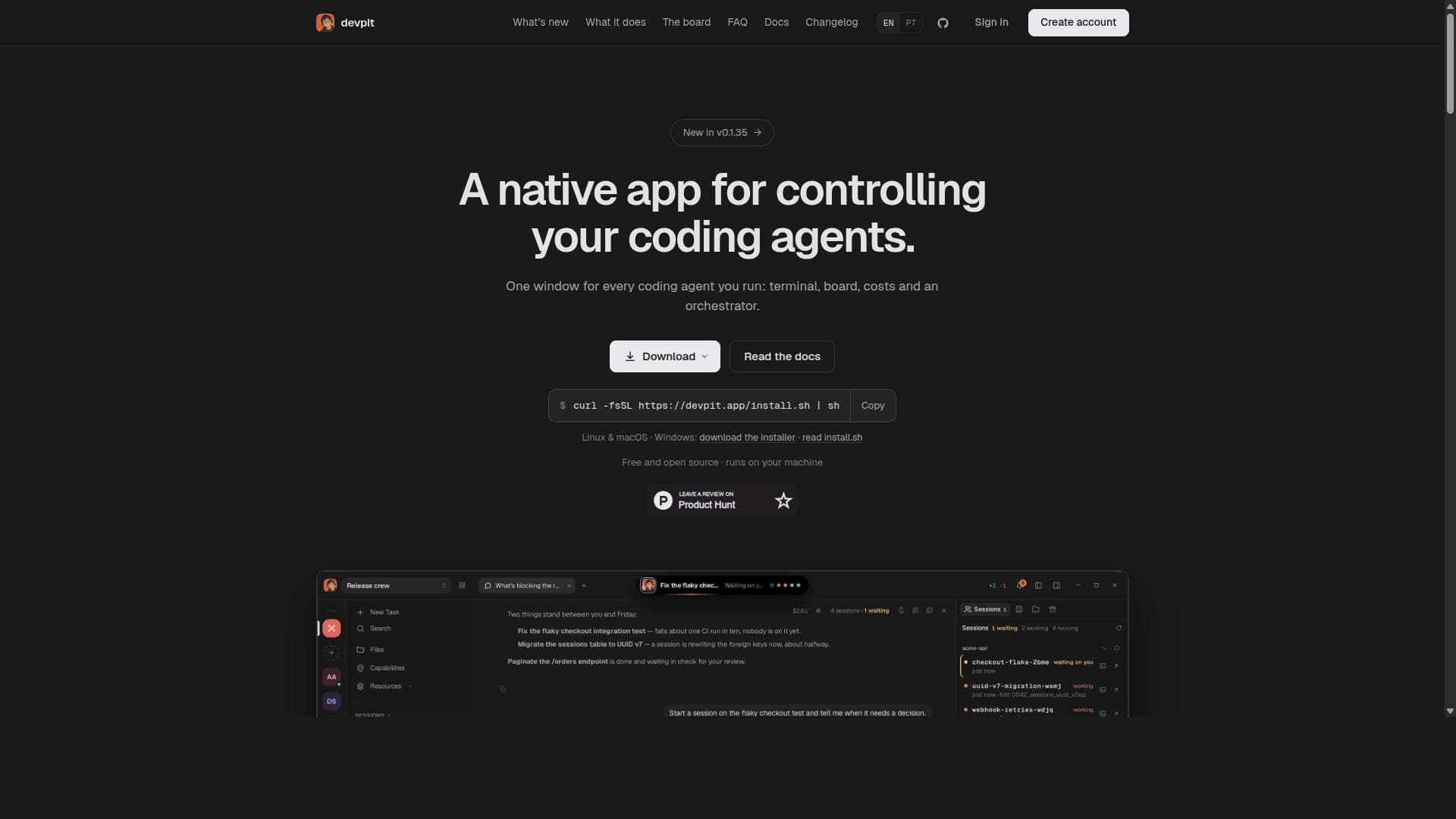
devpit is a native desktop app for running Claude Code agents. One terminal you actually watch, a board where moving a card runs real work, a cost on every agent call, and an orchestrator that sees every project at once. Local-first, open source.
Detailed Description
Devpit is a powerful native desktop application designed specifically to streamline the management and control of coding agents across multiple development projects. Its core purpose is to provide developers with a centralized, efficient environment where they can run, monitor, and orchestrate coding agents without the complexity of juggling multiple tools or interfaces. By running locally on your machine, devpit ensures that your projects remain secure and responsive, while also offering a seamless user experience across Linux, macOS, and Windows platforms. This makes it an ideal solution for developers seeking to enhance productivity and maintain tight control over their coding workflows. At the heart of devpit’s functionality is its unique approach to project management through dedicated terminals. Each project gets its own terminal window, allowing developers to interact with coding agents in isolation, which prevents cross-project interference and keeps workflows clean and organized. Complementing this is the integrated board feature, which acts as a visual workspace to organize, track, and prioritize tasks related to each project. This board helps developers maintain a clear overview of their work progress and agent activities, reducing cognitive load and improving task management. Another standout feature of devpit is its cost tracking system. Every API call made by coding agents is meticulously tracked, giving developers full visibility into the expenses associated with their workflows. This is particularly valuable for teams and individuals working with paid APIs or limited budgets, as it enables proactive cost management and optimization. Additionally, devpit includes an orchestrator component that intelligently manages sessions across multiple projects, coordinating agent activities and ensuring smooth operation even when handling several agents simultaneously. This orchestration capability is crucial for developers who need to run parallel workflows without losing track of any session or task. Devpit’s open source nature and free availability make it accessible to a wide range of users, from solo developers to large teams. Its compatibility with major operating systems ensures that it fits seamlessly into existing development environments. The tool supports multiple agents running concurrently, which is essential for complex projects requiring diverse AI-driven coding assistance. This multi-agent support, combined with the orchestrator’s session management, positions devpit as a comprehensive solution for advanced coding automation and agent control. The tool is best suited for software developers, AI researchers, and technical teams who rely heavily on coding agents to accelerate development, automate testing, or generate code snippets. Use cases include managing AI-assisted code generation, debugging with AI agents, orchestrating automated testing workflows, and tracking API usage costs in real time. Devpit’s project-specific terminals and boards help maintain focus and organization, making it ideal for developers juggling multiple projects or clients. Regarding pricing, devpit is completely free and open source, which means there are no subscription fees or usage limits imposed by the software itself. Users can download and install it locally without any cost, benefiting from continuous community-driven improvements and transparency. This contrasts with many proprietary coding assistant platforms that charge based on usage or require cloud-based subscriptions. When compared to alternatives, devpit stands out by offering a native desktop experience that runs entirely on the user’s machine, enhancing privacy and responsiveness. Unlike cloud-only platforms or browser-based tools, devpit does not require constant internet connectivity or expose sensitive code to external servers. Its integrated cost tracking and orchestrator features also provide a level of control and insight often missing in other coding agent managers. However, as an open source project, devpit may require some technical familiarity to install and configure, which could be a consideration for less technical users. Notable limitations include the current focus on coding agents, which means devpit may not support other types of AI workflows outside software development. Additionally, while it supports multiple agents, the complexity of managing very large numbers of agents or extremely large projects may require additional customization or integration with other project management tools. Users should also be aware that as a community-driven open source project, support and updates depend on contributor activity, which may vary over time. Overall, devpit offers a robust, privacy-conscious, and cost-transparent solution for developers looking to harness the power of coding agents in a controlled, efficient desktop environment. Its combination of project-specific terminals, work boards, cost tracking, and session orchestration makes it a unique and valuable tool in the AI-assisted coding landscape.
Tool Features
- A terminal per project for managing coding agents
- A board to organize and track work
- Cost tracking for every API call
- An orchestrator that manages sessions across projects
- Runs on Linux, macOS, and Windows
- Free and open source software
- Supports multiple agents simultaneously without losing any
Description
Devpit is a free, open source native desktop app that empowers developers to efficiently manage multiple coding agents with dedicated terminals, work boards, and cost tracking. Ideal for developers juggling multiple projects, it enhances productivity by orchestrating sessions locally across Linux, macOS, and Windows.
devpit is a native desktop app for running Claude Code agents. One terminal you actually watch, a board where moving a card runs real work, a cost on every agent call, and an orchestrator that sees every project at once. Local-first, open source.
Detailed Description
Devpit is a powerful native desktop application designed specifically to streamline the management and control of coding agents across multiple development projects. Its core purpose is to provide developers with a centralized, efficient environment where they can run, monitor, and orchestrate coding agents without the complexity of juggling multiple tools or interfaces. By running locally on your machine, devpit ensures that your projects remain secure and responsive, while also offering a seamless user experience across Linux, macOS, and Windows platforms. This makes it an ideal solution for developers seeking to enhance productivity and maintain tight control over their coding workflows. At the heart of devpit’s functionality is its unique approach to project management through dedicated terminals. Each project gets its own terminal window, allowing developers to interact with coding agents in isolation, which prevents cross-project interference and keeps workflows clean and organized. Complementing this is the integrated board feature, which acts as a visual workspace to organize, track, and prioritize tasks related to each project. This board helps developers maintain a clear overview of their work progress and agent activities, reducing cognitive load and improving task management. Another standout feature of devpit is its cost tracking system. Every API call made by coding agents is meticulously tracked, giving developers full visibility into the expenses associated with their workflows. This is particularly valuable for teams and individuals working with paid APIs or limited budgets, as it enables proactive cost management and optimization. Additionally, devpit includes an orchestrator component that intelligently manages sessions across multiple projects, coordinating agent activities and ensuring smooth operation even when handling several agents simultaneously. This orchestration capability is crucial for developers who need to run parallel workflows without losing track of any session or task. Devpit’s open source nature and free availability make it accessible to a wide range of users, from solo developers to large teams. Its compatibility with major operating systems ensures that it fits seamlessly into existing development environments. The tool supports multiple agents running concurrently, which is essential for complex projects requiring diverse AI-driven coding assistance. This multi-agent support, combined with the orchestrator’s session management, positions devpit as a comprehensive solution for advanced coding automation and agent control. The tool is best suited for software developers, AI researchers, and technical teams who rely heavily on coding agents to accelerate development, automate testing, or generate code snippets. Use cases include managing AI-assisted code generation, debugging with AI agents, orchestrating automated testing workflows, and tracking API usage costs in real time. Devpit’s project-specific terminals and boards help maintain focus and organization, making it ideal for developers juggling multiple projects or clients. Regarding pricing, devpit is completely free and open source, which means there are no subscription fees or usage limits imposed by the software itself. Users can download and install it locally without any cost, benefiting from continuous community-driven improvements and transparency. This contrasts with many proprietary coding assistant platforms that charge based on usage or require cloud-based subscriptions. When compared to alternatives, devpit stands out by offering a native desktop experience that runs entirely on the user’s machine, enhancing privacy and responsiveness. Unlike cloud-only platforms or browser-based tools, devpit does not require constant internet connectivity or expose sensitive code to external servers. Its integrated cost tracking and orchestrator features also provide a level of control and insight often missing in other coding agent managers. However, as an open source project, devpit may require some technical familiarity to install and configure, which could be a consideration for less technical users. Notable limitations include the current focus on coding agents, which means devpit may not support other types of AI workflows outside software development. Additionally, while it supports multiple agents, the complexity of managing very large numbers of agents or extremely large projects may require additional customization or integration with other project management tools. Users should also be aware that as a community-driven open source project, support and updates depend on contributor activity, which may vary over time. Overall, devpit offers a robust, privacy-conscious, and cost-transparent solution for developers looking to harness the power of coding agents in a controlled, efficient desktop environment. Its combination of project-specific terminals, work boards, cost tracking, and session orchestration makes it a unique and valuable tool in the AI-assisted coding landscape.
Frequently Asked Questions
What is devpit?
Devpit is a native desktop application designed to help developers control and manage multiple coding agents efficiently. It provides dedicated terminals per project, a work board for task organization, cost tracking for API calls, and an orchestrator to coordinate sessions across projects.
How much does devpit cost?
Devpit is completely free and open source. There are no fees or subscription costs associated with using the software, and it runs locally on your machine.
Who is devpit best for?
Devpit is best suited for software developers, AI researchers, and technical teams who use coding agents to automate or assist with software development tasks, especially those managing multiple projects or requiring detailed cost tracking and session orchestration.
What are the main features of devpit?
Key features include a dedicated terminal per project for isolated agent management, a board to organize and track work, cost tracking for every API call, an orchestrator that manages sessions across multiple projects, support for multiple agents running simultaneously, and compatibility with Linux, macOS, and Windows.
Does devpit offer a free trial?
Since devpit is free and open source software, there is no need for a free trial. Users can download and use it immediately without any cost.
What integrations does devpit support?
Devpit is designed to work with the coding agents you already use, supporting multiple agents simultaneously. While specific third-party integrations are not detailed, it functions as a local orchestrator and manager for your existing coding agents.
How does devpit work?
Devpit runs locally on your desktop and provides a dedicated terminal for each project where coding agents operate. It tracks API call costs, organizes tasks on a board, and uses an orchestrator to manage sessions across projects, enabling smooth multi-agent workflows and centralized control.
Socials
Use ToolReviews
No reviews yet. Be the first to share your experience.
Sponsored Tools











































Recommended Tools
Stay updated on latest Ai tools
Get the latest insights, Join our newsletter
Read and trusted by 50,000+ readers
Join the biggest AI Community
Our community and staff are here to help!
Your feedback will help Alice AI improve in future versions.








Submit your Tool


PoweredByAI.app is an AI Tools Directory helping individuals, businesses, and creators discover the best AI tools for writing, coding, design, productivity, and more.
© 2026 , Product of011BQ. All rights reserved.