🚀 Zaprep: Your Socials on Steroids. Start free — automate 1,000 DMs/month & turn engagement into leads. with 1,000 automated DMs/month.


Is this your AI tool? Claim it today.
Verify ownership, manage your profile, and unlock growth features.
Cosyra revolutionizes AI development by providing a full Ubuntu Linux cloud terminal on your phone, enabling you to run Claude Code, Codex CLI, and Gemini CLI anywhere without a laptop. Ideal for AI developers and enthusiasts on the move, it combines portability with powerful AI coding agents and persistent storage—all for free.

Description
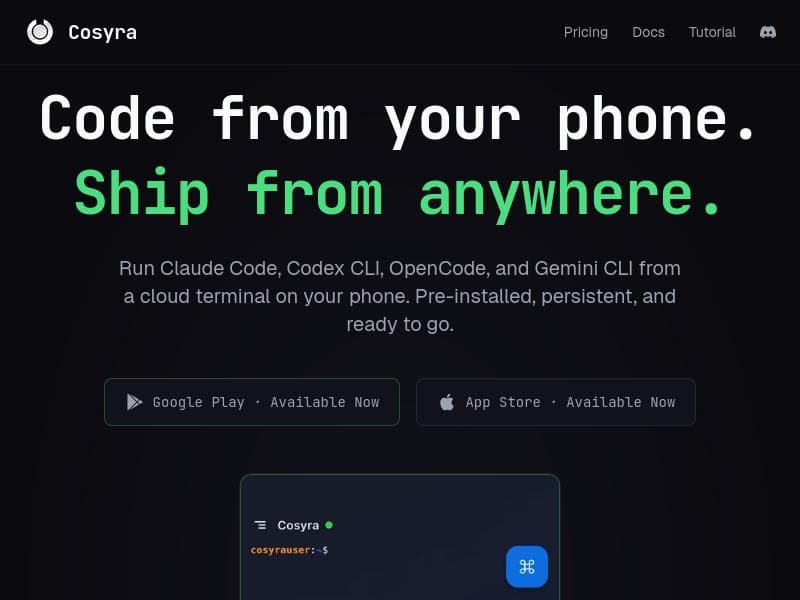
Cosyra is a mobile cloud terminal for AI development. Run Claude Code, Codex CLI, and Gemini CLI directly from your phone. Build with AI agents anywhere - no laptop or remote desktop required.
Detailed Description
Cosyra is an innovative mobile cloud terminal designed specifically for AI development, enabling users to run advanced AI coding tools directly from their smartphones. Its core purpose is to provide a fully functional development environment on mobile devices, eliminating the need for traditional laptops or remote desktops. By offering access to popular AI coding interfaces such as Claude Code, Codex CLI, OpenCode, and Gemini CLI, Cosyra empowers developers to build, test, and deploy AI models and agents anytime and anywhere. This flexibility is especially valuable for developers on the go or those who prefer a lightweight, portable setup without sacrificing the power of a full Linux terminal. One of Cosyra's standout features is its mobile cloud terminal equipped with a full Ubuntu Linux environment. This means users have access to a familiar and robust operating system optimized for development tasks. The terminal supports persistent storage, ensuring that projects, code, and data remain intact across sessions, which is critical for ongoing AI development work. Additionally, Cosyra comes pre-installed with AI coding agents, streamlining the setup process and allowing developers to immediately start coding with AI assistance. The ability to run multiple AI coding CLIs such as Claude Code, Codex CLI, OpenCode, and Gemini CLI directly on a phone is a game-changer, as it consolidates powerful AI tools into a single mobile platform. Cosyra is best suited for AI developers, data scientists, machine learning engineers, and coding enthusiasts who require a portable yet powerful development environment. It caters to professionals who need to work remotely or in environments where carrying a laptop is impractical. Use cases include rapid prototyping of AI models, debugging code on the fly, collaborating with AI agents for coding assistance, and managing AI projects from any location. Students and hobbyists interested in AI development can also benefit from Cosyra’s accessible and cost-effective platform. Regarding pricing, Cosyra is currently offered for free, making it an attractive option for developers seeking a no-cost solution to mobile AI development. The free access lowers barriers to entry and encourages experimentation and learning without financial commitment. While there are no paid plans mentioned, the free model provides significant value given the advanced capabilities available. Compared to alternatives, Cosyra stands out by combining a full Ubuntu Linux terminal with direct access to multiple AI coding interfaces on a mobile device. Many other mobile coding apps lack persistent storage or do not support full Linux environments, limiting their usefulness for serious AI development. Remote desktop solutions require a laptop or desktop to connect to, whereas Cosyra eliminates that dependency entirely. Its pre-installed AI agents and support for multiple AI CLIs further differentiate it from simpler code editors or terminal apps. However, potential limitations include reliance on internet connectivity since it is a cloud terminal, which may affect usability in low-network areas. The mobile interface, while powerful, may not fully replicate the convenience of a physical keyboard and larger screen, potentially impacting productivity for complex tasks. Additionally, as a relatively new tool, Cosyra may have fewer integrations or community resources compared to more established desktop environments. Users should also consider device compatibility and performance variations across different smartphones. In summary, Cosyra offers a unique and powerful mobile-first approach to AI development, blending cloud computing with a full Linux terminal and multiple AI coding tools. Its free pricing, portability, and rich feature set make it an excellent choice for developers seeking flexibility and mobility without compromising on functionality.
Tool Features
- Run Claude Code, Codex CLI, OpenCode, and Gemini CLI on your phone
- Mobile cloud terminal with full Ubuntu Linux
- Persistent storage
- Pre-installed AI coding agents
- No laptop required
Description
Cosyra revolutionizes AI development by providing a full Ubuntu Linux cloud terminal on your phone, enabling you to run Claude Code, Codex CLI, and Gemini CLI anywhere without a laptop. Ideal for AI developers and enthusiasts on the move, it combines portability with powerful AI coding agents and persistent storage—all for free.
Cosyra is a mobile cloud terminal for AI development. Run Claude Code, Codex CLI, and Gemini CLI directly from your phone. Build with AI agents anywhere - no laptop or remote desktop required.
Detailed Description
Cosyra is an innovative mobile cloud terminal designed specifically for AI development, enabling users to run advanced AI coding tools directly from their smartphones. Its core purpose is to provide a fully functional development environment on mobile devices, eliminating the need for traditional laptops or remote desktops. By offering access to popular AI coding interfaces such as Claude Code, Codex CLI, OpenCode, and Gemini CLI, Cosyra empowers developers to build, test, and deploy AI models and agents anytime and anywhere. This flexibility is especially valuable for developers on the go or those who prefer a lightweight, portable setup without sacrificing the power of a full Linux terminal. One of Cosyra's standout features is its mobile cloud terminal equipped with a full Ubuntu Linux environment. This means users have access to a familiar and robust operating system optimized for development tasks. The terminal supports persistent storage, ensuring that projects, code, and data remain intact across sessions, which is critical for ongoing AI development work. Additionally, Cosyra comes pre-installed with AI coding agents, streamlining the setup process and allowing developers to immediately start coding with AI assistance. The ability to run multiple AI coding CLIs such as Claude Code, Codex CLI, OpenCode, and Gemini CLI directly on a phone is a game-changer, as it consolidates powerful AI tools into a single mobile platform. Cosyra is best suited for AI developers, data scientists, machine learning engineers, and coding enthusiasts who require a portable yet powerful development environment. It caters to professionals who need to work remotely or in environments where carrying a laptop is impractical. Use cases include rapid prototyping of AI models, debugging code on the fly, collaborating with AI agents for coding assistance, and managing AI projects from any location. Students and hobbyists interested in AI development can also benefit from Cosyra’s accessible and cost-effective platform. Regarding pricing, Cosyra is currently offered for free, making it an attractive option for developers seeking a no-cost solution to mobile AI development. The free access lowers barriers to entry and encourages experimentation and learning without financial commitment. While there are no paid plans mentioned, the free model provides significant value given the advanced capabilities available. Compared to alternatives, Cosyra stands out by combining a full Ubuntu Linux terminal with direct access to multiple AI coding interfaces on a mobile device. Many other mobile coding apps lack persistent storage or do not support full Linux environments, limiting their usefulness for serious AI development. Remote desktop solutions require a laptop or desktop to connect to, whereas Cosyra eliminates that dependency entirely. Its pre-installed AI agents and support for multiple AI CLIs further differentiate it from simpler code editors or terminal apps. However, potential limitations include reliance on internet connectivity since it is a cloud terminal, which may affect usability in low-network areas. The mobile interface, while powerful, may not fully replicate the convenience of a physical keyboard and larger screen, potentially impacting productivity for complex tasks. Additionally, as a relatively new tool, Cosyra may have fewer integrations or community resources compared to more established desktop environments. Users should also consider device compatibility and performance variations across different smartphones. In summary, Cosyra offers a unique and powerful mobile-first approach to AI development, blending cloud computing with a full Linux terminal and multiple AI coding tools. Its free pricing, portability, and rich feature set make it an excellent choice for developers seeking flexibility and mobility without compromising on functionality.
Frequently Asked Questions
What is Cosyra?
Cosyra is a mobile cloud terminal designed for AI development that allows users to run AI coding tools like Claude Code, Codex CLI, OpenCode, and Gemini CLI directly from their smartphones within a full Ubuntu Linux environment.
How much does Cosyra cost?
Cosyra is currently available for free, providing full access to its mobile cloud terminal and AI coding tools without any subscription or payment.
Who is Cosyra best for?
Cosyra is best suited for AI developers, machine learning engineers, data scientists, and coding enthusiasts who need a portable, powerful development environment accessible from their mobile devices.
What are the main features of Cosyra?
Key features include running Claude Code, Codex CLI, OpenCode, and Gemini CLI on your phone, a mobile cloud terminal with full Ubuntu Linux, persistent storage, pre-installed AI coding agents, and the ability to develop AI projects without a laptop.
Does Cosyra offer a free trial?
Cosyra is offered entirely for free, so there is no need for a trial period to access its features.
What integrations does Cosyra support?
Cosyra supports integration with multiple AI coding interfaces such as Claude Code, Codex CLI, OpenCode, and Gemini CLI, all accessible within its mobile cloud terminal environment.
How does Cosyra work?
Cosyra operates as a cloud-based Ubuntu Linux terminal accessible via your smartphone, allowing you to run AI coding tools and agents remotely with persistent storage, enabling full AI development capabilities without a traditional computer.
Socials
Use ToolReviews
No reviews yet. Be the first to share your experience.
Sponsored Tools











































Recommended Tools
Stay updated on latest Ai tools
Get the latest insights, Join our newsletter
Read and trusted by 50,000+ readers
Join the biggest AI Community
Our community and staff are here to help!
Your feedback will help Alice AI improve in future versions.








Submit your Tool


PoweredByAI.app is an AI Tools Directory helping individuals, businesses, and creators discover the best AI tools for writing, coding, design, productivity, and more.
© 2026 , Product of011BQ. All rights reserved.