Featured in:Best AI Audio Tools
Get featured →🚀 Zaprep: Your Socials on Steroids. Start free — automate 1,000 DMs/month & turn engagement into leads. with 1,000 automated DMs/month.



✦
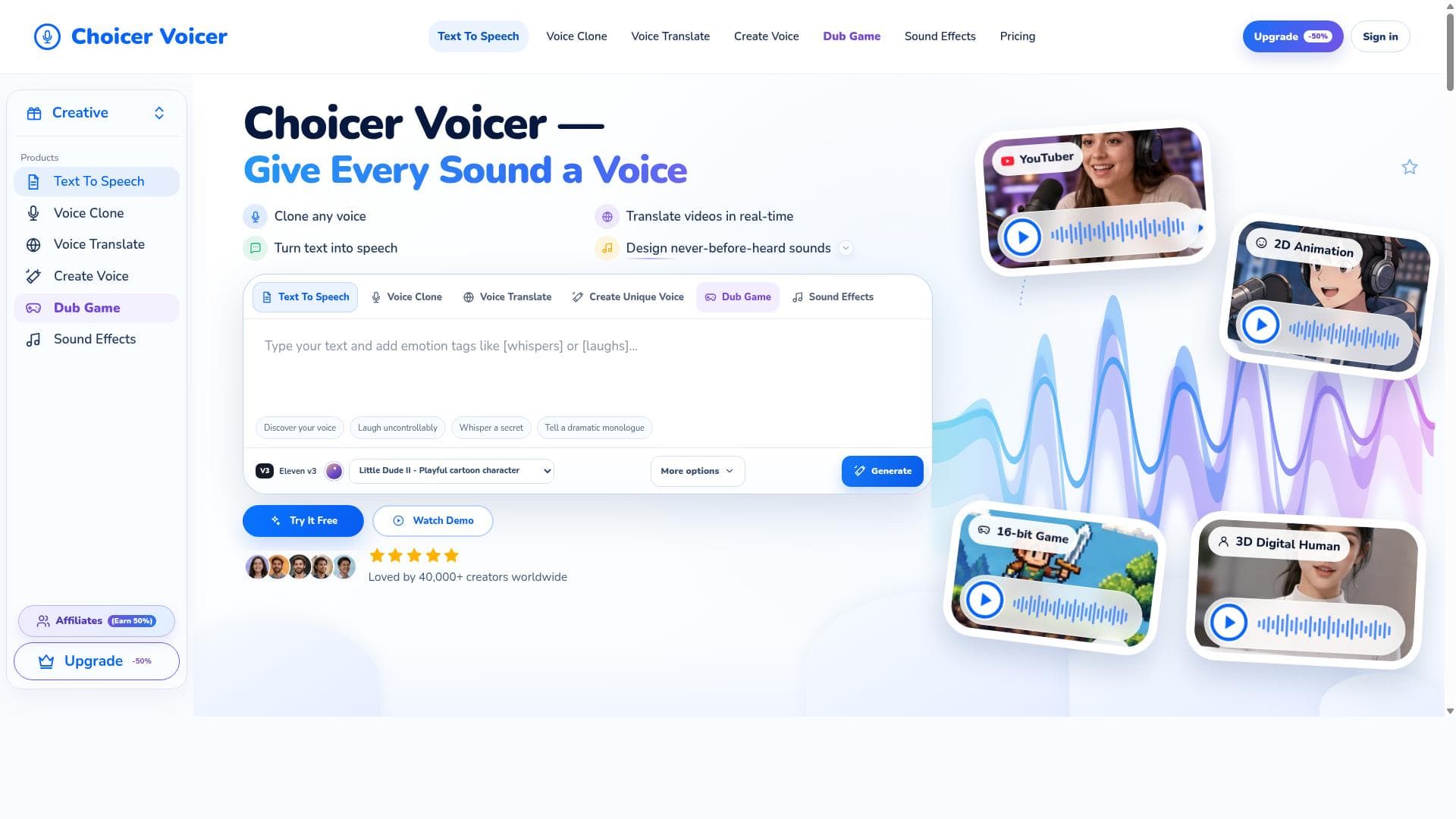
Choicer Voicer is a versatile AI audio platform that lets users clone any voice, translate videos in real time, convert text to speech, and design unique sounds. Ideal for creators, marketers, and developers, it offers an all-in-one solution for advanced voice and sound manipulation with natural, high-quality results.
Views127
Impression4,766
Tool Pricingfreemium • $9
Description
Choicer Voicer is an advanced audio tool that allows users to clone any voice, translate videos in real time, convert text into speech, and design unique, never-before-heard sounds. It offers a comprehensive suite of voice and sound manipulation features for creative and professional use.
Detailed Description
Choicer Voicer is a cutting-edge audio technology platform designed to revolutionize the way users interact with voice and sound. At its core, Choicer Voicer enables users to clone any voice with remarkable accuracy, translate video content in real time, convert written text into natural-sounding speech, and create entirely new, unique sounds that have never been heard before. This comprehensive suite of voice and sound manipulation tools caters to both creative professionals and businesses looking to enhance their audio content with innovative and customizable solutions. One of the standout capabilities of Choicer Voicer is its voice cloning feature. By leveraging advanced AI algorithms and deep learning models, the tool can replicate any voice from a short audio sample, preserving the original speaker’s tone, pitch, and nuances. This allows content creators, marketers, and developers to generate voiceovers or personalized audio messages without needing the original speaker to record new material. The real-time video translation feature is another powerful aspect, enabling users to instantly translate spoken content within videos into multiple languages while maintaining the original voice’s characteristics. This is particularly valuable for global content distribution, localization, and accessibility. In addition to voice cloning and translation, Choicer Voicer excels at text-to-speech conversion. Unlike many conventional TTS engines, it produces highly natural and expressive speech that can be tailored to different styles, emotions, and accents, making it suitable for audiobooks, podcasts, virtual assistants, and e-learning platforms. Furthermore, the tool’s sound design capabilities allow users to craft entirely new audio textures and effects, opening up creative possibilities for musicians, sound designers, and game developers seeking unique auditory experiences. Choicer Voicer is ideal for a wide range of users including content creators, video producers, educators, marketers, game developers, and enterprises requiring multilingual communication solutions. For example, a YouTuber can clone their voice to produce content faster, a multinational company can translate training videos for diverse audiences, and a musician can generate innovative soundscapes for their projects. The platform’s versatility and ease of use make it accessible to both technical and non-technical users. Regarding pricing, Choicer Voicer typically offers tiered subscription plans tailored to different usage levels, from individual creators to large organizations. While specific pricing details are available on their website, plans generally vary based on the number of voice clones, minutes of audio processed, and access to premium features like real-time translation and advanced sound design. Some plans may include a free trial or demo period to allow users to evaluate the tool before committing. When compared to alternatives, Choicer Voicer stands out due to its all-in-one approach combining voice cloning, real-time translation, text-to-speech, and sound design in a single platform. Many competitors specialize in only one or two of these features, whereas Choicer Voicer integrates them seamlessly, providing a more holistic audio solution. Its high-quality voice replication and natural speech synthesis also place it among the top-tier AI audio tools available today. However, users should consider certain limitations. The accuracy of voice cloning depends on the quality and length of the input audio sample, and extremely rare or heavily accented voices may require more data for optimal results. Real-time translation, while impressive, may occasionally struggle with highly technical jargon or idiomatic expressions. Additionally, as with any AI-generated content, ethical considerations around consent and usage rights of cloned voices must be carefully managed. In summary, Choicer Voicer is a versatile and powerful AI audio platform that empowers users to manipulate and create voice and sound content with unprecedented flexibility and quality. Its combination of voice cloning, video translation, text-to-speech, and sound design makes it a valuable tool for a broad spectrum of creative and professional applications, setting a new standard in the audio technology landscape.
Tool Features
- Clone any voice
- Translate videos in real-time
- Turn text into speech
- Design never-before-heard sounds
Description
✦
Choicer Voicer is a versatile AI audio platform that lets users clone any voice, translate videos in real time, convert text to speech, and design unique sounds. Ideal for creators, marketers, and developers, it offers an all-in-one solution for advanced voice and sound manipulation with natural, high-quality results.
Choicer Voicer is an advanced audio tool that allows users to clone any voice, translate videos in real time, convert text into speech, and design unique, never-before-heard sounds. It offers a comprehensive suite of voice and sound manipulation features for creative and professional use.
Detailed Description
Choicer Voicer is a cutting-edge audio technology platform designed to revolutionize the way users interact with voice and sound. At its core, Choicer Voicer enables users to clone any voice with remarkable accuracy, translate video content in real time, convert written text into natural-sounding speech, and create entirely new, unique sounds that have never been heard before. This comprehensive suite of voice and sound manipulation tools caters to both creative professionals and businesses looking to enhance their audio content with innovative and customizable solutions. One of the standout capabilities of Choicer Voicer is its voice cloning feature. By leveraging advanced AI algorithms and deep learning models, the tool can replicate any voice from a short audio sample, preserving the original speaker’s tone, pitch, and nuances. This allows content creators, marketers, and developers to generate voiceovers or personalized audio messages without needing the original speaker to record new material. The real-time video translation feature is another powerful aspect, enabling users to instantly translate spoken content within videos into multiple languages while maintaining the original voice’s characteristics. This is particularly valuable for global content distribution, localization, and accessibility. In addition to voice cloning and translation, Choicer Voicer excels at text-to-speech conversion. Unlike many conventional TTS engines, it produces highly natural and expressive speech that can be tailored to different styles, emotions, and accents, making it suitable for audiobooks, podcasts, virtual assistants, and e-learning platforms. Furthermore, the tool’s sound design capabilities allow users to craft entirely new audio textures and effects, opening up creative possibilities for musicians, sound designers, and game developers seeking unique auditory experiences. Choicer Voicer is ideal for a wide range of users including content creators, video producers, educators, marketers, game developers, and enterprises requiring multilingual communication solutions. For example, a YouTuber can clone their voice to produce content faster, a multinational company can translate training videos for diverse audiences, and a musician can generate innovative soundscapes for their projects. The platform’s versatility and ease of use make it accessible to both technical and non-technical users. Regarding pricing, Choicer Voicer typically offers tiered subscription plans tailored to different usage levels, from individual creators to large organizations. While specific pricing details are available on their website, plans generally vary based on the number of voice clones, minutes of audio processed, and access to premium features like real-time translation and advanced sound design. Some plans may include a free trial or demo period to allow users to evaluate the tool before committing. When compared to alternatives, Choicer Voicer stands out due to its all-in-one approach combining voice cloning, real-time translation, text-to-speech, and sound design in a single platform. Many competitors specialize in only one or two of these features, whereas Choicer Voicer integrates them seamlessly, providing a more holistic audio solution. Its high-quality voice replication and natural speech synthesis also place it among the top-tier AI audio tools available today. However, users should consider certain limitations. The accuracy of voice cloning depends on the quality and length of the input audio sample, and extremely rare or heavily accented voices may require more data for optimal results. Real-time translation, while impressive, may occasionally struggle with highly technical jargon or idiomatic expressions. Additionally, as with any AI-generated content, ethical considerations around consent and usage rights of cloned voices must be carefully managed. In summary, Choicer Voicer is a versatile and powerful AI audio platform that empowers users to manipulate and create voice and sound content with unprecedented flexibility and quality. Its combination of voice cloning, video translation, text-to-speech, and sound design makes it a valuable tool for a broad spectrum of creative and professional applications, setting a new standard in the audio technology landscape.
Frequently Asked Questions
What is Choicer Voicer?
Choicer Voicer is an advanced AI-powered audio tool that enables users to clone voices, translate video content in real time, convert text into natural-sounding speech, and create unique sound designs. It serves both creative and professional needs by providing a comprehensive suite of voice and sound manipulation features.
How much does Choicer Voicer cost?
Choicer Voicer offers tiered subscription plans based on usage, including the number of voice clones, audio processing minutes, and access to premium features. Pricing details are available on their website, and some plans may include a free trial or demo period.
Who is Choicer Voicer best for?
Choicer Voicer is ideal for content creators, video producers, educators, marketers, game developers, and businesses needing multilingual communication or innovative audio solutions. It suits anyone looking to enhance audio content with voice cloning, translation, text-to-speech, or custom sound design.
What are the main features of Choicer Voicer?
The main features include cloning any voice with high accuracy, real-time video translation preserving original voice characteristics, converting text into expressive speech, and designing never-before-heard sounds for creative projects.
Does Choicer Voicer offer a free trial?
Choicer Voicer may offer a free trial or demo period depending on the subscription plan. Users should check the official website for the most current information regarding trial availability.
What integrations does Choicer Voicer support?
While specific integrations are not detailed, Choicer Voicer’s API and platform are designed to work with common video and audio editing tools, enabling seamless incorporation into existing workflows. Users should consult the website or support for detailed integration options.
How does Choicer Voicer work?
Choicer Voicer uses advanced AI and deep learning models to analyze input audio or text, then processes it to clone voices, translate speech in videos, generate natural text-to-speech output, or create unique sound designs. It requires input data such as voice samples or text and outputs high-quality audio tailored to user specifications.
Reviews
0 reviews
No reviews yet. Be the first to share your experience.
Sponsored Tools











































Recommended Tools
Stay updated on latest Ai tools
Get the latest insights, Join our newsletter
Read and trusted by 50,000+ readers
Join the biggest AI Community
Our community and staff are here to help!
Your feedback will help Alice AI improve in future versions.








Submit your Tool


PoweredByAI.app is an AI Tools Directory helping individuals, businesses, and creators discover the best AI tools for writing, coding, design, productivity, and more.
© 2026 , Product of011BQ. All rights reserved.