Featured in:Best AI Writing Tools
Get featured →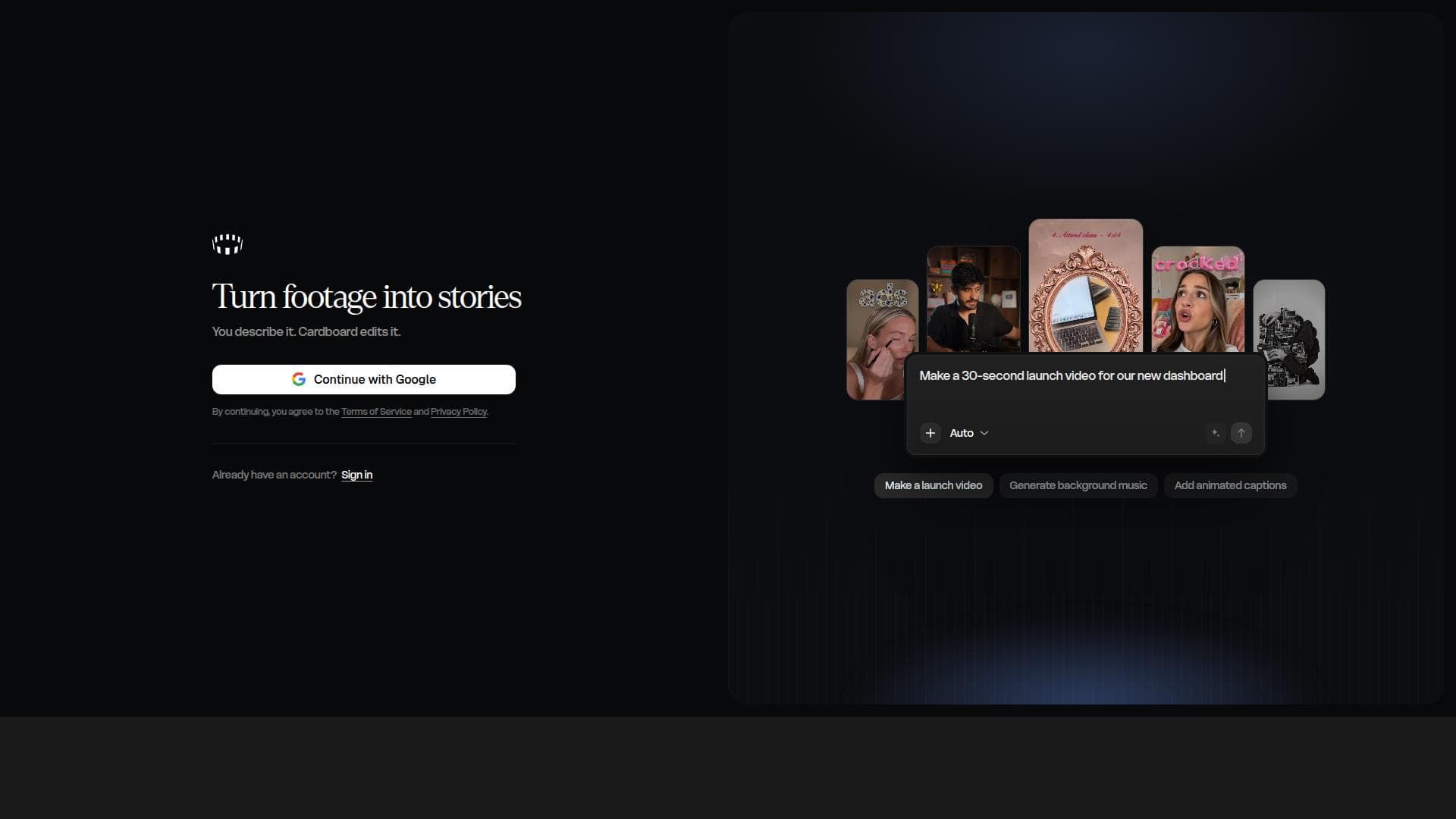


Is this your AI tool? Claim it today.
Verify ownership, manage your profile, and unlock growth features.
✦
Cardboard is an agentic AI video editor that transforms video editing by letting users describe their desired edits while the AI automatically cuts, captions, reframes, and composes videos. Perfect for creators and professionals seeking fast, intelligent editing in-browser or on Mac, it dramatically simplifies video production workflows.

Description
Cardboard is an AI video editor that turns your raw clips into stories. Think of it as a creative collaborator that understands your footage, has taste to know what makes a great edit, and brings your vision to life.
Detailed Description
Cardboard is an innovative AI-powered video editing platform designed to streamline and simplify the video creation process. Available both as a browser-based tool and a native Mac application, Cardboard leverages advanced agentic AI technology to automate complex editing tasks, enabling users to produce polished videos with minimal manual effort. The core purpose of Cardboard is to empower creators, marketers, educators, and professionals to efficiently edit videos by simply describing the desired changes, allowing the AI to intelligently interpret and execute those instructions. This approach drastically reduces the time and technical skill traditionally required for video editing. At the heart of Cardboard’s capabilities is its agentic AI video editor, which acts autonomously to perform multiple editing functions. Users can input natural language descriptions of their editing goals, and the AI automatically cuts the video to highlight key moments, adds accurate captions to improve accessibility and engagement, and reframes shots to optimize composition for different platforms or screen sizes. The AI also composes the final video, ensuring smooth transitions and a coherent narrative flow without requiring users to manually arrange clips or overlays. This combination of automatic cutting, captioning, reframing, and composition makes Cardboard a powerful assistant that handles the bulk of video editing work. Cardboard is particularly well-suited for content creators who produce videos for social media, marketing teams needing quick turnaround on promotional content, educators preparing instructional videos, and professionals creating presentations or training materials. Its browser accessibility means users can edit videos on any device without installing software, while the Mac app offers a more integrated experience for Apple users. Use cases include creating highlight reels from long footage, generating captioned videos for social platforms, repurposing content for different aspect ratios, and rapidly iterating on video edits based on simple text instructions. Regarding pricing, Cardboard offers a tiered subscription model that caters to different user needs, though specific pricing details are available on their website. Typically, plans range from free or trial options with limited features to premium subscriptions unlocking full AI editing capabilities, higher video resolution exports, and priority support. This flexible pricing structure allows individuals and businesses to select a plan that aligns with their editing volume and feature requirements. Compared to traditional video editing software, Cardboard stands out by eliminating the steep learning curve and manual labor associated with timeline-based editing. Unlike conventional editors that require users to drag and drop clips, manually add captions, and adjust framing, Cardboard’s AI-driven approach automates these steps based on simple descriptive input. This makes it faster and more accessible, especially for users without extensive editing experience. While other AI video editors exist, Cardboard’s agentic AI that autonomously interprets user instructions and performs multiple editing functions in one platform is a distinctive advantage. However, there are some considerations to keep in mind. As with any AI-driven tool, the quality of the output depends on the clarity of user instructions and the complexity of the source footage. Highly specialized or creative edits may still require manual refinement. Additionally, while the AI automates many tasks, users should review the final video to ensure it meets their standards. Integration options may be limited compared to some enterprise-level video editing suites, and offline use is currently confined to the Mac app. Despite these limitations, Cardboard offers a compelling solution for fast, intelligent video editing that can save significant time and effort. In summary, Cardboard is a cutting-edge AI video editor that transforms how videos are created by allowing users to describe their edits and letting the AI handle the technical execution. Its automatic cutting, captioning, reframing, and composing features make it ideal for creators and professionals seeking efficient, high-quality video production without the complexity of traditional editing software.
Tool Features
- Agentic AI video editing in browser and on Mac
- Automatic cutting of video based on user description
- Automatic captioning of videos
- Reframing and composing videos automatically
Description
✦
Cardboard is an agentic AI video editor that transforms video editing by letting users describe their desired edits while the AI automatically cuts, captions, reframes, and composes videos. Perfect for creators and professionals seeking fast, intelligent editing in-browser or on Mac, it dramatically simplifies video production workflows.
Cardboard is an AI video editor that turns your raw clips into stories. Think of it as a creative collaborator that understands your footage, has taste to know what makes a great edit, and brings your vision to life.
Detailed Description
Cardboard is an innovative AI-powered video editing platform designed to streamline and simplify the video creation process. Available both as a browser-based tool and a native Mac application, Cardboard leverages advanced agentic AI technology to automate complex editing tasks, enabling users to produce polished videos with minimal manual effort. The core purpose of Cardboard is to empower creators, marketers, educators, and professionals to efficiently edit videos by simply describing the desired changes, allowing the AI to intelligently interpret and execute those instructions. This approach drastically reduces the time and technical skill traditionally required for video editing. At the heart of Cardboard’s capabilities is its agentic AI video editor, which acts autonomously to perform multiple editing functions. Users can input natural language descriptions of their editing goals, and the AI automatically cuts the video to highlight key moments, adds accurate captions to improve accessibility and engagement, and reframes shots to optimize composition for different platforms or screen sizes. The AI also composes the final video, ensuring smooth transitions and a coherent narrative flow without requiring users to manually arrange clips or overlays. This combination of automatic cutting, captioning, reframing, and composition makes Cardboard a powerful assistant that handles the bulk of video editing work. Cardboard is particularly well-suited for content creators who produce videos for social media, marketing teams needing quick turnaround on promotional content, educators preparing instructional videos, and professionals creating presentations or training materials. Its browser accessibility means users can edit videos on any device without installing software, while the Mac app offers a more integrated experience for Apple users. Use cases include creating highlight reels from long footage, generating captioned videos for social platforms, repurposing content for different aspect ratios, and rapidly iterating on video edits based on simple text instructions. Regarding pricing, Cardboard offers a tiered subscription model that caters to different user needs, though specific pricing details are available on their website. Typically, plans range from free or trial options with limited features to premium subscriptions unlocking full AI editing capabilities, higher video resolution exports, and priority support. This flexible pricing structure allows individuals and businesses to select a plan that aligns with their editing volume and feature requirements. Compared to traditional video editing software, Cardboard stands out by eliminating the steep learning curve and manual labor associated with timeline-based editing. Unlike conventional editors that require users to drag and drop clips, manually add captions, and adjust framing, Cardboard’s AI-driven approach automates these steps based on simple descriptive input. This makes it faster and more accessible, especially for users without extensive editing experience. While other AI video editors exist, Cardboard’s agentic AI that autonomously interprets user instructions and performs multiple editing functions in one platform is a distinctive advantage. However, there are some considerations to keep in mind. As with any AI-driven tool, the quality of the output depends on the clarity of user instructions and the complexity of the source footage. Highly specialized or creative edits may still require manual refinement. Additionally, while the AI automates many tasks, users should review the final video to ensure it meets their standards. Integration options may be limited compared to some enterprise-level video editing suites, and offline use is currently confined to the Mac app. Despite these limitations, Cardboard offers a compelling solution for fast, intelligent video editing that can save significant time and effort. In summary, Cardboard is a cutting-edge AI video editor that transforms how videos are created by allowing users to describe their edits and letting the AI handle the technical execution. Its automatic cutting, captioning, reframing, and composing features make it ideal for creators and professionals seeking efficient, high-quality video production without the complexity of traditional editing software.
Frequently Asked Questions
What is Cardboard?
Cardboard is an AI-powered video editing tool available in your browser and on Mac that automates video cutting, captioning, reframing, and composition based on user-described edits.
How much does Cardboard cost?
Cardboard offers tiered subscription plans with varying features and usage limits. Specific pricing details can be found on their website, including any free trial or entry-level options.
Who is Cardboard best for?
Cardboard is ideal for content creators, marketers, educators, and professionals who want to quickly produce high-quality videos without extensive manual editing.
What are the main features of Cardboard?
Key features include agentic AI video editing, automatic cutting based on user instructions, automatic captioning, intelligent reframing for different formats, and AI-driven video composition.
Does Cardboard offer a free trial?
Cardboard typically provides a free trial or a limited free plan to allow users to test its AI video editing capabilities before committing to a paid subscription.
What integrations does Cardboard support?
Cardboard primarily operates as a standalone web and Mac application. Details on integrations with other platforms or tools are limited and can be confirmed via their support channels.
How does Cardboard work?
Users describe the edits they want in natural language, and Cardboard’s AI interprets these instructions to automatically cut, caption, reframe, and compose the video, streamlining the editing process.
Reviews
0 reviews
No reviews yet. Be the first to share your experience.
Sponsored Tools





























Recommended Tools
Stay updated on latest Ai tools
Get the latest insights, Join our newsletter
Read and trusted by 50,000+ readers
Join the biggest AI Community
Our community and staff are here to help!
Your feedback will help Alice AI improve in future versions.