Caffeine Clock
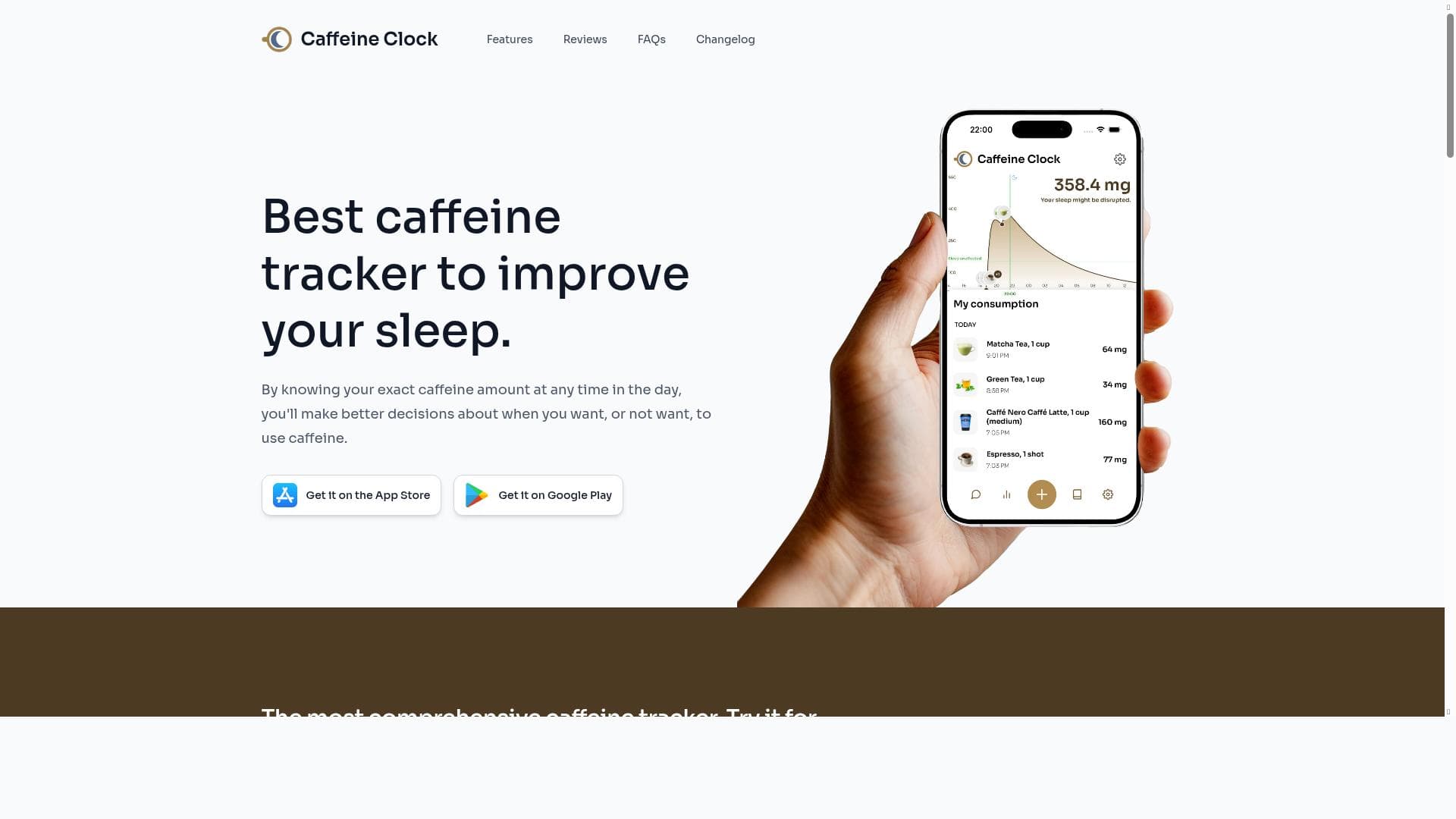


Caffeine Clock is a free, comprehensive caffeine tracking app designed to help users optimize their sleep by managing caffeine intake with precision. Featuring a vast database and real-time caffeine metabolism tracking, it’s ideal for anyone seeking to balance alertness with restorative rest.

Description
Best caffeine tracker to improve your sleep.
Detailed Description
Caffeine Clock is a specialized mobile application designed to help users monitor and manage their caffeine intake with the ultimate goal of improving sleep quality. By providing detailed tracking of caffeine consumption throughout the day, it empowers users to make informed decisions about when and how much caffeine to consume, thereby minimizing sleep disturbances caused by excessive or poorly timed caffeine intake. The app’s core purpose is to bridge the gap between caffeine consumption habits and sleep health, offering an easy-to-use, data-driven approach to optimize daily caffeine use for better rest. One of the standout features of Caffeine Clock is its extensive database of over 200 caffeine-containing items, ranging from common beverages like coffee, tea, and energy drinks to less obvious sources such as chocolate and certain medications. This comprehensive catalog allows users to log their caffeine intake accurately and effortlessly. The app calculates the exact amount of caffeine remaining in the body at any given time, factoring in the natural metabolic breakdown of caffeine over hours. This real-time tracking is visually represented in a user-friendly dashboard, providing a clear overview of caffeine levels and helping users avoid consuming caffeine too late in the day. Caffeine Clock is available on both iOS and Android platforms, making it accessible to a wide range of users. The app’s interface is designed for simplicity and clarity, ensuring that even those unfamiliar with caffeine metabolism can easily understand their consumption patterns. Additionally, the dashboard offers insights into how caffeine intake correlates with sleep quality, helping users identify patterns and make adjustments. This feature is particularly valuable for individuals who struggle with insomnia, poor sleep quality, or those simply looking to optimize their energy levels without compromising rest. The app is ideal for anyone interested in improving their sleep hygiene through better caffeine management. This includes shift workers, students, professionals with demanding schedules, athletes, and health-conscious individuals. For example, a student preparing for exams can use Caffeine Clock to time caffeine intake to maximize alertness during study sessions while ensuring it does not interfere with nighttime sleep. Similarly, athletes can monitor caffeine to enhance performance without disrupting recovery sleep. The app’s detailed tracking and personalized insights make it a practical tool for anyone seeking to balance caffeine’s stimulating effects with the necessity of restorative sleep. Caffeine Clock is offered completely free of charge, making it an accessible option for all users without the barrier of subscription fees or in-app purchases. This pricing model is particularly appealing for those who want to experiment with caffeine tracking without financial commitment. Compared to other caffeine tracking apps, Caffeine Clock distinguishes itself with its large item database, precise caffeine metabolism calculations, and a strong focus on sleep optimization rather than just consumption logging. While Caffeine Clock excels in its niche, users should be aware of certain limitations. The app currently does not offer integrations with other health or sleep tracking devices, which could enhance the holistic understanding of sleep patterns in relation to caffeine. Additionally, while the database is extensive, some niche or regional caffeine products might not be included, requiring manual entry or estimation. Finally, the app’s effectiveness depends on user diligence in logging intake accurately and consistently. In summary, Caffeine Clock is a powerful, user-friendly tool for anyone looking to understand and manage their caffeine consumption to improve sleep quality. Its comprehensive database, real-time caffeine tracking, and sleep-focused insights make it a standout choice in the caffeine tracking app market, especially given its free availability and cross-platform support.
Tool Features
- Track caffeine intake with a database of over 200 items
- Know exact caffeine amount remaining at any time
- Helps optimize sleep quality by managing caffeine consumption
- Available on iOS and Android
- Comprehensive caffeine tracking dashboard
Description
Caffeine Clock is a free, comprehensive caffeine tracking app designed to help users optimize their sleep by managing caffeine intake with precision. Featuring a vast database and real-time caffeine metabolism tracking, it’s ideal for anyone seeking to balance alertness with restorative rest.
Best caffeine tracker to improve your sleep.
Detailed Description
Caffeine Clock is a specialized mobile application designed to help users monitor and manage their caffeine intake with the ultimate goal of improving sleep quality. By providing detailed tracking of caffeine consumption throughout the day, it empowers users to make informed decisions about when and how much caffeine to consume, thereby minimizing sleep disturbances caused by excessive or poorly timed caffeine intake. The app’s core purpose is to bridge the gap between caffeine consumption habits and sleep health, offering an easy-to-use, data-driven approach to optimize daily caffeine use for better rest. One of the standout features of Caffeine Clock is its extensive database of over 200 caffeine-containing items, ranging from common beverages like coffee, tea, and energy drinks to less obvious sources such as chocolate and certain medications. This comprehensive catalog allows users to log their caffeine intake accurately and effortlessly. The app calculates the exact amount of caffeine remaining in the body at any given time, factoring in the natural metabolic breakdown of caffeine over hours. This real-time tracking is visually represented in a user-friendly dashboard, providing a clear overview of caffeine levels and helping users avoid consuming caffeine too late in the day. Caffeine Clock is available on both iOS and Android platforms, making it accessible to a wide range of users. The app’s interface is designed for simplicity and clarity, ensuring that even those unfamiliar with caffeine metabolism can easily understand their consumption patterns. Additionally, the dashboard offers insights into how caffeine intake correlates with sleep quality, helping users identify patterns and make adjustments. This feature is particularly valuable for individuals who struggle with insomnia, poor sleep quality, or those simply looking to optimize their energy levels without compromising rest. The app is ideal for anyone interested in improving their sleep hygiene through better caffeine management. This includes shift workers, students, professionals with demanding schedules, athletes, and health-conscious individuals. For example, a student preparing for exams can use Caffeine Clock to time caffeine intake to maximize alertness during study sessions while ensuring it does not interfere with nighttime sleep. Similarly, athletes can monitor caffeine to enhance performance without disrupting recovery sleep. The app’s detailed tracking and personalized insights make it a practical tool for anyone seeking to balance caffeine’s stimulating effects with the necessity of restorative sleep. Caffeine Clock is offered completely free of charge, making it an accessible option for all users without the barrier of subscription fees or in-app purchases. This pricing model is particularly appealing for those who want to experiment with caffeine tracking without financial commitment. Compared to other caffeine tracking apps, Caffeine Clock distinguishes itself with its large item database, precise caffeine metabolism calculations, and a strong focus on sleep optimization rather than just consumption logging. While Caffeine Clock excels in its niche, users should be aware of certain limitations. The app currently does not offer integrations with other health or sleep tracking devices, which could enhance the holistic understanding of sleep patterns in relation to caffeine. Additionally, while the database is extensive, some niche or regional caffeine products might not be included, requiring manual entry or estimation. Finally, the app’s effectiveness depends on user diligence in logging intake accurately and consistently. In summary, Caffeine Clock is a powerful, user-friendly tool for anyone looking to understand and manage their caffeine consumption to improve sleep quality. Its comprehensive database, real-time caffeine tracking, and sleep-focused insights make it a standout choice in the caffeine tracking app market, especially given its free availability and cross-platform support.
Frequently Asked Questions
What is Caffeine Clock?
Caffeine Clock is a mobile application that helps users track their caffeine intake and manage consumption to improve sleep quality by providing real-time data on caffeine levels in the body.
How much does Caffeine Clock cost?
Caffeine Clock is completely free to use with no subscription fees or in-app purchases.
Who is Caffeine Clock best for?
It is best suited for individuals who want to optimize their sleep by managing caffeine intake, including students, professionals, shift workers, athletes, and anyone sensitive to caffeine’s effects on sleep.
What are the main features of Caffeine Clock?
Key features include tracking caffeine intake from a database of over 200 items, real-time calculation of caffeine remaining in the body, a comprehensive tracking dashboard, and availability on both iOS and Android.
Does Caffeine Clock offer a free trial?
Yes, the app is free to use with full functionality and does not require a trial period.
What integrations does Caffeine Clock support?
Currently, Caffeine Clock does not support integrations with other health or sleep tracking devices.
How does Caffeine Clock work?
Users log their caffeine intake from a large database of items, and the app calculates the caffeine remaining in their system over time to help optimize consumption timing for better sleep.
Reviews
No reviews yet. Be the first to share your experience.















































