🚀 Zaprep: Your Socials on Steroids. Start free — automate 1,000 DMs/month & turn engagement into leads. with 1,000 automated DMs/month.
Bottleneck Calculator
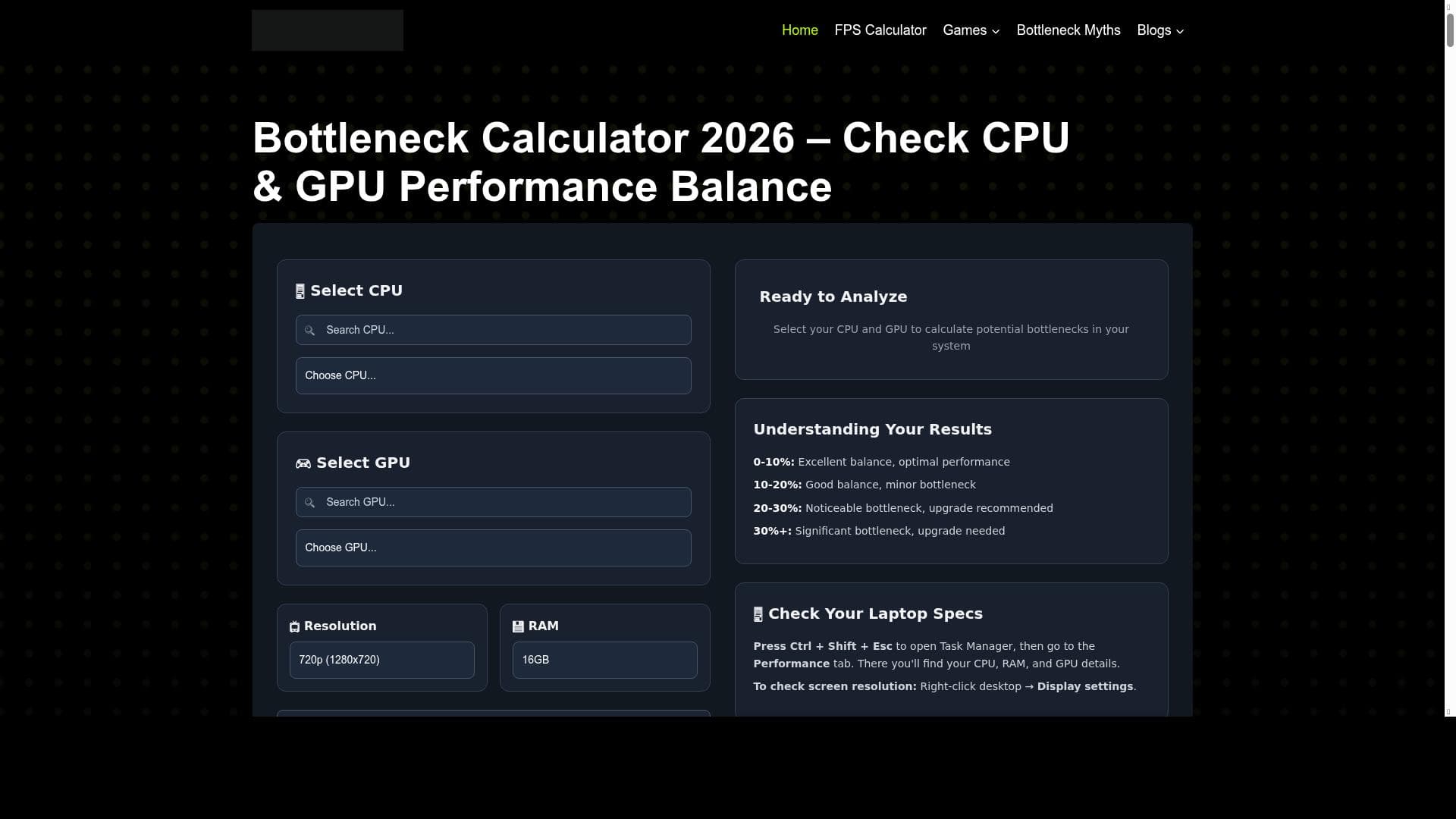


Bottleneck Calculator is a fast, free, and beginner-friendly online tool that instantly reveals whether your CPU or GPU is limiting your system’s performance. Perfect for gamers, content creators, and PC builders, it simplifies hardware decision-making by accurately analyzing component balance with just one click.

Description
Bottleneck Calculator is a simple and accurate tool that helps you analyze the balance between your CPU and GPU. With just one click, it shows whether your system has a performance bottleneck, making it easier to choose the right hardware for gaming, editing, or everyday use. Fast, free, and beginner-friendly at bottleneckcheck.com.
Detailed Description
Bottleneck Calculator is a specialized online tool designed to help users analyze the performance balance between their CPU (Central Processing Unit) and GPU (Graphics Processing Unit). Its core purpose is to identify potential bottlenecks in a computer system that can limit overall performance, especially in tasks that demand high processing power such as gaming, video editing, and other intensive applications. By simply inputting your CPU and GPU models, the tool quickly evaluates whether one component is significantly limiting the other, providing an easy-to-understand result that guides users in making informed hardware decisions. This helps prevent overspending on components that won’t deliver proportional performance gains due to mismatched system parts. The key features of Bottleneck Calculator revolve around its simplicity and accuracy. It offers a straightforward interface where users can select or enter their CPU and GPU details, and with one click, receive a detailed analysis of the system’s balance. The tool detects if the CPU is holding back the GPU or vice versa, which is critical for optimizing gaming FPS (frames per second) and overall system responsiveness. Additionally, it provides actionable insights to improve system performance by highlighting which component upgrade would yield the best results. The tool is fast, requiring no downloads or installations, and is beginner-friendly, making it accessible to users with varying levels of technical expertise. Bottleneck Calculator is ideal for gamers, content creators, PC builders, and everyday users who want to optimize their system’s performance without guesswork. Gamers can use it to ensure their CPU and GPU are well matched to achieve smooth gameplay and maximize FPS. Video editors and graphic designers benefit by confirming their hardware can handle demanding rendering tasks efficiently. PC enthusiasts and builders can use the tool during the planning phase to select compatible components that avoid bottlenecks, saving time and money. Even casual users curious about their system’s performance can easily leverage this tool to understand potential limitations. One of the most attractive aspects of Bottleneck Calculator is that it is completely free to use, with no hidden fees or subscription plans. This makes it an excellent resource for anyone looking to assess their hardware without financial commitment. The website is accessible via any modern browser, ensuring convenience and ease of access. There are no premium tiers or advanced features locked behind paywalls, emphasizing its mission to provide straightforward, valuable insights to all users. Compared to alternative bottleneck analysis tools, Bottleneck Calculator stands out for its user-friendly design and speed. Many competing tools require complex inputs, detailed system scans, or software installations, which can be intimidating for beginners. Bottleneck Calculator’s web-based approach eliminates these barriers, offering immediate results without technical hassle. While some alternatives may provide more granular data or integration with benchmarking software, Bottleneck Calculator’s focus on simplicity and accuracy makes it a preferred choice for quick assessments and hardware planning. However, there are some limitations to consider. The tool relies on a database of CPU and GPU models and their relative performance metrics, which means very new or obscure hardware might not be supported immediately. It also provides a high-level analysis rather than in-depth diagnostics or real-time performance monitoring. Users seeking detailed benchmarking or component stress testing will need to complement this tool with specialized software. Despite these considerations, Bottleneck Calculator remains a valuable first step in understanding system performance balance and making smarter hardware decisions.
Tool Features
- Check CPU and GPU balance
- Detect PC bottlenecks
- Improve gaming FPS
- Enhance system performance
Description
Bottleneck Calculator is a fast, free, and beginner-friendly online tool that instantly reveals whether your CPU or GPU is limiting your system’s performance. Perfect for gamers, content creators, and PC builders, it simplifies hardware decision-making by accurately analyzing component balance with just one click.
Bottleneck Calculator is a simple and accurate tool that helps you analyze the balance between your CPU and GPU. With just one click, it shows whether your system has a performance bottleneck, making it easier to choose the right hardware for gaming, editing, or everyday use. Fast, free, and beginner-friendly at bottleneckcheck.com.
Detailed Description
Bottleneck Calculator is a specialized online tool designed to help users analyze the performance balance between their CPU (Central Processing Unit) and GPU (Graphics Processing Unit). Its core purpose is to identify potential bottlenecks in a computer system that can limit overall performance, especially in tasks that demand high processing power such as gaming, video editing, and other intensive applications. By simply inputting your CPU and GPU models, the tool quickly evaluates whether one component is significantly limiting the other, providing an easy-to-understand result that guides users in making informed hardware decisions. This helps prevent overspending on components that won’t deliver proportional performance gains due to mismatched system parts. The key features of Bottleneck Calculator revolve around its simplicity and accuracy. It offers a straightforward interface where users can select or enter their CPU and GPU details, and with one click, receive a detailed analysis of the system’s balance. The tool detects if the CPU is holding back the GPU or vice versa, which is critical for optimizing gaming FPS (frames per second) and overall system responsiveness. Additionally, it provides actionable insights to improve system performance by highlighting which component upgrade would yield the best results. The tool is fast, requiring no downloads or installations, and is beginner-friendly, making it accessible to users with varying levels of technical expertise. Bottleneck Calculator is ideal for gamers, content creators, PC builders, and everyday users who want to optimize their system’s performance without guesswork. Gamers can use it to ensure their CPU and GPU are well matched to achieve smooth gameplay and maximize FPS. Video editors and graphic designers benefit by confirming their hardware can handle demanding rendering tasks efficiently. PC enthusiasts and builders can use the tool during the planning phase to select compatible components that avoid bottlenecks, saving time and money. Even casual users curious about their system’s performance can easily leverage this tool to understand potential limitations. One of the most attractive aspects of Bottleneck Calculator is that it is completely free to use, with no hidden fees or subscription plans. This makes it an excellent resource for anyone looking to assess their hardware without financial commitment. The website is accessible via any modern browser, ensuring convenience and ease of access. There are no premium tiers or advanced features locked behind paywalls, emphasizing its mission to provide straightforward, valuable insights to all users. Compared to alternative bottleneck analysis tools, Bottleneck Calculator stands out for its user-friendly design and speed. Many competing tools require complex inputs, detailed system scans, or software installations, which can be intimidating for beginners. Bottleneck Calculator’s web-based approach eliminates these barriers, offering immediate results without technical hassle. While some alternatives may provide more granular data or integration with benchmarking software, Bottleneck Calculator’s focus on simplicity and accuracy makes it a preferred choice for quick assessments and hardware planning. However, there are some limitations to consider. The tool relies on a database of CPU and GPU models and their relative performance metrics, which means very new or obscure hardware might not be supported immediately. It also provides a high-level analysis rather than in-depth diagnostics or real-time performance monitoring. Users seeking detailed benchmarking or component stress testing will need to complement this tool with specialized software. Despite these considerations, Bottleneck Calculator remains a valuable first step in understanding system performance balance and making smarter hardware decisions.
Frequently Asked Questions
What is Bottleneck Calculator?
Bottleneck Calculator is an online tool that analyzes the performance balance between your CPU and GPU to identify any bottlenecks that may limit your system’s overall performance.
How much does Bottleneck Calculator cost?
Bottleneck Calculator is completely free to use with no subscription fees or hidden charges.
Who is Bottleneck Calculator best for?
It is best suited for gamers, content creators, PC builders, and everyday users who want to optimize their system’s performance and make informed hardware upgrade decisions.
What are the main features of Bottleneck Calculator?
The main features include checking CPU and GPU balance, detecting performance bottlenecks, improving gaming FPS, and enhancing overall system performance.
Does Bottleneck Calculator offer a free trial?
Yes, the tool is entirely free to use with no trial period since all features are accessible without payment.
What integrations does Bottleneck Calculator support?
Bottleneck Calculator is a standalone web-based tool and does not currently support integrations with other software or platforms.
How does Bottleneck Calculator work?
Users input their CPU and GPU models, and the tool uses a database of performance metrics to analyze and determine if one component is limiting the other, providing a clear bottleneck assessment.
Socials
Use ToolReviews
No reviews yet. Be the first to share your experience.
Sponsored Tools







































Recommended Tools
Stay updated on latest Ai tools
Get the latest insights, Join our newsletter
Read and trusted by 50,000+ readers
Join the biggest AI Community
Our community and staff are here to help!
Your feedback will help Alice AI improve in future versions.







Submit your Tool


PoweredByAI.app is an AI Tools Directory helping individuals, businesses, and creators discover the best AI tools for writing, coding, design, productivity, and more.
© 2026 , Product of011BQ. All rights reserved.