

Is this your AI tool? Claim it today.
Verify ownership, manage your profile, and unlock growth features.
Big Weather is a sleek macOS menu bar app that transforms weather updates into an easy-to-read curve, letting users quickly track temperature and rain trends at a glance. Perfect for Mac users seeking a minimalist yet powerful weather tool, it offers advanced AI insights and official warnings with its Premium plan.

Description
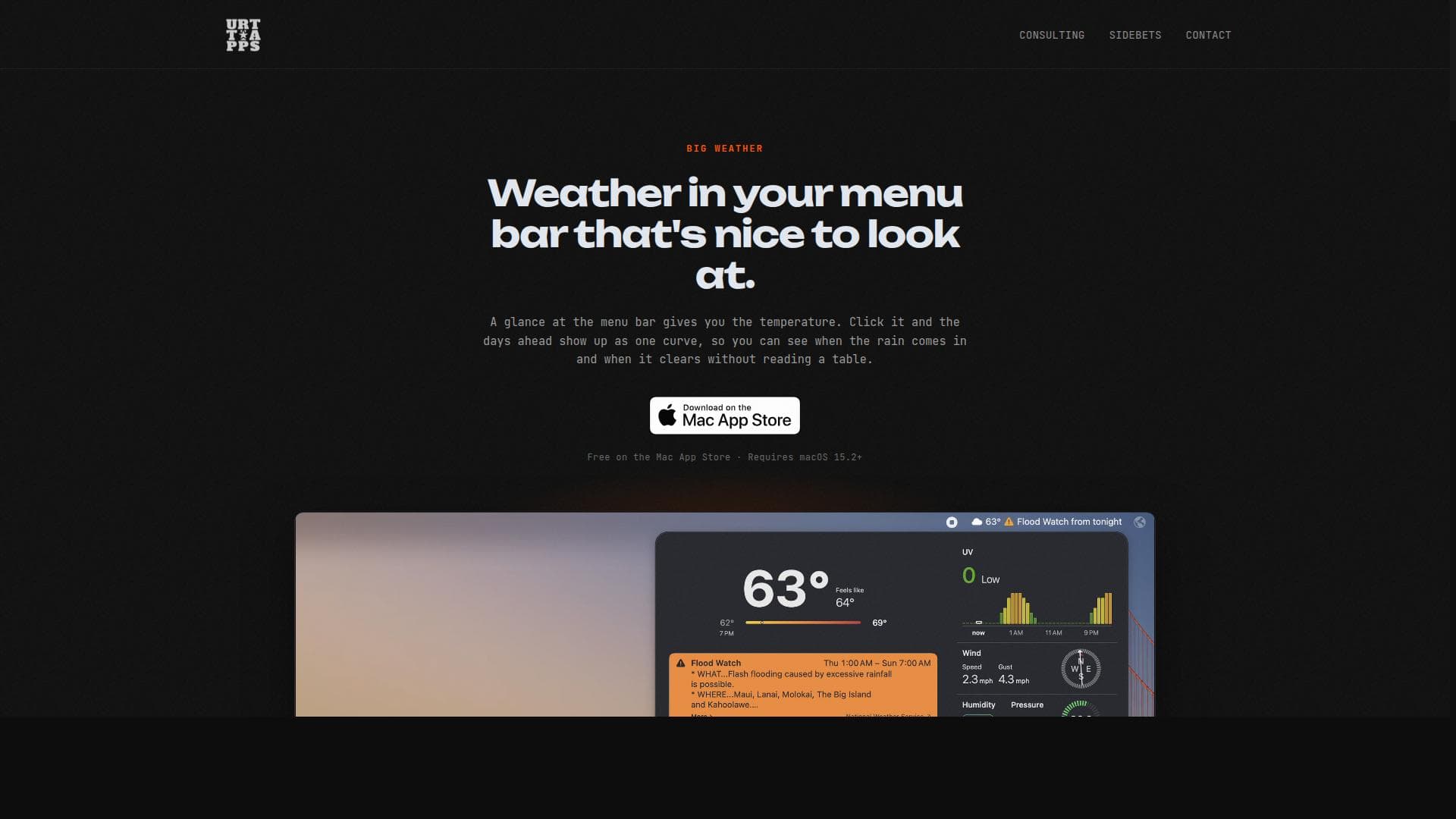
Big Weather puts the weather in your Mac's menu bar: the days ahead as one curve you can scrub through, UV hour by hour, and with Premium, AI insights and official weather warnings.
Detailed Description
Big Weather is a specialized weather application designed exclusively for macOS users, offering a seamless and visually engaging way to stay updated on weather conditions directly from the Mac menu bar. Its core purpose is to provide users with an intuitive and easy-to-read weather overview without the need to open complex apps or websites. By integrating weather information into the menu bar, Big Weather ensures that users can glance at current temperatures and upcoming weather trends effortlessly, making it ideal for those who want quick, reliable weather insights without distraction. One of the standout features of Big Weather is its unique visualization of upcoming days as a single, smooth curve. This design choice allows users to quickly interpret weather trends such as rain and clear periods without having to parse through complicated tables or multiple data points. The curve is interactive, enabling users to scrub through the days ahead to get detailed hourly forecasts. Additionally, the app displays the current temperature right in the menu bar, providing immediate access to essential weather information at all times. Beyond basic forecasts, Big Weather offers detailed UV index data on an hour-by-hour basis, which is particularly useful for users concerned about sun exposure and skin protection. For those opting for the Premium version, the app enhances its utility by incorporating AI-generated insights that help interpret weather patterns and potential impacts. Premium users also receive official weather warnings, such as flood alerts and severe weather notifications, ensuring they stay informed about critical conditions that may affect their safety or plans. Big Weather requires macOS 15.2 or later, making it accessible to users with relatively recent Mac systems. Its interface is designed to be visually appealing and easy to read, focusing on clarity and simplicity without sacrificing detail. This makes it a great tool for a wide range of users, from casual weather watchers to professionals who need quick weather updates integrated into their workflow. The app is free to download from the Mac App Store, providing basic features at no cost. Users interested in advanced capabilities like AI insights and official weather warnings can upgrade to the Premium plan, which adds significant value for those who rely heavily on accurate and detailed weather information. Pricing details for Premium are available within the app or on the developer’s website. Compared to other macOS weather apps, Big Weather stands out due to its minimalist yet informative design and the innovative use of a weather curve to represent upcoming conditions. While many weather apps rely on detailed tables or multiple screens, Big Weather condenses this information into an elegant and interactive visual format. Its focus on menu bar integration also differentiates it from larger, more cumbersome applications. However, potential users should consider that Big Weather is macOS-exclusive and requires a relatively recent operating system version, which may limit accessibility for those with older Macs. Additionally, while the free version offers solid basic features, the most advanced insights and warnings are gated behind a Premium subscription, which may not appeal to all users. In summary, Big Weather is a thoughtfully designed macOS menu bar app that delivers quick, clear, and visually appealing weather updates. Its unique curve visualization, hourly UV data, and AI-powered insights make it a powerful tool for anyone who values easy access to weather information without complexity. Whether for daily planning, outdoor activities, or professional use, Big Weather offers a compelling blend of simplicity and depth in weather forecasting.
Tool Features
- Displays temperature in the Mac menu bar for quick access
- Shows upcoming days as a single curve for easy weather trend visualization
- Provides UV index hour-by-hour
- Includes AI insights and official weather warnings with Premium
- Requires macOS 15.2 or later
- Visually appealing and easy to read interface
Description
Big Weather is a sleek macOS menu bar app that transforms weather updates into an easy-to-read curve, letting users quickly track temperature and rain trends at a glance. Perfect for Mac users seeking a minimalist yet powerful weather tool, it offers advanced AI insights and official warnings with its Premium plan.
Big Weather puts the weather in your Mac's menu bar: the days ahead as one curve you can scrub through, UV hour by hour, and with Premium, AI insights and official weather warnings.
Detailed Description
Big Weather is a specialized weather application designed exclusively for macOS users, offering a seamless and visually engaging way to stay updated on weather conditions directly from the Mac menu bar. Its core purpose is to provide users with an intuitive and easy-to-read weather overview without the need to open complex apps or websites. By integrating weather information into the menu bar, Big Weather ensures that users can glance at current temperatures and upcoming weather trends effortlessly, making it ideal for those who want quick, reliable weather insights without distraction. One of the standout features of Big Weather is its unique visualization of upcoming days as a single, smooth curve. This design choice allows users to quickly interpret weather trends such as rain and clear periods without having to parse through complicated tables or multiple data points. The curve is interactive, enabling users to scrub through the days ahead to get detailed hourly forecasts. Additionally, the app displays the current temperature right in the menu bar, providing immediate access to essential weather information at all times. Beyond basic forecasts, Big Weather offers detailed UV index data on an hour-by-hour basis, which is particularly useful for users concerned about sun exposure and skin protection. For those opting for the Premium version, the app enhances its utility by incorporating AI-generated insights that help interpret weather patterns and potential impacts. Premium users also receive official weather warnings, such as flood alerts and severe weather notifications, ensuring they stay informed about critical conditions that may affect their safety or plans. Big Weather requires macOS 15.2 or later, making it accessible to users with relatively recent Mac systems. Its interface is designed to be visually appealing and easy to read, focusing on clarity and simplicity without sacrificing detail. This makes it a great tool for a wide range of users, from casual weather watchers to professionals who need quick weather updates integrated into their workflow. The app is free to download from the Mac App Store, providing basic features at no cost. Users interested in advanced capabilities like AI insights and official weather warnings can upgrade to the Premium plan, which adds significant value for those who rely heavily on accurate and detailed weather information. Pricing details for Premium are available within the app or on the developer’s website. Compared to other macOS weather apps, Big Weather stands out due to its minimalist yet informative design and the innovative use of a weather curve to represent upcoming conditions. While many weather apps rely on detailed tables or multiple screens, Big Weather condenses this information into an elegant and interactive visual format. Its focus on menu bar integration also differentiates it from larger, more cumbersome applications. However, potential users should consider that Big Weather is macOS-exclusive and requires a relatively recent operating system version, which may limit accessibility for those with older Macs. Additionally, while the free version offers solid basic features, the most advanced insights and warnings are gated behind a Premium subscription, which may not appeal to all users. In summary, Big Weather is a thoughtfully designed macOS menu bar app that delivers quick, clear, and visually appealing weather updates. Its unique curve visualization, hourly UV data, and AI-powered insights make it a powerful tool for anyone who values easy access to weather information without complexity. Whether for daily planning, outdoor activities, or professional use, Big Weather offers a compelling blend of simplicity and depth in weather forecasting.
Frequently Asked Questions
What is Big Weather?
Big Weather is a macOS menu bar weather application that provides users with quick and visually appealing weather updates, including temperature, upcoming weather trends, UV index, and, with Premium, AI insights and official weather warnings.
How much does Big Weather cost?
Big Weather is free to download and use with basic features. Advanced features such as AI insights and official weather warnings require a Premium subscription, with pricing details available within the app or on the developer’s website.
Who is Big Weather best for?
Big Weather is ideal for macOS users who want fast, easy-to-understand weather information directly in their menu bar, including casual users, outdoor enthusiasts, and professionals who need quick weather updates without complex interfaces.
What are the main features of Big Weather?
Key features include displaying the current temperature in the Mac menu bar, visualizing upcoming days as a single weather curve, providing hour-by-hour UV index data, and offering AI-generated insights and official weather warnings in the Premium version.
Does Big Weather offer a free trial?
Big Weather offers a free version with essential weather features. Information about a free trial for the Premium subscription is not explicitly stated and may be available within the app.
What integrations does Big Weather support?
Big Weather is a standalone macOS app designed for menu bar integration and does not currently list support for third-party integrations or external services.
How does Big Weather work?
Big Weather runs in the macOS menu bar, displaying current temperature and allowing users to click the icon to view an interactive curve representing upcoming weather trends. It pulls weather data to provide hourly UV index and, with Premium, AI insights and official warnings.
Socials
Use ToolReviews
No reviews yet. Be the first to share your experience.




















































